
Introduction
This manual provides detailed instructions for the installation, operation, and maintenance of your Biorunn 10.1 Inch Android Stereo Radio. Please read this manual thoroughly before using the product to ensure proper function and safety. This unit is specifically designed for Honda Civic 2006-2011 Right Hand Drive (RHD) models without a factory screen.
Safety Information
- Do not attempt to operate the unit or view videos while driving, as this can lead to accidents.
- Ensure all wiring connections are secure and properly insulated to prevent short circuits or electrical hazards.
- Consult a professional for installation if you are unsure about any steps.
- Keep the unit away from water and excessive moisture.
Setup
1. Applicable Models
This car stereo is compatible with Honda Civic models manufactured between 2006 and 2011, specifically for Right Hand Drive (RHD) vehicles that do not have a factory-installed screen. Before purchase and installation, carefully check your vehicle's dashboard. If you are uncertain about compatibility, provide a picture of your center console to the seller for verification.
2. What's in the Box
The package typically includes:
- Biorunn 10.1 Inch Android Stereo Radio Unit
- USB cables
- Multimedia cables (e.g., RCA or AV cables)
- GPS Antenna
- Power Harness
3. Installation
Installation involves removing the existing car stereo and connecting the new unit. Due to the complexity of automotive electrical systems, professional installation is recommended. Ensure the vehicle's battery is disconnected before beginning installation.

Image: Comparison of the car's dashboard before and after the installation of the Biorunn 10.1 Inch Android Stereo Radio. The 'Before installation' image shows the original car stereo, while the 'After installation' image displays the new larger screen unit seamlessly integrated into the dashboard.
4. Initial Power On
After installation, reconnect the car battery. The unit should power on automatically or by pressing the power button. Follow the on-screen prompts for initial setup, including language selection and time zone settings.
Operating Instructions
1. Basic Controls
The unit features a 10.1-inch IPS touchscreen for primary interaction. Physical buttons or touch-sensitive areas on the left side of the screen typically include:
- Power/Reset Button: Press to turn on/off or long-press to reset.
- Volume Controls: Adjust audio output level.
- Home Button: Returns to the main Android interface.
- Back Button: Navigates to the previous screen or menu.
2. Android System Interface
The unit runs on an Android operating system, providing access to various applications. The main screen displays common apps and widgets. You can download additional applications from the pre-installed app store.

Image: The main Android interface of the Biorunn stereo, showing a customizable home screen with various application icons such as Music, Radio, Waze, Spotify, and YouTube, alongside a visualizer for audio playback.
3. Wireless Car-Play / Android Auto
The stereo supports both wireless and wired Car-Play and Android Auto. This feature allows you to integrate your smartphone's functions directly onto the car's display. You can make calls, use navigation maps, listen to music, and access messages safely while driving.
4. Bluetooth 5.0 Function
Connect your mobile phone via Bluetooth 5.0 for hands-free calling, phone book synchronization, and audio streaming. To pair, enable Bluetooth on your phone and search for the stereo unit. Select the unit and confirm the pairing code if prompted.
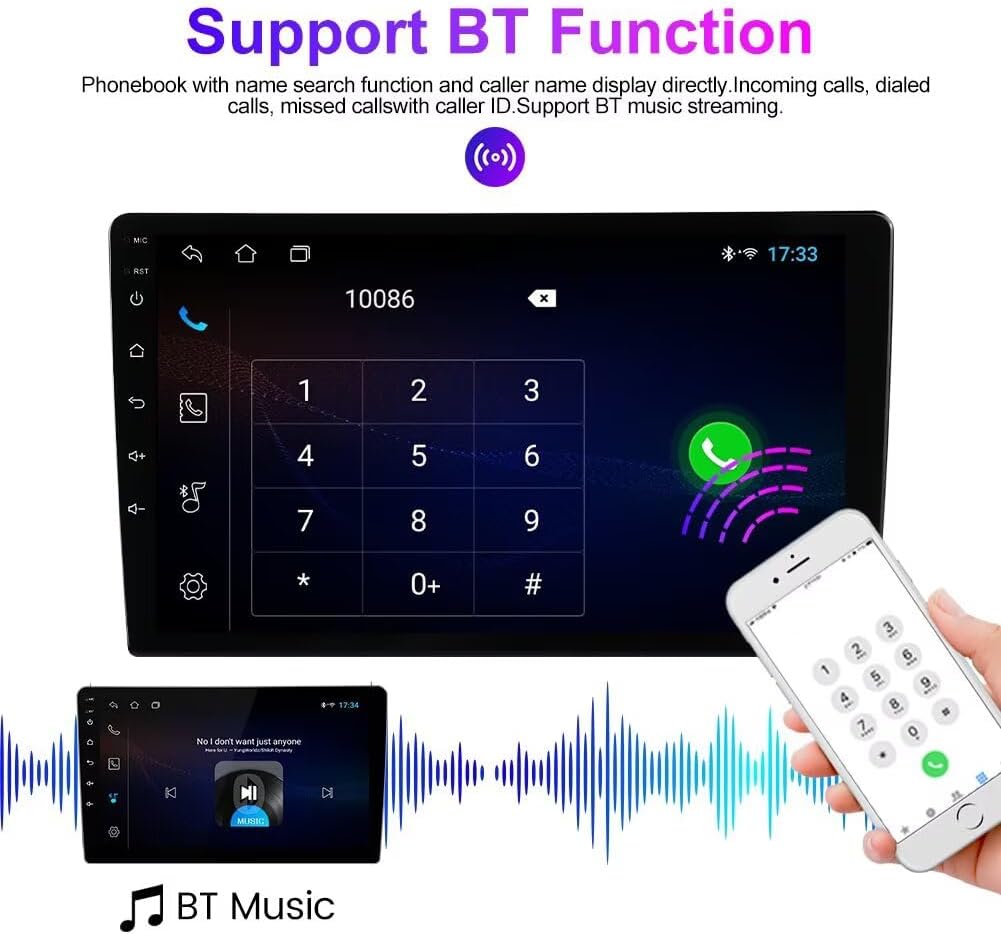
Image: The Bluetooth interface of the Biorunn stereo, displaying a phone dialer for making calls and an illustration of Bluetooth music streaming from a smartphone to the car stereo.
5. FM RDS Radio
The built-in FM RDS radio allows you to listen to your favorite stations. It supports both automatic and manual station searching. You can save up to 18 preset stations for quick access. The RDS (Radio Data System) feature displays station information where available.

Image: The FM RDS Radio interface on the Biorunn stereo, showing frequency selection, preset buttons (P1-P6), and options for automatic search (AS) and local/distance reception (DX).
6. GPS Navigation
The unit includes a built-in global positioning system (GPS) for navigation. Access the navigation application from the main menu. Ensure the GPS antenna is properly installed for optimal signal reception.
7. Multimedia Playback
The stereo supports various audio, video, and photo formats via USB inputs. Connect a USB drive to play media files. Supported formats include:
- Audio: MP3, WMA, AAC, RM, FALC, etc.
- Video: MPEG-1/2/4, H264, H263, VC1, RV, RMVB, DivX, Sorenson SparK, Spark, VP8, AVS Stream (supports 1080P full format).
- Photo: JPG, BMP, JPEG, GIF, PNG.
8. Split Screen Function
The split-screen feature allows two applications to be displayed simultaneously on the screen. This enables multitasking, such as viewing navigation while controlling music playback.

Image: The split-screen display of the Biorunn stereo, showing a video player on the left side and a navigation map application on the right side, demonstrating simultaneous operation of two apps.
9. Steering Wheel Control
The unit supports original steering wheel remote controls. This allows you to manage music playback, answer calls, and perform other functions without taking your hands off the steering wheel, enhancing safety.
10. Reversing Video Input
The stereo is equipped with an input for a reversing camera. When the vehicle is put into reverse gear, the screen will automatically display the camera feed. Note: The reversing camera is not included with the unit and must be purchased separately.

Image: The Biorunn stereo screen displaying a reversing camera view with parking guidelines, overlaid on an illustration of a car backing up, indicating the unit's support for a rear-view camera.
Maintenance
- Screen Cleaning: Use a soft, lint-free cloth to gently wipe the screen. Do not use abrasive cleaners or solvents.
- Software Updates: Periodically check for available software updates to ensure optimal performance and access to new features. Follow the on-screen instructions for any update procedures.
- General Care: Avoid exposing the unit to extreme temperatures or direct sunlight for prolonged periods.
Troubleshooting
| Problem | Possible Cause | Solution |
|---|---|---|
| Unit does not power on. | Incorrect wiring, blown fuse, vehicle battery issue. | Check power connections and vehicle fuses. Ensure battery is charged. |
| No sound. | Volume too low, speaker wiring issue, incorrect audio output setting. | Increase volume. Check speaker connections. Verify audio settings. |
| GPS signal weak or inaccurate. | GPS antenna not properly installed or obstructed. | Ensure GPS antenna has a clear view of the sky and is securely connected. |
| Bluetooth connection issues. | Incorrect pairing, Bluetooth disabled on phone or unit. | Ensure Bluetooth is enabled on both devices. Re-pair the devices. |
| Touchscreen unresponsive. | Temporary software glitch. | Perform a soft reset by pressing the reset button (if available) or power cycling the unit. |
Specifications
- Operating System: Android
- Core: 4 Core
- Screen Size: 10.1 Inches
- RAM: 1GB
- ROM: 32GB
- Resolution: 1280 x 720, IPS Touch Screen
- Connectivity: Built-in Wireless/Wired Car-Play and Android Auto, Bluetooth 5.0, WIFI, USB
- Radio: FM RDS with 18 preset stations
- Navigation: Built-in Global Positioning System (GPS)
- Multimedia Support:
- Audio: MP3, WMA, AAC, RM, FALC, etc.
- Video: MPEG-1/2/4, H264, H263, VC1, RV, RMVB, DivX, Sorenson SparK, Spark, VP8, AVS Stream (1080P full format)
- Photo: JPG, BMP, JPEG, GIF, PNG
- Additional Features: Split Screen, Steering Wheel Control, Reversing Video Input, Multiple Language Support
- Supported Languages: English, German, French, Spanish, Italian, Portuguese, Russian, Dutch, Polish, Japanese, Simplified & Traditional Chinese, Arabic, etc.
Warranty
This Biorunn Android Stereo Radio comes with a 1-year warranty from the date of purchase. This warranty covers manufacturing defects and malfunctions under normal use. It does not cover damage caused by improper installation, misuse, accidents, or unauthorized modifications. Please retain your proof of purchase for warranty claims.
Support
For technical assistance, troubleshooting beyond this manual, or warranty inquiries, please contact the seller or manufacturer directly. Refer to your purchase documentation for contact information.