
Introduction
Thank you for choosing the JINJUNYE Nugget Ice Maker. This manual provides essential information for the safe and efficient operation of your new appliance. Please read it thoroughly before first use and retain it for future reference.

Image: The JINJUNYE Nugget Ice Maker, showcasing its compact design and the type of nugget ice it produces, alongside a refreshing beverage.
Important Safety Instructions
- Read all instructions before operating the appliance.
- Ensure the appliance is placed on a stable, level surface.
- Do not immerse the appliance, power cord, or plug in water or other liquids.
- Keep the appliance away from heat sources and direct sunlight.
- Allow the unit to stand upright for at least 24 hours before first use if it has been tilted or inverted during transport. This allows the refrigerant to settle.
- Use only potable water in the water tank.
- Do not add water above the MAX water level indicator.
- Unplug the appliance before cleaning or when not in use for extended periods.
- Keep children away from the appliance during operation.
Setup Guide
- Unpacking and Placement:
Carefully remove the ice maker from its packaging. Place the unit on a flat, stable surface, ensuring adequate ventilation around the appliance. Allow the unit to stand upright for at least 24 hours before plugging it in. This is crucial for the refrigerant to settle properly after transport.
- Secure the Drain Plug:
Before adding water, ensure the bottom drain plug is firmly in place to prevent any water leakage.

Image: A close-up showing a finger pressing the drain plug firmly into the bottom of the ice maker, illustrating the first step of setup.
- Add Water:
Open the lid and fill the water reservoir with potable water. Do not exceed the "MAX" water level indicator. The water tank capacity is 1.5 liters.

Image: A hand pouring water into the ice maker's reservoir, with a clear indication not to exceed the maximum water level.
- Initial Cleaning (Recommended):
It is recommended to perform a self-cleaning cycle before first use. Refer to the "Maintenance" section for instructions on how to activate the self-cleaning function.
Operating Instructions
Control Panel Overview

Image: A detailed view of the ice maker's control panel, showing indicators for Ice Making, Cleaning, Add Water, Ice Full, Activate Self-Cleaning, and On/Off button.
- Ice Making Indicator: Illuminates when the machine is actively producing ice.
- Cleaning Indicator: Illuminates when the self-cleaning cycle is active.
- Add Water Indicator: Illuminates when the water reservoir needs refilling. The machine will pause operation until water is added.
- Ice Full Indicator: Illuminates when the ice basket is full. The machine will pause operation until ice is removed.
- Clean Button: Press to activate the self-cleaning function.
- On/Off Button: Press to turn the ice maker on or off.
Making Ice
- Power On: After ensuring the drain plug is secure and water is added, plug the ice maker into a grounded electrical outlet. Press the On/Off button to start the ice making process.
- First Batch: The first batch of ice may take slightly longer to produce. It is recommended to discard the first few batches of ice to ensure optimal taste and hygiene.
- Ice Production: The machine will automatically produce nugget ice. The Ice Making indicator will be lit. The JINJUNYE Nugget Ice Maker can produce up to 38 lbs of ice per day, with a 1.5L water tank and 1.8 LB ice basket capacity.
- Monitoring: The Add Water and Ice Full indicators will alert you when action is required. The machine will automatically pause when the ice basket is full or when water is low.
- Enjoy Ice: Once ice is produced, use the provided scoop to retrieve it. For softer, more chewable ice, allow the ice to sit in a small amount of water in the basket.

Image: An illustration detailing the internal components of the ice maker, highlighting the 1.5L water tank and the 1.8 LB ice basket capacity, emphasizing efficient ice production.
Maintenance and Cleaning
Self-Cleaning Function
The JINJUNYE Nugget Ice Maker features a convenient self-cleaning function to maintain hygiene and ensure fresh ice production.
- Activate Cleaning: Ensure there is water in the reservoir. Press the Clean button on the control panel. The Cleaning indicator will illuminate.
- Cleaning Cycle: The machine will automatically perform a 5-minute cleaning cycle, circulating water to remove impurities.
- Drain Water: After the cleaning cycle is complete, place a container under the drain plug at the bottom of the unit. Remove the drain plug to empty the dirty water. Re-insert the drain plug firmly once drained.
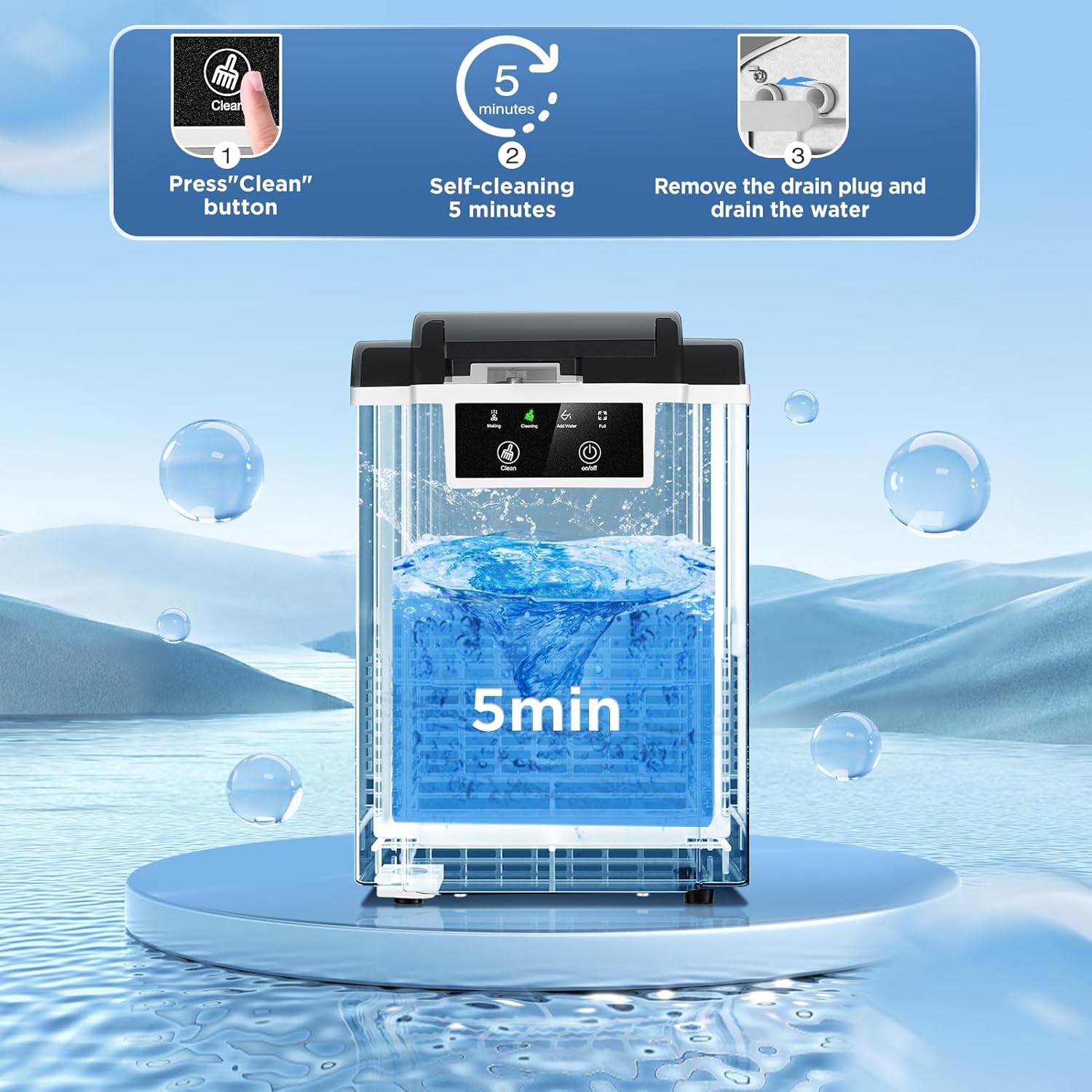
Image: A visual guide illustrating the three steps of the self-cleaning function: pressing the "Clean" button, the 5-minute cleaning cycle, and finally, removing the drain plug to empty the water.
Note: For optimal cleaning, the water temperature should be between 44°F (6.7°C) and 32°F (0°C). Do not add water above the MAX water level during cleaning.
Regular Cleaning
- Exterior: Wipe the exterior of the ice maker with a soft, damp cloth. For stainless steel surfaces, use a stainless steel cleaner if necessary.
- Interior: Periodically clean the interior of the water reservoir and ice basket with a mild detergent and warm water. Rinse thoroughly with clean water.
- Draining: Always drain any remaining water from the reservoir if the unit will not be used for an extended period.
Troubleshooting
| Problem | Possible Cause | Solution |
|---|---|---|
| Ice maker not producing ice. | No water in reservoir; "Add Water" indicator is on. | Add potable water to the reservoir up to the MAX level. |
| Ice maker stops producing ice; "Ice Full" indicator is on. | Ice basket is full. | Remove ice from the basket. The machine will resume operation automatically. |
| Ice production is slow or ice is not forming correctly. | Ambient temperature is too high; water temperature is too high; first use. | Ensure the unit is in a cool environment. Use cold water. The first batch takes longer. |
| Water leakage from the bottom. | Drain plug is not securely in place. | Ensure the drain plug is firmly inserted. |
| Unusual noise during operation. | Normal operation sounds (compressor, water pump); unit not level. | Ensure the unit is on a stable, level surface. If noise is excessive or unusual, contact customer support. |
Specifications
| Feature | Detail |
|---|---|
| Model Name | BS-301B |
| Brand | JINJUNYE |
| Product Dimensions (D x W x H) | 29.5 cm x 22 cm x 33 cm (11.6 in x 8.66 in x 13 in) |
| Weight | 8.71 kg |
| Ice Production Capacity | Up to 38 lbs (17.2 kg) per day |
| Water Tank Capacity | 1.5 Liters |
| Ice Basket Capacity | 1.8 lbs (approx. 0.8 kg) |
| Wattage | 110 watts |
| Voltage | 110 Volts |
| Refrigerant | R600a |
| Material | Stainless Steel |
Warranty and Customer Support
Specific warranty information is not provided within this manual. For details regarding your product's warranty, please refer to the documentation included with your purchase or visit the official JINJUNYE website. For customer support, technical assistance, or to report any issues, please contact JINJUNYE customer service through their official channels.
