
1. Introduction
Welcome to the YinZhiBoo XDC600 Electric Bike user manual. This guide provides essential information for the safe assembly, operation, maintenance, and troubleshooting of your new electric bicycle. Please read this manual thoroughly before your first ride and retain it for future reference. Proper understanding and adherence to these instructions will ensure optimal performance and longevity of your e-bike.
Safety Warning: Always wear a helmet and appropriate safety gear when riding. Familiarize yourself with local traffic laws and regulations before operating the electric bike.
2. Package Contents
Your YinZhiBoo XDC600 Electric Bike is approximately 75% pre-assembled. Please verify that all components listed below are present in the package:
- YinZhiBoo XDC600 Electric Bike (main frame, wheels, motors, battery pre-installed)
- Charger
- Pedals
- Handlebar
- Front Fender
- Rear Fender
- Rear Rack
- Bell
- Horn
- Kickstand
- Tool Kit
- User Manual (this document)
3. Assembly Instructions
Follow these steps to complete the assembly of your YinZhiBoo XDC600 Electric Bike. It is recommended to have a second person assist with some steps.
- Unpacking: Carefully remove the bike and all components from the packaging. Retain packaging materials for potential future transport or returns.
- Handlebar Installation: Attach the handlebar to the stem. Ensure the handlebar is centered and the brake levers and shifters are in a comfortable position. Tighten all bolts securely.
- Front Wheel Installation: Install the front wheel into the fork. Ensure the disc brake rotor is correctly seated within the caliper. Secure the wheel with the quick-release skewer or axle nuts.
- Pedal Installation: Identify the left (L) and right (R) pedals. The left pedal tightens counter-clockwise, and the right pedal tightens clockwise. Apply a small amount of grease to the threads and tighten them firmly with a wrench.
- Seat Post and Saddle: Insert the seat post into the frame and adjust the saddle height to a comfortable riding position. Ensure the minimum insertion mark on the seat post is not visible. Tighten the quick-release lever or bolt securely.
- Fender and Rack Installation: Attach the front and rear fenders, and the rear rack, using the provided hardware. Ensure they are securely fastened and do not interfere with wheel rotation or pedaling.
- Final Checks: Before your first ride, double-check all bolts, nuts, and quick-release levers for tightness. Ensure the tires are inflated to the recommended pressure (indicated on the tire sidewall). Test the brakes and gear shifting.
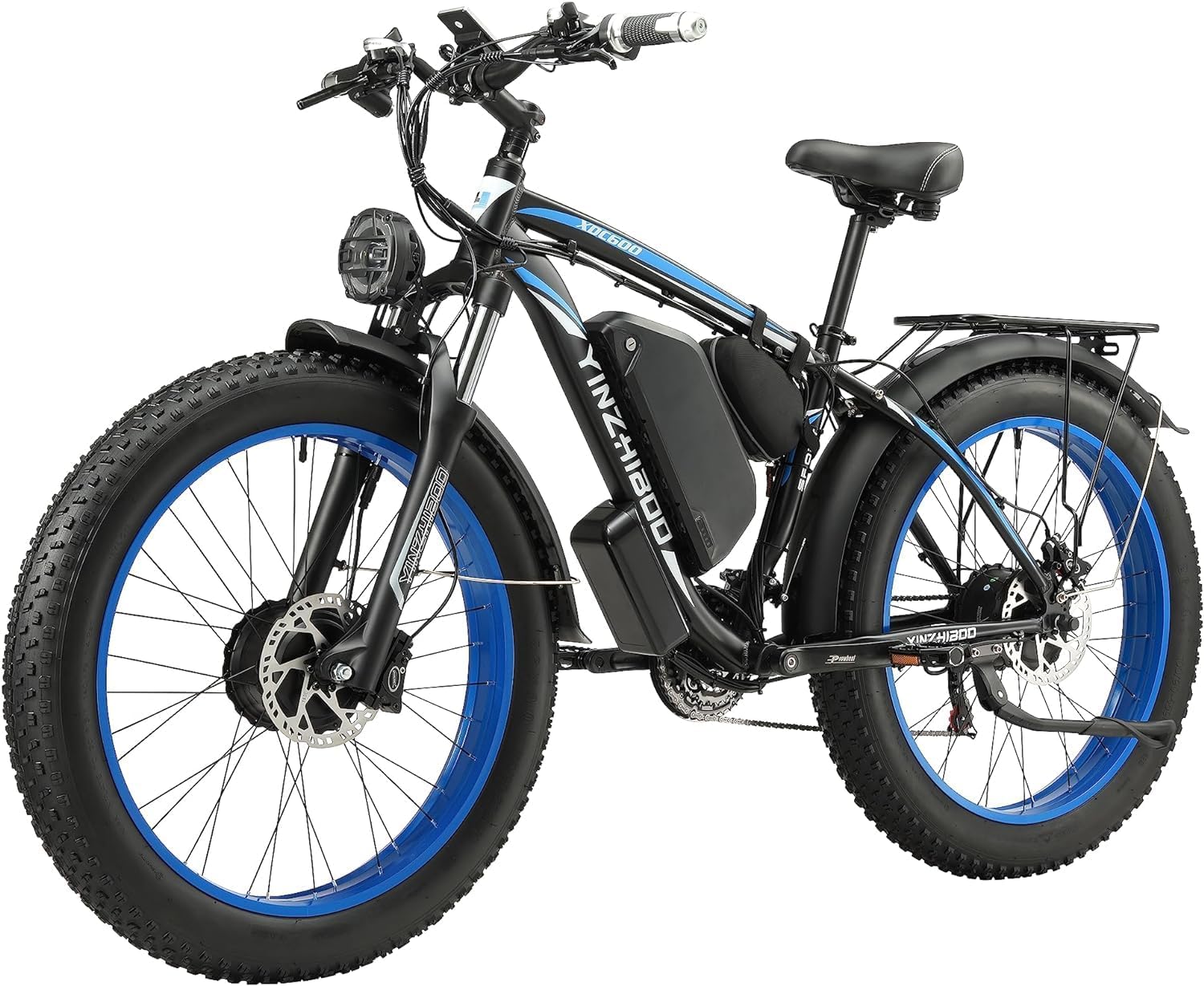
Figure 3.1: Fully assembled YinZhiBoo XDC600 Electric Bike.
4. Components Overview
The YinZhiBoo XDC600 is equipped with advanced features for a robust riding experience.
4.1 Dual Motor System
This e-bike features dual 1000W high-speed brushless motors, one in the front wheel hub and one in the rear wheel hub, providing a combined power output of 2000W. This configuration offers enhanced power and climbing capabilities, assisting speeds up to 35 MPH.

Figure 4.1: Illustration of the dual hub motor system on the YinZhiBoo XDC600.

Figure 4.2: Detailed view of the rear hub motor and 21-speed cassette.
4.2 Battery System
The e-bike is powered by a 48V, 22.4AH detachable lithium-ion battery. This battery is lockable for security and removable for convenient charging indoors. It incorporates Battery Management System (BMS) technology for enhanced safety, protecting against overcharge, over-discharge, short-circuit, overcurrent, overvoltage, and undervoltage conditions.

Figure 4.3: The removable 48V 22.4Ah lithium-ion battery with internal cell structure visible.
4.3 Intelligent LCD Display and Controls
An intelligent digital LCD display is mounted on the handlebar, providing real-time information such as speed, distance traveled, battery life, and selected assist mode. The display allows for easy monitoring and control of the e-bike's functions. The handlebar also features Shimano shift levers for the 21-speed gear system and a throttle for electric assist.

Figure 4.4: Handlebar controls including the LCD display, Shimano shift lever, and throttle.
4.4 Suspension and Brakes
The XDC600 features a front suspension fork designed to absorb shocks and provide a smoother ride, enhancing control over varied terrain. Stopping power is provided by hydraulic disc brakes on both the front and rear wheels, offering reliable and responsive braking performance.

Figure 4.5: Detailed view of the front suspension fork.

Figure 4.6: Alternative perspective of the front suspension system.
4.5 Additional Features
The bike includes a sturdy rear rack for carrying cargo and an integrated taillight for improved visibility. Headlights are also included for night riding.

Figure 4.7: Rear rack and integrated taillight for enhanced utility and safety.
5. Battery and Charging
5.1 Charging the Battery
To charge the battery, you can either charge it while it is installed on the bike or remove it for charging. The battery is lockable and removable for convenience.
- On-Bike Charging: Locate the charging port on the battery (usually on the side or top). Ensure the bike is turned off. Connect the charger to the charging port, then plug the charger into a standard electrical outlet.
- Off-Bike Charging: Use the key to unlock and remove the battery from the bike frame. Place the battery in a dry, stable location. Connect the charger to the battery's charging port, then plug the charger into an electrical outlet.
The charging indicator on the charger will typically show red during charging and turn green when fully charged. A full charge takes approximately 5-7 hours. The battery is designed for approximately 2000 charge cycles.
5.2 Battery Care and Safety
- Do not expose the battery to extreme temperatures (hot or cold).
- Use only the charger provided by YinZhiBoo.
- Avoid fully discharging the battery frequently. Charge it regularly, even if not in use for extended periods.
- Store the battery in a cool, dry place when not in use.
- The integrated BMS protects the battery, but always monitor charging and disconnect once complete.
6. Operating Modes
The YinZhiBoo XDC600 Electric Bike offers five distinct operating modes to suit various riding preferences and conditions:
- 1. PAS Mode (Pedal Assist System): In this mode, the motor provides assistance as you pedal. The level of assistance can typically be adjusted via the LCD display, offering a range of power boosts. This mode extends your range and reduces effort.
- 2. Cruise Mode: This mode allows the bike to maintain a consistent speed without requiring continuous throttle input or pedaling. Activate it by holding the throttle at the desired speed for a few seconds.
- 3. Bike Mode (Manual): This is a traditional bicycle mode where the electric assist is off. You rely solely on your pedaling power and the 21-speed gear system for propulsion.
- 4. Walk Mode: Designed to assist you when pushing the bike, for example, up a steep incline or through a crowded area. This mode provides a low-speed assist without pedaling.
- 5. Pure Electric Mode (Throttle Only): Engage the throttle to propel the bike without pedaling. This mode is ideal for quick bursts of speed or when you prefer not to pedal.
You can switch between these modes and monitor your current settings using the intelligent LCD display on the handlebar.
7. Riding Safety Guidelines
Your safety is paramount. Adhere to the following guidelines for a safe riding experience:
- Always Wear a Helmet: A properly fitted helmet is crucial for head protection.
- Obey Traffic Laws: Follow all local traffic laws, signs, and signals. Ride predictably and signal your turns.
- Pre-Ride Inspection: Before each ride, check tire pressure, brake functionality, handlebar and seat tightness, and ensure all quick releases are secure.
- Visibility: Use the integrated headlights and taillights, especially during low-light conditions. Consider wearing reflective clothing.
- Weather Conditions: Exercise caution when riding in wet conditions, as braking distance increases and traction decreases. Avoid riding in severe weather.
- Rider Specifications: The recommended rider height for this e-bike is approximately 5'6" to 6'9" (170cm to 190cm). The maximum weight capacity is 330 lbs (150 kg). Do not exceed these limits.
- Awareness: Be aware of your surroundings, pedestrians, other vehicles, and road hazards.
- No Stunts: This e-bike is not designed for stunts, jumps, or aggressive off-road riding that could damage components or cause injury.
8. Maintenance
Regular maintenance ensures the longevity and safe operation of your electric bike.
- Cleaning: Clean your bike regularly with a damp cloth. Avoid using high-pressure washers directly on electrical components.
- Tires: Check tire pressure before each ride. Inspect tires for wear, cuts, or punctures.
- Brakes: Regularly check brake pads for wear and ensure brake levers provide firm and responsive stopping power. Adjust or replace as needed.
- Chain: Keep the chain clean and lubricated to ensure smooth gear changes and prevent premature wear.
- Bolts and Fasteners: Periodically check all bolts, nuts, and quick-release mechanisms for tightness. Loose components can lead to accidents.
- Battery: Follow battery care guidelines (Section 5.2).
- Professional Service: For complex repairs or adjustments, especially involving electrical components or hydraulic brakes, consult a qualified bicycle mechanic.
9. Troubleshooting
This section addresses common issues you might encounter with your YinZhiBoo XDC600 Electric Bike.
| Problem | Possible Cause | Solution |
|---|---|---|
| Bike does not power on | Battery not charged Battery not properly seated/locked Power cable loose Ignition lock off | Charge the battery Ensure battery is fully inserted and locked Check all cable connections Turn ignition key to ON position |
| Motor not assisting | PAS level set to 0 Battery low Brake levers engaged Loose motor cable | Increase PAS level on LCD Charge the battery Ensure brake levers are fully released Check motor cable connections |
| Brakes feel weak or spongy | Worn brake pads Air in hydraulic system Disc rotor dirty/damaged | Inspect and replace brake pads Bleed hydraulic brakes (professional service recommended) Clean rotor with disc brake cleaner; replace if damaged |
| Gears not shifting smoothly | Derailleur out of adjustment Dirty/dry chain Bent hanger | Adjust derailleur limits and cable tension Clean and lubricate chain Inspect and straighten/replace derailleur hanger |
If you encounter issues not listed here or if the suggested solutions do not resolve the problem, please contact customer support.
10. Specifications
| Feature | Detail |
|---|---|
| Model Number | XDC600 |
| Brand | YinZhiBoo |
| Bike Type | Electric Bike |
| Age Range | Adult |
| Motor | Dual 1000W Brushless Hub Motors (2000W total) |
| Max Speed | 35 MPH |
| Battery | 48V 22.4Ah Detachable Lithium-ion with BMS |
| Charging Time | 5-7 hours |
| Range (PAS Mode) | 70-90 miles |
| Range (Pure Electric Mode) | 40-60 miles |
| Number of Speeds | 21 (Shimano) |
| Brake Type | Hydraulic Disc Brakes (Front & Rear) |
| Suspension | Front Suspension Fork |
| Frame Material | 6061 Aluminum Alloy |
| Wheel Size | 26 inch Fat Tires |
| Item Weight | 31.8 kg (70 lbs) |
| Max Load Capacity | 330 lbs (150 kg) |
| Recommended Rider Height | 5'6" - 6'9" (170cm - 190cm) |
| Included Components | Bell, Horn, Kickstand, Headlights, Taillight, Rear Rack |
| Special Features | Intelligent Digital LCD Display, Ignition Lock |
11. Warranty and Support
11.1 Warranty Information
YinZhiBoo provides a one-year service warranty for the XDC600 Electric Bike from the date of purchase. This warranty covers manufacturing defects in materials and workmanship. It does not cover normal wear and tear, damage caused by misuse, accidents, improper assembly, or lack of maintenance. Please retain your proof of purchase for warranty claims.
11.2 Customer Support
For any questions, technical assistance, or warranty claims, please contact YinZhiBoo customer support. Our team is available to assist you within 24 hours.
Contact Information:
- Email: [Please refer to your purchase documentation or the official YinZhiBoo website for specific contact email]
- Website: [Please refer to your purchase documentation or search for the official YinZhiBoo website]