
1. Safety Information
Read and understand all safety instructions before installing, operating, or maintaining this product. Failure to follow these instructions may result in electric shock, fire, or serious injury.
- Electrical Safety: Ensure the power supply voltage matches the product's requirements. Always disconnect power before servicing.
- Installation: Install the fixture in a well-ventilated area, away from flammable materials. Ensure secure mounting to prevent falling.
- Operation: Do not look directly into the light source. Avoid operating in wet or damp conditions.
- Maintenance: Refer all servicing to qualified personnel. Use only original replacement parts.
- Minimum Distance: Maintain a minimum distance of 0.20m from flammable materials.
- Maximum Temperature: The maximum ambient operating temperature is 35°C.

Figure 1: Front view of the Moving Head Light, showing the LED lens and control panel with warning labels.
2. Product Overview
The YANGHOPES 150W RGBW LED Moving Head Beam Spot Light is a versatile stage lighting fixture designed for various events. It features a powerful 150W LED light source, offering vibrant RGBW color mixing, multiple gobos, and prismatic effects. Its compact design and various control modes make it suitable for professional and home use.
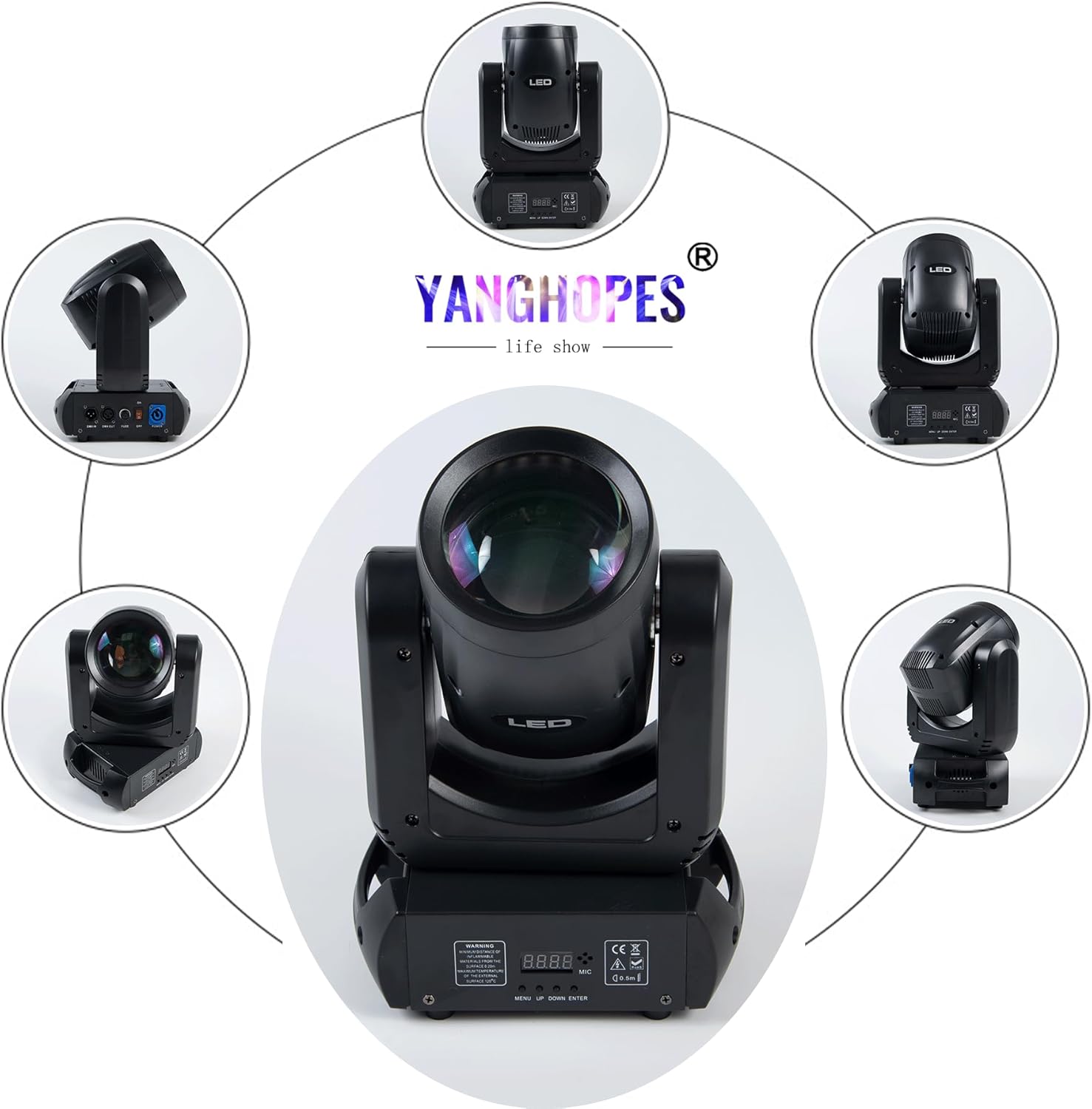
Figure 2: Various perspectives of the moving head light, highlighting its design and connectivity ports.
3. Key Features
- Powerful Illumination: Equipped with a 150W White LUMINUS LED for high brightness.
- Dynamic Color Mixing: 7 colors + white light with color separation and linear rotation.
- Gobo Effects: 7 fixed patterns + white light for diverse projections.
- Prismatic Effects: 8-facet rotatable prism with linear angle of rotation and clockwise rotation.
- Control Modes: DMX512, Master-Slave, Sound Activated, and Self-Propelled modes.
- Movement: Horizontal rotation (Pan) up to 540 degrees; Vertical rotation (Tilt) up to 270 degrees.
- Dimming & Strobe: Electronic dimmer (0-100%) and electronic strobe light.
- Heat Dissipation: Advanced heat dissipation technology for extended lifespan.
- Versatile Mounting: Can be installed standing or mounted overhead using included brackets.

Figure 3: Examples of diverse light patterns and vibrant colors achievable with the fixture.
4. Setup Instructions
- Unpacking: Carefully remove the fixture from its packaging. Inspect for any damage during transit.
- Placement: Position the light on a stable, flat surface or securely mount it using appropriate clamps and safety cables. Ensure adequate ventilation around the unit.
- Power Connection: Connect the power cable to the fixture and then to a compatible power outlet (AC110V-240V, 50Hz/60Hz).
- DMX Connection (Optional):
- For DMX control, connect a DMX cable from your DMX controller's output to the fixture's DMX IN port.
- For multiple fixtures, daisy-chain them by connecting the DMX OUT of the first fixture to the DMX IN of the next.
- Initial Power On: Flip the power switch to the ON position. The display panel will illuminate.

Figure 4: Product dimensions and illustrative light effects.
5. Operating Modes
The fixture offers several control modes, selectable via the control panel buttons (MENU, UP, DOWN, ENTER).
5.1. DMX512 Control Mode
This mode allows precise control over all functions using an external DMX controller.
- Connect the DMX controller as described in the Setup section.
- Use the MENU button to navigate to the DMX address setting (e.g., "A001").
- Use UP/DOWN to set the desired DMX start address. Press ENTER to confirm.
- Refer to the DMX Channel Chart (usually provided in a separate DMX manual or appendix) for specific channel assignments and values.
Video 1: Demonstration of the YANGHOPES 150W LED Moving Head Light's DMX control and various effects, including gobos and color mixing. This video illustrates the dynamic capabilities of the fixture under DMX control.
5.2. Master-Slave Mode
Link multiple fixtures to synchronize their movements and effects without a DMX controller.
- Connect the DMX OUT of the master fixture to the DMX IN of the first slave fixture, and so on.
- On the master fixture, select an auto or sound-activated program.
- On all slave fixtures, set them to "Slave" mode via the control panel. They will then mimic the master unit.
5.3. Sound Activated Mode
The fixture reacts to ambient sound, creating dynamic light shows synchronized with music.
- Use the MENU button to navigate to the sound-activated mode setting (e.g., "Soun").
- Press ENTER to activate. The built-in microphone will detect sound and trigger light effects.
- Adjust microphone sensitivity if available (refer to the display panel options).
5.4. Self-Propelled (Auto) Mode
The fixture runs through pre-programmed internal sequences automatically.
- Use the MENU button to navigate to the auto mode setting (e.g., "Auto").
- Press ENTER to activate. The fixture will cycle through its built-in programs.
- Some models may allow selection of specific auto programs or speed adjustments.
6. Maintenance
Regular maintenance ensures optimal performance and extends the lifespan of your fixture.
- Cleaning: Periodically clean the lens and exterior with a soft, lint-free cloth. Do not use abrasive cleaners or solvents.
- Inspection: Regularly check power cables, DMX cables, and mounting hardware for wear or damage.
- Cooling System: Ensure cooling vents are clear of dust and debris to prevent overheating.
- Professional Servicing: For internal repairs or complex issues, contact qualified service personnel.
7. Troubleshooting
| Problem | Possible Cause | Solution |
|---|---|---|
| No power | Power cable disconnected, faulty outlet, blown fuse. | Check power connections. Test outlet. Replace fuse if necessary. |
| No DMX control | Incorrect DMX address, faulty DMX cable, DMX controller issue. | Verify DMX address. Check DMX cable connections. Test with another DMX cable or controller. |
| Fixture not moving/responding | Incorrect operating mode, motor obstruction, internal fault. | Ensure correct mode is selected. Check for physical obstructions. Power cycle the unit. If problem persists, seek professional service. |
| Overheating | Blocked ventilation, high ambient temperature. | Clear all vents. Ensure adequate airflow. Reduce ambient temperature if possible. |
8. Technical Specifications
- Model: DJ Stage Lighting Spotlight-1011
- Light Source: 150W White LUMINUS LED
- Power Consumption: 180W
- Voltage: AC110V-240V, 50Hz/60Hz
- Brightness: 15000 Lumens
- Horizontal Rotation (Pan): 540 degrees, 360 degrees, 181 degrees (user selectable)
- Vertical Rotation (Tilt): 270 degrees
- Color Palette: 7 colors + white light + color separation
- Fixed Gobo: 7 patterns + white light
- Prism: 8-facet prism, rotatable
- Dimmer: Electronic (0-100%)
- Strobe: Electronic strobe light
- Control Modes: DMX512, Master-Slave, Sound Activated, Self-Propelled
- Material: Metal, Plastic
- Finish: Powder Coated
- Product Dimensions: 12"L x 12"W x 12"H (230mm L x 150mm W x 330mm H)
- Item Weight: 10.78 pounds
- Certifications: CE, FCC
9. Warranty and Support
YANGHOPES is committed to customer satisfaction. For any inquiries, technical assistance, or warranty claims, please contact our customer support team. Refer to your purchase documentation for specific warranty terms and contact details.
Manufacturer: YANGHOPES
Contact: Please refer to the seller's contact information on the purchase platform or the official YANGHOPES website for support.


