
AFEXOA ZH083
AFEXOA Sunrise Alarm Clock
User Manual
Model: ZH083
1. Introduction
Thank you for choosing the AFEXOA Sunrise Alarm Clock. This device is designed to enhance your waking and sleeping experience through natural light simulation and customizable sound features. Please read this manual carefully to understand the product's functions and ensure safe and optimal use.
Safety Information
- Keep the device away from water and high humidity.
- Do not disassemble or attempt to repair the device yourself. Contact qualified personnel for service.
- Use only the provided power adapter.
- Avoid placing the device in direct sunlight or near heat sources.
- Ensure proper ventilation around the device.
2. Product Overview
Components
The AFEXOA Sunrise Alarm Clock consists of the following main components:
- Sunrise Light Dome: The upper translucent hemisphere that emits light.
- Digital Display: Shows time, alarm settings, and other indicators.
- Control Buttons: Located on the top edge, used for various settings and functions.
- Speaker: Integrated into the base for alarm sounds and sleep aid melodies.
- Stable Base: Provides support for the clock.
- Power Port: Located at the back for connecting the power adapter.

Figure 2.1: Overview of the AFEXOA Sunrise Alarm Clock.
Key Features
- Sunrise Simulation: Gradually brightens from red to warm white over 10-60 minutes before your set alarm time.
- Customizable Alarms: Choose from 7 alarm sounds (including natural sounds and music) with 10 adjustable volume levels (up to 110 dB).
- Snooze Function: Press the snooze button for an additional 9 minutes of sleep, with unlimited snooze cycles.
- RGB Colorful Lights: Features 7 solid colors (Warm White, Yellow, White, Red, Blue, Cyan, Purple) and 2 mixed color modes, with 10 adjustable brightness levels for mood lighting or night light use.
- Adjustable Display Brightness: The digital time display has 4 brightness levels (0%, 5%, 50%, 100%) to suit your preference, including an 'OFF' option.
- Sleep Timer: Set a timer for 15, 30, 60, 90, or 120 minutes for the light to gradually dim and turn off, aiding in sleep.
- Power Source: Operates via corded electric power; an adapter is included.
3. Setup
- Unpacking: Carefully remove the alarm clock and all accessories from the packaging. Retain packaging for future storage or transport.
- Power Connection: Connect the provided power adapter to the power port on the back of the alarm clock. Plug the adapter into a standard wall outlet. The display will light up, indicating power is connected.
- Initial Time Setting:
- Press the TIME button. The hour digits will flash.
- Use the + or - buttons to adjust the hour.
- Press TIME again to confirm the hour and move to minute adjustment.
- Use the + or - buttons to adjust the minutes.
- Press TIME a third time to confirm minutes and exit time setting mode.
- To switch between 12-hour and 24-hour format, press and hold the TIME button for 3 seconds.

Figure 3.1: The alarm clock requires a corded electric power source.
4. Operating Instructions
4.1 Setting the Alarm
- Press the ALARM button. The alarm time digits will flash.
- Use the + or - buttons to set the desired alarm hour. Press ALARM to confirm.
- Use the + or - buttons to set the desired alarm minute. Press ALARM to confirm.
- Sunrise Simulation Duration: Use + or - to select the sunrise duration (10, 20, 30, 40, 50, or 60 minutes). This is the time before the alarm sounds that the light will begin to brighten. Press ALARM to confirm.
- Alarm Sound Selection: Use + or - to cycle through 7 built-in ringtones or select 'OFF' for light-only alarm. Press ALARM to confirm.
- Alarm Volume Adjustment: Use + or - to set the alarm volume (L01-L10). Press ALARM to confirm and save settings.
To enable or disable the alarm, press the ALARM ON/OFF button. An alarm icon will appear/disappear on the display.
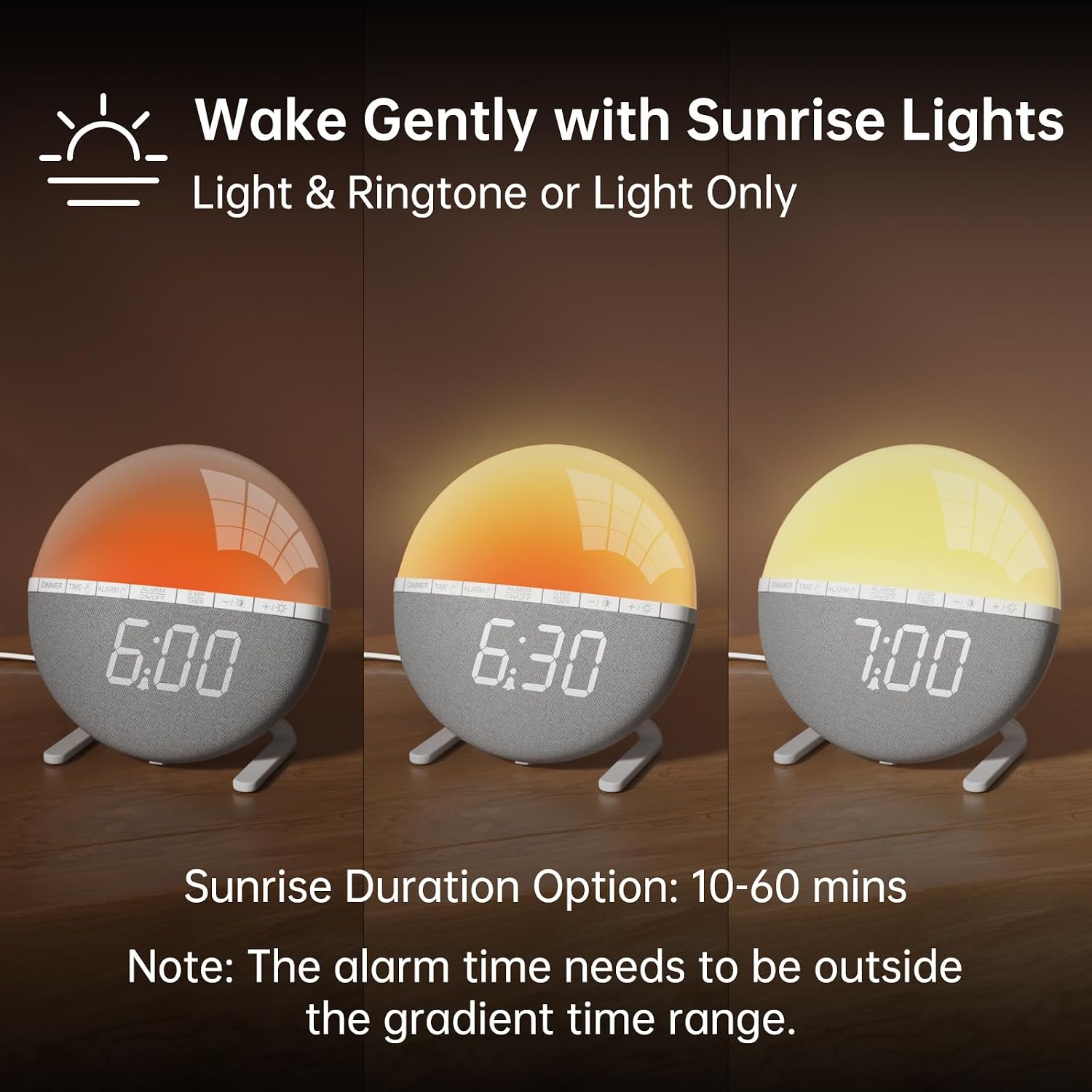
Figure 4.1: Sunrise simulation gradually brightens before the alarm time.

Figure 4.2: Selection of alarm ringtones and volume adjustment.
4.2 Using the Snooze Function
When the alarm sounds, press the large button on top of the light dome (often labeled SNOOZE or indicated by a hand icon) to activate the snooze function. The alarm will pause for 9 minutes and then sound again. This can be repeated an unlimited number of times.

Figure 4.3: Activating the snooze feature.
4.3 Adjusting Light Settings (Night Light/Mood Light)
- Press the LIGHT button to turn on the light.
- Press the LIGHT button repeatedly to cycle through 7 solid colors and 2 mixed color modes.
- Use the + or - buttons to adjust the brightness level (10 levels) of the selected light mode.
- To turn off the light, press the LIGHT button until it switches off, or press and hold the LIGHT button for 3 seconds.

Figure 4.4: Exploring the gorgeous night light options.
4.4 Using the Sleep Timer
The sleep timer allows the light to gradually dim and turn off after a set period, helping you fall asleep.
- Press the SLEEP TIMER button.
- Press repeatedly to cycle through the available timer durations: 15, 30, 60, 90, or 120 minutes.
- The light will gradually dim over the selected period and then turn off.
- To cancel the sleep timer, press the SLEEP TIMER button until no timer duration is displayed.

Figure 4.5: Utilizing the sleep aid timer function.
4.5 Adjusting Display Brightness
To adjust the brightness of the digital time display:
- Press the DIMMER button.
- Press repeatedly to cycle through 4 brightness levels: 0% (OFF), 5%, 50%, and 100%.
- Select the level that provides optimal comfort without disturbing your sleep.

Figure 4.6: Options for dimming the clock display.
4.6 Official Product Video
Video 4.1: An official product video demonstrating the AFEXOA Sunrise Alarm Clock Wake Up Light features and operation.
5. Maintenance
- Cleaning: To clean the device, gently wipe the surface with a soft, dry cloth. Do not use abrasive cleaners, solvents, or harsh chemicals.
- Storage: If storing the device for an extended period, unplug it from the power outlet and store it in a cool, dry place, away from direct sunlight and extreme temperatures.
- Handling: Handle the device with care to avoid dropping or physical impact, which could damage internal components.
6. Troubleshooting
| Problem | Possible Cause | Solution |
|---|---|---|
| Device does not power on. | Power adapter not properly connected or power outlet issue. | Ensure the power adapter is securely plugged into both the device and a working wall outlet. Try a different outlet. |
| Alarm does not sound. | Alarm not activated, volume too low, or 'OFF' selected for sound. | Check if the alarm is enabled (alarm icon visible). Increase alarm volume. Ensure a sound option is selected, not 'OFF'. |
| Sunrise light does not activate. | Sunrise duration not set or set to 0 minutes. | Verify that a sunrise duration (e.g., 10-60 minutes) is selected during alarm setup. |
| Display is too bright or too dim. | Display brightness setting is incorrect. | Press the DIMMER button to cycle through the 4 brightness levels until desired brightness is achieved. |
| Time changes unexpectedly. | Power interruption or internal malfunction. | Reset the time. If the issue persists, contact customer support. |
7. Specifications
- Brand: AFEXOA
- Model: ZH083
- Product Dimensions: 5.5"W x 5.9"H
- Item Weight: 10.6 ounces
- Material: Acrylonitrile Butadiene Styrene (ABS)
- Display Type: Digital
- Power Source: Corded Electric
- Light Colors: 7 Solid, 2 Mixed
- Brightness Levels: 10 (for light), 4 (for display)
- Alarm Sounds: 7 Ringtones + OFF option
- Snooze Duration: 9 minutes
- Sleep Timer Options: 15, 30, 60, 90, 120 minutes
8. Warranty and Support
For warranty information, technical support, or any questions regarding your AFEXOA Sunrise Alarm Clock, please contact the manufacturer directly through their official website or the retailer from whom you purchased the product.
Please have your model number (ZH083) and purchase details ready when contacting support.
Ask a question about this manual
Ask about setup, troubleshooting, compatibility, parts, safety, or missing instructions. Manuals+ will review the question and use this page’s manual context to help answer it.