
1. Introduction
Thank you for choosing the Hasuit VDNX-01 48.8-inch Vanity Desk. This manual provides essential information for the safe assembly, operation, and maintenance of your new vanity desk. Please read these instructions carefully before assembly and retain them for future reference.

Image 1.1: The Hasuit VDNX-01 48.8-inch Vanity Desk in Black, showcasing its lighted mirror, storage, and overall design.
2. Safety Information
Please observe the following safety precautions to prevent injury or damage to the product:
- Always follow assembly instructions carefully to avoid injury.
- Keep electrical components away from water and do not overload power outlets.
- Do not use the vanity if any electrical components are damaged or malfunctioning.
- Ensure all connections are secure before use.
- Place the vanity on a flat, stable surface to prevent tipping.
3. Package Contents
Before beginning assembly, verify that all parts are present and undamaged. Refer to the separate assembly manual for a detailed list of components and hardware.
- Vanity Desk Panels (MDF board)
- Lighted Mirror Assembly
- Hardware Pack (screws, cam locks, drawer slides, handles)
- Power Outlet and USB Charging Station Unit
- LED Bulbs and Controller
- Glass Tabletop Insert
- Assembly Instruction Manual
4. Assembly Instructions
Assembly of the Hasuit VDNX-01 Vanity Desk is required. A detailed, step-by-step assembly manual is included in the packaging. Please follow these instructions carefully.
- Unpack all components and verify against the parts list in the assembly manual.
- Identify each part and hardware piece. All parts are individually packed and marked.
- Follow the illustrated steps in the assembly manual for constructing the desk frame, drawers, shelves, and cabinet.
- Install the lighted mirror and connect its electrical components as directed.
- Integrate the power outlet and USB charging station according to the instructions.
- Ensure all screws and fasteners are tightened securely.
Note: Assembly may take several hours. It is recommended to have a second person assist with certain steps, especially when handling the mirror.
5. Product Features
5.1 Lighted Mirror with 3 Lighting Modes
The vanity desk features a large HD mirror surrounded by 10 LED bulbs. These bulbs offer three distinct color modes and adjustable brightness to suit various lighting needs.

Image 5.1: Illustration of the three lighting modes (Cool White, Natural Light, Warm Yellow) and adjustable brightness feature of the mirror.
5.2 Ample Storage Solutions
This vanity desk is designed with extensive storage capacity to organize your items efficiently.
- Spacious Tabletop: Provides ample surface area for frequently used items.
- 4 Open Shelves: Located on either side of the mirror for easy access to cosmetics and decor.
- 6 Drawers: Includes a large glass-top drawer for visible organization and five additional drawers for concealed storage.
- 1 Side Cabinet: Offers additional enclosed storage space.
- 6 Jewelry Hooks: Integrated on the side for hanging necklaces, bracelets, and other accessories.
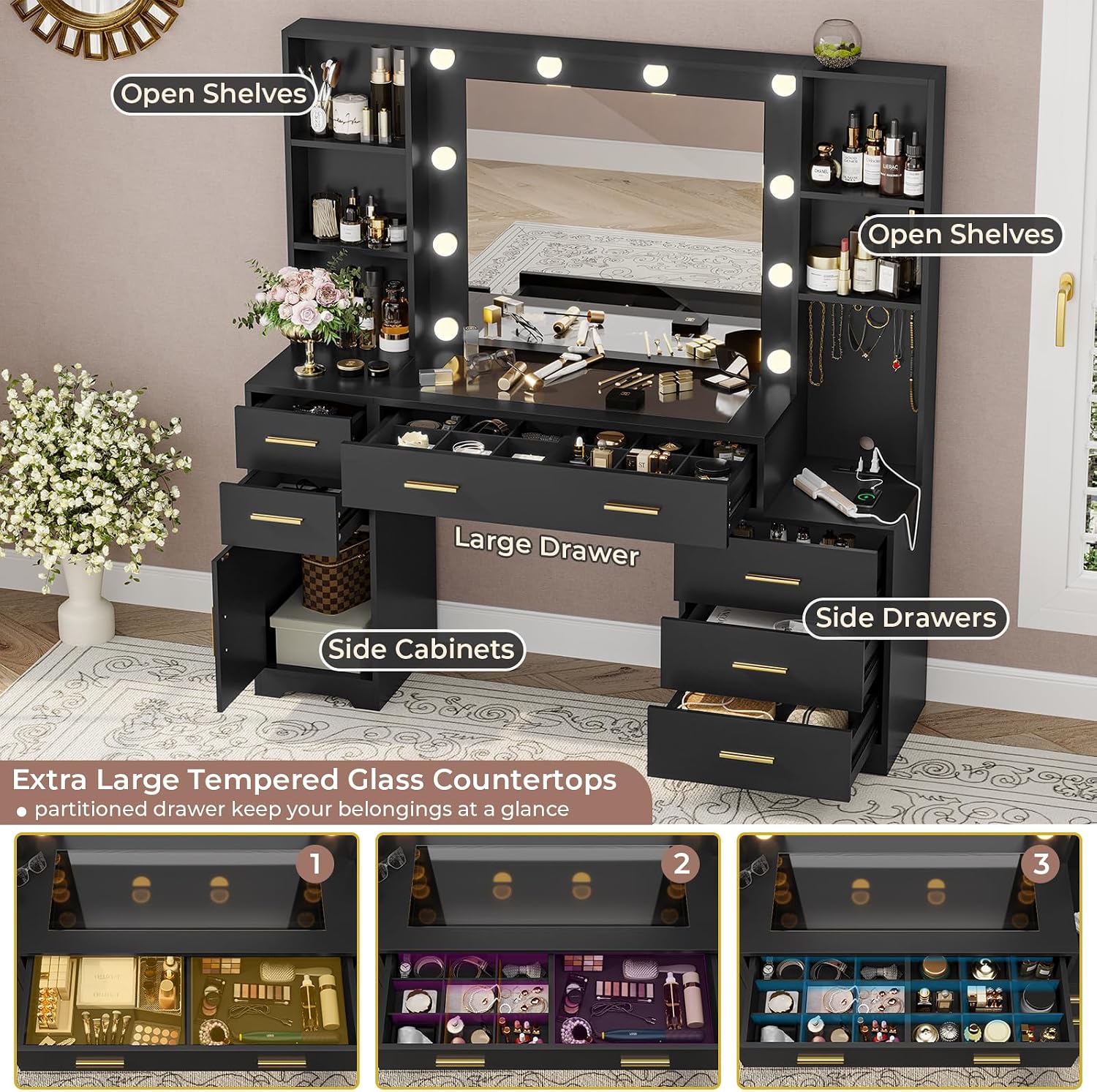
Image 5.2: Overhead view highlighting the various storage compartments including open shelves, the large central drawer, side cabinets, and additional side drawers.

Image 5.3: Close-up view showing the jewelry hooks for hanging accessories and an adjustable shelf for customizable storage height.
5.3 Built-in Charging Station
The vanity desk includes a convenient charging station to power your electronic devices.
- 2 Standard AC Outlets: 125V/12A for hair dryers, curling irons, and other appliances.
- 2 USB Ports: 5V/2.1A for charging smartphones, tablets, and other USB-powered devices.
- 5.9-Foot Power Cord: Provides flexibility for placement.

Image 5.4: The vanity desk featuring the built-in charging station with two AC outlets and two USB ports, ideal for powering beauty tools and charging devices.
6. Operating Instructions
6.1 Lighted Mirror Operation
The LED bulbs are controlled by an inline switch on the power cord.
- Power On/Off: Press the power button on the controller to turn the lights on or off.
- Change Light Color: Press the 'M' button to cycle through the three color modes: Cool White (8000K), Natural Light (4000K), and Warm Yellow (3000K).
- Adjust Brightness: Use the '+' and '-' buttons to increase or decrease the brightness level for the selected color mode.
6.2 Charging Station Usage
The integrated charging station provides convenient power access.
- AC Outlets: Plug in your hair dryer, curling iron, or other small appliances into the 125V/12A outlets.
- USB Ports: Connect your smartphone, tablet, or other USB-powered devices to the 5V/2.1A USB ports for charging.
- Ensure the vanity desk is plugged into a functional wall outlet for the charging station to operate.
7. Maintenance and Care
To ensure the longevity and appearance of your Hasuit Vanity Desk, follow these care instructions:
- Cleaning Surfaces: Wipe with a dry cloth for general dusting. For spills or marks, use a damp cloth and mild cleaner, then dry immediately. Avoid abrasive cleaners.
- Mirror Care: Clean the mirror with a glass cleaner and a soft, lint-free cloth.
- Electrical Components: Keep the power outlet and light connections dry. Do not immerse any electrical parts in water.
- Drawer Maintenance: Periodically check drawer slides for smooth operation. If needed, clean and apply a small amount of silicone lubricant.
- General Inspection: Regularly check all screws and fasteners to ensure they remain tight. Tighten if necessary.
8. Troubleshooting
If you encounter issues with your vanity desk, refer to the following common problems and solutions:
- Lights Not Working:
- Ensure the power cord is securely plugged into a wall outlet.
- Check the inline controller for damage or loose connections.
- Verify that the wall outlet is functional by plugging in another device.
- Charging Station Not Providing Power:
- Confirm the vanity's main power cord is plugged in.
- Check if the device you are trying to charge is working correctly.
- Avoid overloading the outlets; ensure total wattage does not exceed specified limits.
- Drawers Sticking or Not Closing Smoothly:
- Ensure drawer slides are properly aligned and free of obstructions.
- Check that the drawer contents are not interfering with closure.
- Verify that all assembly screws for the drawer slides are tight.
- Missing or Damaged Parts During Assembly:
- Refer to the contact information in the Warranty and Support section to request replacement parts.
9. Specifications
| Feature | Specification |
|---|---|
| Brand | Hasuit |
| Model Number | VDNX-01 |
| Product Dimensions (D x W x H) | 15.75 x 48.8 x 55.12 inches |
| Item Weight | 113.5 pounds |
| Color | Black |
| Frame Material | Engineered Wood |
| Assembly Required | Yes |
| Lighting Modes | 3 (Cool White, Natural Light, Warm Yellow) |
| Power Outlets | 2 x 125V/12A AC Outlets |
| USB Ports | 2 x 5V/2.1A USB Ports |
| Product Care Instructions | Wipe With Dry, Wipe with Damp Cloth |

Image 9.1: Detailed dimensions of the Hasuit VDNX-01 Vanity Desk, including overall height, width, depth, and individual component measurements.
10. Warranty and Support
Hasuit provides long-term service for its products. If you have any questions regarding assembly, missing parts, product defects, or require technical support, please contact the Hasuit customer service team. Your purchase is welcome, and we are ready to assist you.
For support, please refer to the contact information provided with your purchase documentation or visit the official Hasuit store online.