
1. Product Overview
The BNETA IoT Smart Pet Feeder F1-D is an intelligent solution designed for pet parents to manage their pet's feeding schedule remotely. This feeder is suitable for small to medium-sized pets and accommodates dry food types ranging from 5mm to 15mm. It features a Full HD camera for real-time monitoring, a dual power system for uninterrupted operation, and a 4.5L large capacity food hopper.
- Real-time Video: Monitor your pet from anywhere.
- Completely Sealed: Locks in freshness and prevents pests.
- Motion Detection: Captures important moments.
- Dual Power Supply: Ensures continuous feeding during power outages.
- 4.5 L Large Capacity: Reduces the frequency of refills.
- Easy to Disassemble and Clean: Simplifies maintenance.

Image 1.1: Front view of the BNETA IoT Smart Pet Feeder F1-D, showing the camera and dispensing area.
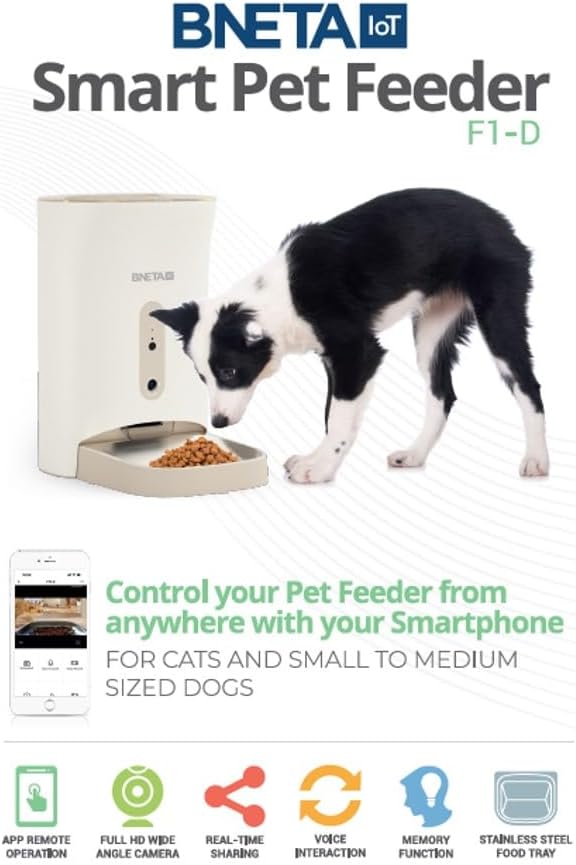
Image 1.2: The BNETA Smart Pet Feeder F1-D in use with a dog, illustrating features like app remote operation, full HD camera, real-time sharing, and voice interaction.
2. Safety Information
Please read all safety instructions before using the device to prevent injury or damage. Keep this manual for future reference.
- Use only the original power adapter provided with the feeder.
- Do not immerse the main unit in water or any other liquids.
- Keep the feeder away from direct sunlight and heat sources.
- Ensure the feeder is placed on a stable, level surface.
- This device is for indoor use only.
- Keep out of reach of children and pets when not in use or during assembly.
- Only use dry pet food with a diameter between 5mm and 15mm.
3. Package Contents
Verify that all components are present and in good condition upon unpacking:
- BNETA IoT Smart Pet Feeder F1-D Main Unit
- Stainless Steel Food Tray
- Power Adapter
- Desiccant Box (pre-installed or separate)
- User Manual
4. Setup
Follow these steps to set up your BNETA Smart Pet Feeder F1-D:
- Place the Feeder: Position the feeder on a flat, stable surface in a suitable indoor location.
- Install Food Tray: Attach the stainless steel food tray to the main unit. Ensure it is securely in place.
- Connect Power: Plug the power adapter into the feeder's power port and then into a wall outlet. The feeder will power on.
- Install Backup Batteries (Optional): For dual power supply, insert 3 D-cell batteries (not included) into the battery compartment at the bottom of the feeder. This ensures operation during power outages.

Image 4.1: The feeder operating with a cat, demonstrating the dual power supply feature for continuous operation.
- Download the App: Scan the QR code in the manual or search for the 'BNETA IoT' app on your smartphone's app store (iOS/Android).
- Register and Log In: Create an account or log in if you already have one.
- Add Device: Follow the in-app instructions to add your F1-D feeder. This typically involves connecting the feeder to your home Wi-Fi network (2.4GHz only).
- Fill Food Hopper: Open the top lid and pour dry pet food into the 4.5L food hopper. Ensure the desiccant box is properly placed to maintain food freshness.

Image 4.2: The feeder with its lid open, showcasing the large 4.5L food hopper capacity.
- Record Voice Message: Use the app to record a 10-second voice message. This message will play at meal times to comfort your pet.
5. Operating Instructions
Control your pet's feeding and monitor their activity using the BNETA IoT app.
- Scheduling Meals:
Open the BNETA IoT app. Navigate to the feeder's control interface. Select 'Add Plan' to set up feeding schedules. You can customize meal times, portion sizes, and frequency. The app allows for precise control over your pet's diet. - Manual Feeding:
To dispense food instantly, tap the 'Feed' button in the app. You can select the number of portions to dispense. - Real-time Monitoring:
Access the live video feed from the Full HD camera through the app. You can view your pet, listen to audio, and even speak to them using the two-way audio feature. - Voice Interaction:
Use the 'Start Speak' function in the app to talk to your pet remotely. - Motion Detection:
The feeder's camera includes motion detection. You will receive notifications on your phone if motion is detected, allowing you to monitor your pet's activity. - Video Sharing:
Share captured videos or live streams with family members through the app.

Image 5.1: Screenshot of the mobile app, showing options for remote interaction, intelligent capture, night vision, feeding control, video sharing, and smart notifications.
6. Maintenance
Regular cleaning and maintenance ensure the longevity and hygienic operation of your pet feeder.
- Disassembly: The feeder is designed for easy disassembly. Remove the food tray, then detach the food hopper and dispensing mechanism components as instructed in the app or by gently twisting/unlatching.
- Cleaning: Wash the stainless steel food tray, food hopper, and dispensing components with mild soap and water. Rinse thoroughly and dry completely before reassembly. Do not wash the main unit with electronic components. Wipe the exterior of the main unit with a damp cloth.
- Desiccant Box: Replace the desiccant packet in the desiccant box every 1-2 months to maintain food freshness and prevent moisture buildup.
- Infrared Sensor: Periodically check and clean the infrared sensor near the food outlet to ensure accurate food detection and prevent jams.

Image 6.1: Detailed view of the self-developed food dispensing system, showing anti-stuck reverse rotation, lockable lid design, infrared detection, and components designed for easy cleaning.

Image 6.2: The feeder showcasing features that keep food fresh, including a sealed top lid, desiccant box, and hidden food outlet.
7. Troubleshooting
If you encounter issues with your BNETA Smart Pet Feeder, refer to the following common solutions:
| Problem | Possible Cause | Solution |
|---|---|---|
| Feeder not powering on | Power adapter not connected; Power outage; Batteries depleted. | Ensure power adapter is securely plugged in. Check wall outlet. Replace D-cell batteries if using backup power. |
| Food not dispensing | Food jam; Hopper empty; Dispensing mechanism blocked; Incorrect food size. | Check food level. Clear any food jams in the outlet. Ensure food size is between 5mm-15mm. Clean dispensing mechanism. |
| App cannot connect to feeder | Incorrect Wi-Fi password; Feeder too far from router; Router on 5GHz band; Feeder not in pairing mode. | Ensure correct 2.4GHz Wi-Fi network and password. Move feeder closer to router. Reset feeder and re-enter pairing mode. |
| Camera not working | Network issue; App permissions. | Check Wi-Fi connection. Ensure app has camera permissions. Restart app and feeder. |
8. Specifications
- Model Number: F1-D
- Dimensions: 41.6 x 25.2 x 19.4 cm
- Weight: 2.6 kg
- Food Capacity: 4.5 Liters
- Compatible Food Size: 5mm - 15mm dry food
- Power Supply: DC 5V/1A adapter (included), 3 x D-cell batteries (not included)
- Connectivity: Wi-Fi 2.4GHz
- Camera: Full HD
- Color: Cream with brown clear lid
- Specific Uses: Indoor
- Pet Type: Cat, Dog, Small Animal
- UPC: 759649255905
9. Warranty and Support
The BNETA IoT Smart Pet Feeder F1-D comes with a 1 Year Limited Warranty from the date of purchase. This warranty covers manufacturing defects under normal use.
For technical support, warranty claims, or further assistance, please contact BNETA customer service through the contact information provided on the official BNETA website or within the BNETA IoT app.
Please retain your proof of purchase for warranty validation.
