
ZYWUOY O6J41OF2VZ2O1843UO525WKW1
ZYWUOY Smart Thermostat User Manual
Model: O6J41OF2VZ2O1843UO525WKW1
1. Introduction
This manual provides comprehensive instructions for the installation, operation, and maintenance of your ZYWUOY Smart Thermostat. Please read this manual carefully before installation and use to ensure proper function and safety. This thermostat is designed for temperature control in air conditioning systems, offering precise regulation for comfort and energy efficiency.
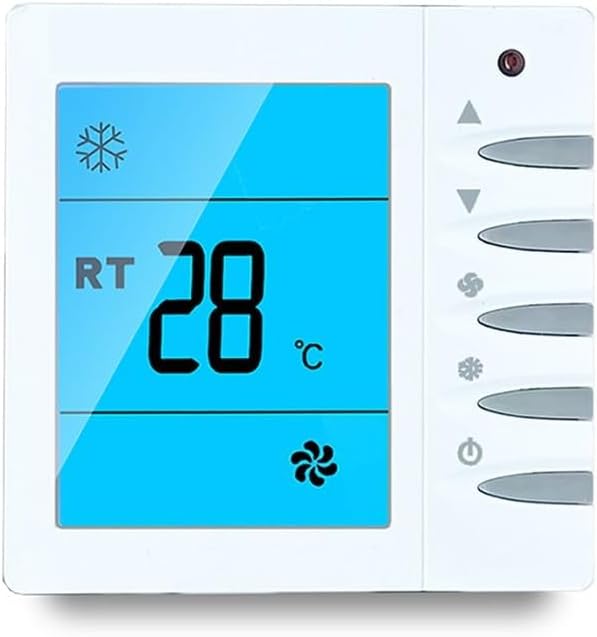
Figure 1: Front view of the ZYWUOY Smart Thermostat.
The thermostat features a clear LCD display and intuitive touch buttons for easy temperature and mode adjustments.
2. Product Features
- Touch Button Temperature Control: Easily control temperature with responsive touch buttons. Adjust settings for power, fan speed, temperature reduction, and mode conversion.
- LCD Display: The clear LCD screen displays the current operating mode (cooling or heating) and provides easy-to-read information.
- Fan Speed Selection: Choose from High, Medium, Low, or Automatic fan speed settings. The automatic mode adjusts fan speed based on the temperature difference between the room and the set temperature.
- Durable Material: Constructed from ABS material for durability and longevity.
- Compact Size: Dimensions of 86 x 86 x 13 mm allow for easy installation.
- Wide Power Compatibility: Supply voltage ranges from AC 85V to 260V, suitable for various power sources.

Figure 2: Thermostat with app control illustration.
The thermostat supports advanced features like app control for convenient remote management.
3. Installation
3.1 Safety Precautions
- Always turn off power at the circuit breaker before beginning installation.
- Installation should be performed by a qualified electrician or HVAC professional.
- Ensure wiring complies with local electrical codes.
3.2 Mounting Dimensions

Figure 3: Thermostat dimensions.
The thermostat has a standard mounting hole pitch of 60mm. Overall dimensions are 86mm (width) x 86mm (height) x 13mm (thickness).
3.3 Wiring Diagram

Figure 4: Wiring terminals on the back of the thermostat.
The terminal block is capable of connecting 2 conductors of 1.5 mm² or 1 x 2.5 mm². Refer to the diagram for proper connection of fan and electric valve wires.

Figure 5: System connection diagram.
This diagram shows how the thermostat connects to a typical air conditioning unit, controlling both the fan coil and the electric valve.
4. Operating Instructions
4.1 Button Functions

Figure 6: Thermostat button functions.
Familiarize yourself with the touch buttons for seamless control of your thermostat.
- Power On/Off: Press the power button (⏻) to turn the unit on or off. When off, the fan coil, electric valve, or air valve are also turned off.
- Temperature Adjustment: Use the up (▲) and down (▼) arrows to increase or decrease the set temperature.
- Mode Conversion: Press the mode button (❄ or ☀) to switch between cooling and heating modes. The LCD will display the corresponding icon.
- Fan Speed Selection: Press the fan speed button (🌬) to cycle through fan speeds: High, Medium, Low, and Auto.
- Automatic Fan Mode: In "Auto" mode, the fan speed adjusts automatically:
- If ambient temperature differs by 1℃ from set temperature, low fan speed is selected.
- If ambient temperature differs by 2℃ from set temperature, medium fan speed is selected.
- If ambient temperature differs by 3℃ or more from set temperature, high fan speed is selected.
5. Specifications
| Parameter | Value |
|---|---|
| Product Name | Air Conditioning Controller |
| Material | ABS |
| Dimensions (W x H x T) | 86 x 86 x 13 mm |
| Temperature Sensor | NTC Thermistor |
| Temperature Control Accuracy | ±1℃ |
| Temperature Setting Range | 5 ~ 35℃ |
| Display Range | 0 ~ 50℃ |
| Working Environment Temperature | 0 ~ 45℃ |
| Display Type | LCD |
| Humidity | 5 ~ 95% RH (non-condensing) |
| Button Type | Lightly touch button |
| Supply Voltage | AC 85 ~ 260V, 50/60Hz |
| Consumable Power | <1 W |
| Load Current | 2A (resistive load), 1A (inductive load) |
| Terminal Block | Capable of connecting 2 conductors of 1.5 mm² or 1 x 2.5 mm² |
| Mounting Hole Pitch | 60 mm (standard) |
| Degree of Protection | IP 30 |

Figure 7: Technical specifications overview.
This image provides a summary of the thermostat's technical data and a brief introduction to its application.
6. Maintenance
To ensure optimal performance and longevity of your ZYWUOY Smart Thermostat, follow these simple maintenance guidelines:
- Cleaning: Gently wipe the thermostat's surface with a soft, dry cloth. Do not use abrasive cleaners, solvents, or chemical sprays, as these can damage the display or casing.
- Avoid Obstructions: Ensure that the thermostat's vents (if any) are not blocked by furniture, curtains, or other objects, as this can affect temperature sensing accuracy.
- Regular Checks: Periodically check the wiring connections to ensure they are secure, especially if the unit has been moved or subjected to vibrations. (Ensure power is off before checking connections).
- Software Updates: If applicable (for app-controlled models), ensure your thermostat's firmware and companion app are updated to the latest versions for improved functionality and security.
7. Troubleshooting
If you encounter issues with your ZYWUOY Smart Thermostat, refer to the following common troubleshooting steps:
| Problem | Possible Cause | Solution |
|---|---|---|
| Thermostat not powering on. | No power supply; loose wiring; circuit breaker tripped. | Check power supply at the circuit breaker. Ensure all wiring connections are secure. Consult an electrician if necessary. |
| Incorrect temperature reading. | Thermostat placed near heat sources/drafts; sensor obstruction. | Relocate thermostat away from direct sunlight, heat sources, or drafts. Ensure no objects are blocking the sensor. |
| HVAC system not responding to thermostat. | Incorrect wiring; system mode mismatch; HVAC system issue. | Verify wiring against the diagram (Figure 4). Ensure the thermostat mode (heating/cooling) matches your HVAC system's capability. Check your HVAC system's power and settings. |
| Fan not operating correctly. | Incorrect fan speed setting; fan wiring issue. | Check the selected fan speed setting. Verify fan wiring connections. |
If the problem persists after attempting these solutions, please contact customer support.
8. Warranty and Support
All ZYWUOY products undergo strict quality control standards to ensure reliability and performance.
For any questions, technical assistance, or support inquiries regarding your Smart Thermostat, please contact our customer service team. While specific warranty details are not provided in this manual, we are committed to assisting you with any issues you may encounter.
Please have your model number (O6J41OF2VZ2O1843UO525WKW1) ready when contacting support for faster service.
Ask a question about this manual
Ask about setup, troubleshooting, compatibility, parts, safety, or missing instructions. Manuals+ will review the question and use this page’s manual context to help answer it.