
1. Introduction and Overview
The TTfone TT880 is a mobile phone designed for simplicity and ease of use, particularly for seniors. It features large, well-separated buttons, a clear display, and essential functions for reliable communication. Key features include an SOS emergency button, a loud speaker, and an integrated flashlight.

The TTfone TT880 mobile phone shown alongside its included mains charger, ready for initial setup.
2. Setup
2.1. Package Contents
Verify that your package contains the following items:
- TTfone TT880 Mobile Phone
- Rechargeable Battery
- USB Type-C Charging Cable
- Mains Charger (if included with your specific model)
- User Manual
2.2. Battery and SIM Card Installation
- Remove the Back Cover: Gently slide or pry off the back cover of the phone.
- Insert SIM Card: Locate the SIM card slot. Insert your activated 2G SIM card into the designated slot, ensuring the gold contacts face downwards and the cut corner aligns correctly.
- Insert Battery: Place the rechargeable battery into the battery compartment, aligning the gold contacts on the battery with the contacts in the phone.
- Replace Back Cover: Carefully reattach the back cover until it clicks securely into place.
2.3. Charging the Phone
Before first use, fully charge the phone battery. A full charge typically takes approximately 3 hours.
- Connect the USB Type-C charging cable to the charging port at the bottom of the phone.
- Connect the other end of the USB cable to the included mains charger or a compatible USB power adapter.
- Plug the charger into a wall outlet. The battery indicator on the phone screen will show charging status.
- Once fully charged, disconnect the charger.

The TTfone TT880 connected via its USB-C port for charging, with the screen indicating battery percentage.
2.4. Powering On/Off
- To Power On: Press and hold the Green Call button until the screen illuminates.
- To Power Off: Press and hold the Red End Call button until the phone powers down.
3. Operating the Phone
3.1. Keypad and Navigation
The TT880 features a large, easy-to-use keypad with speaking keys for enhanced accessibility.

The TTfone TT880 features a simplified keypad with large, well-separated buttons for easy dialing and navigation.
- Number Keys (0-9, *, #): Used for dialing numbers and entering text.
- Green Call Button: Initiates a call or answers an incoming call.
- Red End Call Button: Ends a call or returns to the idle screen.
- Navigation Keys: The central circular button with up/down/left/right arrows is used to navigate menus. The center button within the circle typically acts as a 'Select' or 'OK' button.
- Menu Button: Accesses the main menu of the phone.
- Phonebook Button: Directly accesses your saved contacts.
3.2. Making and Receiving Calls
- To Make a Call: Enter the phone number using the keypad and press the Green Call button.
- To Answer a Call: When the phone rings, press the Green Call button.
- To End a Call: Press the Red End Call button.
3.3. Sending and Receiving SMS Messages
- To Send an SMS: Navigate to the 'Messages' menu, select 'Write Message', enter your text using the keypad, and then select 'Send' to a contact or entered number.
- To Read an SMS: New messages will typically appear as a notification. Navigate to the 'Messages' menu and select 'Inbox' to view received messages.
3.4. SOS Emergency Function
The TT880 features a dedicated SOS button for emergencies. This function allows you to quickly contact pre-defined numbers.

The dedicated SOS button on the back of the TTfone TT880 allows for quick activation of emergency calls and messages to pre-set contacts.
- Setting SOS Numbers: Access the 'SOS Settings' in the phone's menu to add up to five emergency contact numbers. These contacts will receive an SMS and/or a call when the SOS button is pressed.
- Activating SOS: In an emergency, press and hold the SOS button on the back of the phone for a few seconds. The phone will automatically send an emergency SMS to the pre-set numbers and then begin dialing them in sequence until one is answered.
3.5. Flashlight
The TT880 includes a convenient built-in flashlight.
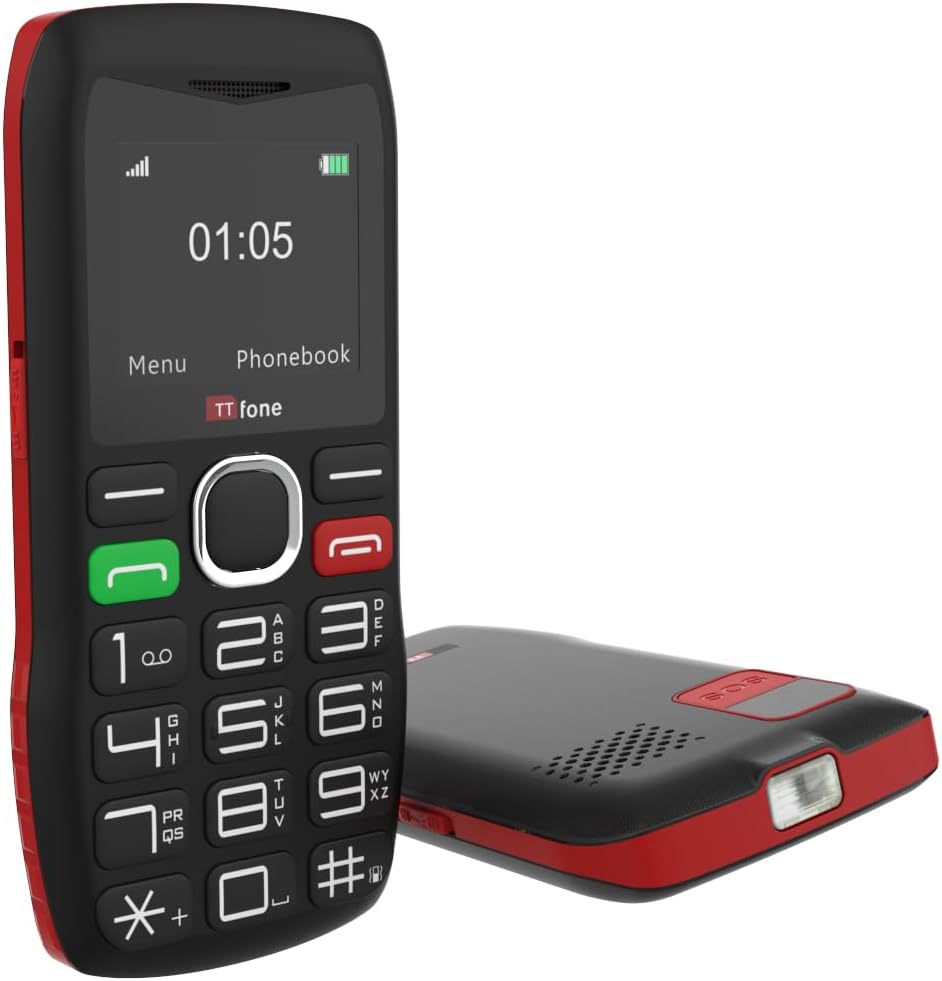
The TTfone TT880 includes a built-in flashlight, activated by a dedicated switch for convenience in low-light conditions.
- To Turn On/Off: Locate the dedicated flashlight switch on the side of the phone. Slide the switch to activate or deactivate the flashlight.
3.6. Volume Control
The phone features an extra loud speaker for clear audio during calls.

The TTfone TT880 is equipped with an extra loud speaker, designed to enhance call clarity and hands-free communication.
- During a call, use the volume up/down buttons (usually on the side of the phone) to adjust the earpiece or loudspeaker volume.
- Ringtone and notification volumes can be adjusted through the 'Settings' menu.
3.7. Phonebook
Store frequently called numbers in the phonebook for quick access.
- To Add a Contact: Go to 'Phonebook' from the main menu, select 'Add New Contact', enter the name and number, then save.
- To Call a Contact: Access the 'Phonebook', select the desired contact, and press the Green Call button.
3.8. Bluetooth Connectivity
The TT880 supports Bluetooth for connecting to compatible devices like headsets.
- To Enable Bluetooth: Navigate to 'Settings' > 'Bluetooth' and turn it 'On'.
- To Pair a Device: Select 'Search for devices' and choose your desired Bluetooth device from the list. Follow on-screen prompts to complete pairing.
4. Maintenance
4.1. Cleaning
To maintain the phone's condition, wipe it regularly with a soft, dry cloth. Avoid using harsh chemicals or abrasive cleaners.
4.2. Battery Care
- Avoid exposing the battery to extreme temperatures.
- Do not puncture or damage the battery.
- If the phone will not be used for an extended period, charge it periodically to prevent deep discharge.
4.3. Environmental Protection
The TT880 has an IP54 rating, indicating some resistance to dust and splashing water. However, it is not waterproof. Avoid submerging the phone in water or exposing it to heavy rain.
5. Troubleshooting
If you encounter issues with your TTfone TT880, refer to the following common problems and solutions:
| Problem | Possible Solution |
|---|---|
| Phone does not power on | Ensure the battery is correctly installed and fully charged. Press and hold the Green Call button for several seconds. |
| Cannot make or receive calls | Check if the SIM card is properly inserted and activated. Verify that you have network signal. Ensure the phone is not in airplane mode. |
| Poor call quality or low volume | Adjust the call volume using the side buttons during a call. Ensure the speaker is not obstructed. Move to an area with better network coverage. |
| SOS button not working | Verify that emergency contact numbers are correctly set in the SOS settings. Ensure the phone has network signal. |
| Battery drains quickly | Ensure the phone is fully charged. Reduce screen brightness. Close unused applications. If the issue persists, the battery may need replacement. |
| Phone not charging | Check if the charging cable and adapter are securely connected and undamaged. Try a different power outlet or USB port. Ensure the charging port on the phone is clean. |
6. Specifications
Below are the technical specifications for the TTfone TT880 mobile phone:
| Feature | Detail |
|---|---|
| Brand | TTfone |
| Model | TT880 |
| Display Size | 1.8 Inches |
| Display Type | LCD |
| Display Resolution | 128 x 160 pixels |
| Battery Capacity | 800 mAh Lithium-ion |
| Average Battery Life (Talk Time) | Up to 6 hours |
| Average Battery Life (Standby) | Up to 72 hours (3 days) / Up to 5 days (as per product description) |
| Charging Time | Approximately 3 hours |
| Mobile Technology | 2G |
| Connectivity | Bluetooth, USB Type-C |
| Special Features | Easy to operate, Long battery life, SOS emergency call button, USB Type-C, No camera, Loud speaker, Flashlight |
| RAM Memory | 32 MB |
| Flash Memory Capacity | 32 MB |
| Dimensions (Package) | 26.2 x 18 x 3.4 cm |
| Weight (Package) | 240 g |
| IP Rating | IP54 (Dust and splash resistant) |
7. Warranty and Support
7.1. Warranty Information
The TTfone TT880 is manufactured by TTfone. For specific warranty terms and conditions, please refer to the warranty card included with your product or contact TTfone directly. Keep your proof of purchase for warranty claims.
7.2. Customer Support
If you require further assistance or encounter issues not covered in this manual, please contact TTfone customer support. Contact details can typically be found on the manufacturer's website or on the product packaging.


