
Nerf G0218EU4
Nerf N Series STRIKEBACK Blaster
Model: G0218EU4
Official User Manual
Introduction
The Nerf N Series STRIKEBACK Blaster is designed for extreme accuracy, speed, and distance, utilizing the revolutionary Nerf N Series N1 darts. This blaster features a unique power snapback action and integrated dart storage, providing an enhanced play experience. This manual provides essential information for the safe and effective use of your new blaster.
Safety Information
WARNING: Do not aim at eyes or face. Use of eyewear is recommended for players and people within range. Use only official NERF darts. Other darts may not meet safety standards. Do not modify darts or blaster.
WARNING: Not suitable for children under 3 years. Choking hazard due to small parts.
- Always wear protective eyewear during play.
- Never aim or fire at people or animals.
- Only use darts specifically designed for this blaster.
- Do not modify the blaster or darts in any way.
- Keep small parts and darts away from young children to prevent choking hazards.
What's in the Box
- 1x Nerf N Series STRIKEBACK Blaster
- 18x Nerf N Series N1 Darts
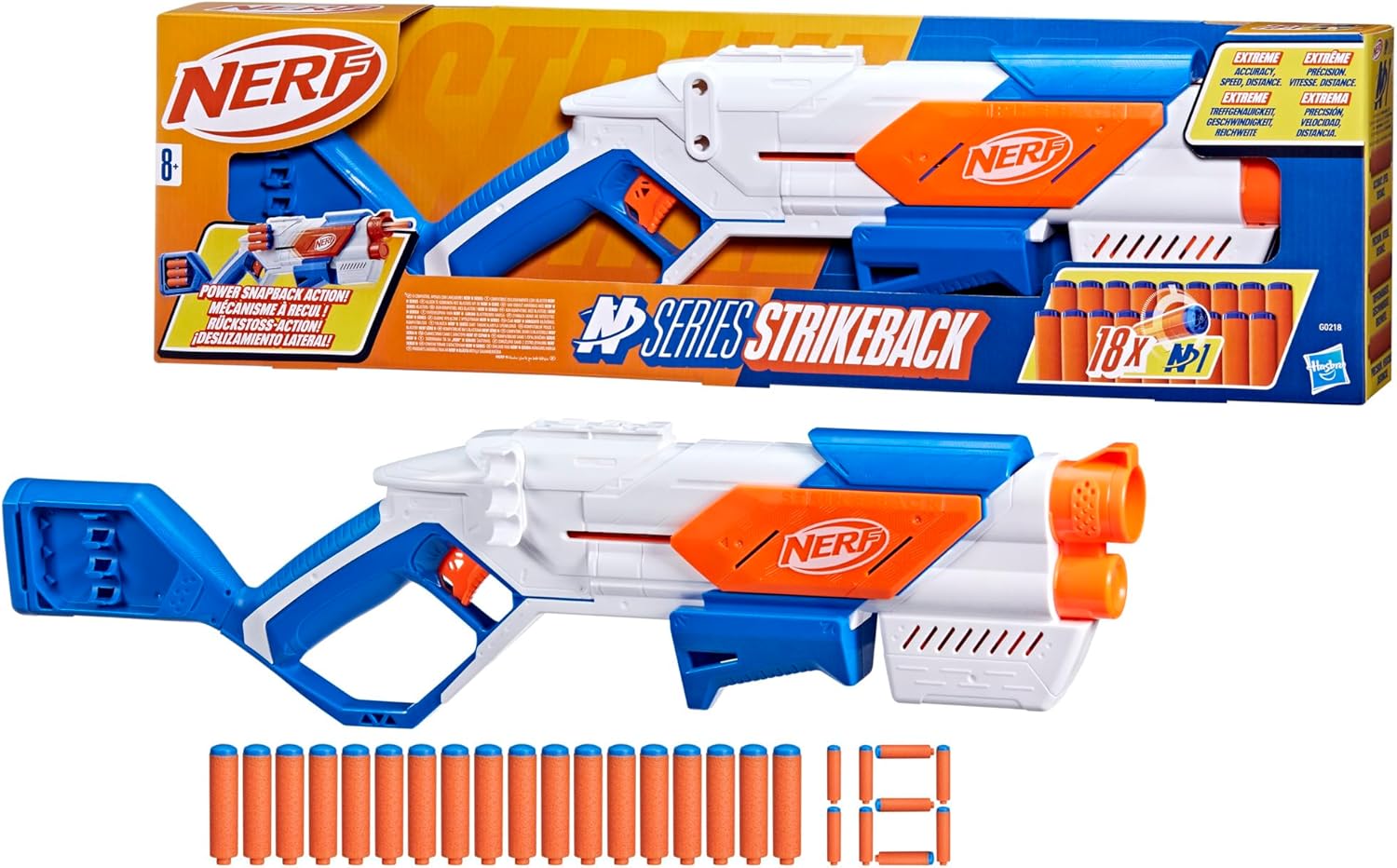
Image: The Nerf N Series STRIKEBACK Blaster shown both in its retail packaging and removed from the box, accompanied by the included 18 Nerf N1 darts.
Setup
Unboxing
Carefully remove the blaster and darts from the packaging. Ensure all components listed in the "What's in the Box" section are present.
Loading Darts
The STRIKEBACK Blaster features an internal 6-dart clip and additional onboard dart storage.
- Internal Clip Loading: To load the internal 6-dart clip, pull the priming handle (located on the front of the blaster) fully back. Insert up to six Nerf N1 darts into the top loading slot until they are fully seated.
- Onboard Dart Storage: The blaster also has storage for additional darts on the stock. Insert darts into these slots for quick access during play.

Image: A hand inserting an orange Nerf N1 dart into the top loading slot of the blaster, demonstrating how to load the internal clip.

Image: A hand placing an orange Nerf N1 dart into one of the storage slots located on the blue stock of the blaster.
Operating Instructions
Priming and Firing
- Ensure darts are loaded into the internal clip as described in the Setup section.
- Hold the blaster firmly with one hand on the handle and the other on the priming handle at the front.
- Pull the priming handle fully back until it clicks into place. This primes the blaster.
- Aim at your target, ensuring no one is in the line of fire and protective eyewear is worn.
- Pull the trigger to fire a dart. Experience the cool snapback action as the side of the blaster kicks forward with each shot.

Image: A person wearing protective eyewear, holding the Nerf N Series STRIKEBACK blaster and firing a dart, illustrating the blaster in action.
Dart Compatibility
The Nerf N Series STRIKEBACK Blaster is designed exclusively for Nerf N Series N1 darts. Standard Nerf Elite darts or other dart types are not compatible and should not be used, as they may cause damage to the blaster or affect performance.

Note: This image is a still from a video. No video content is embedded as per instructions.
Maintenance
- Keep the blaster clean and free of dirt or debris. Use a dry cloth to wipe down the exterior.
- Store darts in a cool, dry place to maintain their shape and performance.
- Avoid exposing the blaster to extreme temperatures or direct sunlight for prolonged periods.
- Do not use water or cleaning solutions on the internal mechanisms.
Troubleshooting
Darts Not Firing or Jamming
- Check Dart Compatibility: Ensure you are only using official Nerf N Series N1 darts. Other darts will not function correctly and can cause jams.
- Proper Loading: Verify that darts are fully inserted into the internal clip. Darts that are not fully seated may not fire or may cause jams.
- Clear Obstructions: If a dart is jammed, ensure the blaster is not primed, then carefully inspect the dart loading area and barrel for any obstructions. Gently remove any jammed darts. Do not force the priming handle or trigger if a jam is suspected.
- Priming Action: Make sure the priming handle is pulled back completely until it clicks before attempting to fire. Incomplete priming will prevent the blaster from firing.
Specifications
| Feature | Detail |
|---|---|
| Brand | Nerf |
| Model Number | G0218EU4 |
| Product Dimensions | 2.64 x 25.98 x 7.24 inches |
| Item Weight | 1.96 pounds |
| Manufacturer Recommended Age | 3 years and up |
| Dart Capacity (Internal Clip) | 6 darts |
| Onboard Dart Storage | Yes (for 6 additional darts) |
| Dart Type | Nerf N Series N1 Darts (18 included) |
| Release Date | July 15, 2024 |
| Manufacturer | Hasbro European Trading B.V. |
Warranty and Support
For warranty information and customer support, please refer to the contact details provided on the product packaging or visit the official Hasbro website. Keep your proof of purchase for any warranty claims.
Manufacturer: Hasbro European Trading B.V.
Related documentsG0218EU4


Ask a question about this manual
Ask about setup, troubleshooting, compatibility, parts, safety, or missing instructions. Manuals+ will review the question and use this page’s manual context to help answer it.