
1. Introduction
This manual provides instructions for the GHUST Replacement IR Remote Control. This remote is designed to function as a direct replacement for original LG Smart OLED TV remotes, offering essential control without the voice or pointer features found in some original models. It requires no programming or setup, making it ready for use immediately after battery installation.
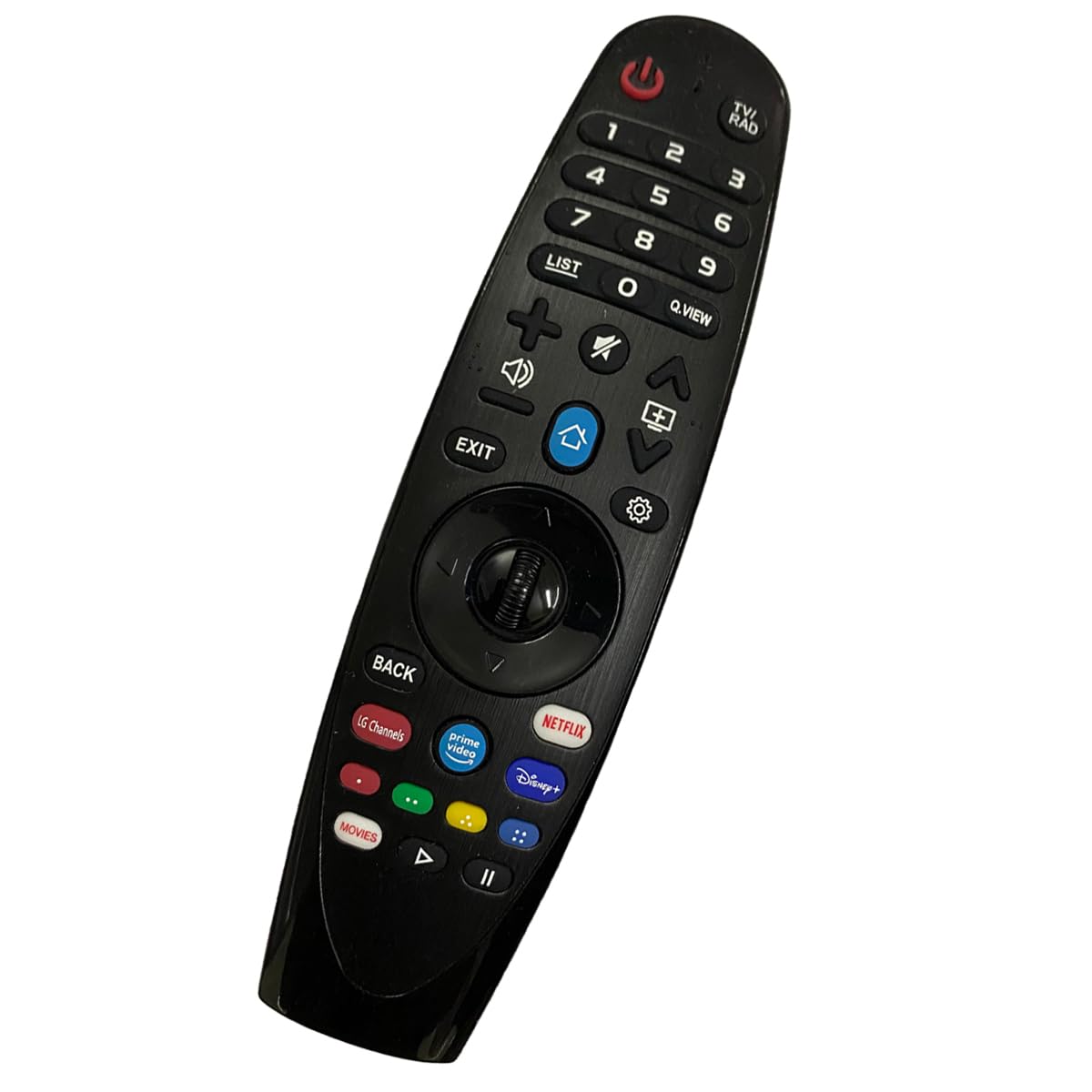
Figure 1: GHUST Replacement IR Remote Control (Angled View)
2. Package Contents
- 1 x GHUST Replacement IR Remote Control
Note: AAA batteries are not included and must be purchased separately.
3. Setup
3.1 Battery Installation
- Locate the battery compartment cover on the back of the remote control.
- Slide the cover downwards or press the latch (if present) to open the compartment.
- Insert two (2) AAA batteries, ensuring the positive (+) and negative (-) terminals align correctly with the markings inside the compartment.
- Close the battery compartment cover by sliding it back into place until it clicks securely.

Figure 2: Battery Compartment (Back View)
3.2 Initial Use
No programming or setup is required. Once batteries are installed, the remote control is ready to operate your compatible LG Smart OLED TV. Point the remote directly at your television and begin use.
4. Operating Instructions
The GHUST Replacement IR Remote Control provides standard functions for navigating your LG Smart OLED TV. Below is a general overview of common buttons and their functions:

Figure 3: Remote Control Front View
- Power Button (⏻): Turns the TV on or off.
- Number Pad (0-9): Direct channel selection.
- Volume Up/Down (+/-): Adjusts the TV volume.
- Channel Up/Down (∧/∨): Changes TV channels.
- Mute (🔇): Mutes or unmutes the TV audio.
- Home Button (🏠): Accesses the TV's main smart hub or home screen.
- Back Button: Returns to the previous screen or menu.
- Navigation Pad (Up, Down, Left, Right, OK): Navigates through menus and selects options.
- Streaming Service Buttons (e.g., Netflix, Prime Video, Disney+): Provides direct access to specified streaming applications.
Note: This remote control operates using infrared (IR) technology and does not support voice commands or pointer functionality.
5. Compatible TV Models
This replacement remote control is compatible with a wide range of LG Smart OLED TV models, including but not limited to:
- NANO Series: 43NANO75UQA, 50NANO75UQA, 55NANO75UQA, 65NANO75UQA, 70NANO75UQA, 75NANO75UQA, 86NANO75UQA, 50NANO80AQA, 55NANO80AQA, 65NANO80AQA, 75NANO80AQA, 86UQ9000PUD
- UQ Series: 43UQ7590PUB, 50UQ7590PUB, 55UQ7590PUB, 65UQ7590PUB, 70UQ7590PUB, 75UQ7590PUB, 43UQ7070ZUD, 50UQ7070ZUE, 65UQ7070ZUE, 70UQ7070ZUD, 70UN7070PUA, 75UQ7070ZUD, 86UQ7070ZUD, 86UQ7590ZUD, 50UQ7570PUA, 50UQ7570PUJ, 55UQ7570PUA, 55UQ7570PUJ, 65UQ7570PUA, 65UQ7570PUJ
- QNED Series: 50QNED80AQA, 50QNED80UQA, 55QNED80AQA, 55QNED80UQA, 55QNED85AQA, 55QNED85UQA, 65QNED80AQA, 65QNED80UQA, 65QNED85AQA, 65QNED85UQA, 75QNED80AQA, 75QNED80UQA, 75QNED85AQA, 75QNED85UQA, 86QNED80AQA, 86QNED80UQA, 86QNED85AQA, 86QNED85UQA, 65QNED90UQA, 75QNED90UQA, 86QNED90UQA, 65QNED99UQA, 75QNED99UQA, 86QNED99UQA
- OLED Series: OLED42C2AUA, OLED42C2PUA, OLED48A2AUA, OLED48A2PUA, OLED48C2AUA, OLED55A2AUA, OLED55A2PUA, OLED55B2PUA
This remote is also compatible with original remote models such as MR19BA, MR20GA, MR21GA, MR23GA.
6. Maintenance
6.1 Cleaning
To clean the remote control, use a soft, dry cloth. For stubborn dirt, lightly dampen the cloth with water or a mild, non-abrasive cleaner. Avoid using harsh chemicals or abrasive materials, as these can damage the remote's surface or buttons.
6.2 Battery Replacement
Replace batteries when the remote's response becomes sluggish or stops working. Always replace both AAA batteries at the same time with new ones. Do not mix old and new batteries, or different types of batteries.
7. Troubleshooting
- Remote not responding:
- Ensure batteries are inserted correctly with the correct polarity.
- Replace old batteries with new AAA batteries.
- Check for any obstructions between the remote control and the TV's IR receiver.
- Ensure you are within the effective range of the TV's IR receiver.
- Specific buttons not working:
- Clean the remote control, especially around the unresponsive buttons, to remove any dirt or debris.
- Confirm that the button functionality is supported by this replacement remote (e.g., voice and pointer functions are not supported).
8. Specifications
| Feature | Specification |
|---|---|
| Brand | GHUST |
| Item Weight | 3.52 ounces |
| Package Dimensions | 8.07 x 4.33 x 1.5 inches |
| Batteries Required | 2 AAA batteries (not included) |
| Special Feature | Ergonomic design |
| Color | Black |
| Max Number of Supported Devices | 1 (Television) |
9. Warranty and Support
For any questions regarding the quality or functionality of your GHUST Replacement IR Remote Control, please contact the seller directly. They are committed to resolving any issues promptly to ensure your satisfaction.
Please refer to your purchase documentation for specific warranty details and contact information.