
1. Introduction
This manual provides detailed instructions for the setup, operation, and maintenance of your Xech Solaris Plus Digital Wall Clock, Mars edition. This innovative clock features a pristine glass panel, a bright LED display, and a unique Mars-inspired design, offering clear visibility of time, date, day of the week, and temperature.

Front view of the Xech Solaris Plus Digital Wall Clock, showcasing its Mars-themed design and clear LED display for time, date, and temperature.
2. What's in the Box
Please verify that all components are present in the package:
- 1 x Solaris Plus Wall Clock
- 1 x 3 meter Male to Female USB Extension Cable
- 1 x USB Power Cable (1.5 meters)
- 1 x 5V2A Adaptor

The complete set of accessories provided with the Solaris Plus clock, including the 5V2A adapter, 3m USB Male to Female Extension Cable, and the standard USB power cable.
3. Setup Instructions
3.1 Power Connection
- Connect the smaller end of the USB Power Cable to the USB port on the back of the Solaris Plus clock.
- Connect the larger end of the USB Power Cable to the provided 5V2A Adaptor.
- Plug the 5V2A Adaptor into a standard electrical outlet.
- If additional reach is required, use the 3-meter Male to Female USB Extension Cable between the USB Power Cable and the adaptor.
3.2 Mounting Options
The Solaris Plus clock offers both wall-mount and tabletop placement options.

This image illustrates the versatile mounting options for the Solaris Plus clock, showing it both securely mounted on a wall and elegantly positioned on a tabletop.
Wall Mount:
- Locate the keyhole slot on the back of the clock.
- Securely install a screw (not included) into your desired wall location, ensuring it can support the clock's weight (approximately 1.7 kg).
- Align the keyhole slot with the screw head and gently slide the clock down to secure it.
Tabletop Mount:
- Insert the provided tabletop stands into the designated slots on the bottom rear of the clock.
- Ensure the stands are firmly seated to provide stable support.
- Place the clock on a flat, stable surface.

Detailed view of the clock's rear, illustrating the integrated wall mount hole for hanging and the slots for attaching the tabletop stand.
4. Operating Instructions
4.1 Setting the Clock
The clock features three control buttons (A, B, C) located on the back for adjustments.
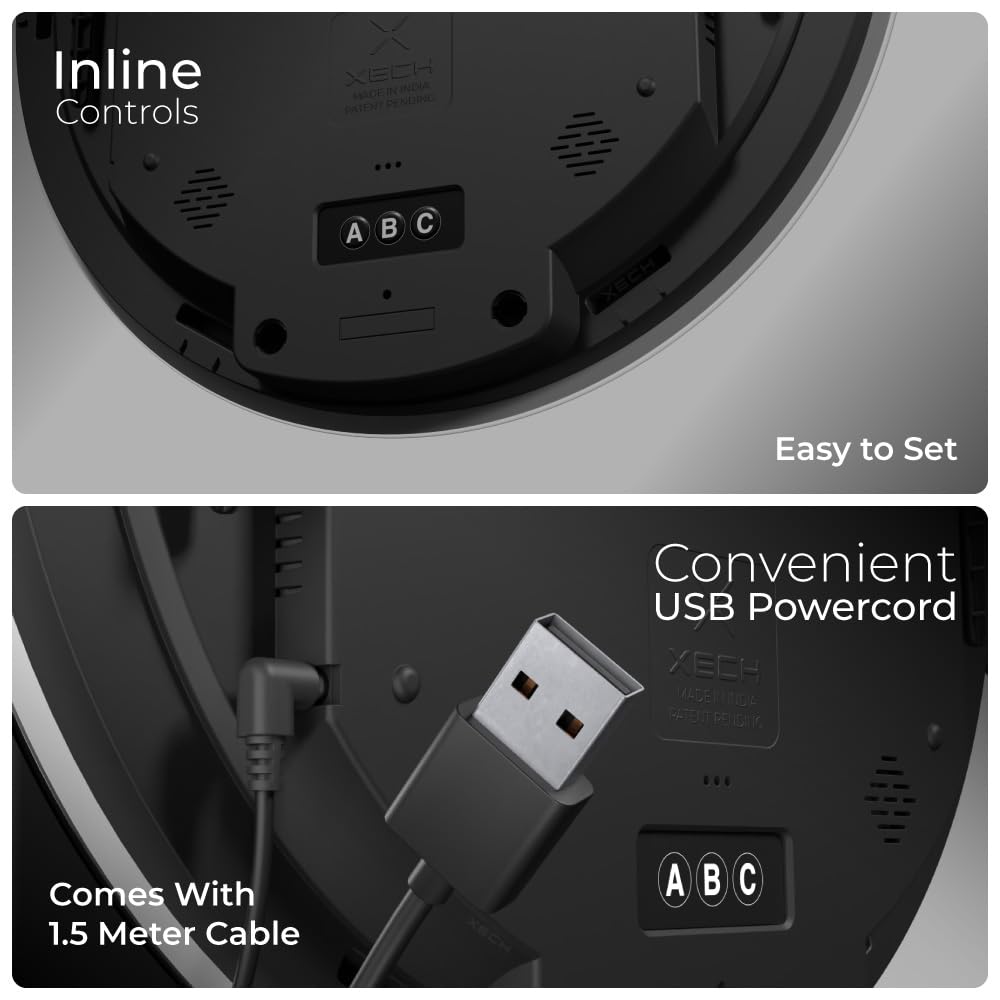
A close-up of the clock's rear panel, highlighting the three control buttons (A, B, C) for settings and the convenient USB power input.
- Accessing Settings: Press and hold button 'A' to enter setting mode. The first adjustable parameter will begin to flash.
- Navigating Parameters: Press button 'A' repeatedly to cycle through different settings (e.g., Time, Date, Year, 12/24-hour format, Temperature Unit).
- Adjusting Values: Use button 'B' to decrease the value and button 'C' to increase the value of the flashing parameter.
- Saving Settings: Once all adjustments are made, press button 'A' again until the display stops flashing to exit setting mode and save your changes.
4.2 Display Features
The Solaris Plus clock displays the following information:
- Digital Time: Displays current time in either 12-hour or 24-hour format.
- Day of the Week: Indicates the current day (MON, TUE, WED, THU, FRI, SAT, SUN).
- Calendar: Shows the date in MM/DD format.
- Temperature: Displays the ambient temperature in Celsius or Fahrenheit.

This image labels the various information displayed on the clock face: digital time, day of the week, calendar (month/day), and temperature in Celsius.
4.3 Temporal Memory
The Solaris Plus clock is equipped with a temporal memory function. In the event of a power outage, the clock will intelligently remember the last set time and date, minimizing the need for re-setting once power is restored. Note that this feature requires a brief internal battery (not user-replaceable) to maintain memory, but the clock itself requires continuous USB power for display and full functionality.

The clock's bright LED display ensures clear visibility of time, date, and temperature, whether in a well-lit room or during nighttime hours.
5. Specifications
| Feature | Detail |
|---|---|
| Brand | Xech |
| Model Number | SOLARIS PLUS |
| Display Type | Digital LED |
| Style | Mars |
| Special Features | Calendar Display, Illuminated, Large Display, Silent Clock, Temperature Display, Temporal Memory |
| Product Dimensions | 31.5W x 31.5H Centimeters |
| Power Source | Corded Electric (USB Powered) |
| Material | Glass, Acrylonitrile Butadiene Styrene (ABS) |
| Item Weight | 1.7 kg |
| Operating Voltage | 5V |
| Working Range | -20°C to 50°C |
6. Maintenance
- Cleaning: Use a soft, dry, or slightly damp cloth to clean the glass panel and body of the clock. Avoid abrasive cleaners or solvents, as they may damage the surface.
- Placement: Ensure the clock is placed in a stable location, away from direct sunlight, extreme temperatures, and high humidity to prevent damage and ensure accurate temperature readings.
- Power: Always use the provided 5V2A adaptor and USB cables for optimal performance and to prevent electrical issues.
7. Troubleshooting
| Problem | Possible Cause | Solution |
|---|---|---|
| Clock display is off. | No power supply. | Check if the USB cable is securely connected and the power adapter is plugged into a working outlet. Ensure the power source is active. |
| Time/Date is incorrect after power interruption. | Temporal memory may not have saved or was reset. | Manually reset the time and date using the control buttons on the back of the clock as per Section 4.1. |
| Temperature reading appears inaccurate. | Clock is exposed to direct heat/cold sources or placed in a poorly ventilated area. | Relocate the clock to an area with stable ambient temperature, away from windows, vents, or appliances that generate heat/cold. Allow some time for the sensor to adjust. |
| Buttons are unresponsive. | Temporary software glitch. | Unplug the clock from the power source, wait 10 seconds, and then plug it back in. Try operating the buttons again. |
8. Warranty and Support
Your Xech Solaris Plus Digital Wall Clock comes with a 1-Year Warranty from the date of purchase, covering manufacturing defects. Please retain your purchase receipt for warranty claims.
For technical assistance, troubleshooting, or warranty inquiries, please contact XECH Technologies Pvt Ltd customer care:
- Customer Care: +91 88288 44466
- Manufacturer: XECH Technologies Pvt Ltd, MIDC, Andheri East, India.