
BESTEK MRI10011
BESTEK 1000W Car Power Inverter User Manual
Model: MRI10011
1. Introduction
This manual provides essential information for the safe and efficient operation of your BESTEK 1000W Car Power Inverter. This device converts 12V DC power from your vehicle's battery into 110V AC power, along with 30W PD USB-C and 18W Quick USB-A charging capabilities. It is designed for use in vehicles, RVs, and during outdoor activities or power outages.

Image 1.1: The BESTEK 1000W Car Power Inverter, featuring a red aluminum casing, two standard AC outlets, and multiple USB charging ports.
2. Important Safety Instructions
Read all instructions before operating the inverter. Failure to follow these instructions may result in electric shock, fire, or serious injury.
- Ventilation: Ensure adequate ventilation around the inverter. Do not cover the ventilation openings.
- Dry Environment: Do not expose the inverter to water, rain, or spray. Do not operate it in damp or wet conditions.
- Proper Connection: Connect the inverter directly to a 12V battery using the provided cables for loads exceeding 120W. Using a cigarette lighter adapter for high-wattage devices can blow vehicle fuses.
- Load Limits: Do not exceed the inverter's rated continuous power output of 1000W. The peak surge power is 2000W.
- Flammable Materials: Do not operate the inverter near flammable materials, fumes, or gases.
- Children: Keep the inverter out of reach of children.
- Reverse Polarity: Ensure correct polarity when connecting to the battery (red to positive, black to negative) to prevent damage.
- Unplug When Not in Use: Disconnect the inverter from the battery when not in use to prevent battery drain.
3. Product Overview
3.1. Key Features
- High Power Output: Provides 1000W continuous DC to AC power (12V to 110V) and 2000W peak surge power.
- Multiple Charging Ports: Equipped with two 110V AC outlets, one PD 30W USB-C port, and one QC 18W USB-A port.
- Advanced Multi-Protection: Features an AI smart chip and built-in fuse for protection against overheating, under-voltage, over-voltage, overloading, and short-circuiting.
- Intelligent Cooling System: Two smart high-cooling fans adjust speed based on temperature and power load to prevent overheating.
- Compact Design: Dimensions of 9.13 x 4.72 x 2.71 inches for portability and easy storage.
3.2. Component Identification

Image 3.1: Front and Rear Panel Description of the Inverter.
The inverter features an aluminum alloy body for durability. The front panel includes the LED Power Indicator, Power Switch, AC Outlets, and USB Power Ports. The rear panel houses the Fuse, Intelligent Cooling Fan, Positive Terminal, and Negative Terminal.

Image 3.2: Input and Output Ports.
The diagram above illustrates the DC 12V input connection, the AC 110-120V output from the AC outlets, and the PD 30W/QC 18W fast charge USB outputs.
4. Setup and Installation
4.1. Connecting to a 12V Battery
- Ensure the inverter's power switch is in the 'OFF' position.
- Connect the red battery cable to the positive (+) terminal of the 12V battery and the red terminal on the inverter.
- Connect the black battery cable to the negative (-) terminal of the 12V battery and the black terminal on the inverter.
- Ensure all connections are secure and tight. Loose connections can cause overheating and damage.
Note: For power draws exceeding 120W, direct connection to the vehicle's 12V battery using the provided battery clamps is required. The cigarette lighter adapter is suitable only for low-power devices (typically up to 120W) due to vehicle fuse limitations.

Image 4.1: Universal Compatibility and Connection Diagram.
4.2. Mounting Considerations
The inverter is designed to be portable. If permanent installation is desired, ensure it is mounted in a well-ventilated area, away from direct sunlight, heat sources, and moisture. Secure the inverter to prevent movement during vehicle operation.
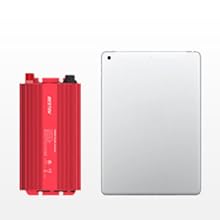
Image 4.2: Inverter Dimensions for Placement.
5. Operation
5.1. Powering On and Off
- After connecting the inverter to the 12V battery, press the power switch to the 'ON' position. The LED power indicator will illuminate.
- To turn off the inverter, press the power switch to the 'OFF' position.
5.2. Connecting Devices
- Plug your AC-powered devices into the 110V AC outlets.
- Connect your USB-powered devices to the PD 30W USB-C port or the QC 18W USB-A port for fast charging.
- Ensure the total wattage of all connected devices does not exceed 1000W.
5.3. Intelligent Cooling Fan
The inverter is equipped with two intelligent cooling fans. The fan on the power input side adjusts its speed based on temperature after power-on. The fan on the AC output side operates at a low speed when powered on and increases speed with rising temperature. This system ensures efficient heat dissipation and quiet operation under normal loads.

Image 5.1: Intelligent Cooling Fan System.
6. Protection Features
The BESTEK 1000W Power Inverter incorporates a 'double safety protection mechanism' with an AI smart chip and built-in fuse to safeguard both the inverter and connected devices. In case of a malfunction, the inverter will automatically cut off power and display a red warning light.

Image 6.1: Safety Guarantee System.
The protection features include:
- Low-voltage protection
- Over-voltage protection
- Overload protection
- Short-circuit protection
- Overheating protection
- Anti-reverse polarity protection

Image 6.2: Internal Multi-Protection Circuitry.
7. Maintenance
- Cleaning: Keep the inverter clean and free of dust. Use a dry cloth to wipe the exterior. Do not use liquid cleaners.
- Ventilation: Regularly check that the ventilation openings are clear and unobstructed.
- Connections: Periodically inspect battery and output connections for tightness and corrosion.
- Storage: When not in use for extended periods, store the inverter in a cool, dry place, disconnected from the battery.
8. Troubleshooting
If the inverter stops functioning or displays a red warning light, check the following:
- No Power Output:
- Ensure the inverter is switched 'ON'.
- Check battery connections for tightness and correct polarity.
- Verify the 12V battery has sufficient charge.
- Check if the total load exceeds 1000W. Reduce the load if necessary.
- Inspect vehicle fuses if using a cigarette lighter adapter for low-wattage devices.
- Overheating:
- Ensure the inverter is in a well-ventilated area.
- Clear any obstructions from the cooling fan vents.
- Reduce the connected load.
- Red Warning Light: Indicates a protection mode has been activated (e.g., low voltage, over-voltage, overload, overheating, short circuit, reverse polarity). Disconnect all loads, turn off the inverter, check connections and battery voltage, and then restart.
9. Specifications
| Feature | Specification |
|---|---|
| Model Number | MRI10011 |
| Continuous Power | 1000 Watts |
| Peak Surge Power | 2000 Watts |
| Input Voltage | DC 12V |
| AC Output Voltage | AC 110V |
| USB-C Output | PD 30W |
| USB-A Output | QC 18W |
| Item Weight | 3.34 pounds |
| Package Dimensions | 10.94 x 6.42 x 4.65 inches |
| Recommended Uses | Car, Travel, Camping, Home, Small electronics |
10. Warranty and Customer Support
10.1. Warranty Information
BESTEK products are ETL certified for safety and quality. This product includes an 18-Month Product Replacement Warranty. Additionally, BESTEK offers a refund within 180 days of purchase for any dissatisfactions.
Image 10.1: Service Plan Overview.
10.2. Customer Support
For technical assistance or any questions regarding your purchase, BESTEK provides 24/7 technical and friendly customer service support. Please refer to the contact information provided with your product packaging or visit the official BESTEK website for support options.
Image 10.2: Customer Support Channels.
Related documentsMRI10011


Ask a question about this manual
Ask about setup, troubleshooting, compatibility, parts, safety, or missing instructions. Manuals+ will review the question and use this page’s manual context to help answer it.