
1. Introduction
The BAOFENG UV-5RM Plus is an advanced multi-band walkie talkie designed for reliable and versatile communication. This enhanced version of the UV-5R offers an extended reception frequency band, including aviation and police bands, a larger 2500mAh battery with USB-C charging, and new features like one-key frequency copy and manual DTMF dialing. It also boasts a larger 1.77-inch color display for improved user experience. This manual provides essential information for setting up, operating, maintaining, and troubleshooting your device.

Image 1.1: BAOFENG UV-5RM Plus Multi-Band Walkie Talkie. This image shows the front view of the walkie talkie, highlighting its display, keypad, and antenna.
2. Package Contents
Please verify that all items are present in your package:
- 1 x BAOFENG UV-5RM Plus Radio
- 1 x Antenna
- 1 x 2500 mAh Li-ion Battery
- 1 x Type-C Charging Cable
3. Setup
3.1 Battery Installation
- Ensure the radio is powered off.
- Align the 2500 mAh Li-ion battery with the battery compartment on the back of the radio.
- Slide the battery upwards until it clicks securely into place.
3.2 Charging the Battery
The UV-5RM Plus features convenient USB-C charging, allowing you to charge the radio using various power sources.
- Connect the provided Type-C charging cable to the USB-C port on the side of the radio.
- Connect the other end of the cable to a compatible USB power source (e.g., wall adapter, power bank, car charger, laptop USB port).
- The charging indicator on the radio will show the charging status.

Image 3.1: Type-C Charging Options. This image illustrates various methods for charging the radio, including wall charging, power bank charging, car charging, and laptop charging via the USB-C port.
3.3 Antenna Attachment
Screw the antenna clockwise onto the antenna connector at the top of the radio until it is finger-tight. Do not overtighten.
4. Operating Instructions
4.1 Power On/Off and Volume Control
To power on the radio, rotate the volume knob clockwise. Continue rotating to adjust the volume. To power off, rotate the knob counter-clockwise until it clicks.
4.2 Channel Selection and Frequency Range
The UV-5RM Plus supports 999 channels. You can switch between channels using the UP/DOWN arrow keys or by directly entering the frequency using the keypad. The radio transmits on frequencies 144-146 MHz and 430-440 MHz, and offers extended reception covering aviation and police bands.
4.3 One-Key Frequency Copy
This feature allows for quick replication of frequencies from another radio. Press the dedicated frequency copy button to initiate the search and copy process, streamlining communication setup.
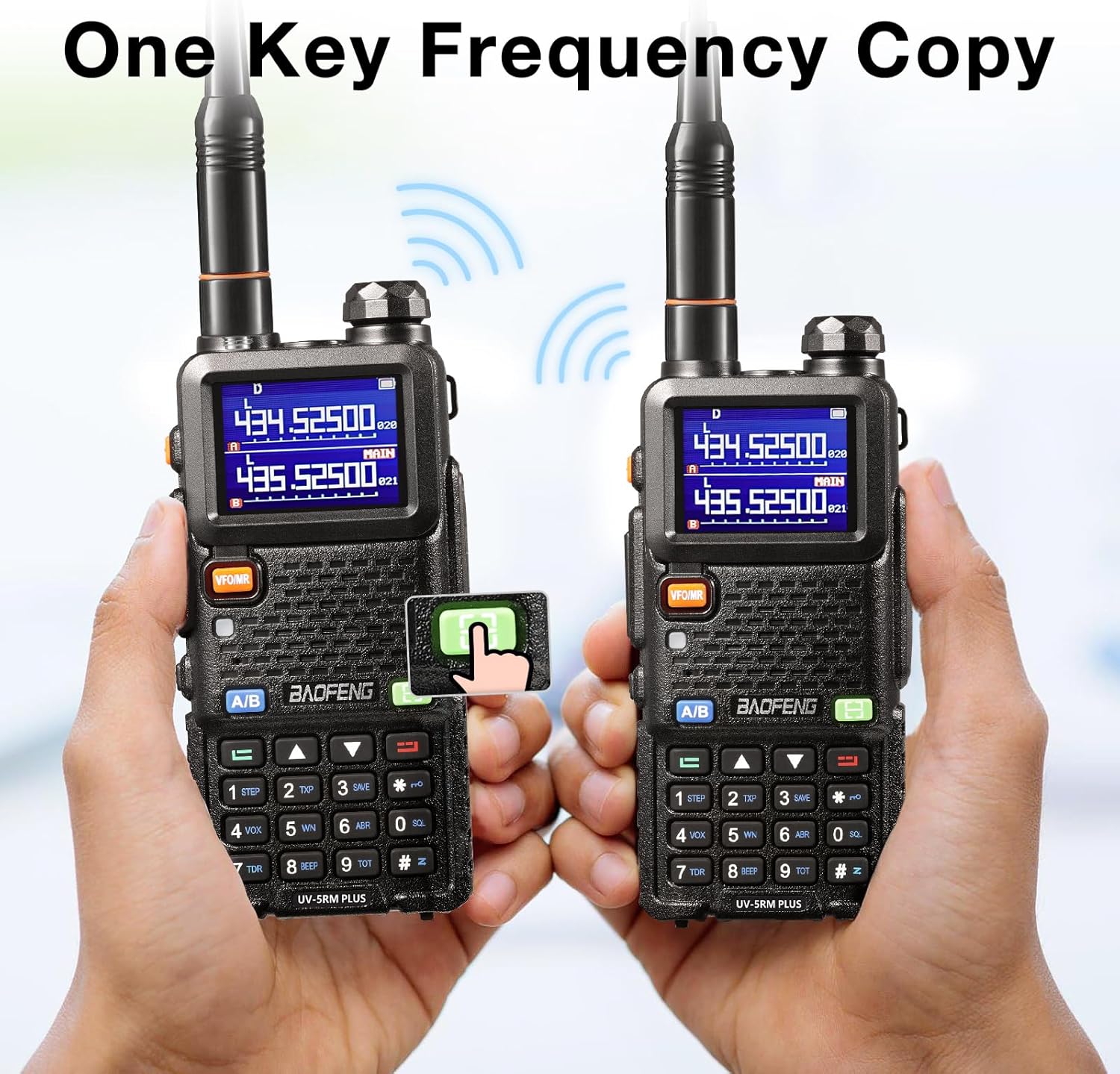
Image 4.1: One-Key Frequency Copy. This image demonstrates the one-key frequency copy function, showing two radios and a hand pressing the copy button on one to replicate the frequency from the other.
4.4 DTMF Manual Dial
The DTMF (Dual-Tone Multi-Frequency) manual dial function allows you to send DTMF tones directly from the keypad, useful for accessing repeaters or other systems requiring tone sequences.

Image 4.2: DTMF Manual Dial. This image shows a hand operating the radio's keypad to manually dial DTMF tones.
4.5 VOX and Squelch
- VOX (Voice Operated Exchange): Enables hands-free operation by transmitting when it detects your voice. Adjust the VOX sensitivity in the menu.
- Squelch: Eliminates background noise by muting the speaker until a signal of sufficient strength is received. The squelch level can be adjusted to suit your environment.
4.6 Firmware Updates
The UV-5RM Plus supports open-source firmware, allowing users to customize and update the radio's functionality. Firmware updates can typically be found and applied via platforms like GitHub, providing flexibility for advanced users.

Image 4.3: Firmware Update on GitHub. This image depicts the radio connected to a laptop displaying a GitHub repository, illustrating the process of updating the firmware.
4.7 Display
The radio features a larger 1.77-inch color display, providing clear visibility of frequencies, channels, and other operational information.

Image 4.4: Enhanced UV-5R Bigger, Colorful Screen. This image highlights the larger, colorful display of the UV-5RM Plus, showing frequency information and comparing its size to older models.
5. Maintenance
5.1 Cleaning
Wipe the radio's surface with a soft, damp cloth. Do not use harsh chemicals or abrasive cleaners. Ensure the radio is dry before use or charging.
5.2 Battery Care
- Avoid fully discharging the battery frequently to prolong its lifespan.
- Charge the battery in a cool, dry environment.
- If storing the radio for an extended period, charge the battery to about 50% and remove it from the device.
5.3 Storage
Store the radio in a cool, dry place away from direct sunlight, extreme temperatures, and corrosive materials. Keep it away from dust and moisture.
6. Troubleshooting
| Problem | Solution |
|---|---|
| Radio does not power on. | Ensure the battery is properly installed and charged. Check if the battery is depleted. |
| No transmission or poor reception. | Check antenna connection. Verify frequency settings and ensure you are within range of other radios or repeaters. Adjust squelch level. |
| Battery indicator shows low charge quickly. | Ensure the battery is fully charged. Battery performance can degrade over time; consider replacing if significantly old. |
| Cannot copy frequency. | Ensure the transmitting radio is within close proximity and actively transmitting on the desired frequency during the copy process. |
If issues persist after attempting these solutions, please refer to the warranty and support section for further assistance.
7. Specifications
| Feature | Detail |
|---|---|
| Brand | Baofeng |
| Model | UV5RM Plus |
| Tuner Technology | UHF & VHF |
| Frequency Range (TX) | 144-146 MHz & 430-440 MHz |
| Battery Capacity | 2500 mAh Lithium-ion |
| Number of Channels | 999 |
| Display Size | 1.77 inches (color) |
| Charging | USB Type-C |
| Weight | 300 Grams |
| Dimensions (Package) | 21.7 x 18 x 6.9 cm |
| Water Resistance Level | Not water resistant |
8. Warranty and Support
This product comes with a standard manufacturer's warranty. For specific warranty terms and conditions, please refer to the documentation included with your purchase or contact the seller directly. For technical support, troubleshooting assistance beyond this manual, or inquiries about replacement parts, please reach out to the authorized Baofeng service center or your point of purchase.


