
1. Product Overview
The ELEGOO Saturn 4 is a high-resolution 12K resin 3D printer designed for detailed and precise additive manufacturing. It features a 10-inch monochrome LCD screen, intelligent mechanical sensors, and automatic leveling for an enhanced user experience. This manual provides essential information for setting up, operating, maintaining, and troubleshooting your printer.

Figure 1: The ELEGOO Saturn 4 12K Resin 3D Printer alongside a detailed resin-printed figurine, showcasing the printer's capability for high-fidelity models.
2. Safety Information
Always prioritize safety when operating the ELEGOO Saturn 4. Resin 3D printing involves materials and processes that require careful handling.
- Ventilation: Operate the printer in a well-ventilated area to minimize exposure to resin fumes.
- Personal Protective Equipment (PPE): Always wear gloves, safety glasses, and a mask when handling liquid resin or uncured prints.
- Resin Handling: Avoid direct skin contact with resin. In case of contact, wash thoroughly with soap and water. Store resin in a cool, dark place, away from direct sunlight and out of reach of children and pets.
- UV Light: Do not look directly into the UV light source during operation. The printer's cover is designed to block harmful UV light.
- Electrical Safety: Ensure the printer is properly grounded and connected to a suitable power supply. Do not operate with damaged cables or components.
- Disposal: Dispose of cured resin and contaminated materials according to local regulations. Never pour liquid resin down drains.
3. What's in the Box
Upon unboxing your ELEGOO Saturn 4, verify that all components are present:
- ELEGOO Saturn 4 Resin 3D Printer
- Build Plate
- Resin Tank
- Tool Kit (includes Allen wrenches)
- Scraper (plastic and metal)
- Mask
- Gloves
- Funnel
- Backup Screws
- Adapter
- USB Disk (contains user manual and test files)
- User Manual (this document)

Figure 2: A visual representation of all items included in the ELEGOO Saturn 4 product packaging, ensuring users can verify their contents.
4. Setup and Initial Preparation
Follow these steps to prepare your ELEGOO Saturn 4 for its first print:
- Placement: Place the printer on a stable, level surface in a well-ventilated room, away from direct sunlight.
- Power Connection: Connect the power adapter to the printer and a suitable power outlet. Ensure the power switch is in the 'off' position before connecting.
- Resin Tank Installation: Carefully place the resin tank onto the LCD screen, ensuring it is properly seated and secured. The Saturn 4 features a dual-entry resin tank for convenience.
- Build Plate Installation: Attach the build plate to the Z-axis arm. The quick lock and release mechanism simplifies this process.
- Automatic Leveling: The Saturn 4 features hands-free auto-leveling. When the build plate drops to the LCD screen, it will automatically level, eliminating the need for manual adjustments.
- Initial Self-Check: After turning on the printer, perform a one-button self-check to ensure all components are functioning correctly. This intelligent feature helps troubleshoot potential faults before printing.

Figure 3: Illustration of the hands-free auto-leveling system in action, highlighting the ease of setup for the build plate.

Figure 4: A visual display of the printer's self-check interface, indicating system status and the integrated high-temperature protection mechanism.
5. Operating Instructions
Once set up, you can begin your 3D printing projects:
- Prepare Your Model: Use compatible slicing software (e.g., Chitubox) to prepare your 3D model. This involves adding supports, orienting the model, and slicing it into layers.
- Load Resin: Carefully pour the desired resin into the resin tank. Ensure the resin level is appropriate for your print. The printer features intelligent resin shortage detection, which will pause printing and alert you if resin levels are too low.
- Start Printing: Transfer your sliced file (typically .goo or .ctb format) to the printer via USB. Select the file on the printer's touchscreen interface and initiate the print.
- Monitor Progress: The printer's intelligent mechanical sensors detect foreign objects, insufficient or excess resin, and leveling errors, automatically pausing printing and issuing alerts until resolved.
- Post-Processing: After printing, carefully remove the build plate and print. Clean the print with isopropyl alcohol (IPA) and cure it under UV light for optimal strength.
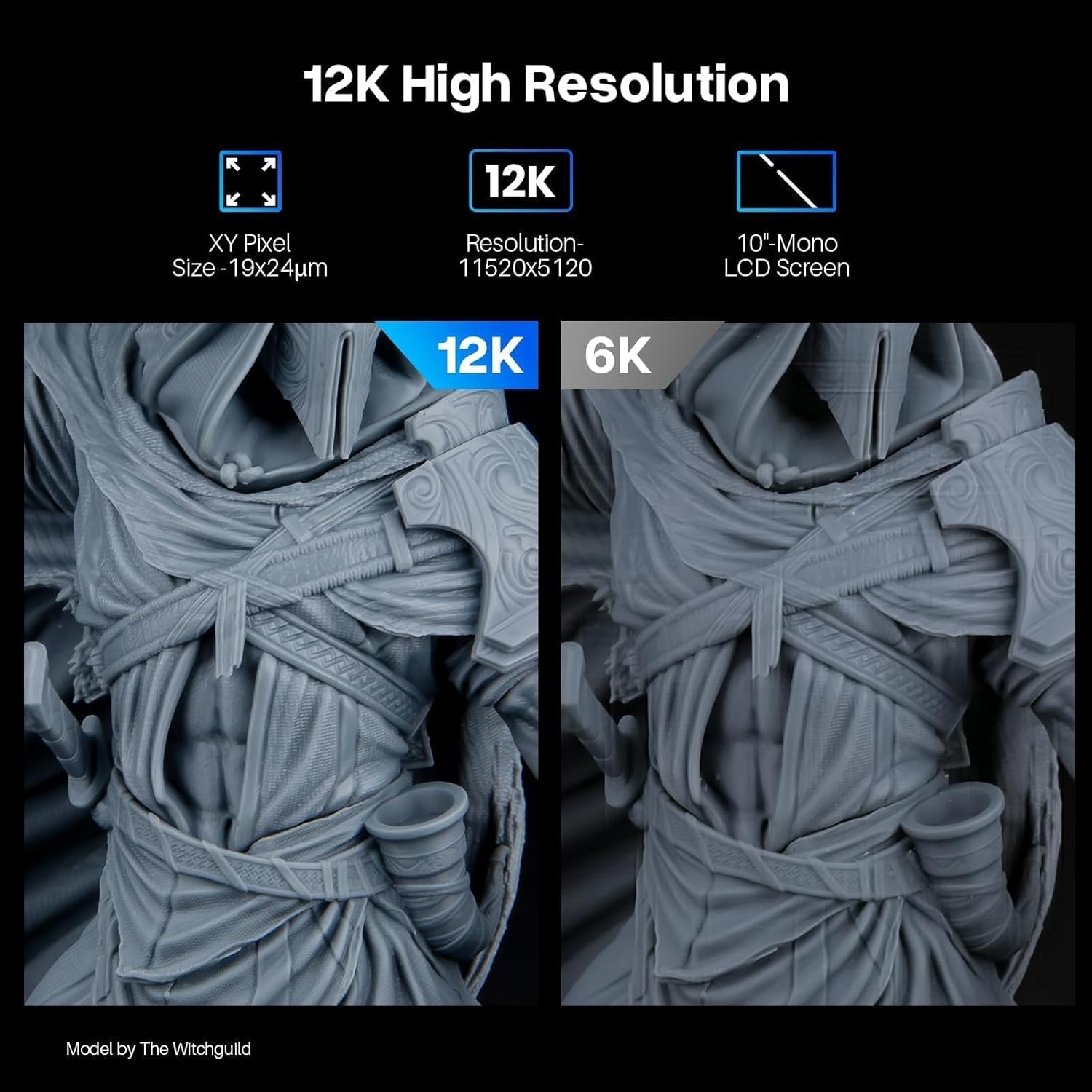
Figure 5: A close-up comparison demonstrating the superior detail and resolution achieved with 12K printing compared to 6K, highlighting the Saturn 4's advanced capabilities.

Figure 6: An internal view illustrating the intelligent mechanical sensor system, which detects issues like resin shortage or residue, ensuring smoother printing operations.
6. Maintenance
Regular maintenance ensures the longevity and optimal performance of your ELEGOO Saturn 4:
- Cleaning the Build Plate: After each print, clean the build plate thoroughly with IPA and a soft cloth.
- Cleaning the Resin Tank: Periodically inspect and clean the resin tank. If there is cured resin stuck to the FEP film, carefully remove it using a plastic scraper. Replace the FEP film if it is damaged or cloudy.
- LCD Screen Protection: The printer includes a 9H hardness tempered film to protect the 10-inch 12K mono LCD screen from scratches and extend its service life. Keep the screen clean and free of resin spills.
- Advanced Cooling System: The printer features an advanced cooling system to protect it from premature wear and enhance print quality. Ensure the cooling vents are not obstructed.
- High Temperature Protection: An integrated high temperature protection system automatically halts printing if the LED temperature exceeds safety thresholds, safeguarding your prints and the machine itself from heat damage.
Motherboard Replacement Guide
For advanced maintenance or repair, such as motherboard replacement, refer to the official video guide below. This procedure requires careful attention to detail and proper handling of internal components.
Video 1: Official ELEGOO guide on how to replace the motherboard of the Saturn 4 3D printer. This video demonstrates the steps for safely accessing and replacing the internal motherboard components.
7. Troubleshooting
If you encounter issues with your ELEGOO Saturn 4, consider the following common solutions:
- Print Failures: Check resin exposure settings, ensure proper support structures, and verify the build plate is clean and level.
- Intelligent Fault Detection: The printer's built-in mechanical sensors detect foreign objects, insufficient or excess resin, and leveling errors. If an issue is detected, the printer will automatically pause and issue alerts. Address the indicated issue before resuming.
- Printer Not Responding: Ensure the power cord is securely connected and the power switch is on. Perform a device self-check via the touchscreen interface to diagnose internal component status.
- Resin Curing Issues: Verify the resin type matches your settings, check the UV light source for proper function, and ensure the resin is not expired or contaminated.
For further assistance, refer to the comprehensive user guide available on the provided USB disk or contact ELEGOO customer support.
8. Specifications
| Feature | Detail |
|---|---|
| Brand | ELEGOO |
| Model Number | Saturn 4 |
| Product Dimensions | 12.89 x 12.96 x 21.57 inches (32.74 x 32.92 x 54.79 cm) |
| Item Weight | 29.7 pounds (13.5 kg) |
| Material | Aluminum |
| Color | Saturn 4 |
| LCD Screen Size | 10-inch Mono LCD |
| Resolution | 12K (11520x5120) |
| XY Resolution | 19x24μm |
| Printing Size (LWH) | 218.88 x 122.88 x 220 mm³ / 8.61 x 4.83 x 8.66 inches |
| Light Source | COB light source (92% uniformity) |
| Screen Protector | 9H hardness tempered film |
| Leveling | Automatic Leveling |
| Fault Detection | Intelligent Mechanical Sensors (resin shortage, residue, leveling errors) |
| Temperature Protection | Integrated high temperature protection system |
| Cooling System | Advanced cooling system |
| Lid Design | Flip-top lid |

Figure 7: An illustration highlighting the generous build volume of the ELEGOO Saturn 4, allowing for larger and more complex prints.
9. Warranty and Support
ELEGOO provides comprehensive customer support for the Saturn 4 12K Resin 3D Printer. For warranty information, technical assistance, or service inquiries, please refer to the official ELEGOO website or contact their customer service directly. Keep your purchase receipt as proof of purchase for warranty claims.
You can find additional resources and FAQs on the ELEGOO Official Store.