
TRIGKEY S6 Pro 6900HX
TRIGKEY S6 Pro 6900HX Mini PC User Manual
Model: S6 Pro 6900HX | Brand: TRIGKEY
Introduction
Thank you for choosing the TRIGKEY S6 Pro 6900HX Mini PC. This compact yet powerful computer is designed for a wide range of applications, from daily office tasks and web browsing to light gaming and multimedia entertainment. Featuring an AMD Ryzen 9 6900HX processor, high-speed DDR5 RAM, and PCIe 4.0 NVMe SSD storage, it delivers efficient performance in a small form factor. This manual provides essential information for setting up, operating, maintaining, and troubleshooting your new Mini PC.
Package Contents
Before you begin, please verify that all items are present in the package:
- 1 x TRIGKEY S6 Pro 6900HX Mini PC
- 1 x User Manual
- 1 x Wall Mount Bracket
- 2 x HDMI Cables
- 1 x Power Adapter
Product Overview
The TRIGKEY S6 Pro 6900HX Mini PC is engineered for performance and versatility. Below is an overview of its key components and features.
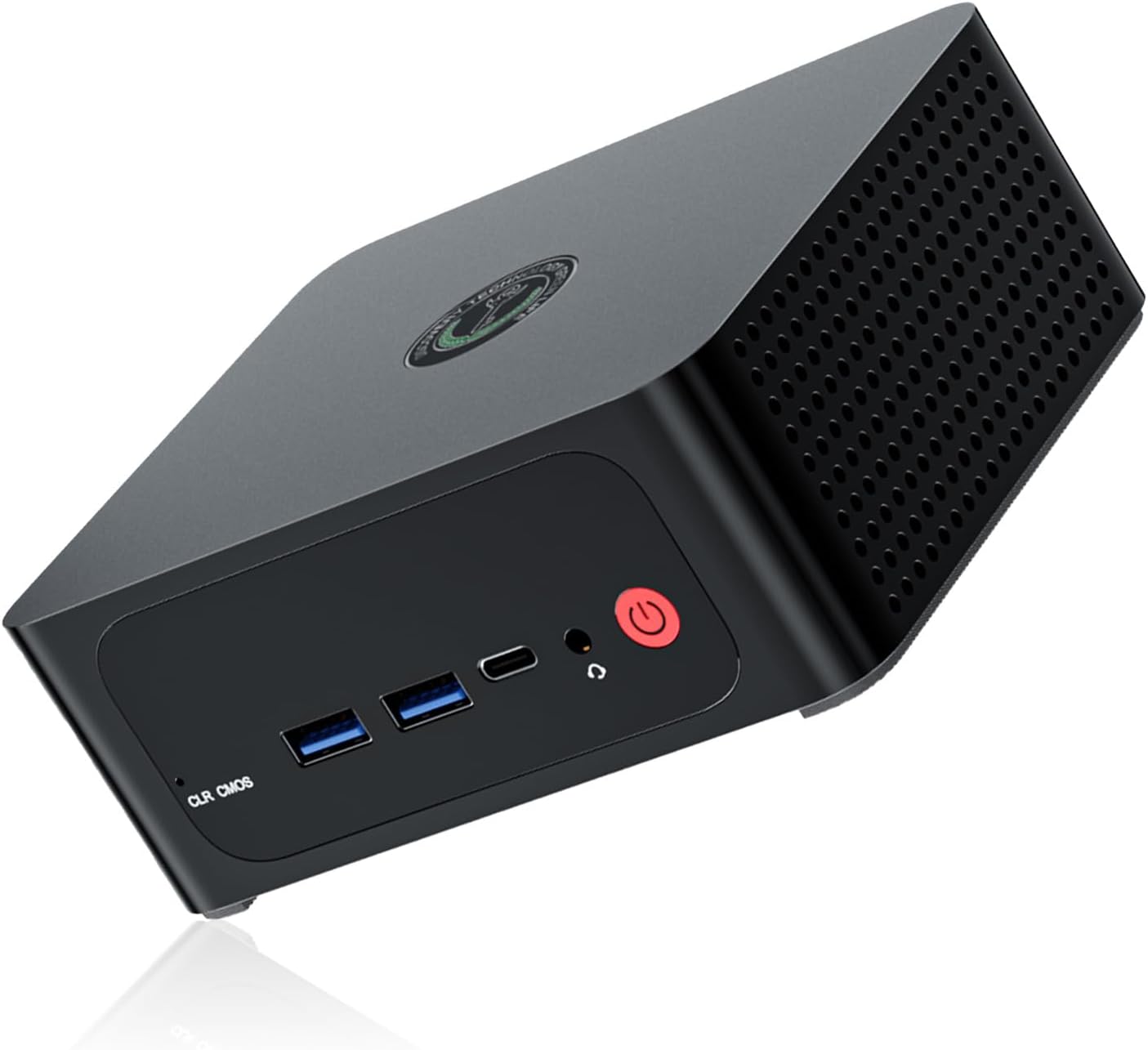
Figure 1: Front view of the TRIGKEY S6 Pro 6900HX Mini PC, showcasing its compact design and accessible front ports including USB and power button.

Figure 2: Exploded view illustrating the internal components of the Mini PC, including the motherboard, CPU, cooling fan, heat pipe, SO-DIMM DDR5 RAM, M.2 NVMe PCIe 4.0 SSD, ABS plastic case, and metal chassis.
Key Features:
- High-Performance Processor: Equipped with an AMD Ryzen 9 6900HX (8 Cores/16 Threads, up to 4.9 GHz, 16MB L3 Cache) for efficient multitasking and demanding applications.
- Expandable Memory & Storage: 16GB DDR5 RAM (upgradable to 64GB) and 500GB PCIe 4.0 NVMe SSD storage (expandable to 2TB).
- Triple Display Support: Connect up to three monitors via HDMI 2.0 (4K@60Hz), DisplayPort 1.4 (4K@144Hz), and USB4.0 (40Gbps).
- Advanced Connectivity: Features 2.5Gbps LAN, WiFi 6 (2.4Gbps), and Bluetooth 5.2 for stable and fast network and peripheral connections.
- Compact Design: Small footprint (4.96 x 4.44 x 1.92 inches) with VESA mount support for space-saving installation.
Setup Guide
1. Connecting Peripherals
Before powering on your Mini PC, connect all necessary peripherals.
- Monitor: Connect your monitor(s) to the Mini PC using the provided HDMI cables or your own DisplayPort/USB4.0 cables. The Mini PC supports up to three displays simultaneously.
- Keyboard & Mouse: Plug your USB keyboard and mouse into the available USB 2.0 or USB 3.0 ports.
- Network: For a wired connection, connect an Ethernet cable to the 2.5G LAN port. For wireless, ensure your WiFi network is available.
- Power: Connect the power adapter to the DC-in port on the Mini PC, then plug the adapter into a power outlet.
2. Initial Power On
Once all peripherals are connected:
- Press the power button located on the front of the Mini PC.
- The system will boot up. If it's the first time, it may guide you through the initial Windows 11 setup process.
3. VESA Mount Installation (Optional)
The included VESA mount bracket allows you to attach the Mini PC to the back of a compatible monitor or to a wall, saving desk space.
- Attach the VESA bracket to the back of your monitor using the provided screws, aligning with the VESA mounting holes.
- Slide the Mini PC onto the bracket until it clicks securely into place.
Operating Instructions
Power Management
- Power On: Press the power button.
- Shut Down: Click the Start button in Windows, then select Power > Shut down.
- Restart: Click the Start button in Windows, then select Power > Restart.
- Sleep: Click the Start button in Windows, then select Power > Sleep.
BIOS Settings
To access the BIOS/UEFI settings, press the DEL key repeatedly during startup immediately after pressing the power button. Here you can configure boot options, system time, and other advanced settings.
Wake-on-LAN and Auto-Power-on
The Mini PC supports Wake-on-LAN (WoL) and Auto-Power-on features. These can be enabled and configured within the BIOS settings.
- Wake-on-LAN: Allows the computer to be woken up remotely over a network connection.
- Auto-Power-on: Configures the computer to automatically power on at a scheduled time.
Maintenance
System Updates
Regularly update your operating system and drivers to ensure optimal performance and security.
- Windows Updates: Go to Settings > Windows Update and check for updates.
- Driver Updates: Visit the TRIGKEY official website for the latest drivers for your S6 Pro 6900HX Mini PC.
Cleaning
To maintain proper airflow and prevent overheating, periodically clean the exterior of the Mini PC.
- Use a soft, dry cloth to wipe down the casing.
- For dust accumulation in vents, use compressed air. Ensure the PC is powered off and unplugged before cleaning.
Storage and Memory Expansion
The TRIGKEY S6 Pro 6900HX Mini PC allows for easy expansion of its RAM and SSD storage.

Figure 3: Illustration of DDR5 4800MHz SO-DIMM modules, indicating the upgradability of RAM up to 64GB.

Figure 4: Diagram showing the dual PCIe 4.0 NVMe SSD slots, allowing for storage expansion up to 2TB.
Refer to the detailed instructions on the TRIGKEY support website or consult a qualified technician for guidance on hardware upgrades.
Troubleshooting
If you encounter issues with your Mini PC, refer to the following common troubleshooting steps.
| Problem | Possible Cause | Solution |
|---|---|---|
| No power/System won't turn on | Power adapter not connected; Faulty power outlet; Power button issue. | Ensure power adapter is securely connected to both PC and outlet. Try a different outlet. Contact support if issue persists. |
| No display on monitor | Loose video cable; Incorrect input source on monitor; Monitor not powered on. | Check HDMI/DP/USB4.0 cable connections. Select correct input source on monitor. Ensure monitor is powered on. |
| No internet connection (wired) | Ethernet cable loose; Router/modem issue; Network driver issue. | Check Ethernet cable connection. Restart router/modem. Update network drivers. |
| No internet connection (wireless) | WiFi disabled; Incorrect password; Router issue; WiFi driver issue. | Ensure WiFi is enabled in Windows. Re-enter WiFi password. Restart router. Update WiFi drivers. |
| System is slow or unresponsive | Too many applications running; Low disk space; Malware; Outdated drivers. | Close unnecessary applications. Free up disk space. Run antivirus scan. Update drivers. |
For more complex issues or if the problem persists, please contact TRIGKEY customer support.
Specifications
Detailed technical specifications for the TRIGKEY S6 Pro 6900HX Mini PC:
| Feature | Detail |
|---|---|
| Model | S6 Pro 6900HX |
| Processor | AMD Ryzen 9 6900HX (8 Cores, 16 Threads, up to 4.9 GHz, 16MB L3 Cache) |
| Graphics | AMD Radeon 680M (12 Cores, 2400 MHz) |
| RAM | 16GB DDR5 (2x8GB, 4800MHz), expandable up to 64GB |
| Storage | 500GB PCIe 4.0 NVMe SSD, expandable up to 2TB |
| Operating System | Windows 11 OS |
| Video Output | 1x HDMI 2.0 (4K@60Hz), 1x DisplayPort 1.4 (4K@144Hz), 1x USB4.0 (40Gbps) - Triple Display Support |
| Network | 2.5G Ethernet LAN, WiFi 6 (2.4Gbps) |
| Bluetooth | Bluetooth 5.2 |
| USB Ports | 2x USB 3.0, 2x USB 2.0 |
| Dimensions | 4.96 x 4.44 x 1.92 inches (12.6 x 11.3 x 4.9 cm approx) / 21.2 x 13.4 x 5.7 cm (package) |
| Weight | 1.2 kilograms (package) |

Figure 5: Visual summary of the TRIGKEY S6 Pro 6900HX's core specifications, including CPU, GPU, RAM, storage, and connectivity.

Figure 6: Detailed view of the AMD Ryzen 9 6900HX processor, highlighting its 8 cores, 4.90 GHz max turbo frequency, and 16 threads.

Figure 7: Diagram illustrating the advanced connectivity features such as WiFi 6, 2.5Gbps network adapters, Bluetooth 5.2, triple display support, and VESA mount compatibility.
Warranty and Support
TRIGKEY provides comprehensive support for your Mini PC.
- Warranty: Your TRIGKEY S6 Pro 6900HX Mini PC comes with a 1-year warranty from the date of purchase.
- Technical Support: Lifetime technical support is available for all TRIGKEY products.
- Customer Service: Individual 7x24 hour customer support is provided.
- Certifications: All products have passed FCC, CE, and ROSH certifications.
For assistance, please contact TRIGKEY customer service through their official website or the contact information provided with your purchase.
Related documentsS6 Pro 6900HX


Ask a question about this manual
Ask about setup, troubleshooting, compatibility, parts, safety, or missing instructions. Manuals+ will review the question and use this page’s manual context to help answer it.