
1. Introduction
Thank you for purchasing the YESIDO YSW13 Mini Portable Bluetooth Speaker. This manual provides essential information for the safe and efficient use of your device. The YSW13 speaker features wireless Bluetooth connectivity, vibrant RGB lighting, and a compact design for portable audio enjoyment.

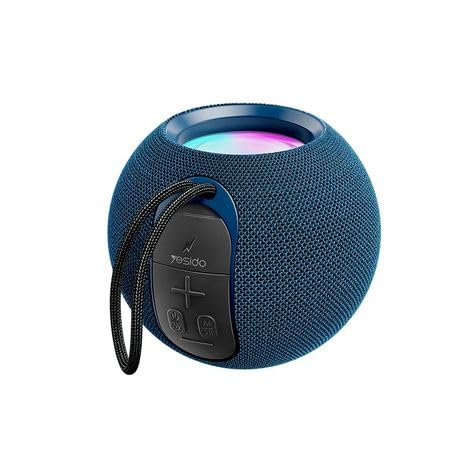
A front view of the YESIDO YSW13 Mini Portable Bluetooth Speaker, showcasing its compact design and fabric finish.
2. Package Contents
Please check the package for the following items:
- YESIDO YSW13 Mini Portable Bluetooth Speaker
- USB Charging Cable
- User Manual
The retail packaging for the YESIDO YSW13 Mini Portable Bluetooth Speaker, showing product features and branding.
3. Setup
3.1 Charging the Speaker
Before first use, fully charge the speaker. Connect the provided USB charging cable to the speaker's charging port and the other end to a DC 5V power source (e.g., a USB wall adapter or computer USB port). The charging indicator light will illuminate during charging and turn off when fully charged. A full charge typically takes approximately 2-3 hours.
3.2 Powering On/Off
- To power on: Press and hold the Power button for a few seconds until you hear an audible prompt and the RGB lights activate.
- To power off: Press and hold the Power button again for a few seconds until you hear an audible prompt and the lights turn off.
3.3 Bluetooth Pairing
The YESIDO YSW13 uses Bluetooth version 5.1 for stable wireless connection up to 10 meters.
- Ensure the speaker is powered on and in Bluetooth pairing mode (indicated by a flashing light or audible prompt).
- On your mobile device, enable Bluetooth and search for available devices.
- Select "YESIDO YSW13" from the list of devices.
- Once connected, you will hear a confirmation sound, and the speaker's indicator light will become solid.
4. Operating Instructions
4.1 Music Playback
- Play/Pause: Press the Play/Pause button once to play or pause music.
- Volume Control: Use the volume buttons on the speaker or your connected device to adjust the volume.
- Next/Previous Track: Press and hold the volume up button for the next track, and the volume down button for the previous track.
4.2 Connection Modes
The YSW13 speaker supports both wireless (Bluetooth) and wired connections, as well as TF card playback.
- Bluetooth Mode: Connect wirelessly as described in Section 3.3.
- TF Card Mode: Insert a TF (MicroSD) card with MP3 audio files into the designated slot. The speaker will automatically switch to TF card mode and begin playback.

Close-up view of the YESIDO YSW13 speaker's side panel, illustrating the TF card slot for direct music playback without Bluetooth.
4.3 RGB Lighting
The speaker features integrated RGB lights that enhance the listening experience. The lights typically cycle through various colors automatically. Refer to the speaker's specific controls for any options to change light modes or turn them off, if available.
4.4 True Wireless Stereo (TWS) Function
For an enhanced audio experience, two YESIDO YSW13 speakers can be interconnected to create a True Wireless Stereo (TWS) system, providing 3D sound effects.
- Ensure both YSW13 speakers are powered on and not connected to any Bluetooth device.
- On one speaker (this will be the primary speaker), double-press the Power button (or a dedicated TWS button if present). The speaker will enter TWS pairing mode.
- The two speakers will automatically search for and connect to each other. A confirmation sound will indicate successful pairing.
- Once paired, connect your mobile device to the primary speaker via Bluetooth as described in Section 3.3. Audio will now play through both speakers in stereo.

Two YESIDO YSW13 speakers placed side-by-side, demonstrating the True Wireless Stereo (TWS) function for interconnected playback and enhanced 3D sound.
5. Maintenance
- Cleaning: Use a soft, dry cloth to clean the speaker's surface. Do not use abrasive cleaners or solvents.
- Storage: Store the speaker in a cool, dry place away from direct sunlight and extreme temperatures.
- Battery Care: To prolong battery life, avoid fully discharging the speaker frequently. Charge the speaker regularly, even if not in use for extended periods.
- Water Resistance: This speaker is not waterproof. Avoid exposure to water or excessive moisture.
6. Troubleshooting
| Problem | Possible Cause | Solution |
|---|---|---|
| Speaker does not power on | Low battery; Power button not pressed correctly | Charge the speaker; Press and hold the Power button until it turns on. |
| Cannot pair via Bluetooth | Speaker not in pairing mode; Device Bluetooth off; Too far from speaker | Ensure speaker is in pairing mode; Enable Bluetooth on your device; Move device closer to speaker (within 10m). |
| No sound during playback | Volume too low; Speaker not connected; Incorrect source selected | Increase volume on speaker and device; Re-pair Bluetooth; Ensure correct mode (Bluetooth/TF Card) is active. |
| TWS pairing fails | Speakers already connected to other devices; Too far apart | Disconnect both speakers from other devices; Ensure speakers are close to each other during TWS pairing. |
7. Specifications

An internal view of the YESIDO YSW13 speaker, highlighting the full-frequency audio unit and top bass diaphragm for HIFI music timbre.
- Model: YSW13
- Brand: YESIDO
- Bluetooth Version: 5.1
- Battery Capacity: 1200mAh
- Power Supply: DC 5V
- Bluetooth Range: > 10 meters
- Connect Mode: Wired / Wireless (Bluetooth, TF Card)
- Audio Signal to Noise Ratio: 95dB
- Speaker Unit: Full frequency unit + low frequency diaphragm (52mm speaker unit)
- Frequency Response: 85Hz-20KHz
- Material: ABS + PC + silicone
- Product Dimensions: 7D x 6W x 5H centimetres
- Special Features: Bass Boost, RGB Lights, TWS (True Wireless Stereo) support

An exploded diagram illustrating the 360-degree sound output and the internal 52mm speaker unit of the YESIDO YSW13, designed for high bass.
8. Warranty and Support
The YESIDO YSW13 Mini Portable Bluetooth Speaker comes with a limited warranty. Please refer to the product packaging or contact your retailer for specific warranty terms and conditions. For technical support or inquiries, please contact the YESIDO customer service department or your point of purchase.