
Introduction
This manual provides essential information for the safe and efficient use of your ACEMAGIC AX16 Charger & Adapter. Please read this manual thoroughly before using the product and retain it for future reference.
Important Safety Instructions
- Do not expose the adapter to rain, moisture, or extreme temperatures.
- Ensure the power outlet voltage matches the adapter's input requirements.
- Avoid dropping or subjecting the adapter to strong impacts.
- Do not disassemble or attempt to repair the adapter yourself. Refer all servicing to qualified personnel.
- Keep the adapter away from children and pets.
- Unplug the adapter from the power outlet when not in use for extended periods.
Setup
Follow these steps to set up your ACEMAGIC AX16 Charger & Adapter:
- Inspect the Adapter: Before connecting, visually inspect the charger and its cables for any signs of damage. Do not use if damaged.
- Connect to Device: Insert the DC output plug of the adapter firmly into the charging port of your compatible ACEMAGIC device (e.g., laptop). Ensure a secure connection.
- Connect to Power Outlet: Plug the AC input plug of the adapter into a standard, grounded electrical wall outlet.
- Verify Connection: Once connected, your device should indicate that it is receiving power or charging.

Image 1: Top view of the ACEMAGIC AX16 Charger and Adapter. This image shows the compact black rectangular body of the adapter with its attached power cable and DC output plug.
Operating Instructions
The ACEMAGIC AX16 Charger & Adapter is designed for straightforward operation:
- Charging: Once properly connected, the adapter will automatically begin charging your device. Most devices will display a charging indicator (e.g., battery icon, LED light).
- Optimal Performance: For best results, use the adapter in a well-ventilated area. Avoid covering the adapter during operation to prevent overheating.
- Disconnection: To disconnect, first unplug the adapter from the wall outlet, then disconnect the DC output plug from your device.
Maintenance
Proper maintenance ensures the longevity and safe operation of your adapter:
- Cleaning: Use a soft, dry cloth to clean the exterior of the adapter. Do not use liquid cleaners or aerosols.
- Storage: When not in use, store the adapter in a cool, dry place, away from direct sunlight and extreme temperatures. Avoid tightly winding the cables to prevent damage.
- Cable Care: Regularly check the power cables for fraying, cuts, or bends. Do not use the adapter if the cables are damaged.
Troubleshooting
If you encounter issues with your ACEMAGIC AX16 Charger & Adapter, refer to the following common problems and solutions:
| Problem | Possible Cause | Solution |
|---|---|---|
| Device not charging. | Loose connection, faulty outlet, damaged adapter/cable, device issue. | Ensure all connections are secure. Try a different power outlet. Inspect adapter and cables for damage. Test with another compatible device if possible. |
| Adapter is hot to the touch. | Normal operation (slight warmth), poor ventilation, excessive load. | Ensure adequate ventilation around the adapter. If excessively hot, disconnect immediately and contact support. |
| Sparking when plugging in. | Normal initial contact spark, or faulty outlet/adapter. | A small spark is normal. If sparking is continuous or excessive, unplug immediately and do not use. Contact a qualified electrician or support. |
Specifications
Key technical specifications for the ACEMAGIC AX16 Charger & Adapter:
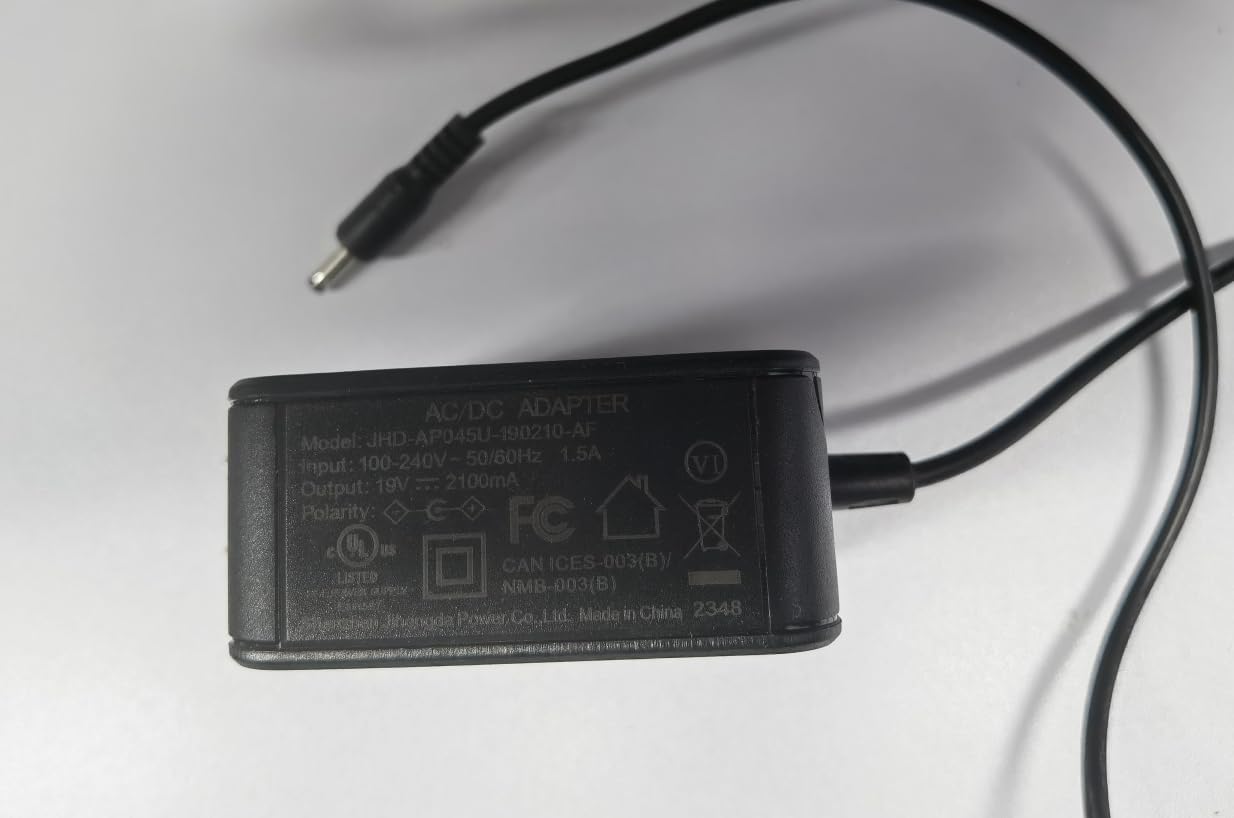
Image 2: Bottom view of the ACEMAGIC AX16 Charger and Adapter. This image displays the product label with detailed electrical specifications and compliance markings.
| Feature | Detail |
|---|---|
| Model Name | AX16 |
| Manufacturer | Shenzhen CYX Industrial Co., Ltd. |
| Input Voltage | 100-240V ~ 50/60Hz |
| Input Current | 1.5A |
| Output Voltage | 19V |
| Output Current | 2100mA (2.1A) |
| Product Dimensions | 12.7 x 12.7 x 12.7 cm (approximate adapter body) |
| Special Feature | High Definition Audio (Note: This feature is for the device it powers, not the adapter itself) |
Warranty Information
ACEMAGIC products are manufactured to high quality standards. For specific warranty terms and conditions applicable to your AX16 Charger & Adapter, please refer to the warranty card included with your purchase or visit the official ACEMAGIC website. Keep your purchase receipt as proof of purchase for warranty claims.
Customer Support
If you require further assistance or have questions not covered in this manual, please contact ACEMAGIC customer support:
- Online Support: Visit the official ACEMAGIC website for FAQs, support resources, and contact forms.
- Email Support: Refer to your product packaging or the ACEMAGIC website for the dedicated support email address.
When contacting support, please have your product model (AX16) and purchase details ready.


