
TRIUMPHKEY 0430
TRIUMPHKEY Electric Glass Standing Desk User Manual
Model: 0430
Introduction
This manual provides detailed instructions for the assembly, operation, and maintenance of your TRIUMPHKEY Electric Glass Standing Desk. Please read this manual thoroughly before use to ensure safe and efficient operation.
The TRIUMPHKEY Electric Glass Standing Desk is designed to enhance your work or study space with its elegant design and functional features. It boasts a durable tempered glass surface, an electric height adjustment system with memory presets, integrated USB charging ports, and a convenient storage drawer.
Safety Instructions
- Ensure all components are securely fastened before use.
- Keep hands and objects clear of moving parts during height adjustment.
- Do not overload the desk. Refer to specifications for weight capacity.
- Use only the provided power adapter.
- Do not attempt to disassemble or repair the motor or electrical components yourself. Contact qualified service personnel.
- Keep liquids away from electrical components and charging ports.
- Place the desk on a level and stable surface.
Package Contents
Before assembly, verify that all parts are present and undamaged. If any parts are missing or damaged, please contact customer support.
- Glass Desktop with Integrated Drawer and Control Panel
- Desk Legs (2)
- Foot Supports (2)
- Crossbar/Frame Components
- Power Adapter and Cable
- Assembly Hardware (screws, wrench, etc.)
- User Manual (this document)

Image: Packaging of the TRIUMPHKEY Electric Glass Standing Desk, showing the brown cardboard box with product details and handling instructions.
Setup and Assembly
The TRIUMPHKEY Electric Glass Standing Desk is designed for straightforward assembly. The table plate (glass top with drawer and control panel) comes as a single unit, simplifying the process.
- Unpack Components: Carefully remove all parts from the packaging and lay them out on a soft, clean surface to prevent scratches.
- Attach Legs to Desktop: Align the desk legs with the pre-drilled holes on the underside of the glass desktop. Secure them using the provided screws and tools. Ensure the motor and cable connections are not pinched.
- Attach Foot Supports: Connect the foot supports to the bottom of each desk leg. Tighten all screws firmly.
- Connect Power: Plug the power adapter into the desk's power input port, then plug the adapter into a standard electrical outlet.
- Initial Test: Before placing items on the desk, perform a test run of the height adjustment function to ensure smooth operation.

Image: An assembled TRIUMPHKEY Electric Glass Standing Desk, white in color, with a monitor and keyboard, situated in a modern room with plants and wooden flooring.
Operating Instructions
Height Adjustment
The desk features an electric lift system allowing height adjustment between 72cm (28.3 inches) and 118cm (46.5 inches).
- Adjusting Height: Use the UP (▲) and DOWN (▼) buttons on the control panel to raise or lower the desk to your desired height.
- Memory Presets: The desk can store up to 3 common height settings.
- Adjust the desk to your desired height.
- Press and hold one of the memory buttons (1, 2, or 3) until you hear a beep or the display flashes, indicating the height has been saved.
- To recall a saved height, simply press the corresponding memory button (1, 2, or 3). The desk will automatically move to the stored position.

Image: Two TRIUMPHKEY Electric Glass Standing Desks side-by-side, illustrating the height adjustment range from a lower sitting position to a higher standing position.

Image: Close-up of the desk's control panel, showing the UP/DOWN arrows, three memory preset buttons (1, 2, 3), a USB-A charging port, and a Type-C charging port.
Integrated Charging Ports
The desk is equipped with USB-A and Type-C charging ports for convenient charging of your electronic devices.
- Simply connect your smartphone, tablet, or other compatible device to the USB-A or TYPE-C port on the control panel.
- Ensure the desk is powered on for the charging ports to function.
Storage Drawer
A built-in drawer provides organized storage for office supplies, keeping your desktop clutter-free.
- Pull the drawer gently to open and push to close.
- The drawer is divided into compartments for efficient organization of pens, notebooks, and other small items.

Image: The open storage drawer of the desk, displaying its internal compartments and dimensions (e.g., 62cm width, 30cm depth, 5cm height for main compartment, with smaller sections).
Glass Desktop Features
The tempered glass surface offers both aesthetic appeal and practical functionality.
- Writable Surface: The glass can be used as a whiteboard for notes and ideas. Use dry-erase markers and wipe clean with a soft cloth.
- Easy to Clean: The smooth glass surface is simple to clean with a damp cloth and mild cleaner.
- Durability: The 5mm thick tempered glass provides a sturdy and wear-resistant work surface.

Image: A close-up view of the glass desktop, showing text written on it with a dry-erase marker, and icons indicating its writable surface, easy-to-clean property, and 50kg weight capacity.
Maintenance
- Cleaning the Glass: Use a soft, lint-free cloth and a glass cleaner or mild soap and water solution. Avoid abrasive cleaners or harsh chemicals that could damage the glass.
- Frame Cleaning: Wipe the metal frame with a damp cloth. Dry immediately to prevent rust.
- Motor and Cables: Periodically check the motor and power cables for any signs of wear or damage. Ensure cables are not tangled or pinched.
- General Care: Avoid placing extremely hot or cold items directly on the glass surface without protection. Do not drop heavy or sharp objects on the glass.
Troubleshooting
| Problem | Possible Cause | Solution |
|---|---|---|
| Desk does not move. | Power cable disconnected; Overload; Motor error. | Check power connection. Reduce weight on desk. Unplug and replug power after 30 seconds to reset. |
| Uneven height adjustment. | Obstruction; Unbalanced load. | Ensure no obstructions. Distribute weight evenly on the desktop. |
| Noise during operation. | Normal motor sound; Loose components. | A slight motor sound is normal. Check all screws and connections for tightness. |
| Charging ports not working. | Desk not powered on; Device incompatibility. | Ensure desk is plugged in and powered. Try a different device or cable. |
If the problem persists after attempting these solutions, please contact customer support.
Specifications
| Feature | Detail |
|---|---|
| Brand | TRIUMPHKEY |
| Model Number | 0430 |
| Product Dimensions (D x W x H) | 47.24"D x 23.62"W x 46.46"H (120cm x 60cm x 72-118cm) |
| Adjustable Height Range | 72 cm - 118 cm (28.3 inches - 46.5 inches) |
| Color | White |
| Top Material Type | Tempered Glass (5mm thick) |
| Base Material | Alloy Steel |
| Weight Capacity | 50 kg (110 lbs) |
| Item Weight | 30 Kilograms (66 lbs) |
| Special Features | Adjustable Height, Electric, Built-in USB-A & Type-C Ports, Storage Drawer, Writable Glass Surface, 3 Memory Presets |
| Assembly Required | Yes |
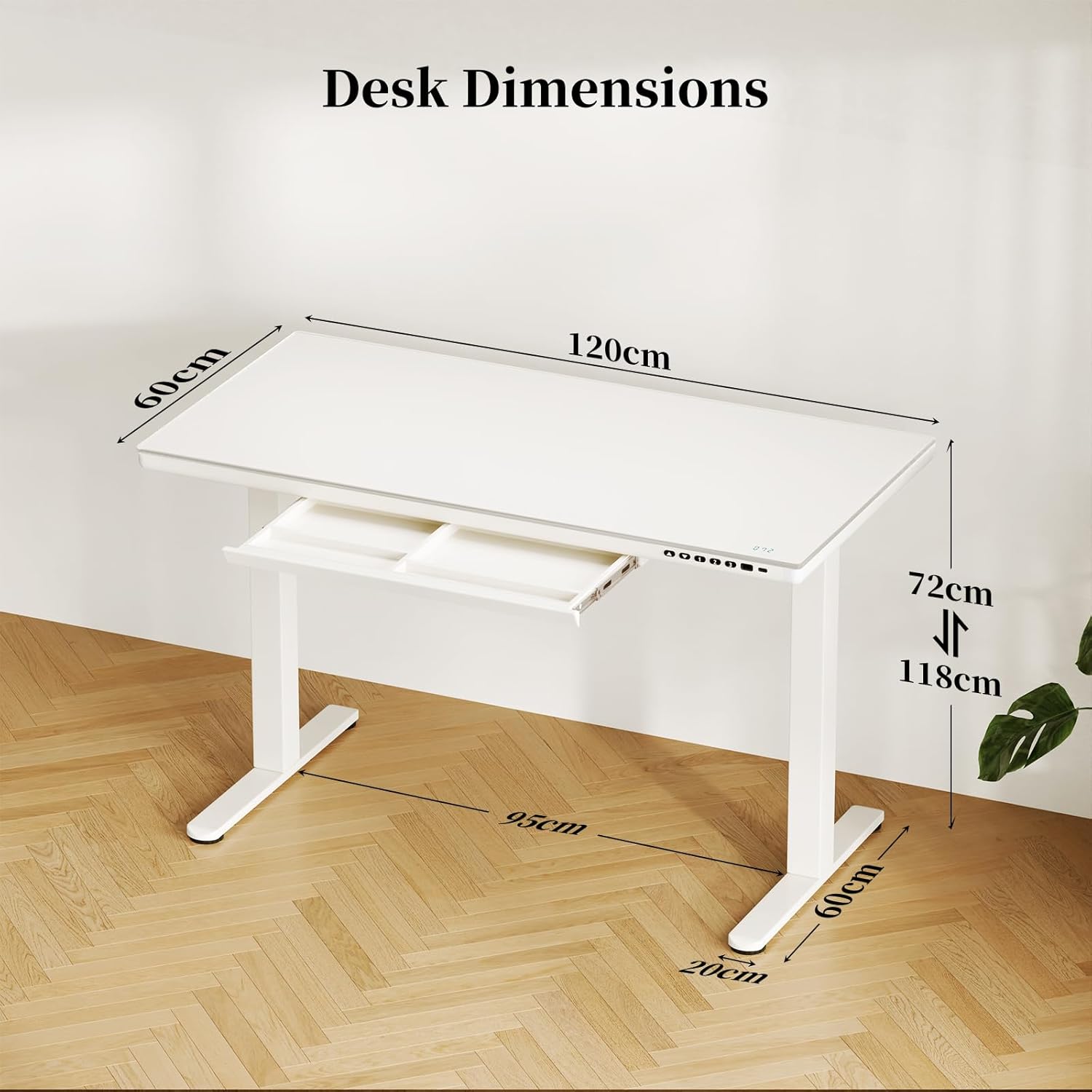
Image: Diagram showing the dimensions of the TRIUMPHKEY Electric Glass Standing Desk: 120cm length, 60cm width, and adjustable height from 72cm to 118cm.
Warranty and Support
For warranty information or technical support, please refer to the contact details provided with your purchase or visit the official TRIUMPHKEY website.
You can also reach out to customer support via the platform where you purchased the product.

Image: A generic icon representing customer support services.
Ask a question about this manual
Ask about setup, troubleshooting, compatibility, parts, safety, or missing instructions. Manuals+ will review the question and use this page’s manual context to help answer it.