
1. Product Overview
The KIVI Basic-44T-K TV Wall Mount is designed to securely hold flat-panel televisions ranging from 32 to 55 inches in size, with a maximum weight capacity of 35 kg. This mount features a tilt mechanism for optimal viewing angles and a slim profile, positioning the TV approximately 20 mm from the wall. It includes a convenient design for quick installation and automatic spring locks with straps for easy TV removal.
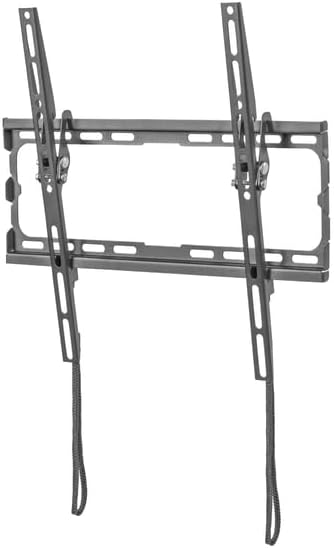
Image 1.1: The KIVI Basic-44T-K TV Wall Mount, showing the wall plate and two vertical TV brackets with pull straps.
2. Safety Information
- Read all instructions carefully before installation. If you have any doubts, consult a qualified professional.
- Ensure the wall structure can safely support the combined weight of the mount and your television.
- Do not exceed the maximum weight capacity of 35 kg (77 lbs).
- This mount is designed for TVs between 32 and 55 inches. Using it with TVs outside this range may compromise stability.
- Use only the provided hardware or specified alternatives. Do not substitute parts.
- Keep children and pets away during installation.
- Periodically check all connections to ensure they remain secure.

Image 2.1: Overview of quality control tests, including strength (load tests), load capacity (tests on concrete and wooden walls), safety (salt water spray, temperature tests), and transportability (packaging tests).
3. Package Contents
Verify that all components are present and undamaged before beginning installation. The package typically includes:
- Wall Plate Assembly
- TV Brackets (2 pieces)
- Mounting Hardware Kit (screws, anchors, washers for wall and TV attachment)
- Instruction Manual (this document)
If any parts are missing or damaged, do not proceed with installation. Contact KIVI customer support for assistance.
4. Specifications
| Model Number | Basic-44T-K |
| Screen Size Compatibility | 32" to 55" |
| Maximum Weight Capacity | 35 kg (77 lbs) |
| Mounting Type | Wall Mount (Tilt) |
| VESA Compatibility | Up to 400x400 mm (e.g., 200x200, 300x300, 400x200, 400x400) |
| Distance from Wall | Approximately 20 mm |
| Tilt Angle | Up to 8 degrees |
| Package Dimensions | 45 x 17.5 x 2.8 cm |
| Item Weight | 1.05 kg |
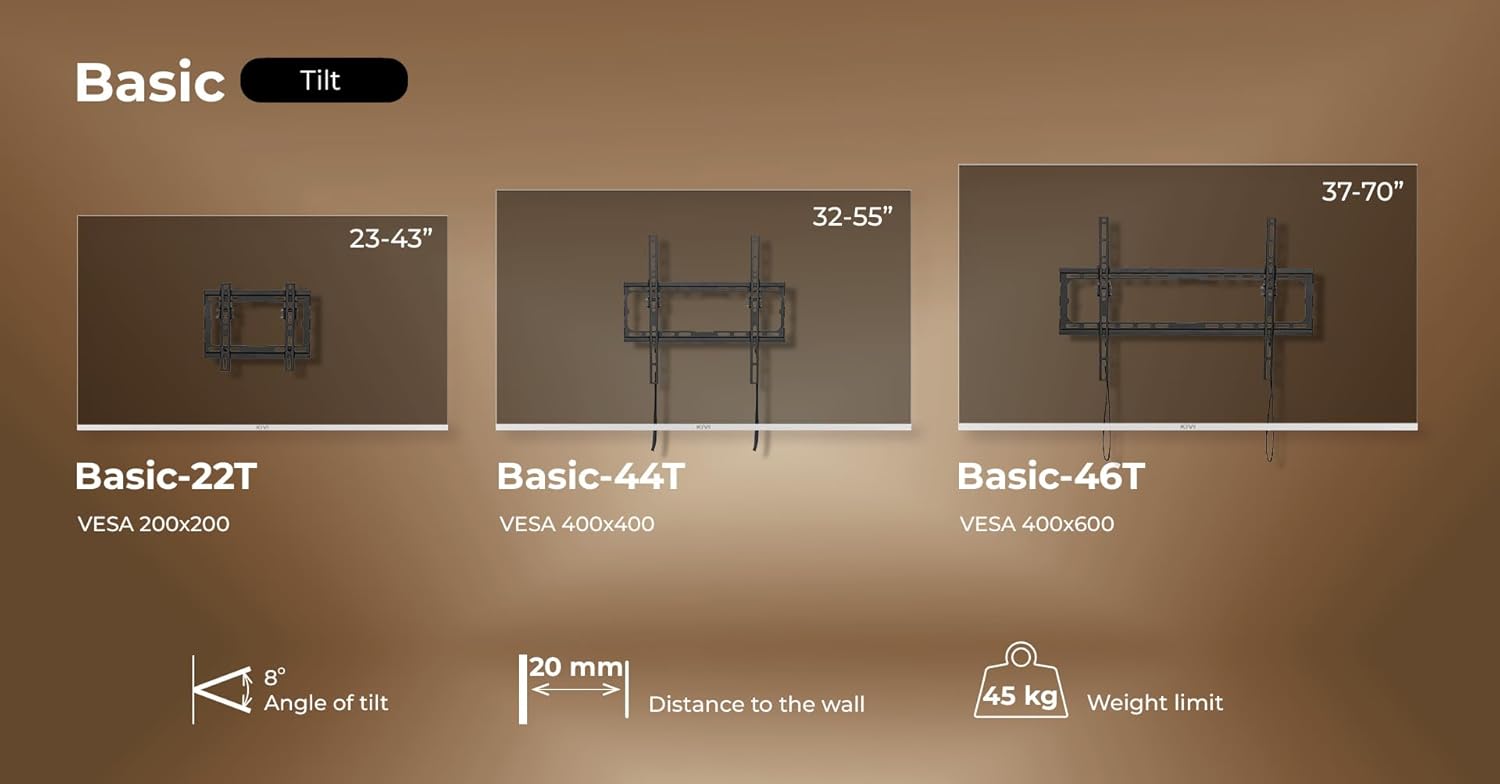
Image 4.1: VESA compatibility for Basic-22T (200x200), Basic-44T (400x400), and Basic-46T (400x600). This image also illustrates the 8-degree tilt and 20mm distance from the wall. Note: While a 45kg weight limit is shown for the larger Basic-46T, the Basic-44T-K model is rated for 35kg.

Image 4.2: Detailed VESA dimensions for Basic-46T (600x400mm), Basic-44T (400x400mm), and Basic-22T (200x200mm). Also illustrates the 20mm distance from the wall for the mounted TV.
5. Setup and Installation
This section provides a general guide for installing your KIVI TV wall mount. Always refer to the specific instructions and diagrams included in your package for detailed steps. Professional installation is recommended if you are unsure about any part of the process.
5.1 Tools Required (Not Included)
- Drill
- Drill bits appropriate for your wall type and anchor size
- Stud finder (for wood stud walls)
- Level
- Pencil
- Measuring tape
- Phillips head screwdriver
- Socket wrench (if applicable for lag bolts)
5.2 Attaching TV Brackets to the TV
- Carefully place your TV face down on a soft, clean surface to prevent screen damage.
- Identify the VESA mounting holes on the back of your TV.
- Select the appropriate screws, washers, and spacers from the hardware kit that fit your TV's VESA holes.
- Attach the two vertical TV brackets to the back of your TV, ensuring they are centered and securely fastened. The pull straps should hang freely at the bottom.
5.3 Mounting the Wall Plate
- Determine the desired height and location for your TV. Use a pencil to mark the top center of where the TV will be.
- Hold the wall plate against the wall at the marked location and use a level to ensure it is perfectly horizontal. Mark the drilling points through the holes on the wall plate.
- Drill pilot holes at the marked locations. The size of the drill bit will depend on your wall type (wood stud, concrete, brick) and the anchors/lag bolts provided.
- Insert wall anchors (if required for your wall type) into the pilot holes.
- Secure the wall plate to the wall using the appropriate screws/lag bolts and washers. Ensure it is firmly attached and level.

Image 5.1: An installed KIVI Basic Tilt mount, illustrating its convenient design, 20mm distance from the wall, 8-degree tilt capability, automatic spring locks with straps for quick release, and fixing screws for secure TV attachment.
5.4 Hanging the TV
- With assistance, carefully lift the TV and hook the TV brackets onto the top edge of the wall plate.
- Gently lower the TV until the brackets engage with the wall plate. You should hear a click as the automatic spring locks engage.
- Pull the release straps downwards to ensure the TV is securely locked onto the wall plate. The straps should be accessible for future removal.
- Tighten any fixing screws on the TV brackets to further secure the TV to the wall plate, if applicable.
6. Operating the Mount
6.1 Adjusting Tilt
The KIVI Basic-44T-K mount allows for a tilt adjustment of up to 8 degrees. To adjust the tilt:
- Gently push or pull the bottom of the TV to achieve the desired viewing angle.
- The friction-based tilt mechanism will hold the TV in place. No tools are typically required for tilt adjustment once installed.
6.2 Removing the TV from the Mount
To remove the TV from the wall mount:
- Locate the pull straps hanging below the TV.
- Pull both straps downwards simultaneously to disengage the automatic spring locks.
- With assistance, carefully lift the TV upwards and away from the wall plate.
7. Maintenance
- Regular Inspection: Periodically check all mounting hardware and connections to ensure they are tight and secure. Loose connections can lead to instability.
- Cleaning: Clean the mount with a soft, dry cloth. Avoid abrasive cleaners or solvents that could damage the finish.
- Weight Limits: Do not hang additional items on the TV or mount that would exceed the specified weight capacity.
8. Troubleshooting
- Problem: TV appears crooked or not level.
- Solution: Ensure the wall plate was installed perfectly level. Some mounts offer post-installation leveling adjustments; check your specific model's features. If not, the wall plate may need to be re-adjusted.
- Problem: TV is not securely locked onto the wall plate.
- Solution: Ensure the TV brackets are fully engaged with the wall plate and the automatic spring locks have clicked into place. Pull the release straps to confirm engagement. Check if any fixing screws on the brackets need to be tightened.
- Problem: Difficulty adjusting the tilt.
- Solution: The tilt mechanism relies on friction. Ensure no cables are obstructing the movement. If the tilt is too loose or too stiff, check if there are any adjustable bolts on the TV brackets that control tilt tension (refer to your specific mount's diagrams).
- Problem: Missing parts or damaged components.
- Solution: Do not proceed with installation. Contact KIVI customer support immediately for replacement parts.
9. Warranty and Support
KIVI products are manufactured with quality and reliability in mind. For warranty information, product support, or to inquire about replacement parts, please refer to the warranty card included with your purchase or visit the official KIVI website.
Please retain your proof of purchase for warranty claims.
