
D-Line DTBRTA400-DL
D-Line Full Motion TV Wall Bracket Instruction Manual
Model: DTBRTA400-DL
Brand: D-Line
1. Introduction
Thank you for choosing the D-Line Full Motion TV Wall Bracket. This manual provides detailed instructions for the safe and proper installation, operation, and maintenance of your new TV wall mount. Please read this manual thoroughly before beginning installation and retain it for future reference.
This bracket is designed to securely mount 32-70 inch televisions, supporting weights up to 110 lbs (50 kg). It offers full motion capabilities including tilt, turn, and extension for optimal viewing angles.
2. Product Features
- Full Motion Capability: Allows for tilt (+20°/-10°), turn (+/- 90°), and extension from 2.3 inches to 18.6 inches from the wall, providing versatile viewing angles.
- Wide Compatibility: Suitable for 32-70 inch TVs with VESA patterns including 200x200mm, 300x200mm, 400x200mm, 300x300mm, 400x300mm, and 400x400mm.
- High Weight Capacity: Constructed from high-quality steel, tested to securely hold screens up to 110 lbs (50 kg).
- Easy Installation: Features a hook-on installation design with included fixings for solid and stud walls, a spirit level, and a step-by-step guide.
- Cable Management: Includes a cable management clip to help organize and conceal TV cables for a neat appearance.
3. Package Contents
Before installation, verify that all components are present and undamaged. If any parts are missing or defective, contact D-Line customer support.

Figure 3.1: Included Mounting Hardware. The image shows the main bracket assembly, including the wall plate, articulating arms, and the TV mounting frame, along with a spirit level and cable ties.
The package typically includes:
- Wall Plate Assembly
- TV Bracket Arms (x2)
- Spirit Level
- Assorted TV Screws (M4, M6, M8)
- Washers and Spacers
- Wall Anchors (for concrete/brick)
- Lag Bolts (for wood studs)
- Cable Ties
- Installation Guide
4. Setup and Installation
Important Safety Information:
- Do not attempt installation if you are unsure about the process. Consult a qualified professional.
- Ensure the mounting surface can support the combined weight of the bracket and the TV.
- Always use appropriate safety gear, including eye protection.
- Do not mount on drywall alone.
4.1. Tools Required (Not Included)
- Pencil
- Stud Finder (for wood stud installation)
- Drill
- Drill Bits (appropriate size for lag bolts/anchors)
- Socket Wrench or Adjustable Wrench
- Phillips Head Screwdriver
- Measuring Tape
4.2. Wall Type Considerations
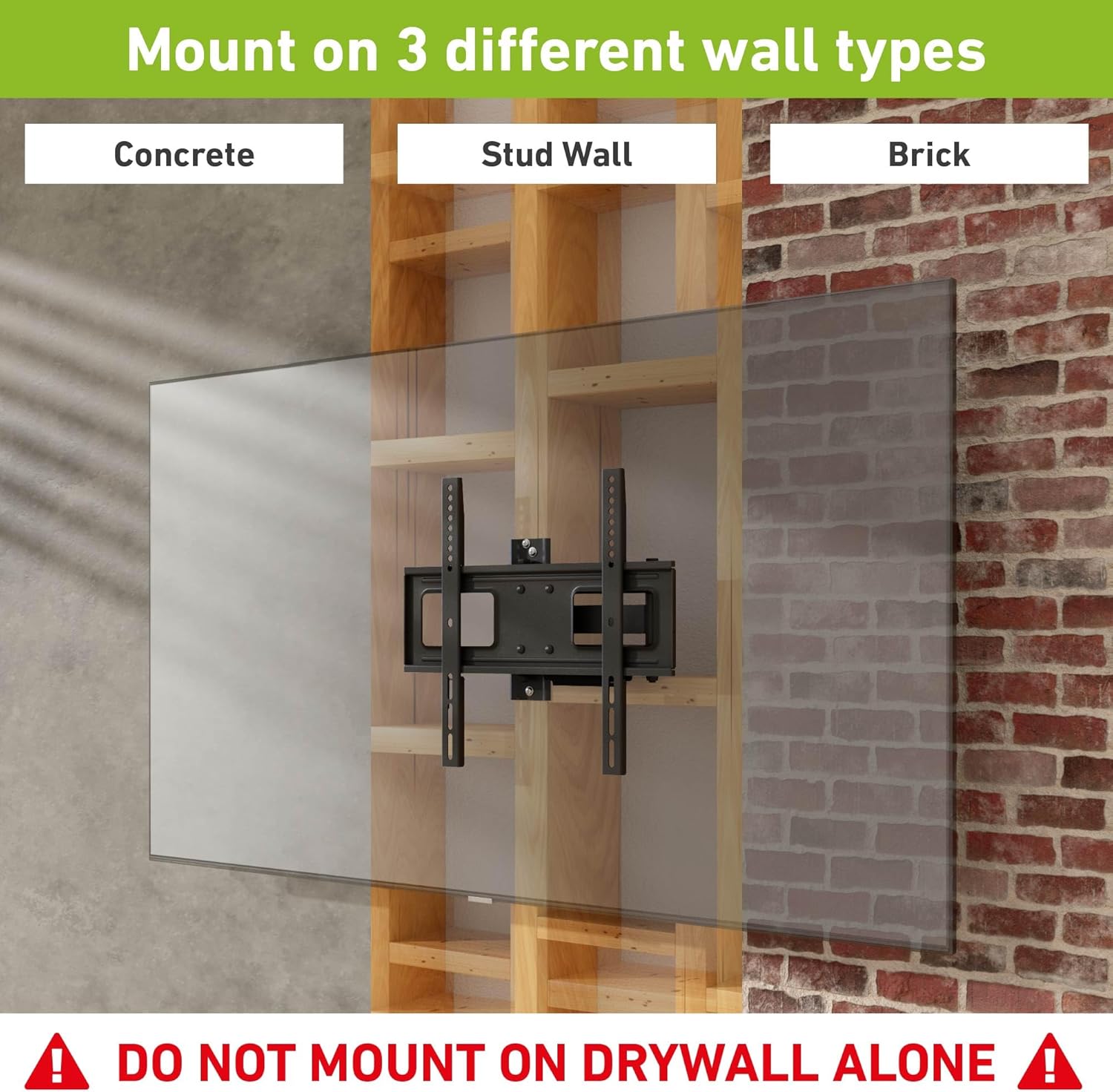
Figure 4.1: Supported Wall Types. The image illustrates the range of TV sizes (32-70 inches) and VESA patterns (200x200, 300x200, 400x200, 300x300, 400x300, 400x400) supported by the bracket.
This bracket is designed for installation on:
- Wood Stud Walls: Locate the center of the wood studs using a stud finder.
- Solid Concrete Walls: Use the provided concrete anchors.
- Brick Walls: Use the provided concrete anchors.
WARNING: DO NOT MOUNT ON DRYWALL ALONE. Ensure the mounting surface is structurally sound.
4.3. Attaching TV Brackets to TV
1. Carefully place your TV face down on a soft, clean surface to prevent scratches.
2. Identify the VESA mounting holes on the back of your TV. These are typically in a square or rectangular pattern.

Figure 4.2: VESA Compatibility. The image illustrates the range of TV sizes (32-70 inches) and VESA patterns (200x200, 300x200, 400x200, 300x300, 400x300, 400x400) supported by the bracket.
3. Select the correct diameter and length of screws (M4, M6, or M8) that fit your TV's VESA holes. Use spacers if the TV back is uneven or if screws are too long.
4. Attach the two vertical TV bracket arms to the back of your TV using the selected screws and washers. Ensure the arms are centered and level, with the hooks facing upwards (or as per the bracket design for hanging onto the wall plate).

Figure 4.3: Assembled Bracket Components. This image shows the main bracket assembly, including the wall plate, articulating arms, and the TV mounting frame, along with a spirit level and cable ties.
4.4. Mounting the Wall Plate
1. Determine the desired height for your TV. Mark the top center of where the TV will be.
2. Hold the wall plate against the wall at the desired height and use the integrated spirit level (or your own) to ensure it is perfectly horizontal. Mark the drill holes with a pencil.
3. Drill pilot holes according to your wall type and the size of the lag bolts/anchors. For wood studs, drill into the center of the studs. For concrete/brick, insert the plastic anchors into the drilled holes.
4. Secure the wall plate to the wall using the appropriate lag bolts (for wood studs) or concrete screws/anchors. Tighten all bolts firmly, but do not overtighten.
4.5. Hanging the TV
1. With assistance, carefully lift the TV (with the attached brackets) and hook the TV bracket arms onto the wall plate. Ensure the TV is securely seated on the wall plate.
2. Locate the safety screws or locking mechanisms on the bottom of the TV bracket arms. Tighten these to secure the TV to the wall plate and prevent accidental dislodgement.
5. Operating Instructions
The D-Line Full Motion TV Wall Bracket allows for flexible adjustment to achieve your ideal viewing experience.
5.1. Adjusting Viewing Angle
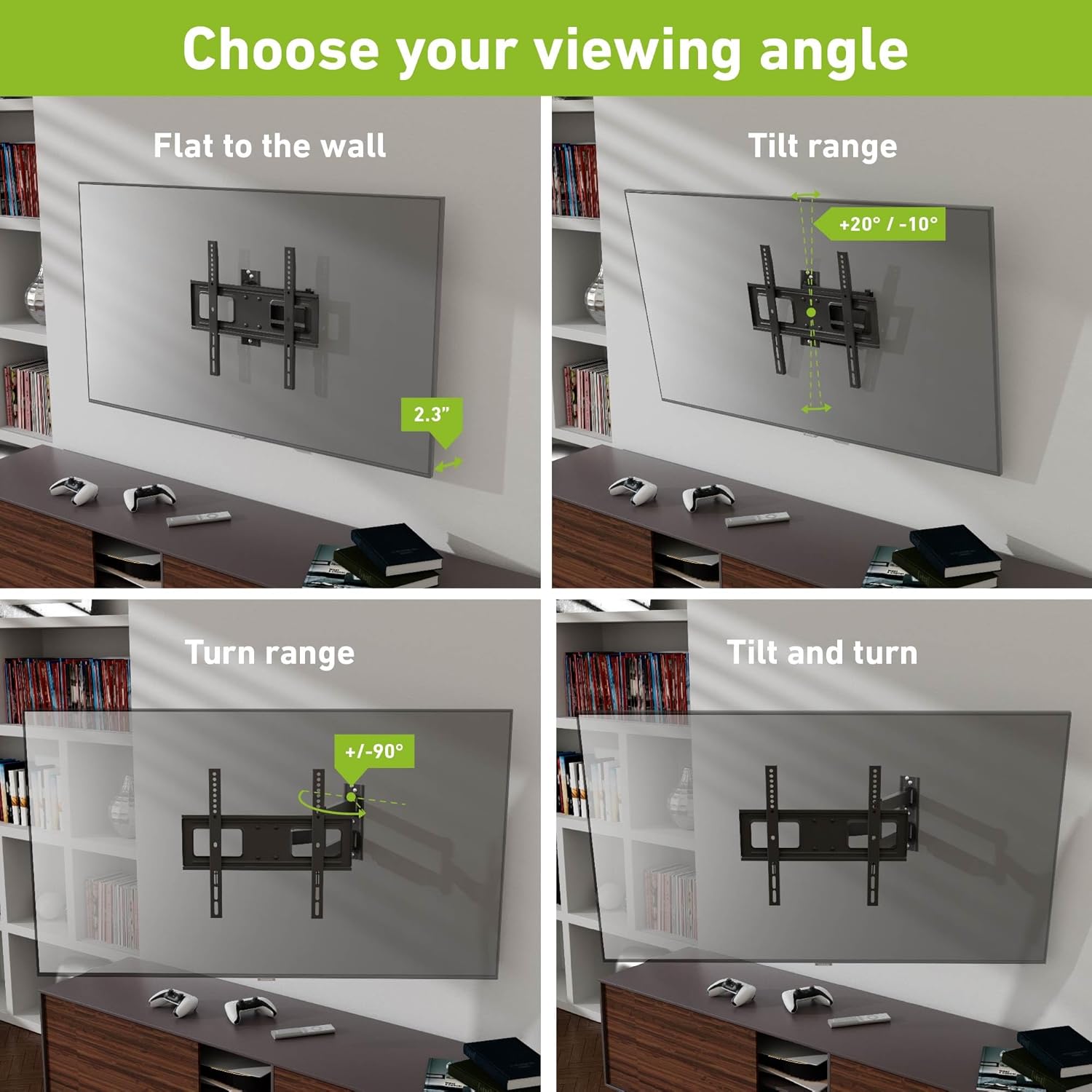
Figure 5.1: Viewing Angle Adjustments. This image demonstrates the various motion capabilities: flat to wall, tilt range, turn range, and combined tilt and turn for optimal viewing.
- Tilt: Gently push or pull the top or bottom of the TV to adjust the vertical tilt. The bracket supports a tilt range of +20° (upwards) to -10° (downwards).
- Turn/Swivel: Carefully push or pull the side of the TV to swivel it horizontally. The bracket allows for a turn range of +/- 90° (depending on TV size and wall clearance).
- Extend/Retract: Pull the TV away from the wall to extend the articulating arms, or push it back towards the wall to retract.
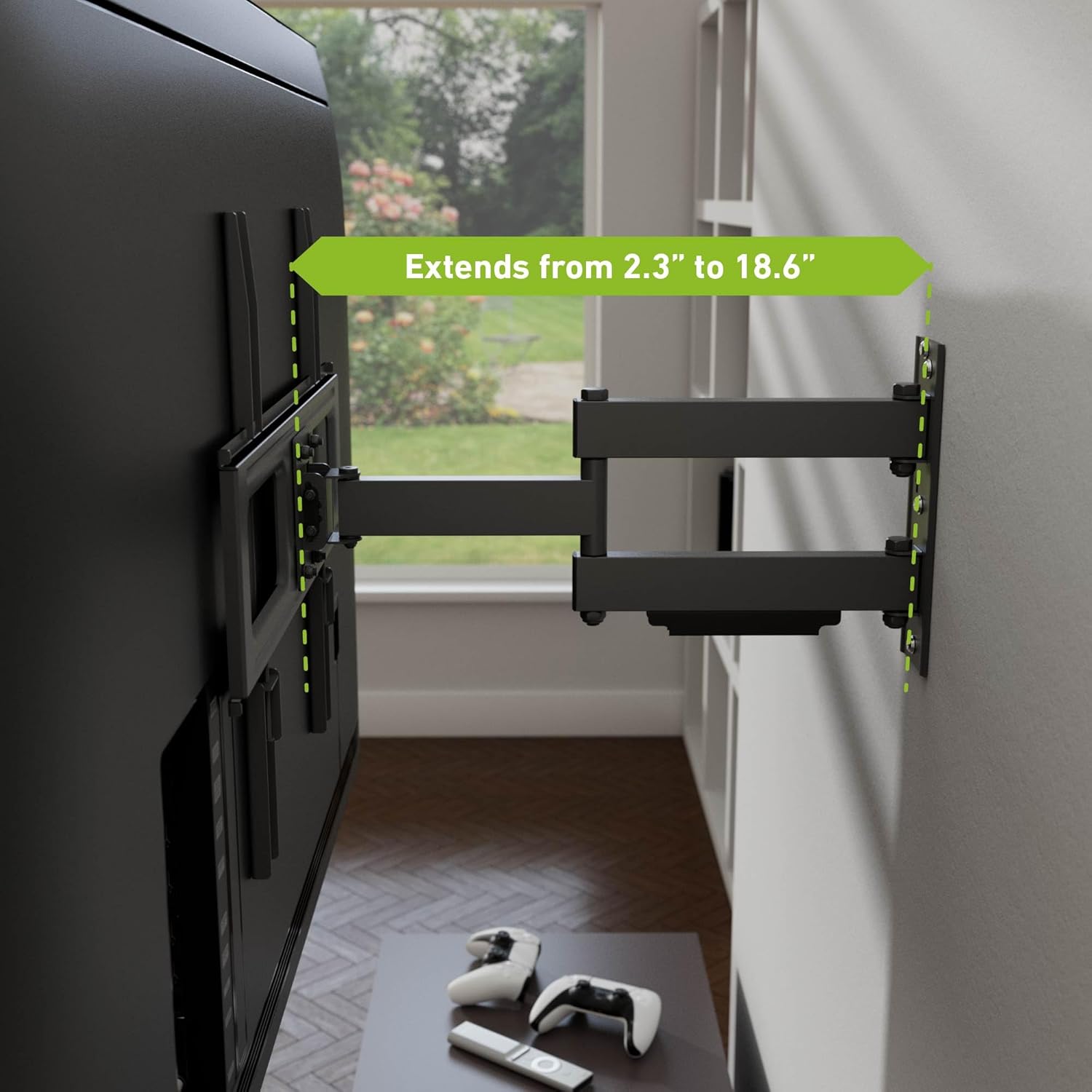
Figure 5.2: Extension Range. The image shows the bracket's ability to extend the TV from a minimum of 2.3 inches to a maximum of 18.6 inches from the wall.
The bracket allows the TV to extend from 2.3 inches (minimum) to 18.6 inches (maximum) from the wall.
5.2. Cable Management

Figure 5.3: Cable Management. The image highlights the integrated cable management clip designed to keep cords organized and out of sight.
Route your TV and power cables through the integrated cable management clips on the bracket arms. This helps to keep your setup tidy and prevents cables from snagging during adjustments.
6. Maintenance
To ensure the longevity and safe operation of your D-Line TV Wall Bracket, follow these maintenance guidelines:
- Regular Inspection: Periodically check all screws and bolts to ensure they remain tight. Loose connections can compromise stability.
- Cleaning: Wipe the bracket with a soft, dry cloth. Avoid using abrasive cleaners or solvents that could damage the finish.
- Lubrication: The articulating joints are designed for smooth movement. If any stiffness occurs over time, a small amount of silicone-based lubricant can be applied to the pivot points.
- Weight Limit: Never exceed the maximum weight capacity of 110 lbs (50 kg).

Figure 6.1: Weight Capacity. The bracket is designed to safely hold televisions weighing up to 110 lbs (50 kg).
7. Troubleshooting
| Problem | Possible Cause | Solution |
|---|---|---|
| TV is not level after installation. | Wall plate not level; TV bracket arms not level. | Re-check the wall plate with a spirit level and adjust if necessary. Ensure TV bracket arms are securely and evenly attached to the TV. |
| Bracket feels loose or wobbly. | Mounting bolts not tightened sufficiently; incorrect wall anchors used; wall not strong enough. | Ensure all wall plate and TV bracket bolts are securely tightened. Verify correct wall type and anchor usage. If wall is insufficient, consult a professional. |
| Difficulty adjusting tilt/swivel/extension. | Joints are stiff; TV is too heavy for smooth movement. | Apply a small amount of silicone-based lubricant to the articulating joints. Ensure TV weight does not exceed 110 lbs. |
| Screws for TV attachment don't fit. | Incorrect screw size selected; TV VESA holes are unique. | Refer to your TV's manual for correct VESA screw specifications. Use the provided assortment of screws (M4, M6, M8) and spacers to find the best fit. |
8. Specifications
| Model Number | DTBRTA400-DL |
| Compatible TV Sizes | 32 - 70 Inches |
| VESA Compatibility | 200x200mm, 300x200mm, 400x200mm, 300x300mm, 400x300mm, 400x400mm |
| Weight Capacity | Up to 110 lbs (50 kg) |
| Movement Type | Articulating (Full Motion) |
| Tilt Angle | +20° / -10° |
| Turn/Swivel Angle | +/- 90° (dependent on TV size) |
| Extension from Wall | 2.3 inches to 18.6 inches |
| Material | Metal |
| Item Weight | 8.68 pounds (bracket only) |
| Color | Black |
9. Safety Information
Adhere to the following safety precautions to prevent injury or property damage:
- Always ensure the wall structure is capable of supporting the combined weight of the TV and the mount.
- Do not install the mount on drywall alone. It must be anchored to wood studs, concrete, or brick.
- Use all provided hardware and follow the installation steps precisely.
- Do not overtighten screws, as this can cause damage to the bracket or the wall.
- Keep children and pets away from the installation area.
- Never attempt to adjust the TV without ensuring a firm grip and proper balance.
- If any part of the bracket appears damaged or defective, do not use it. Contact customer support.
10. Warranty and Support
D-Line products are manufactured to high standards and come with a limited warranty against defects in materials and workmanship. For specific warranty terms and conditions, please refer to the warranty card included with your product or visit the official D-Line website.
For technical support, missing parts, or any questions regarding your D-Line Full Motion TV Wall Bracket, please contact D-Line customer service:
- Website: www.d-line-it.com (or refer to regional website)
- Email: Refer to product packaging or website for contact email.
- Phone: Refer to product packaging or website for contact phone number.
Please have your model number (DTBRTA400-DL) and purchase information ready when contacting support.
Related documentsDTBRTA400-DL

Ask a question about this manual
Ask about setup, troubleshooting, compatibility, parts, safety, or missing instructions. Manuals+ will review the question and use this page’s manual context to help answer it.