
1. Product Overview
The JINJUNYE Electric Wine Dispenser Model KW-2320 is designed to enhance your wine experience through rapid decanting, precise dispensing, and convenient features. It integrates an aerator, a quantitative dispensing system, and a power bank function, all within a compact, rechargeable unit.
Included Components:
- 1 x JINJUNYE Electric Wine Aerator
- 4 x Different Size Adapters
- 2 x Silicone Tubes (11.81 inches and 13.77 inches)
- 1 x USB-C Charging Cord
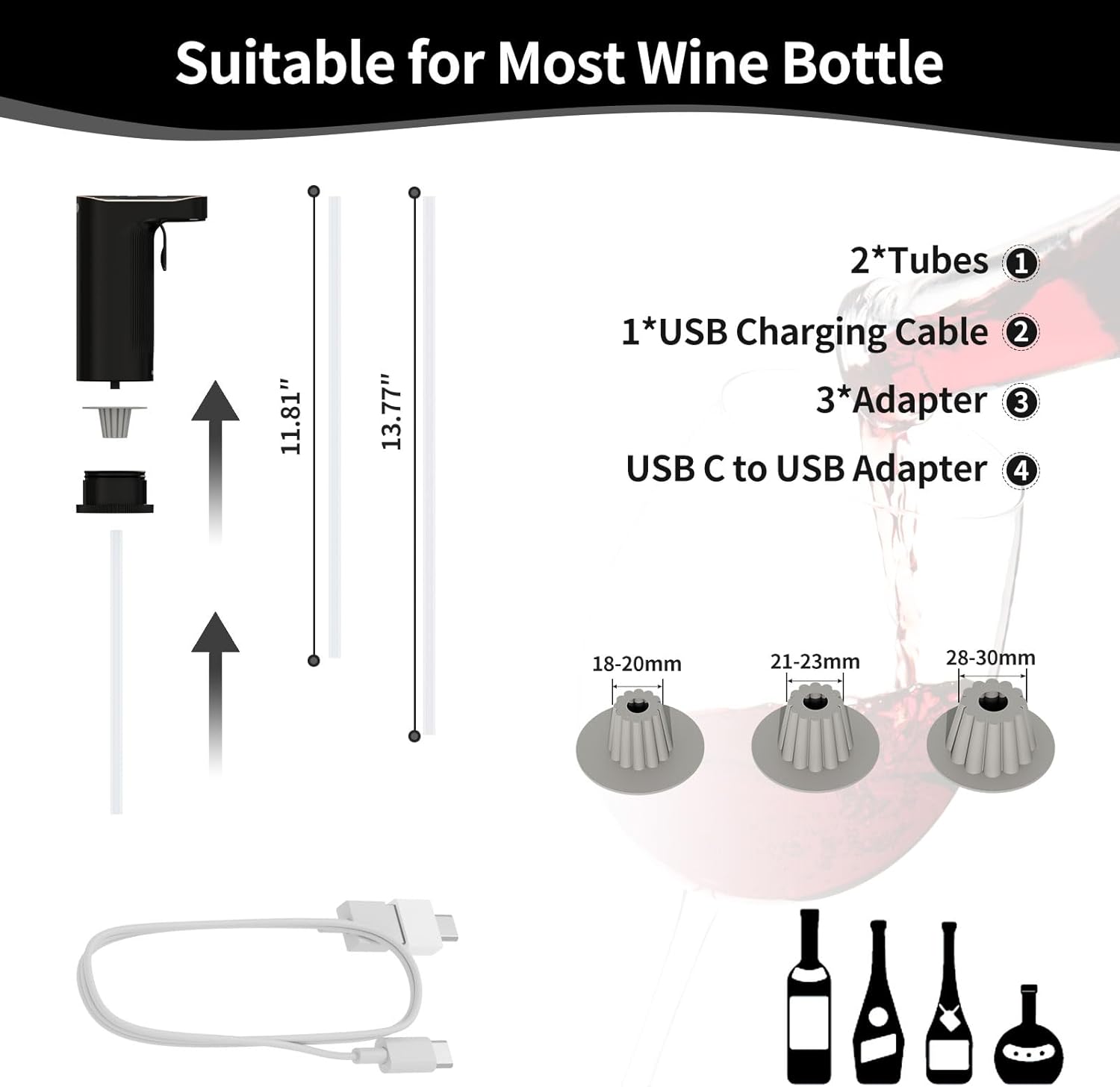
Image: Overview of the JINJUNYE Electric Wine Dispenser and its included accessories, such as tubes, adapters, and charging cable.
2. Setup and Assembly
2.1 Initial Charging
Before first use, fully charge the device using the provided USB-C charging cord. Connect the cord to the dispenser and a compatible USB power source. The display will indicate the charging status. A full charge provides power for approximately 100 bottles of 750ML red wine.
2.2 Assembling the Dispenser
- Unscrew the Bottom Lid: Gently twist and remove the bottom lid of the dispenser.
- Take Out the Adapter: Remove any pre-installed adapter from the dispenser.
- Choose Suitable Adapter: Select the appropriate silicone adapter size (18-20mm, 21-23mm, or 28-30mm) that best fits your wine bottle's neck.
- Tighten the Bottom Lid: Insert the chosen adapter and screw the bottom lid back onto the dispenser securely.
- Connect the Tube: Attach one of the silicone tubes to the bottom of the dispenser. Ensure it is firmly connected.
- Insert into Bottle: Place the assembled dispenser firmly into the neck of your wine bottle. Ensure a snug fit to prevent air leakage.

Image: Step-by-step instructions for installing the dispenser onto a wine bottle, including adapter selection and tube connection.
3. Operating Instructions
3.1 Power On/Off
The device typically powers on automatically when inserted into a bottle and a button is pressed, or by pressing the main dispensing button. To power off, the device will usually enter standby mode after a period of inactivity or can be manually turned off by holding a specific button (refer to device markings).
3.2 Aerator Mode (Quantitative Dispensing)
This mode allows you to dispense a precise amount of wine (1-999ML) with aeration. The dispenser will automatically stop once the set volume is reached.
- Select Aerator Mode: Press the 'M' button to switch to Aerator Mode. The display will show 'Aerator' or a similar indicator.
- Set Volume: Use the '+' and '-' buttons to adjust the desired dispensing volume between 1ML and 999ML.
- Dispense Wine: Place your glass under the spout and press the main dispensing button. The wine will be aerated and dispensed to the set volume, then stop automatically.

Image: The dispenser's display showing the 'Aerator Mode' for setting specific dispensing volumes.
3.3 Amt Mode (Total Consumption Tracking)
The Amt Mode tracks the total amount of wine dispensed over time, allowing you to monitor consumption.
- Select Amt Mode: Press the 'M' button to switch to Amt Mode. The display will show 'Amt' or a similar indicator.
- Dispense Wine: Place your glass under the spout and press the main dispensing button. The wine will be aerated and dispensed continuously until the button is released. The display will show the cumulative volume dispensed.
- Clear Count: To reset the total count to 0, long-press the 'M' button.

Image: The dispenser's display showing the 'Amt Mode' for tracking total wine consumption.
3.4 Power Bank Function
The dispenser features a 2000mAh battery that can also function as a power bank to recharge mobile phones and other small devices.
- Connect your device to the USB-C port on the dispenser using a compatible charging cable.
- The dispenser's display will show the remaining power, allowing for real-time monitoring.
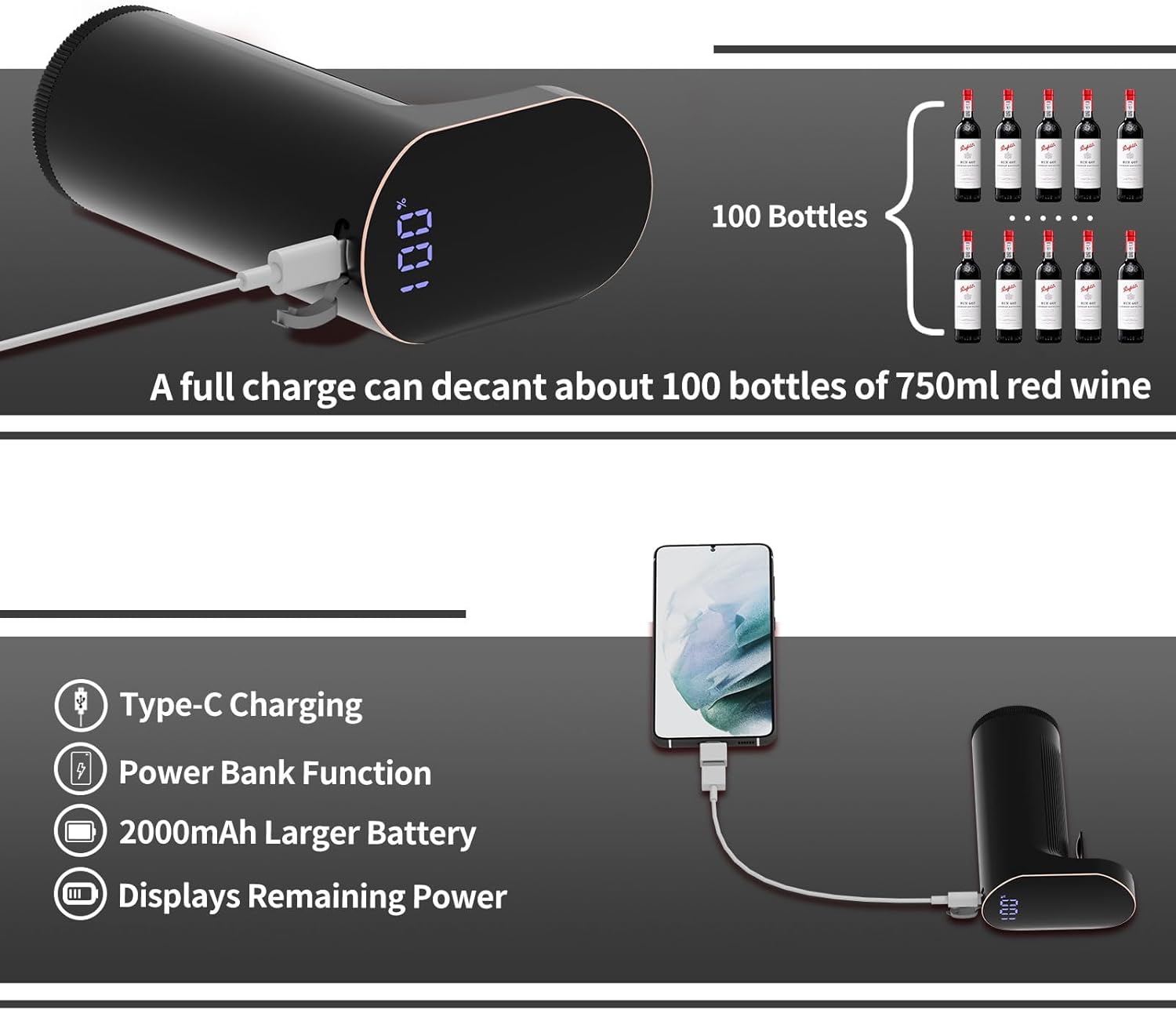
Image: The dispenser's power bank function, showing it charging a mobile phone and highlighting its battery capacity.
4. Maintenance
4.1 One-Touch Self-Cleaning
The dispenser features a self-cleaning function for easy maintenance without disassembly.
- Prepare Water: Fill a clean bottle or container with clean water.
- Insert Dispenser: Place the dispenser into the water-filled container.
- Press Clean Button: Press the dedicated clean button (usually marked with a water drop icon) on the dispenser. The device will pump water through its system to clean internal components. Repeat as necessary until the water runs clear.

Image: Visual guide for the self-cleaning process of the wine dispenser.
4.2 General Care
- Wipe the exterior of the dispenser with a soft, damp cloth. Do not immerse the main unit in water.
- The silicone tubes and adapters are dishwasher safe for thorough cleaning.
- Store the dispenser in a clean, dry place when not in use.
5. Troubleshooting
If you encounter issues with your JINJUNYE Electric Wine Dispenser, please refer to the following common problems and solutions:
| Problem | Possible Cause | Solution |
|---|---|---|
| Device not turning on or charging | Low battery; faulty charging cable/adapter; device malfunction. | Ensure the device is fully charged using the provided USB-C cable and a working power source. Try a different cable or adapter. |
| Wine not dispensing or dispensing slowly | Silicone tube is blocked or not properly connected; adapter not sealed correctly; wine level too low; internal blockage. | Check that the silicone tube is securely attached and clear of obstructions. Ensure the adapter creates a tight seal with the bottle. Perform a self-cleaning cycle. |
| Inaccurate quantitative dispensing | Air leakage; internal sensor issue; improper setting. | Verify the adapter is tightly sealed to the bottle neck. Ensure the desired volume is correctly set in Aerator Mode. Perform a self-cleaning cycle. |
| Device leaks | Loose connections; damaged components. | Check all connections, especially the silicone tube and the adapter's seal to the bottle. Ensure the bottom lid is securely tightened. |
If the problem persists after attempting these solutions, please contact customer support.
6. Specifications
| Feature | Detail |
|---|---|
| Brand | JINJUNYE |
| Model Name | Electric Wine Aerator (KW-2320) |
| Material | Plastic, Stainless Steel |
| Color | Black + Golden |
| Capacity (Dispensing Range) | 1-999 ML |
| Special Features | Electric Wine Dispenser, One-Touch Decanting, Accurate Quantitative Setting, Power Bank Function, Self-Clean Function |
| Included Components | Electric Wine Aerator, 4*Different Size Adapters, 2*Tube, 1*USB C Charging Cord |
| Item Weight | 0.46 Pounds (7.4 ounces) |
| Package Dimensions | 7.56 x 6.97 x 2.4 inches |
| Battery | 1 Lithium Ion battery (2000mAh), included |
7. Warranty and Support
7.1 Warranty Information
This product comes with a standard manufacturer's warranty. Please refer to the product packaging or the seller's website for specific warranty terms and conditions, including duration and coverage details.
7.2 Customer Support
For technical assistance, troubleshooting not covered in this manual, or warranty claims, please contact JINJUNYE customer support through the retailer where the product was purchased or visit the official JINJUNYE website for contact information.