
Introduction
Thank you for choosing the Genérico TREO CINEMA54 1 DIN Car Stereo. This manual provides essential information for the proper installation, operation, and maintenance of your new car audio system. Please read this manual thoroughly before using the product to ensure optimal performance and safety.
The CINEMA54 features a 4-inch LCD display, MP5/MP4/MP3/WMA playback, Bluetooth connectivity, FM radio, USB/SD/MMC ports, and an AUX input, designed to enhance your in-car entertainment experience.
Setup and Installation
Proper installation is crucial for the performance and longevity of your car stereo. If you are unsure about any steps, it is recommended to seek professional assistance.
Package Contents:
- CINEMA54 1 DIN Car Stereo
- Remote Control
- Wiring Harness
- Mounting Hardware
- User Manual (this document)
- Rear View Camera (if included in your package)
Safety Precautions:
- Disconnect the vehicle's negative battery terminal before installation to prevent electrical shorts.
- Ensure all wiring is correctly connected to avoid damage to the unit or vehicle.
- Do not install the unit where it might obstruct the driver's view or interfere with vehicle operation.
- Use appropriate tools and wear safety glasses during installation.
Wiring Diagram:
Refer to the wiring diagram on the back of the unit and the included wiring harness for correct connections. Below is an image illustrating the rear connections of the CINEMA54 unit.
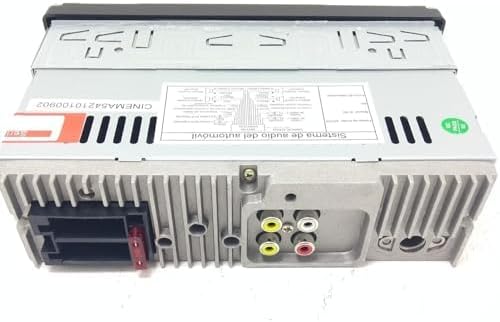
Figure 1: Rear Connections of the CINEMA54 Unit. This image displays the back panel of the car stereo, highlighting the various ports for power, speakers, RCA outputs, and other auxiliary connections. Ensure all cables are securely connected according to the vehicle's wiring and the provided diagram.
- Power Connection: Connect the yellow wire to the constant 12V power supply, the red wire to the accessory 12V supply (switched with ignition), and the black wire to ground.
- Speaker Connections: Connect the speaker wires to the corresponding positive and negative terminals for each speaker (Front Left, Front Right, Rear Left, Rear Right).
- Antenna Connection: Connect your vehicle's FM antenna to the antenna input.
- RCA Output: Use the RCA output jacks for connecting to external amplifiers.
- Rear Camera Input: Connect the video cable from your rear view camera to the dedicated input.
- USB/SD/MMC: These ports are typically on the front panel for media playback.
Operating Instructions
Familiarize yourself with the controls and functions of your CINEMA54 car stereo.
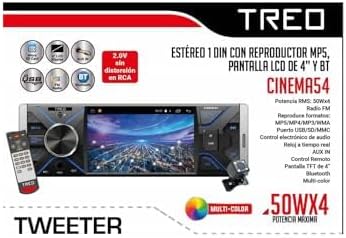
Figure 2: CINEMA54 Unit with Remote Control. This image shows the front panel of the car stereo, including the 4-inch display, control buttons, USB port, and the included remote control. The rear camera is also depicted, indicating its integration capability.
Basic Functions:
- Power On/Off: Press the power button (usually marked with PWR or MODE) to turn the unit on or off.
- Volume Control: Use the rotary knob or VOL+ / VOL- buttons on the unit or remote control.
- Mode Selection: Press the MODE button to switch between functions like Radio, USB, SD, AUX, and Bluetooth.
- Menu Navigation: Use the MENU button and directional controls to navigate through settings and options on the 4-inch display.
Radio Operation (FM):
- Select FM mode using the MODE button.
- Press the SEEK or TUNE buttons to automatically scan for stations.
- Manually tune by holding the SEEK buttons or using the menu.
- Save favorite stations by pressing and holding a preset number button (1-6).
Media Playback (USB/SD/MMC):
- Insert a USB drive or SD/MMC card into the respective slot.
- The unit should automatically switch to USB/SD mode. If not, press MODE.
- Use the PLAY/PAUSE, NEXT, and PREV buttons to control playback.
- The unit supports MP5, MP4, MP3, and WMA formats.
Bluetooth Connectivity:
- Select BT (Bluetooth) mode using the MODE button.
- On your mobile device, enable Bluetooth and search for available devices.
- Select "CINEMA54" from the list of devices. If prompted for a password, enter "0000" or "1234".
- Once paired, you can stream audio or make hands-free calls through the car stereo.
- Use the unit's controls or remote for call management (answer, end, reject) and music playback.
AUX Input:
- Connect an external audio device (e.g., MP3 player) to the AUX IN jack using a 3.5mm audio cable.
- Select AUX mode using the MODE button.
- Audio will play through the car stereo speakers. Control playback from the external device.
Rear View Camera:
If a rear view camera is connected, the display will automatically switch to the camera view when the vehicle is put into reverse gear (requires proper wiring to the reverse light trigger).
Maintenance
Regular maintenance helps ensure the longevity and optimal performance of your CINEMA54 car stereo.
- Cleaning the Display: Use a soft, dry cloth to wipe the 4-inch LCD display. For stubborn smudges, lightly dampen the cloth with water or a screen cleaner designed for electronics. Do not use abrasive cleaners or solvents.
- Cleaning the Unit: Wipe the exterior of the unit with a soft, dry cloth. Avoid getting liquids inside the unit.
- USB/SD Ports: Keep the USB and SD card slots free from dust and debris. Use compressed air if necessary.
- Fuse Replacement: If the unit does not power on, check the fuse located on the rear of the unit or in the wiring harness. Replace it with a fuse of the same amperage rating (e.g., 10A or 15A, refer to the unit's specifications).
- Avoid Extreme Temperatures: Do not expose the unit to extreme heat or cold, as this can affect its performance and lifespan.
Troubleshooting
If you encounter issues with your CINEMA54 car stereo, refer to the following common problems and solutions before contacting support.
| Problem | Possible Cause | Solution |
|---|---|---|
| No power | Blown fuse, incorrect wiring, loose connection. | Check the fuse and replace if necessary. Verify all power and ground connections. Ensure the ignition wire is receiving power. |
| No sound | Volume too low, mute activated, incorrect speaker wiring, faulty speakers. | Increase volume. Check if mute is on. Verify speaker connections. Test with different audio source. |
| Bluetooth not connecting | Bluetooth not enabled on device, incorrect pairing, interference. | Ensure Bluetooth is enabled on your phone. Delete previous pairings and re-pair. Move closer to the unit. Restart both devices. |
| USB/SD not playing | Unsupported file format, corrupted media, faulty USB/SD card. | Ensure files are in supported formats (MP5/MP4/MP3/WMA). Try a different USB drive or SD card. Check for proper insertion. |
| Radio reception is poor | Antenna not connected, damaged antenna, weak signal area. | Check antenna connection. Ensure antenna is fully extended (if applicable). Try tuning to a stronger station. |
| Rear camera not displaying | Incorrect wiring, camera malfunction, reverse trigger not connected. | Verify camera video input and reverse trigger wire connections. Check camera power supply. |
Specifications
Below are the technical specifications for the Genérico TREO CINEMA54 1 DIN Car Stereo.

Figure 3: CINEMA54 Product Specifications. This image presents a detailed list of technical specifications for the car stereo, including power output, supported media formats, and connectivity options.
| Feature | Detail |
|---|---|
| Brand | Genérico |
| Model | CINEMA54 |
| RMS Power Output | 50W x 4 |
| Peak Power Output | 200 Watts |
| Display | 4-inch TFT LCD Screen |
| Connectivity Technology | Bluetooth, USB, HDMI, AUX |
| Wireless Technology | Bluetooth |
| Supported Media Formats | MP5, MP4, MP3, WMA |
| Ports | USB, SD/MMC Card Slot, AUX IN |
| Audio Output Mode | Stereo |
| RCA Output | 2.0V without distortion |
| Compatible Devices | Smartphones, tablets, USB drives, SD/MMC cards, MP3 players, radio devices |
| Item Weight | 1 Kilogram |
| Manufacturer | PROTECH |
Warranty Information
The Genérico TREO CINEMA54 car stereo comes with a product warranty of 30 Days from the date of purchase. This warranty covers manufacturing defects under normal use. Please retain your proof of purchase for any warranty claims.
The warranty does not cover damage caused by improper installation, misuse, accidents, unauthorized repairs, or normal wear and tear. For warranty service, please contact your retailer or the manufacturer's support.
Customer Support
If you require further assistance or have questions not covered in this manual, please contact your point of purchase or the manufacturer's customer service department.
When contacting support, please have the following information ready:
- Product Model: CINEMA54
- Date of Purchase
- Detailed description of the issue