
1. Introduction
This manual provides essential instructions for the safe operation and maintenance of your Authticar S9S GPS Drone. Please read this manual thoroughly before operating the drone to ensure proper function and to prevent damage or injury. The S9S drone features a 4K EIS anti-shake dual camera with a 2-axis gimbal, a brushless motor, 5G WiFi transmission, and intelligent obstacle avoidance.
2. Package Contents
Verify that all items listed below are included in your package. If any items are missing or damaged, please contact customer support.
- 1x Authticar S9S Drone
- 1x Remote Controller
- 1x 7.4V/1600mAh Intelligent Battery
- 1x Foam Storage Bag
- 1x Charging Cable
- 1x Screwdriver
- 1x APP Instruction Manual
- 1x User Manual (this document)
- 4x Spare Propellers

Image: All components included in the Authticar S9S drone package, laid out for inspection.
3. Product Overview
The Authticar S9S is a foldable RC quadcopter designed for stable flight and high-quality aerial photography. Key components include the drone body, remote controller, and intelligent battery.
3.1 Drone Components
- Foldable Arms: For compact storage and transport.
- Brushless Motors: Provide enhanced power, stability, and longer lifespan.
- 4K EIS Camera with 2-Axis Gimbal: Captures stable 4K video and high-resolution photos.
- Obstacle Avoidance Sensor: Detects and avoids obstacles during flight.
- GPS Module: Enables precise positioning, return-to-home functions, and intelligent flight modes.
- LED Indicators: Display drone status and battery level.

Image: The Authticar S9S GPS Drone in its unfolded state, showcasing its four propellers, central body with camera, and obstacle avoidance sensor.

Image: Close-up view of the S9S drone highlighting the 2-axis gimbal camera and the brushless motor technology.
3.2 Remote Controller
The remote controller provides intuitive control over the drone's flight and camera functions. It features a phone holder for real-time FPV viewing via the companion app.

Image: The remote controller with a smartphone mounted, displaying the drone's live camera feed.
4. Setup
4.1 Battery Charging and Installation
- Charge the drone battery using the provided charging cable and a compatible USB power adapter (not included). The LED indicator on the battery will show charging status.
- Once fully charged, insert the intelligent battery into the drone's battery compartment until it clicks securely into place.
- Install 3 AA batteries (not included) into the remote controller.

Image: A detailed view of the 7.4V 1600mAh intelligent modular battery for the S9S drone.
4.2 Propeller Installation
Ensure propellers are installed correctly according to their markings (A and B) on the corresponding motor arms. Use the provided screwdriver to secure them.
4.3 App Download and Connection
- Scan the QR code in the APP Instruction Manual or search for the designated app in your device's app store.
- Install the app on your smartphone.
- Power on the drone and the remote controller.
- On your smartphone, connect to the drone's 5G WiFi network (usually named 'S9S-XXXXXX').
- Open the app to establish a connection and view the live camera feed.
5. Operating Instructions
5.1 Pre-Flight Checks
- Ensure batteries are fully charged for both drone and remote.
- Check that propellers are securely attached and undamaged.
- Perform a compass calibration as instructed by the app or manual before the first flight in a new location.
- Fly in an open area, away from people, buildings, and obstacles.
5.2 Takeoff and Landing
- One-Key Takeoff: Press the one-key takeoff button on the remote controller or in the app. The drone will automatically ascend to a safe hovering altitude.
- Manual Takeoff: Push both joysticks down and outwards to start the motors, then slowly push the left joystick up to ascend.
- One-Key Landing: Press the one-key landing button. The drone will automatically descend and land.
- Manual Landing: Slowly pull the left joystick down to descend, then push both joysticks down and inwards to stop the motors after landing.

Image: Illustration of simple drone operation, including one-key takeoff, landing, and stable hovering.
5.3 Flight Controls
- Left Joystick: Controls altitude (up/down) and rotation (left/right).
- Right Joystick: Controls forward/backward and left/right movement.
- Headless Mode: Activates a mode where the drone's orientation is irrelevant to control inputs, making it easier for beginners.
- Altitude Hold: Maintains a stable altitude automatically.

Image: Depiction of Headless Mode, showing the drone's orientation relative to the pilot, and the obstacle avoidance function.
5.4 GPS Functions
- GPS Positioning: Provides stable hovering and precise flight.
- Return to Home (RTH): Automatically returns the drone to its takeoff point. This function activates in cases of low battery, loss of signal, or manual activation.
- Waypoint Flight: Plan a custom flight path by setting multiple waypoints on the app map. The drone will follow this trajectory automatically.
- Intelligent Follow: The drone can automatically follow the remote controller or a designated subject, maintaining a set distance.
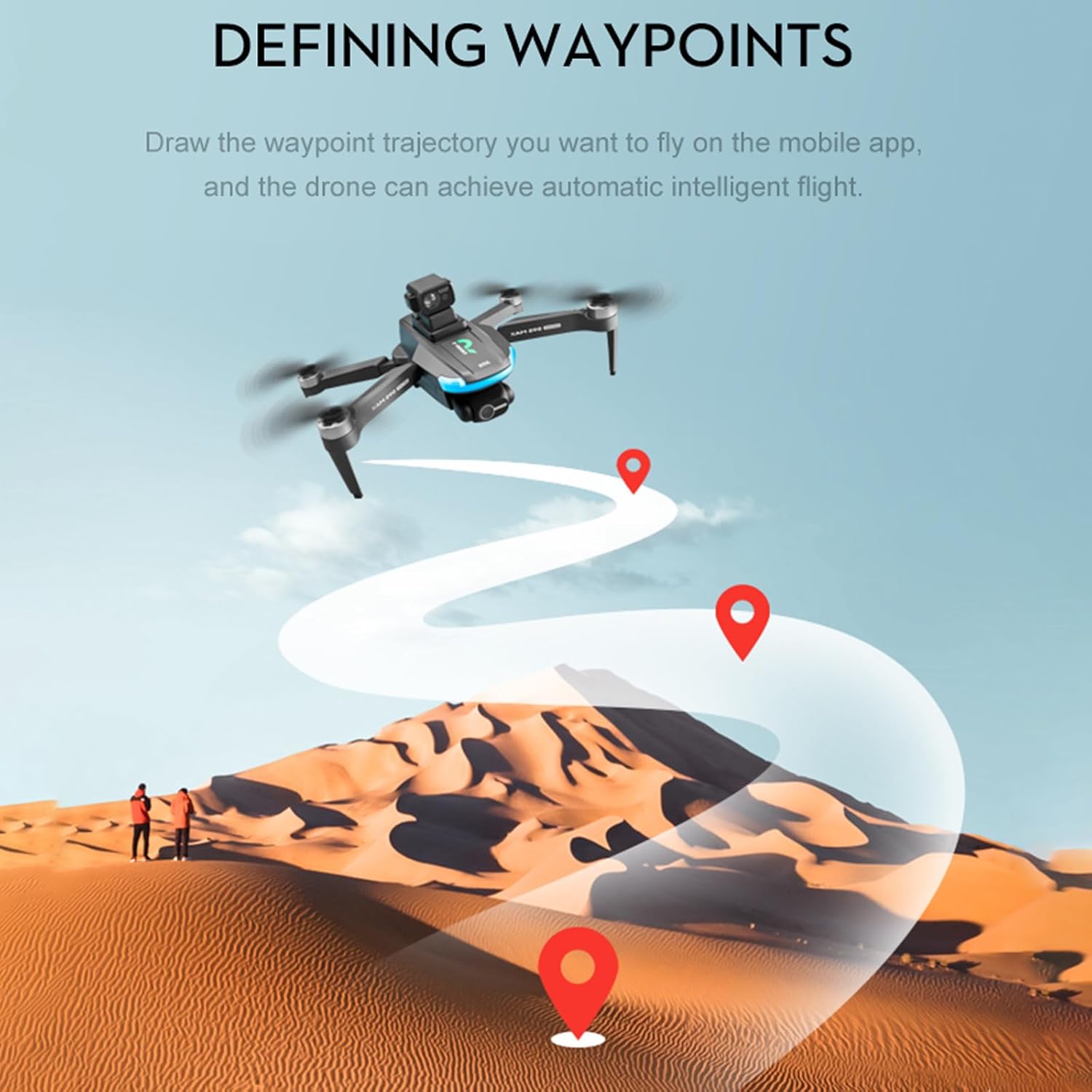
Image: An aerial view illustrating the waypoint flight feature, where a drone follows a pre-defined path over a landscape.

Image: The drone intelligently following a person, demonstrating its automatic tracking capability.

Image: The drone performing a GPS intelligent return, with icons indicating various return conditions like out of control, low battery, and one-click return.
5.5 Obstacle Avoidance
The S9S drone features 360° intelligent obstacle avoidance. When an obstacle is detected during flight, the drone will automatically adjust its path to avoid collision, providing an added layer of safety.

Image: The drone demonstrating automatic obstacle avoidance while flying through a forest, adjusting its trajectory to bypass trees.
5.6 Camera Operation
- Photo/Video Capture: Use the dedicated buttons on the remote or within the app to take photos or start/stop video recording.
- 4K EIS Camera with 2-Axis Gimbal: The camera provides 4K resolution with Electronic Image Stabilization (EIS) and a 2-axis mechanical gimbal for smooth, stable footage.
- Gesture Control: Perform specific hand gestures in front of the camera to trigger photo or video capture.

Image: People using hand gestures to command the drone's camera for photo and video capture.

Image: A comparison showing the clarity difference between 4K and 1080P video capture from the drone's camera.
6. Maintenance
6.1 Cleaning
Regularly clean the drone body, camera lens, and sensors with a soft, dry cloth. Avoid using harsh chemicals or solvents.
6.2 Propeller Replacement
Inspect propellers for cracks or damage before each flight. Replace damaged propellers immediately using the provided spare parts and screwdriver. Ensure correct A/B propeller placement.
6.3 Battery Care
- Do not overcharge or over-discharge the battery.
- Store batteries in a cool, dry place, away from direct sunlight and extreme temperatures.
- If storing for extended periods, charge the battery to approximately 50-60% capacity.
6.4 Storage
When not in use, fold the drone arms and store the drone and its accessories in the provided foam storage bag to protect them from dust and physical damage.
7. Troubleshooting
| Problem | Possible Cause | Solution |
|---|---|---|
| Drone does not power on | Low battery; Battery not installed correctly | Charge battery; Reinstall battery securely |
| No image on app | WiFi not connected; App not open | Connect to drone's WiFi; Open the app |
| Drone drifts during flight | Improper calibration; Windy conditions | Perform compass and gyroscope calibration; Fly in calm conditions |
| Remote controller not responding | Low remote battery; Not paired | Replace remote batteries; Re-pair remote with drone |
| GPS signal weak or unavailable | Flying indoors; Obstructions (buildings, trees) | Fly in open outdoor areas; Avoid areas with signal interference |
8. Specifications
| Feature | Detail |
|---|---|
| Brand | Authticar |
| Model Name | S9S |
| Camera | 4K UHD EIS Anti-Shake Dual Camera |
| Gimbal | 2-Axis Mechanical Gimbal |
| Motor Type | Brushless Motor |
| Transmission | 5G WiFi |
| Obstacle Avoidance | 360° Intelligent Obstacle Avoidance |
| Battery | 7.4V/1600mAh Lithium Polymer |
| Flight Time | Up to 25 minutes per battery (2 batteries provide 50 mins total) |
| Control Range | Up to 800 meters |
| Wind Resistance | Level-5 |
| Product Dimensions | 9.84"L x 8.66"W x 2.91"H |
| Item Weight | 1.45 pounds |
| Skill Level | Beginner |

Image: Close-up of the drone's brushless motor and propeller, highlighting its quiet and powerful operation.

Image: Visual representation of the 1600mAh battery capacity and its contribution to 25 minutes of flight time.
9. Safety Guidelines
- Always operate the drone in open areas, away from people, animals, buildings, and power lines.
- Maintain a safe distance from the drone during takeoff and landing.
- Do not fly the drone in strong winds, rain, or other adverse weather conditions.
- Ensure the drone is within your line of sight at all times.
- Respect local regulations and airspace restrictions.
- Never fly the drone near airports or restricted zones.
- Children should only operate the drone under direct adult supervision.
10. Warranty and Support
Authticar provides a standard warranty for the S9S GPS Drone against manufacturing defects. For detailed warranty information, technical support, or service inquiries, please refer to the contact information provided on the product packaging or the official Authticar website. Please retain your proof of purchase for warranty claims.