
Introduction
Thank you for choosing the Legami Daisy Bike Lock. This numeric combination lock is designed to provide security for your bicycle. Featuring a customizable 4-digit combination, it is water-resistant and designed to resist cutting attempts. This manual provides essential instructions for setting up, operating, and maintaining your lock to ensure its longevity and effective use.
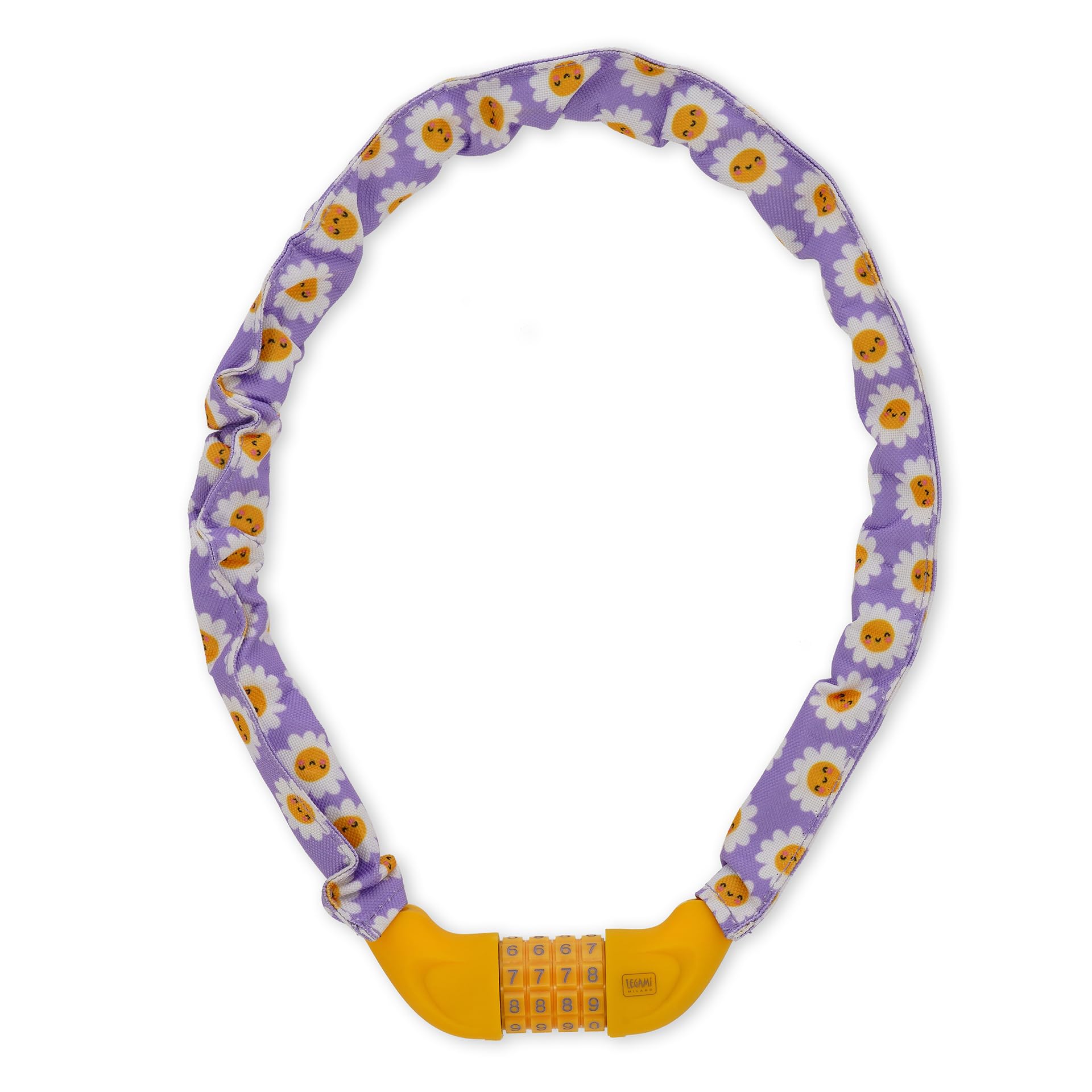
Image: The Legami Daisy Bike Lock, showcasing its design and combination mechanism.
Setup: Setting Your Personal Combination
Your Legami Daisy Bike Lock comes with a factory preset combination, usually "0000". Follow these steps to set your personal 4-digit combination:
- Open the Lock: Ensure the lock is currently set to the opening combination (factory default is "0000"). Press the release button or pull the shackle to open the lock.
- Locate the Reset Mechanism: On the side or bottom of the combination mechanism, you will find a small reset button or screw. This might be a small knob that needs to be turned 90 degrees, or a button that needs to be pressed with a pen.
- Engage Reset Mode:
- If it's a button: Press and hold the reset button with a pointed object (like a pen tip) until the new combination is set.
- If it's a screw/knob: Turn the reset screw/knob 90 degrees clockwise (or as indicated by an arrow) to engage the reset mode.
- Set Your New Combination: While in reset mode, rotate the number dials to your desired 4-digit combination. Choose a memorable but not easily guessable number.
- Disengage Reset Mode:
- If it was a button: Release the reset button.
- If it was a screw/knob: Turn the reset screw/knob back 90 degrees counter-clockwise to its original position.
- Test the New Combination: Scramble the dials, then enter your new combination and attempt to open the lock. Ensure it opens correctly.
Important: Remember your new combination. There is no master key or way to reset the combination if it is forgotten without knowing the current one.

Image: Detailed view of the combination dials for setting your code.
Operating the Lock
Locking Your Bicycle
- Position the Lock: Wrap the chain around your bicycle frame and a secure, immovable object (e.g., a bike rack, lamppost).
- Align Combination: Rotate the number dials to your personal 4-digit combination.
- Insert Shackle: Insert the locking shackle into the main body of the lock until it clicks securely into place.
- Scramble Dials: Once locked, immediately scramble the number dials to prevent unauthorized access.

Image: Demonstrating how to secure a bicycle with the lock.
Unlocking Your Bicycle
- Align Combination: Rotate the number dials to your personal 4-digit combination.
- Release Mechanism: Press the release button or pull the shackle to open the lock. The shackle should spring open or be easily removable.
- Remove Lock: Detach the lock from your bicycle and the secure object.

Image: A close-up of hands unlocking the bike lock.
Maintenance
The Legami Daisy Bike Lock is designed to be water-resistant and durable. To ensure optimal performance and longevity:
- Cleaning: Wipe the lock periodically with a damp cloth to remove dirt and grime. Avoid harsh chemicals that could damage the materials.
- Lubrication: If the combination dials become stiff, apply a small amount of silicone-based lubricant to the moving parts. Do not use oil-based lubricants as they can attract dirt.
- Storage: When not in use for extended periods, store the lock in a dry place to prevent moisture buildup.
Troubleshooting
- Lock will not open with correct combination:
- Ensure all four digits are perfectly aligned with the indicator marks.
- Try rotating the dials slightly back and forth around your combination to ensure full engagement of the internal mechanism.
- The dials might be stiff. Apply a silicone lubricant as described in the Maintenance section.
- Forgotten Combination:
Unfortunately, if you have forgotten your combination, there is no way to open the lock without knowing the code. The lock is designed for security, and there is no master key or backdoor reset. Consider trying common combinations you might use (birth dates, phone numbers, etc.). If unsuccessful, the lock may need to be cut, which will render it unusable.
- Lock feels stiff or difficult to operate:
This could be due to dirt or lack of lubrication. Clean the lock and apply a silicone-based lubricant to the dials and shackle mechanism.
Specifications
| Brand | Legami |
| Model Name | Bike Lock |
| Model Number | BIL0004 |
| Type of Closure | Combination |
| Special Features | Weather Resistant, Cut Resistant |
| Material | ABS, Zinc, Polyester exterior, PVC core, Iron interior |
| Dimensions (LxWxH) | 75 cm (Length), 1.4 cm (Diameter) |
| Color | Purple (Daisy pattern) |
| Recommended Uses | Bicycle security in urban and outdoor environments |
Warranty and Support
Legami products are designed for quality and durability. For any questions, support, or warranty inquiries regarding your Legami Daisy Bike Lock, please contact Legami customer service through their official channels.
You can find more information and contact details by visiting the official Legami website or their brand store on Amazon:
- Legami Brand Store on Amazon
- For general inquiries, refer to the contact information provided on Legami's official e-commerce website, which supports multiple languages.
Legami is committed to providing innovative, cheerful, fun, and quality products. Your satisfaction is important.