
HILEO hi96
HILEO Open Ear Headphones User Manual
Model: hi96 | Brand: HILEO
Introduction
Thank you for choosing HILEO Open Ear Headphones. This manual provides detailed instructions for setting up, operating, and maintaining your new headphones to ensure optimal performance and longevity. Designed for comfort and awareness, these headphones allow you to enjoy high-fidelity audio while staying connected to your surroundings without inserting into the ear canal.
Product Overview
The HILEO Open Ear Headphones feature an innovative design that rests comfortably outside your ear canal, providing a unique listening experience. They come with a compact charging case for extended battery life and easy portability. Constructed with lightweight soft silicone and featuring a multi-point support system, these headphones offer a comfortable and secure fit.
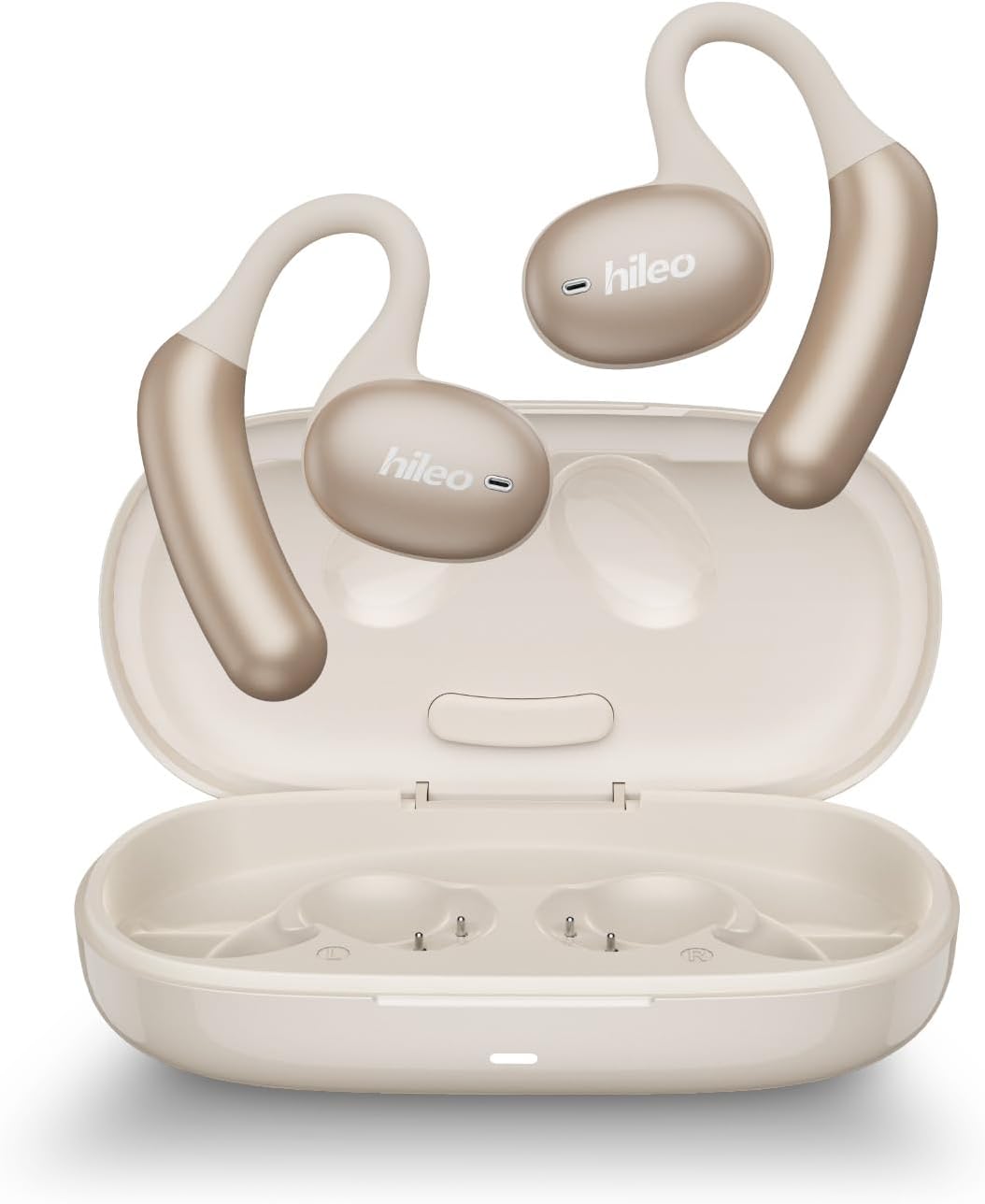
Figure 1: HILEO Open Ear Headphones and Charging Case (White model shown).

Figure 2: The headphones feature an elastic memory titanium alloy for flexibility and durability, designed to fit all ear shapes.
What's in the Box:
- HILEO Open Ear Headphones (Left and Right)
- Charging Case
- USB Charging Cable (Type-C)
- User Manual (This document)
Setup
1. Charging the Headphones and Case:
Before first use, fully charge the headphones and the charging case. Place the headphones into the charging case. Connect the USB charging cable to the charging port on the case and a power source. The indicator lights on the case will show charging status.

Figure 3: Charging the headphones and case. The headphones offer 8 hours of continuous playback and up to 90 hours of standby time.
2. Pairing with Your Device:
- Ensure the headphones are charged and inside the charging case.
- Open the charging case. The headphones will automatically enter pairing mode.
- On your smartphone, tablet, or other Bluetooth-enabled device, go to the Bluetooth settings.
- Search for "HILEO hi96" in the list of available devices and select it to connect.
- Once connected, you will hear an audio prompt, and the indicator light on the headphones will change.
The headphones feature Bluetooth 5.2 for enhanced connectivity, offering stable connections up to 10 meters (33 feet) in open spaces. Nano-level chips ensure low latency, providing an unimaginable gaming experience.

Figure 4: Audio and video synchronization for an immersive experience with low latency.
Operating Instructions
The HILEO Open Ear Headphones are equipped with intuitive touch controls for easy management of your audio and calls.
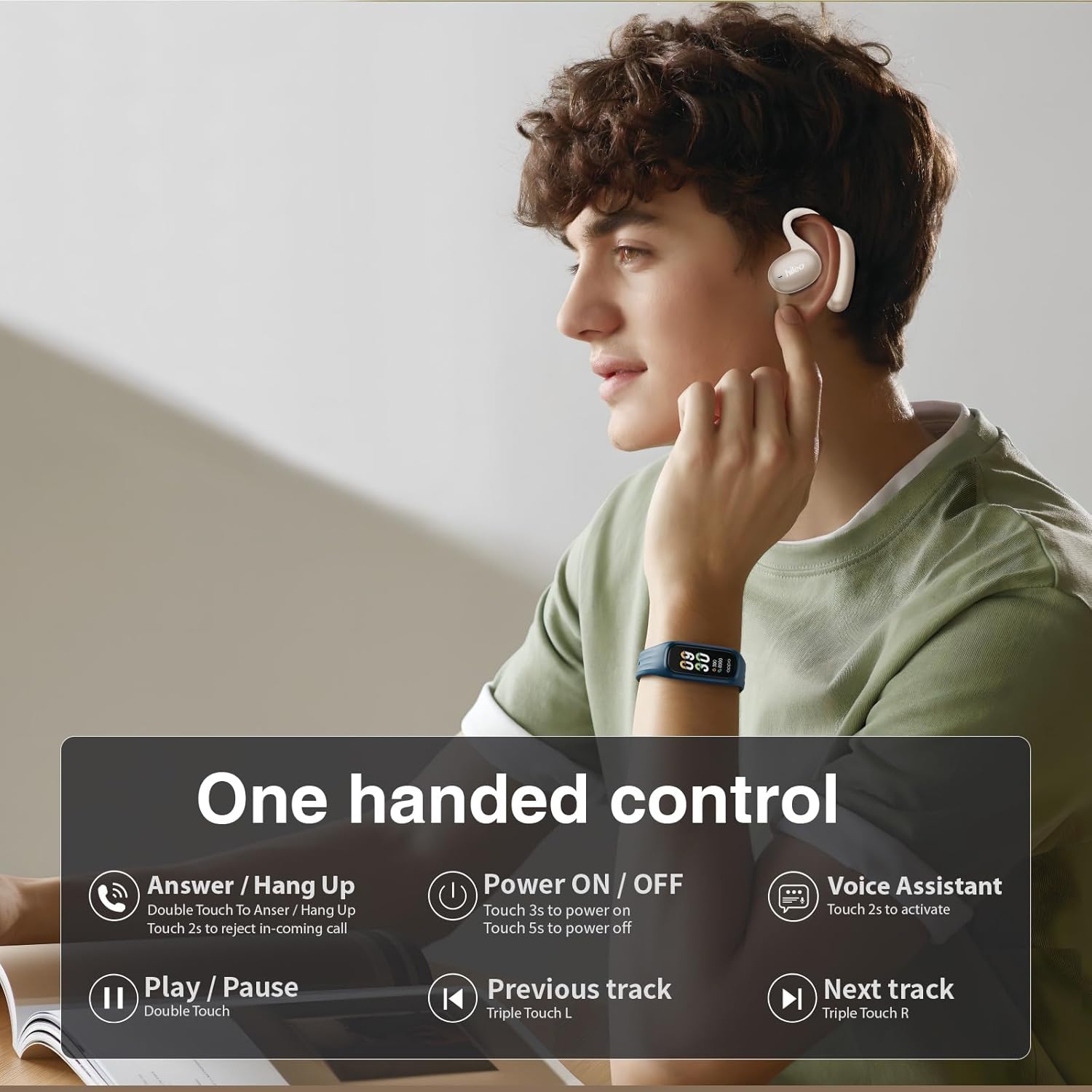
Figure 5: One-handed control via touch sensors on the headphones.
Touch Control Functions:
| Function | Action |
|---|---|
| Power ON / OFF | Touch 3s to power on / Touch 5s to power off |
| Answer / Hang Up Call | Double Touch to Answer / Hang Up |
| Reject Incoming Call | Touch 2s |
| Play / Pause Music | Double Touch |
| Previous Track | Triple Touch Left (L) headphone |
| Next Track | Triple Touch Right (R) headphone |
| Voice Assistant | Touch 2s to activate |
The open-ear design allows you to maintain environmental awareness while enjoying your audio, making them ideal for sports and outdoor activities.

Figure 6: The open-ear design ensures comfort and awareness during activities like running or fitness.
Maintenance
- Cleaning: Regularly wipe the headphones and charging case with a soft, dry cloth. Avoid using harsh chemicals or abrasive materials.
- Storage: When not in use, store the headphones in their charging case to protect them from dust and damage. Store in a cool, dry place away from direct sunlight and extreme temperatures.
- Water Resistance: The headphones are waterproof. However, avoid prolonged submersion in water and ensure they are dry before placing them back in the charging case to prevent damage to the charging contacts.
Troubleshooting
| Problem | Possible Solution |
|---|---|
| Headphones not pairing |
|
| No sound or low volume |
|
| Charging issues |
|
| Sound quality issues (e.g., static, drops) |
|
Specifications
| Feature | Detail |
|---|---|
| Model Name | hi96 |
| Connectivity Technology | Wireless |
| Wireless Communication Technology | Bluetooth |
| Bluetooth Version | 5.2 |
| Bluetooth Range | 10 Meters (approx. 33 feet) |
| Operating Frequency | 2.4GHz ISM |
| Battery Life (Continuous Playback) | 8 Hours |
| Standby Time | 90 Hours |
| Ear Placement | Open Ear |
| Form Factor | Over Ear |
| Control Method | Touch |
| Water Resistance Level | Waterproof |
| Item Weight | 6.7 ounces |
| Package Dimensions | 7.36 x 5.51 x 1.54 inches |
| Audio Driver Type | Bone Conduction Driver (Note: The product is designed as open-ear headphones that do not insert into the ear canal, allowing for environmental awareness.) |
| Signal-to-noise ratio | 59dB |
| Noise Control | ENC Noise Cancellation for HD Calling |

Figure 7: Powerful Dynamic Audio Experience with 14.2mm dynamic driver for premium sound quality and powerful bass.

Figure 8: ENC intelligent noise reduction technology accurately filters ambient sound, restores clear human voice, and makes calls feel like face-to-face.
Safety Information
- Do not disassemble, repair, or modify the product.
- Keep away from extreme temperatures, humidity, and corrosive substances.
- Avoid dropping or subjecting the headphones to strong impacts.
- Do not use the headphones at excessively high volumes for prolonged periods to prevent hearing damage.
- Dispose of the product responsibly according to local regulations.
Official Product Video
Video 1: HILEO Open Ear Wireless Headphones Overview. This video highlights the open-ear design, long battery life, modern connectivity, and lightweight, waterproof build of the headphones.
Warranty and Support
For warranty information and customer support, please refer to the warranty card included with your product or visit the official HILEO website. You can also contact HILEO customer service through the retailer where you purchased the product.
Visit the HILEO Store: HILEO Store on Amazon
Ask a question about this manual
Ask about setup, troubleshooting, compatibility, parts, safety, or missing instructions. Manuals+ will review the question and use this page’s manual context to help answer it.