
Introduction
The GeeekPi Argon Neo 5 M.2 NVMe PCIe Case is designed to enhance the capabilities of your Raspberry Pi 5. This enclosure integrates an M.2 NVMe expansion board, allowing you to boot your Raspberry Pi 5 from an NVMe M.2 drive for significantly faster and higher storage access via the PCIe slot. It features both passive and active cooling mechanisms to maintain optimal operating temperatures for your Raspberry Pi 5 and the M.2 NVMe drive. This manual provides essential information for the proper installation, operation, and maintenance of your Argon Neo 5 case.
Package Contents
Before beginning installation, please verify that all components are present in the package:
- Argon NEO 5 M.2 NVME PCIE CASE
- 8.5x45mm PCIe FFC cable
- M2.5x8mm screws (4 pieces)
- M2.5x6mm screws (2 pieces)
- Heat dissipation patches (thermal pads)
- Anti-slippery rubber feet
- Drawstring Gift Bag (Note: Raspberry Pi Board and NVMe SSD are not included)

Image: All components included in the Argon Neo 5 M.2 NVMe PCIe Case package.
Setup and Installation
Follow these steps carefully to assemble your Raspberry Pi 5 with the Argon Neo 5 M.2 NVMe PCIe Case:
- Prepare the FFC Cable: Ensure the golden finger of the FFC cable is facing upwards when connecting.
- Prepare the Case: Remove any protective film from the internal components of the case.
- Connect FFC Cable: Insert the FFC cable through the designated hole and connect it to the PCIe slot on your Raspberry Pi 5.
- Install Raspberry Pi 5: Carefully place your Raspberry Pi 5 board into the bottom part of the case, ensuring all ports align correctly.
- Install NVMe SSD: Attach your M.2 NVMe SSD (up to 2280 size) to the expansion board within the case. Apply the provided heat dissipation patch to the NVMe drive for optimal thermal management.
- Secure the Top Cover: Place the top cover onto the assembled unit and secure it with the provided screws.
- MicroSD Card Insertion: Important: Ensure the microSD card is NOT inserted into the Raspberry Pi during the assembly process. Insert the SD card only before initial use, and then screw on the bottom cover if applicable.
- Attach Rubber Feet: Apply the anti-slippery rubber feet to the bottom of the case.

Image: Step-by-step installation guide for the Argon Neo 5 M.2 NVMe PCIe Case.

Image: Reminder regarding microSD card insertion during assembly.
Operating Instructions
The Argon Neo 5 case is designed for optimal performance and ease of use with your Raspberry Pi 5:
- Cooling System: The durable aluminum casing provides passive cooling. An integrated 30mm PWM fan offers active cooling, efficiently managing the temperature of your Raspberry Pi 5.
- NVMe Storage: Utilize the M.2 NVMe PCIe expansion for high-speed storage, significantly improving data access and system responsiveness compared to traditional SD card storage.
- Port Access: The removable top cover allows full access to all Raspberry Pi 5 ports, including PCIe, PoE, MIPI, RTC, and UART. The cover can be reattached for a seamless appearance.
- Power Button: The case includes a plastic power cap for easy power on/off functionality without requiring additional tools. LED status indicators remain visible.

Image: Side view of the Argon Neo 5 case with USB and Ethernet ports.

Image: Side view of the Argon Neo 5 case with USB-C and HDMI ports.
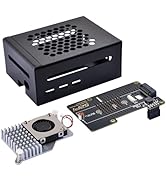
Image: Internal view of the case components, showing the fan and heatsink.
Maintenance
To ensure the longevity and optimal performance of your Argon Neo 5 case and Raspberry Pi 5, consider the following maintenance tips:
- Cleaning: Periodically clean the exterior of the case with a soft, dry cloth. Avoid using harsh chemicals or abrasive materials.
- Fan Inspection: Check the integrated PWM fan for dust accumulation. If necessary, gently clean the fan blades with compressed air or a soft brush to ensure unrestricted airflow.
- Thermal Pads: Ensure the thermal pads remain properly seated between the NVMe SSD and the heatsink for efficient heat transfer.
- Ventilation: Keep the case's ventilation openings clear of obstructions to allow for proper airflow and cooling.
Troubleshooting
If you encounter issues with your Argon Neo 5 case, consider these common troubleshooting steps:
- NVMe SSD Not Detected:
- Verify that the FFC cable is securely connected to both the NVMe expansion board and the Raspberry Pi 5's PCIe slot.
- Ensure the NVMe SSD is correctly seated in its slot.
- Check that your Raspberry Pi OS is updated and configured to support NVMe boot or storage.
- Fan Not Spinning:
- Confirm the fan cable is properly connected to the Raspberry Pi 5's fan header.
- Ensure the Raspberry Pi 5 is powered on and operating under a load that would trigger the fan (the PWM fan may not spin at low temperatures).
- Check for any physical obstructions preventing the fan from spinning.
- Overheating:
- Ensure the thermal pads are correctly applied to the NVMe SSD and any other heat-generating components.
- Verify that the fan is functioning correctly and that the case's vents are not blocked.
- Operating in a well-ventilated environment can help.
- Loose Power Button: If the power button feels loose or gets stuck, ensure the plastic power cap is correctly aligned and seated. Avoid excessive force when pressing the button.
Specifications
| Feature | Detail |
|---|---|
| Model Number | Argon Neo 5 M.2 NVME PCIE Case |
| Brand | GeeekPi |
| Compatible Devices | Raspberry Pi 5 |
| Material | Aluminum |
| Color | Black |
| Hardware Interface | PCI |
| Hard Drive Form Factor | M.2 NVMe (up to 2280 size) |
| Cooling | Passive (aluminum case) + Active (30mm PWM fan) |
| Dimensions (Approx.) | 95mm (L) x 70mm (W) x 40mm (H) |

Image: Dimensions of the Argon Neo 5 M.2 NVMe PCIe Case.
Warranty and Support
For warranty information, technical support, or further assistance, please refer to the official GeeekPi website or contact the seller directly. Keep your proof of purchase for warranty claims.