
Introduction
The KUAIVO Digital Postal Shipping Scale (Model kvps001) is designed for high-accuracy weighing of various items, from small packages to large parcels, with a maximum capacity of 440 lbs (200 kg) and a minimum weight detection of 0.06 lb. Its precision sensor ensures measurements accurate to 0.35 oz. This versatile scale is suitable for small businesses, post offices, warehouses, and home use, including weighing luggage.
Key features include a high-definition LCD display with blue backlight for clear readability in various lighting conditions, and four selectable measurement units: LB, OZ, KG, and LB:OZ. The scale also incorporates convenient Hold and Tare functions to streamline your weighing tasks. Constructed with a durable stainless steel platform and anti-slip supports, it offers stability and ease of maintenance.
What's in the Box
- Shipping Scale
- Charging Cable (Type-C)
- 2 x AAA Batteries
- Back Nail Slot (for wall mounting display)

Setup
- Unpack Components: Carefully remove all items from the packaging.
- Install Batteries: Open the battery compartment on the back of the remote LCD display. Insert the two AAA batteries, ensuring correct polarity (+/-). Close the compartment securely.
- Connect Display: The remote LCD display is connected to the scale platform via a coiled cable. Ensure the cable is securely plugged into both the display unit and the scale platform.
- Power Supply Options: The scale can be powered by the installed AAA batteries or via the included Type-C charging cable. Connect the Type-C cable to the display unit and a suitable USB power source for continuous operation or charging.
- Placement: Place the scale platform on a hard, flat, and stable surface to ensure accurate readings. Avoid soft or uneven surfaces like carpets.
- Wall Mounting (Optional): The remote display unit features back nail slots, allowing it to be mounted on a wall for convenient viewing, especially when weighing large items that might obstruct the view of the platform.

Operating Instructions
- Power On/Off: Press the Power button (usually marked with a power symbol) on the remote display to turn the scale on or off. The display will light up.
- Unit Conversion: Press the U button (Unit) to cycle through the available measurement units: pounds (LB), ounces (OZ), kilograms (KG), and pounds:ounces (LB:OZ). Select the desired unit for your measurement.
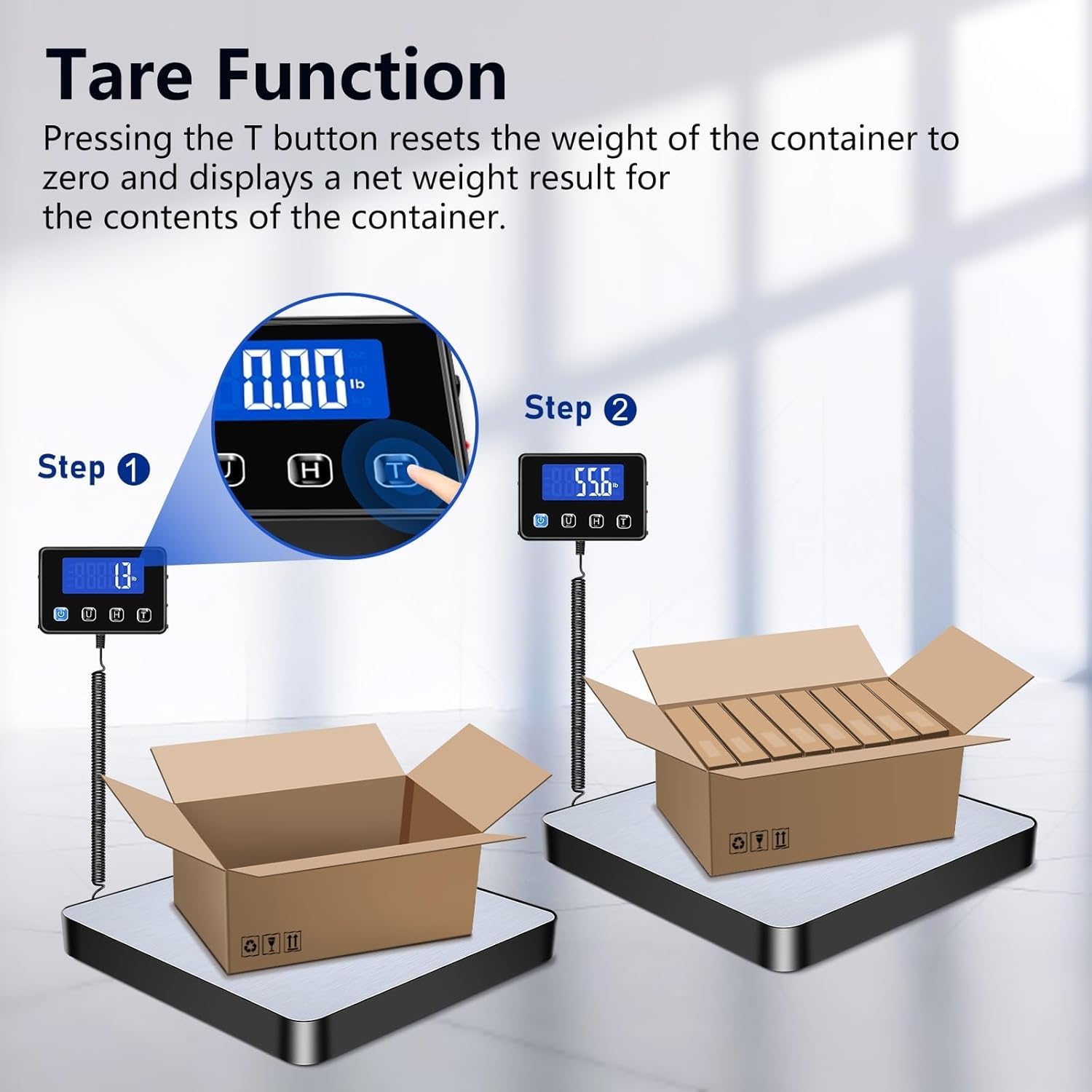
- Tare Function: To weigh items in a container without including the container's weight, place the empty container on the scale platform. Once the weight stabilizes, press the T button (Tare). The display will reset to zero. You can then add items to the container, and the scale will show only the net weight of the items.
- Hold Function: For large or awkwardly shaped items that might obscure the display, use the H button (Hold). Place the item on the scale. Once the weight is stable, press the H button. The displayed weight will lock, allowing you to remove the item and still read the measurement. Press H again to release the hold.


Maintenance
- Cleaning: The stainless steel platform is polished and rust-proof, making it easy to clean. Use a soft, damp cloth to wipe down the surface. Avoid abrasive cleaners or harsh chemicals that could damage the finish.
- Storage: Store the scale in a dry, cool place away from extreme temperatures and humidity. Ensure the display unit is securely stored, either attached to the platform or wall-mounted, to prevent damage.
- Battery Care: If using batteries, remove them if the scale will not be used for an extended period to prevent leakage.
- Avoid Overload: Do not exceed the maximum weight capacity of 440 lbs (200 kg) to prevent damage to the internal sensors.

Troubleshooting
- Inaccurate Readings: Ensure the scale is placed on a perfectly flat and stable surface. Uneven surfaces can cause discrepancies. Re-tare the scale before each measurement, especially if using a container.
- Display Not Turning On: Check if the AAA batteries are correctly installed and have sufficient charge. If using the Type-C cable, ensure it is securely connected to a working power source.
- Display Flashing/Error Message: This may indicate an overload. Remove the item from the scale immediately. If the issue persists, try replacing the batteries or using the Type-C power supply.
- Weight Not Stabilizing: Ensure the item being weighed is centered on the platform and not touching any other surfaces. Avoid vibrations or movement around the scale during measurement.
Specifications
| Feature | Detail |
|---|---|
| Brand | KUAIVO |
| Model | kvps001 |
| Weight Limit | 440 Pounds (200 kg) |
| Readout Accuracy | 0.35 oz |
| Minimum Weight Value | 0.06 lb |
| Display Type | LCD with Blue Backlight |
| Measurement Units | LB, OZ, KG, LB:OZ |
| Special Features | Auto Shut Off, Portable, Tare Function, Hold Function |
| Power Supply | 2 x AAA Batteries (Included), Type-C Charging Cable (Included) |
| Material Type | Stainless Steel Platform |
| Item Weight | 1.77 Kilograms |
Official Product Videos
Video: KUAIVO Shipping Scale - An overview of the scale's features and functionality by the seller.
Video: Digital Shipping Scale - A demonstration of the digital shipping scale's operation and benefits by the seller.
Warranty & Support
For any questions, technical support, or warranty claims regarding your KUAIVO Digital Postal Shipping Scale, please refer to the contact information provided in your product packaging or visit the official KUAIVO website. Ensure you have your model number (kvps001) and purchase details available when contacting support.