
Important Safety Information
This product is certified by the Children's Product Certificate (CPC) and has a weight capacity of 350 lbs. Proper assembly is necessary to prevent instability or collapse. The full-length guardrail ensures added safety. Please check the product and assembly manual for any potential pinch points or sharp edges. Always ensure all connections are secure before use.
Product Overview
The Bellemave Twin XL Loft Bed is designed to maximize space, featuring an integrated desk, storage stairs, a wardrobe, an adjustable shelf, and a charging station. It also includes RGB LED lighting for customizable ambiance. This heavy-duty metal loft bed is suitable for kids, teens, and adults.
Key Features:
- Integrated L-Shaped Desk: Provides a dedicated area for work or study.
- Charging Station: Includes USB ports and 2 outlets for convenient device charging.
- RGB LED Lights: Offers 16 color options with adjustable brightness via remote control.
- Storage Stairs: Features built-in storage compartments and handrails for safe access.
- Wardrobe: Equipped with a hanging rod for clothing storage.
- Heavy-Duty Construction: Made from rust-proof metal with thickened steel support legs and slats for durability and stability.
- Safety Design: Full-length guardrails and CPC certification ensure user safety.
Video: Overview of the Bellemave Twin XL Loft Bed, showcasing its features and design.
Package Contents
The Bellemave Twin XL Loft Bed is shipped in two (2) separate boxes. Please ensure both boxes are received before beginning assembly. All necessary tools and a detailed assembly instruction guide are included in the package.
Setup and Assembly Instructions
Assembly of the Bellemave Twin XL Loft Bed requires careful attention to the provided instruction guide. It is recommended to have at least two adults for assembly. Follow the step-by-step instructions to ensure proper construction and stability.
- Unpack Components: Carefully remove all parts from both boxes. Lay them out and verify against the parts list in the instruction manual.
- Identify Hardware: Separate and identify all screws, bolts, and other hardware components.
- Assemble Base Frame: Begin by assembling the main bed frame components as per the manual. Ensure all connections are finger-tight initially.
- Attach Desk and Storage Unit: Connect the L-shaped desk and the storage stairs/wardrobe unit to the main frame.
- Install Slats: Securely place and fasten the bed slats onto the frame.
- Final Tightening: Once all components are in place, systematically tighten all screws and bolts using the provided tools. Do not overtighten.
- Install LED Lights and Charging Station: Follow the specific instructions for installing the LED light strip and connecting the charging station.
Note: Refer to the included paper manual for detailed diagrams and specific part numbers.
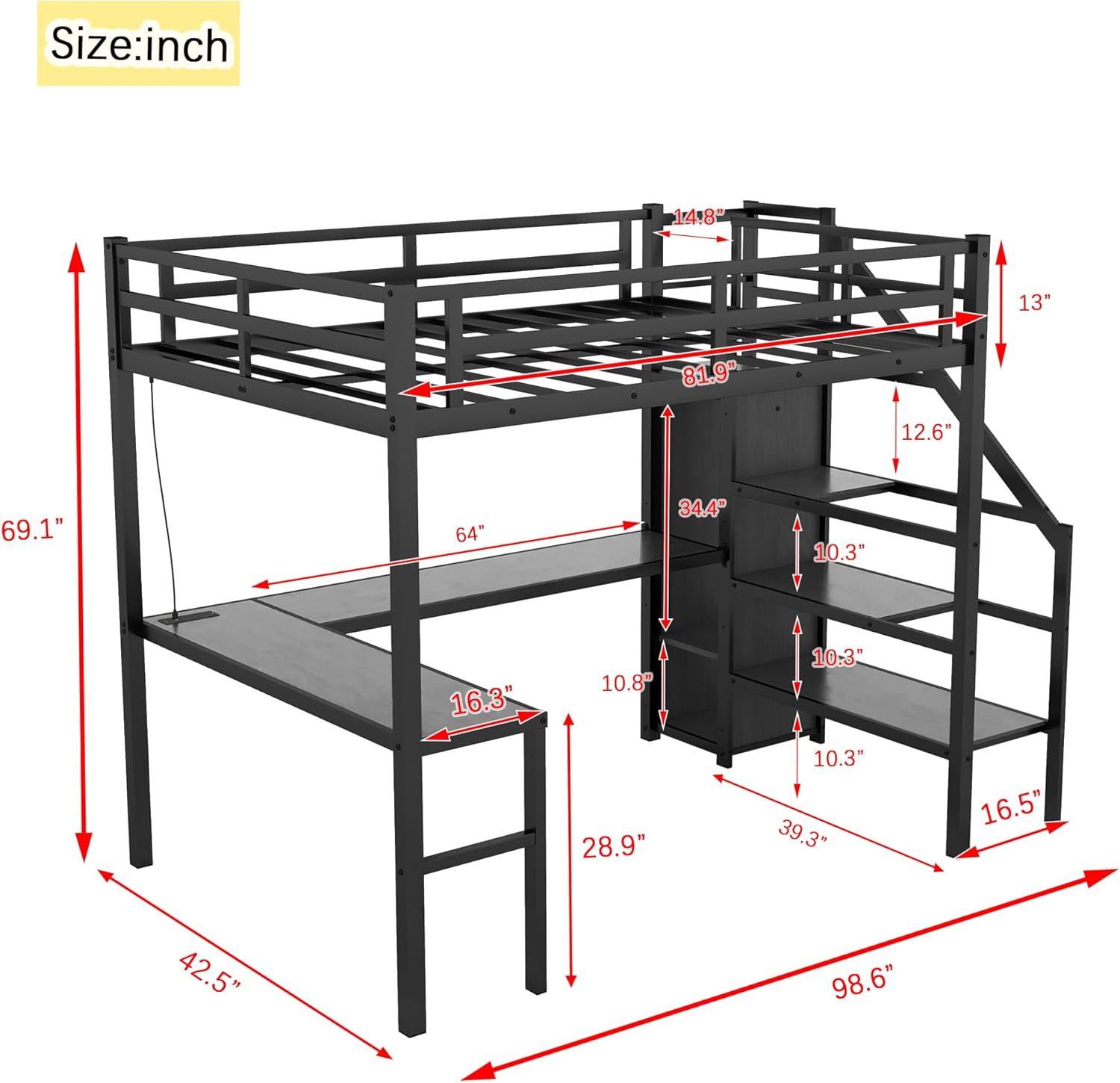
Image: Detailed dimensions of the Twin XL Loft Bed, including overall length, width, height, and desk/storage measurements.

Image: Angled view of the assembled loft bed, highlighting the integrated desk and storage stairs.

Image: Close-up view showing the bed's guardrail height and the design of the storage stairs with shelves.
Operating Instructions
LED Lighting System:
- Power On/Off: Use the provided remote control to turn the LED lights on or off.
- Color Selection: The remote allows selection from 16 different color options.
- Brightness Adjustment: Adjust the brightness levels using the remote control to suit your preference.
Charging Station:
- USB Ports: Connect your USB-compatible devices (e.g., smartphones, tablets) to the USB ports for charging.
- Power Outlets: Use the two standard power outlets for laptops, lamps, or other electronic devices.
- Safety: Ensure devices are compatible with the power output of the charging station. Do not overload the outlets.

Image: The loft bed desk area illuminated by LED lights, showing the integrated charging station.
Maintenance
- Regular Cleaning: Wipe down metal surfaces with a soft, damp cloth. Avoid abrasive cleaners that may damage the finish.
- Check Connections: Periodically inspect all bolts and screws to ensure they remain tight. Retighten as necessary to maintain stability.
- Weight Capacity: Do not exceed the stated weight capacity of 350 lbs for the bed.
- Mattress Compatibility: Use a Twin XL size mattress that fits securely within the bed frame.
Troubleshooting
| Problem | Possible Cause | Solution |
|---|---|---|
| Bed wobbles or feels unstable. | Loose connections or uneven assembly. | Ensure all bolts and screws are securely tightened. Check that the bed is on a level surface. |
| LED lights are not working. | Power connection issue, faulty remote, or damaged LED strip. | Check if the power adapter is properly plugged in. Replace remote batteries. Inspect the LED strip for visible damage. Contact customer support if issues persist. |
| Charging station not providing power. | Power cable disconnected or circuit overload. | Verify the charging station's power cable is fully plugged into a working wall outlet. Avoid plugging too many high-power devices simultaneously. |
| Missing parts during assembly. | Packaging error or lost component. | Double-check all packaging materials. Contact Bellemave customer support with your model number and a description of the missing part. |
Specifications
| Feature | Detail |
|---|---|
| Model Number | GZZ000076TXL2 |
| Brand | Bellemave |
| Size | Twin XL |
| Product Dimensions | 99"L x 42.5"W x 69"H |
| Material | Metal |
| Color | Black Wardrobe |
| Weight Capacity | 350 lbs |
| Assembly Required | Yes |
| Special Features | Adjustable, Charging Station (USB ports & outlets), RGB LED Lights, Wardrobe, Storage Stairs |
| Certifications | Children's Product Certificate (CPC) |
Warranty and Support
For warranty information, missing parts, or technical assistance, please contact Bellemave customer support. Refer to your purchase documentation or the Bellemave official website for contact details.
Please retain your proof of purchase for any warranty claims.


