
1. Product Overview
The Voltas 183V Vertis Smart Elite Gold is a 1.5-ton, 3-star inverter split air conditioner designed for efficient and consistent cooling in medium-sized rooms (111 to 150 sq ft). This model features Wi-Fi connectivity, a 5-in-1 adjustable cooling mode, and is built with a 100% copper condenser for enhanced durability and performance. It is capable of cooling effectively even at ambient temperatures up to 52°C.

Image 1.1: The indoor unit of the Voltas 183V Vertis Smart Elite Gold AC.
2. Key Features
- 1.5 Ton Capacity: Suitable for rooms ranging from 111 to 150 sq ft.
- Inverter Compressor: Adjusts power based on heat load for efficient and consistent cooling.
- 5-in-1 Adjustable Cooling Mode: Offers multiple tonnage options to suit varying cooling needs and save energy.
- Wi-Fi Enabled: Control your AC remotely via a smartphone application.
- High Ambient Cooling: Maintains effective cooling performance even at 52°C.
- Anti-Dust with Anti-Microbial Filter: Ensures cleaner and healthier air by filtering out dust and microbes.
- 100% Copper Condenser: Provides superior heat transfer, durability, and requires low maintenance.
- Stabilizer-Free Operation: Operates within a voltage range of 110V to 285V.
- R32 Refrigerant: Environmentally friendly refrigerant with no ozone depletion potential.
3. Installation and Setup
3.1 Package Contents
Upon unpacking, ensure all components are present:
- 1 Indoor Unit (IDU)
- 1 Outdoor Unit (ODU)
- 3-meter length Inter Connecting Copper Pipe
- 1 Remote Control
- User Manual (this document)
3.2 Unit Dimensions and Weight
- Indoor Unit (IDU): 96 cm (L) x 31.7 cm (B) x 23.5 cm (H), Weight: 11.1 kg
- Outdoor Unit (ODU): 83.5 cm (L) x 55.5 cm (B) x 29.5 cm (H), Weight: 24.7 kg
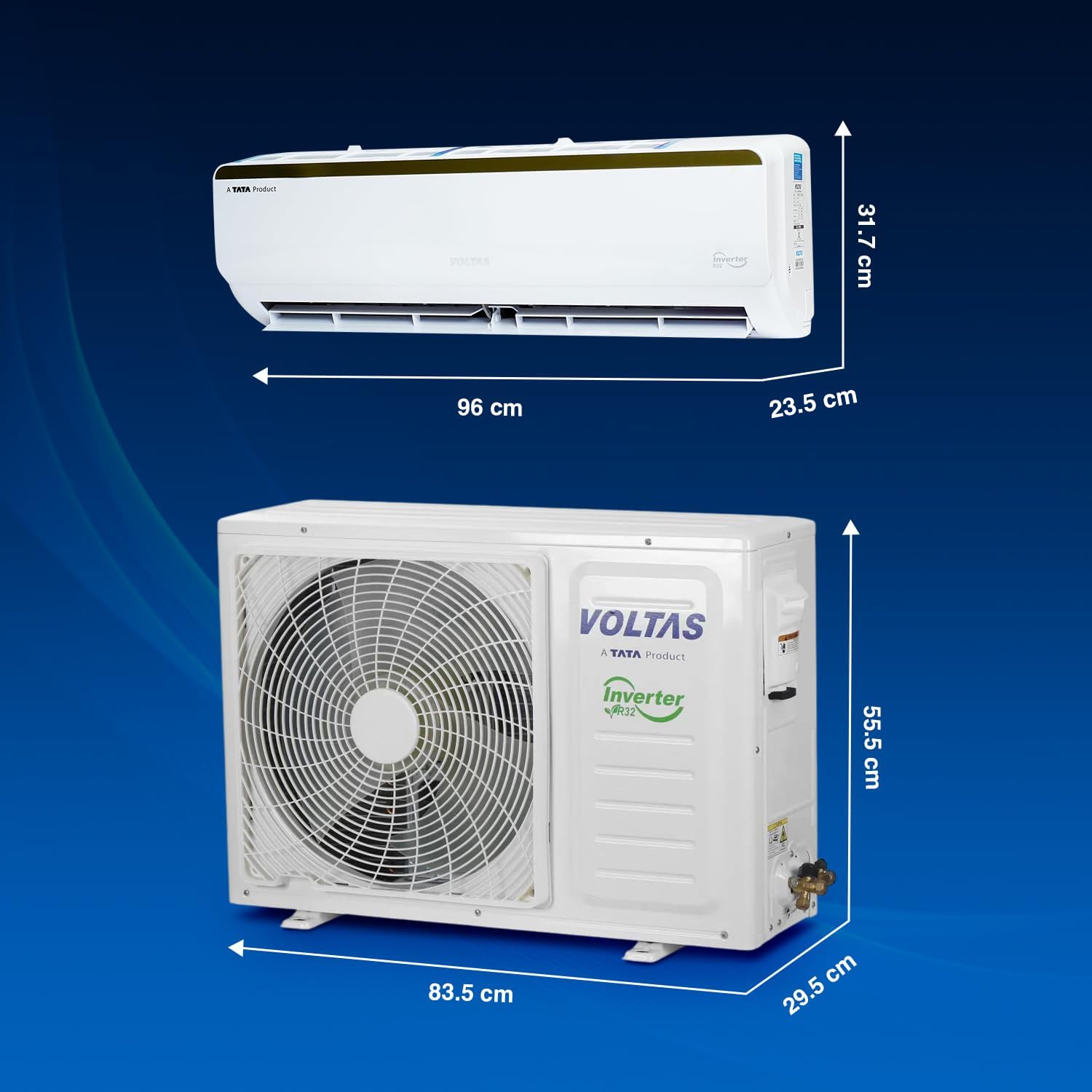
Image 3.1: Dimensions of the indoor and outdoor units.
3.3 Professional Installation
It is highly recommended to have the air conditioner installed by a certified Voltas technician to ensure proper functioning, safety, and to maintain warranty validity. Incorrect installation can lead to performance issues or damage.
The unit supports stabilizer-free operation within a voltage range of 110V to 285V, eliminating the need for an external stabilizer in most cases.
4. Operating Instructions
4.1 Remote Control Functions
The remote control allows you to access all features of your Voltas AC. Ensure batteries are correctly inserted. The hidden digital temperature display on the indoor unit provides clear feedback.
- Power On/Off: Press the power button to turn the unit on or off.
- Temperature Adjustment: Use the up/down arrows to set your desired temperature.
- Mode Selection: Cycle through cooling, fan, dry, and auto modes.
- Fan Speed: Adjust the fan speed for optimal airflow.
- Timer Mode: Set a timer for automatic power on/off.
4.2 5-in-1 Adjustable Cooling Mode
This feature allows you to adjust the cooling capacity (tonnage) of the AC via the remote control to match the number of occupants or ambient temperature, optimizing energy consumption.

Image 4.1: Visual representation of the 5-in-1 Adjustable Mode, adapting cooling based on room occupancy and temperature.
4.3 Wi-Fi Connectivity and Smart Control
The AC is Wi-Fi enabled, allowing you to control it from anywhere using the Voltas Smart AC application on your smartphone. It is also compatible with Amazon Alexa and Google Assistant for voice commands.
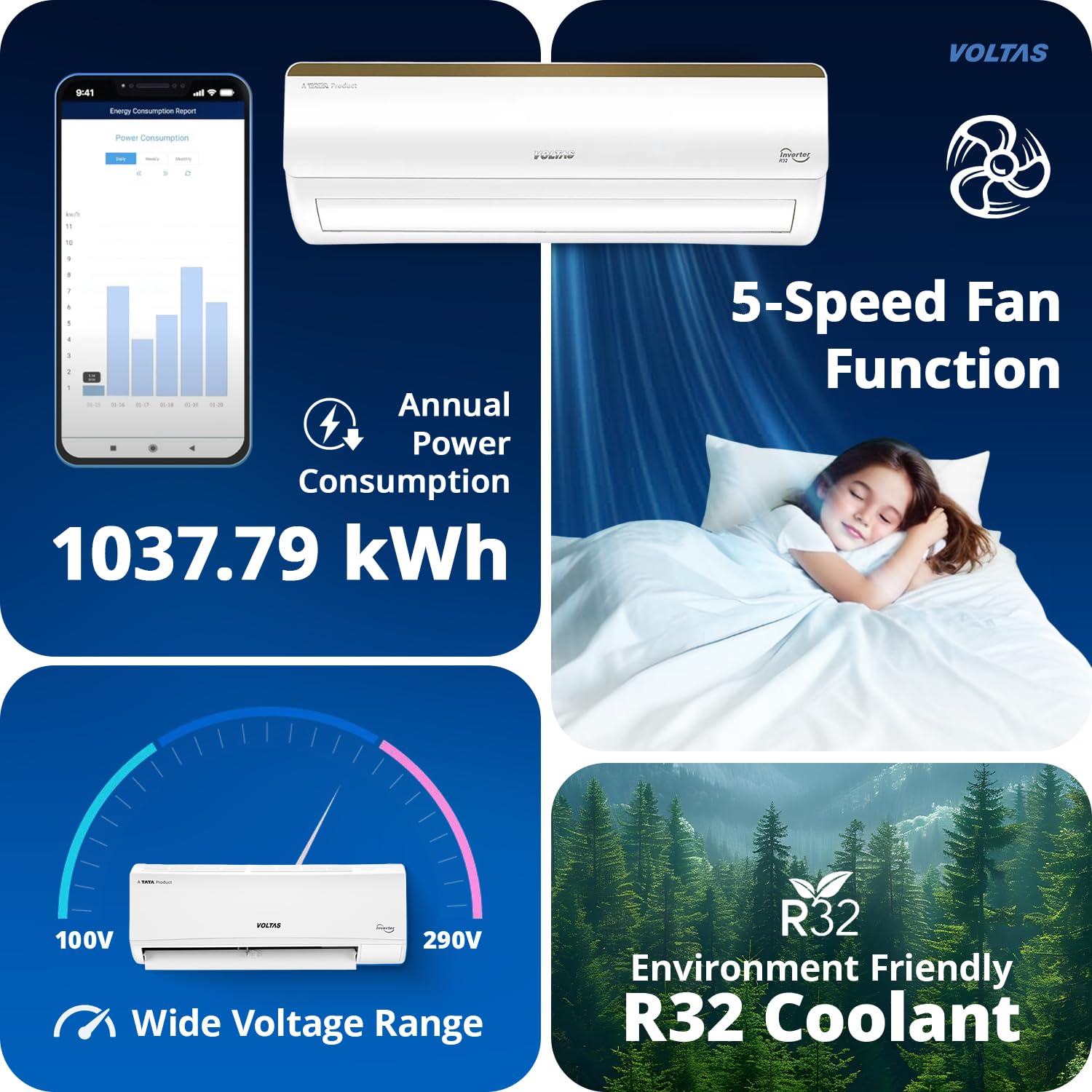
Image 4.2: The AC features a hidden display and can be controlled via Wi-Fi using a smartphone app.
- Download App: Search for "Voltas Smart AC" on your smartphone's app store.
- Pairing: Follow the in-app instructions to pair your AC with your Wi-Fi network.
- Voice Control: Integrate with Amazon Alexa or Google Assistant for hands-free operation.
4.4 Special Operating Modes
- Turbo Mode: Activates maximum cooling power for rapid temperature reduction.
- Sleep Mode: Adjusts temperature and fan speed for comfortable sleep while saving energy.
- SuperDry Mode: Effectively removes excess moisture from the air, ideal for humid conditions.
- Auto Restart: Automatically resumes previous settings after a power outage.

Image 4.3: Illustration of Sleep Mode for quiet cooling and Memory Restart for power outage recovery.
5. Maintenance
Regular maintenance ensures optimal performance and longevity of your Voltas AC.
5.1 Filter Cleaning
The Anti-Dust with Anti-Microbial Filter should be cleaned regularly to maintain air quality and cooling efficiency. A Filter Clean Indicator will alert you when cleaning is due.
- Turn off the AC and disconnect from power.
- Open the front panel of the indoor unit.
- Remove the air filters.
- Clean filters with a soft brush or vacuum cleaner. For heavy dirt, wash with mild detergent and water, then air dry completely before reinserting.
- Close the front panel.

Image 5.1: The Anti-Dust Filter with Anti-Microbial Coating helps maintain clean air by trapping dust, germs, bacteria, and fungi.
5.2 IceWash Technology
The Smart Self-Cleaning IceWash Technology automatically removes dirt from the evaporator coil by freezing and then thawing, ensuring optimal performance and hygiene.

Image 5.2: The IceWash technology cleans the indoor unit's coil by freezing and melting ice, removing accumulated dirt.
5.3 Anti-Corrosive Coating
The unit features an Anti-Corrosive Coating on the evaporator (HP Side) and a Hydrophilic Blue Fin Coating on the evaporator. These coatings protect against rust and corrosion, reduce mold growth, keep the coil dry, and enhance cooling efficiency, contributing to the AC's long lifespan.

Image 5.3: The Anti-Corrosive Coating protects critical components from rust and wear.
6. Troubleshooting
If you encounter issues with your AC, refer to the following common problems and solutions before contacting customer support.
| Problem | Possible Cause | Solution |
|---|---|---|
| AC not turning on | No power supply; Remote control batteries low/dead. | Check power connection and circuit breaker. Replace remote batteries. |
| Insufficient cooling | Dirty air filters; Blocked outdoor unit; Incorrect mode setting; Room size too large. | Clean air filters. Clear obstructions from outdoor unit. Ensure correct mode (Cool) and temperature setting. Verify room size is within recommended range. |
| Unusual noise | Loose parts; Obstruction in fan; Unit not level. | Check for loose components. Ensure no foreign objects are in the fan. Verify unit is installed on a level surface. |
| Water leakage from indoor unit | Blocked drain pipe; Improper installation. | Check and clear the drain pipe. If problem persists, contact a service technician. |
| Error Code (e.g., "E6") | Internal system fault; Wiring issue. | Note the error code and contact Voltas customer service for diagnosis and repair. |
For persistent issues or complex problems, please contact Voltas customer support or a certified service technician.
7. Specifications
| Feature | Detail |
|---|---|
| Brand | Voltas |
| Model | 183V Vertis Smart Elite Gold |
| Energy Efficiency | 3 Star |
| Capacity | 1.5 Tons |
| Annual Energy Consumption | 1037.79 kWh (as per energy label) |
| Cooling Power | 5.4 Kilowatts |
| ISEER Value | 3.80 |
| Noise Level (IDU) | 46 / 45 / 43 / 38 / 28 dB |
| Installation Type | Split System |
| Special Features | Dust Filter, Remote Controlled, Anti Dust with Anti Microbial Filter, Anti-Corrosive Coating, Auto Restart, Large LED Display, Turbo Mode, Dual Temp Display, Self Diagnosis, 5 in 1 Adjustable Cooling |
| Colour | White |
| Voltage | 110 - 285 Volts (Stabilizer free operation) |
| Refrigerant Gas | R32 (Environmental Friendly) |
| Material | Plastic |
| Item Weight | 31 kg 400 g (Total) |
| Product Dimensions (IDU) | 23.5D x 96W x 31.7H Centimeters |
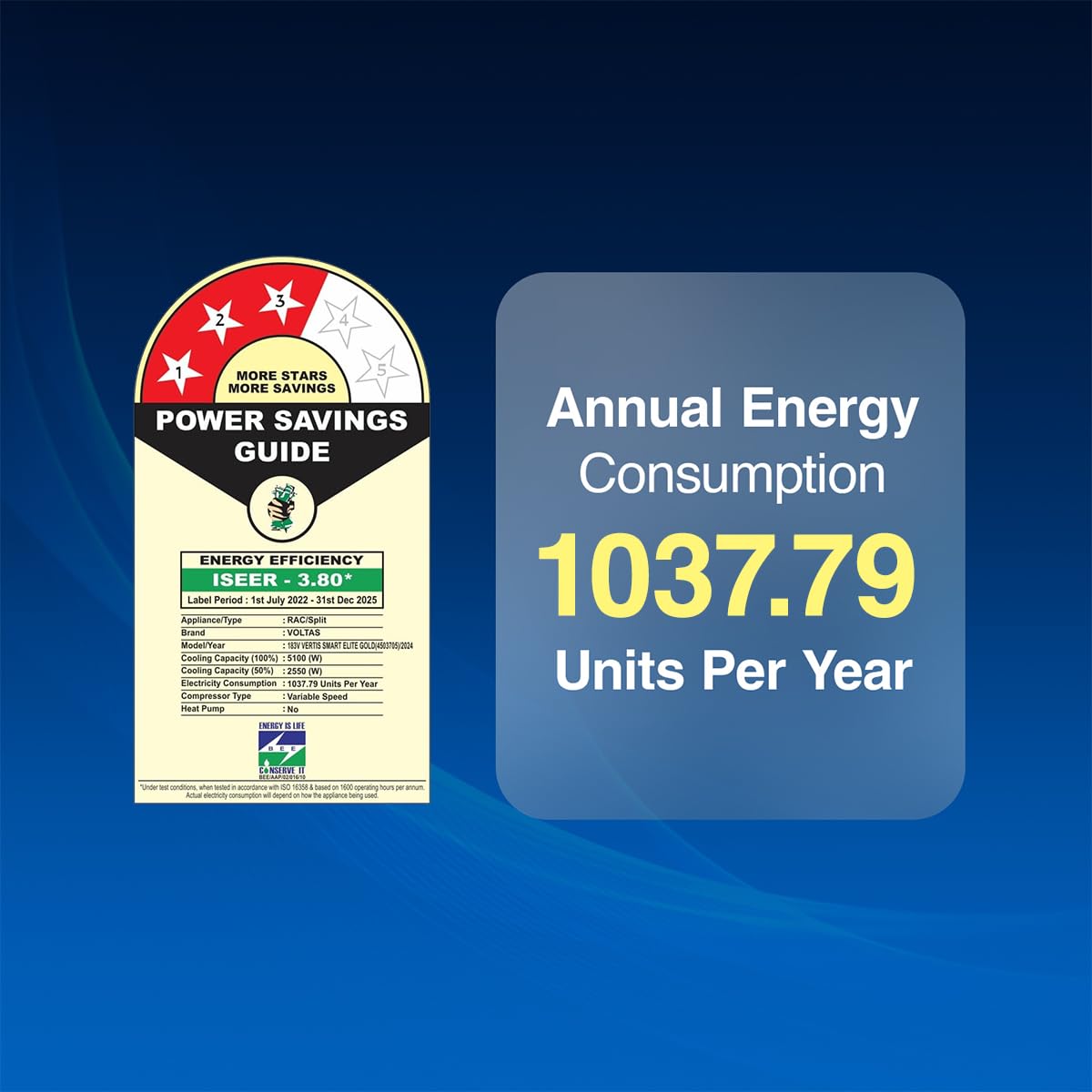
Image 7.1: The energy efficiency label showing 3-star rating and annual energy consumption.
8. Warranty and Support
Voltas provides comprehensive warranty coverage for your peace of mind.
- Product Warranty: 5 Years Comprehensive Warranty on the Product for purchases made from 19th Sep'25 to 31st March '26.
- Compressor Warranty: 10 Years Warranty on Inverter Compressor.
- PCB Warranty: 5 Years Warranty on PCB for purchases made from Jan 2025 onwards.
To avail warranty services, please retain your Amazon invoice as proof of purchase. For further support, you can access the user manual from the brand's official website or contact Voltas customer service.