
1. Introduction
Thank you for choosing the Ingco Electronic Scale HESA3303. This manual provides essential information for the safe and efficient operation, maintenance, and troubleshooting of your new electronic scale. Please read this manual thoroughly before using the device and retain it for future reference.
The Ingco HESA3303 is a versatile electronic scale designed for accurate weighing with a maximum capacity of 30 kg and a precision of 2 grams. It features an LED display for clear readings and is suitable for various applications, including industrial, commercial, and kitchen use.
2. Safety Instructions
- Always place the scale on a firm, level, and stable surface to ensure accurate measurements.
- Do not overload the scale beyond its maximum capacity of 30 kg, as this may damage the weighing mechanism.
- Keep the scale away from water, moisture, and extreme temperatures. This device is not waterproof.
- Avoid dropping or subjecting the scale to strong impacts, which can affect its accuracy and functionality.
- Use only the specified power supply (AC 220-240V, 50/60Hz).
- Do not attempt to disassemble or repair the scale yourself. Contact qualified service personnel for assistance.
- Clean the scale with a soft, damp cloth. Do not use abrasive cleaners or immerse the unit in water.
3. Package Contents
Please check the package contents upon unpacking to ensure all items are present and undamaged:
- Ingco Electronic Scale HESA3303 Unit (1)
- Power Cable (1)
- User Manual (1)
4. Setup
4.1 Unpacking
Carefully remove the scale from its packaging. Inspect the unit for any signs of damage during transit. Keep the packaging materials for potential future transport or storage.
4.2 Placement
Place the electronic scale on a flat, stable, and vibration-free surface. Ensure there is adequate space around the scale for safe operation and to prevent interference with other objects.
4.3 Power Connection
Connect the power cable to the scale's power input port and then plug it into a standard AC 220-240V, 50/60Hz electrical outlet. The scale does not require batteries for operation.
4.4 Initial Calibration/Zeroing
After connecting the power, turn on the scale using the power button. Allow a few seconds for the display to stabilize and show '0.00' or '0.000'. If the display does not show zero, press the 'ZERO' or 'TARE' button to reset it. This ensures accurate measurements.
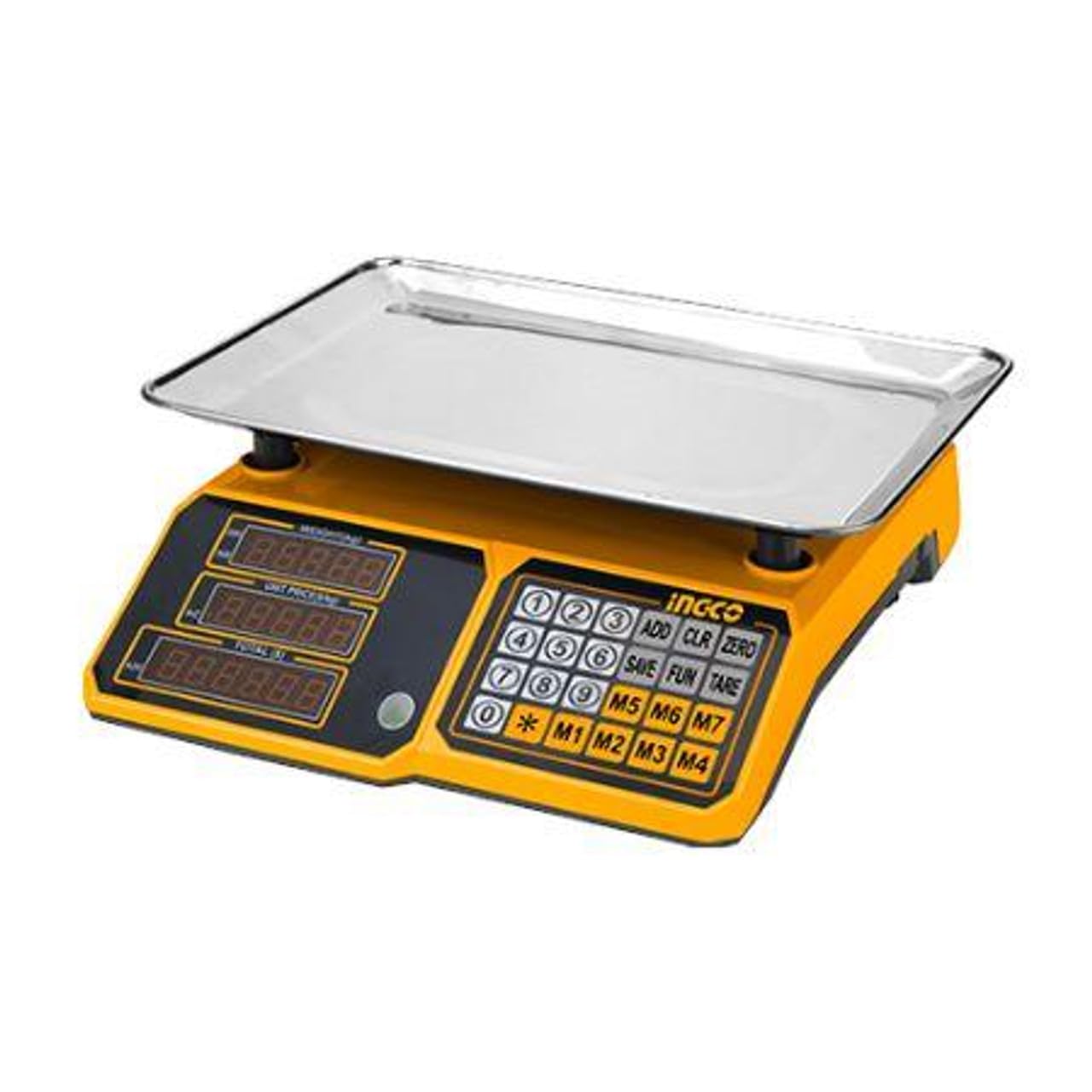
Figure 1: Ingco HESA3303 Electronic Scale. This image shows the scale's platform, control panel with an LED display, and the yellow base.
5. Operating Instructions
5.1 Power On/Off
- To turn on the scale, press the ON/OFF button. The LED display will light up and show '0.00'.
- To turn off the scale, press and hold the ON/OFF button until the display turns off.
5.2 Weighing Items
- Ensure the scale is powered on and the display shows '0.00'.
- Carefully place the item to be weighed onto the center of the weighing platform.
- Wait for the display to stabilize. The weight will be shown on the LED screen.
- Remove the item from the platform. The display should return to '0.00'.
5.3 Tare Function
The tare function allows you to subtract the weight of a container, so you only measure the contents.
- Place an empty container on the weighing platform. The display will show its weight.
- Press the TARE button. The display will reset to '0.00'.
- Add the items you wish to weigh into the container. The display will now show only the net weight of the items.
- To clear the tare, remove the container and its contents, then press the TARE button again, or turn the scale off and on.
6. Maintenance
6.1 Cleaning
- Always disconnect the scale from the power supply before cleaning.
- Wipe the scale's surface with a soft, slightly damp cloth.
- Do not use harsh chemicals, abrasive cleaners, or solvents, as these can damage the finish and electronic components.
- Ensure no liquid enters the interior of the scale.
6.2 Storage
When not in use for extended periods, store the scale in a clean, dry place, away from direct sunlight and extreme temperatures. It is recommended to store it in its original packaging to protect it from dust and physical damage.
7. Troubleshooting
If you encounter issues with your Ingco Electronic Scale HESA3303, please refer to the following common problems and solutions:
| Problem | Possible Cause | Solution |
|---|---|---|
| Scale does not turn on | No power supply; Power cable not connected properly; Faulty outlet | Check power cable connection; Ensure outlet is functional; Try a different outlet. |
| Inaccurate readings | Scale not on a level surface; Overloaded; Drafts or vibrations; Debris under platform | Place on a stable, level surface; Do not exceed 30 kg; Avoid windy areas; Clean under the platform. |
| Display shows 'Err' or other error code | Overload; Internal malfunction | Remove item if overloaded; Turn off and restart the scale. If error persists, contact customer support. |
| Display does not show '0.00' | Something on the platform; Not properly zeroed | Ensure platform is clear; Press the 'ZERO' or 'TARE' button. |
If the problem persists after attempting these solutions, please contact Ingco customer support for further assistance.
8. Specifications
| Feature | Detail |
|---|---|
| Brand | Ingco |
| Model Number | HESA3303 |
| Maximum Weight Capacity | 30 Kilograms |
| Reading Accuracy | 2 grams |
| Display Type | LED |
| Power Source Type | AC Current (220-240V, 50/60Hz) |
| Material | Plastic |
| Color | Yellow |
| Product Dimensions | 24 x 10 x 33 cm (approx. 9.45 x 3.94 x 12.99 inches) |
| Platform Size | 13 inches x 9.5 inches (approx. 330 x 240 mm) |
| Item Weight | 3.23 Kilograms |
| Batteries Required | No |
| Special Features | High weight capacity, LED screen |
9. Warranty and Support
Ingco products are manufactured to high-quality standards. For information regarding warranty coverage, please refer to the warranty card included with your purchase or visit the official Ingco website. If you require technical support, spare parts, or have any questions not covered in this manual, please contact Ingco customer service through their official channels.
Please have your model number (HESA3303) and purchase date ready when contacting support.