
DLYFULL B4
Dlyfull B4 Universal Battery Tester
Model: B4
Brand: DLYFULL
Introduction
The Dlyfull B4 Universal Battery Tester is designed to accurately measure the voltage and remaining capacity of a wide range of battery types. This manual provides comprehensive instructions for the proper setup, operation, and maintenance of your battery tester, ensuring optimal performance and longevity.

Image: The Dlyfull B4 Universal Battery Tester, showing its LCD display and various testing slots.
What's in the Box
- 1 x Dlyfull B4 Battery Load Tester
- 2 x AAA Alkaline 1.5V Batteries
- 1 x Welcome Guide
Product Features
- Robust Compatibility: Compatible with 12 battery types, including 1.2V Ni-MH, 1.45V Zinc Air, 1.5V Alkaline, 3.0V Lithium Manganese, 3.2V LiFePO4, 3.7V Li-ion, 6.0V, 9.0V, and 12.0V Alkaline packs. Supports AAA, AA, C, SC, D, N sizes, button cells, CR123A, CR-V3, 2CR5, 23A, 27A, and more.
- Smart LCD Display: Features an LCD screen that displays battery voltage and level in both percentage and a battery bar, providing clear and precise information.
- Portable & Easy to Use: Compact design weighing less than 0.36 pounds, making it convenient for carrying and storage. Cylindrical batteries are tested using the black negative pin, while button and combination batteries are placed in their corresponding slots.
- Self-Test Function: A "CHECK" button allows for a self-test of the tester's internal battery level by holding it for 3 seconds.

Image: The Dlyfull B4 Battery Tester demonstrating its powerful compatibility with over 12 different battery types, including various cylindrical and button cell batteries.
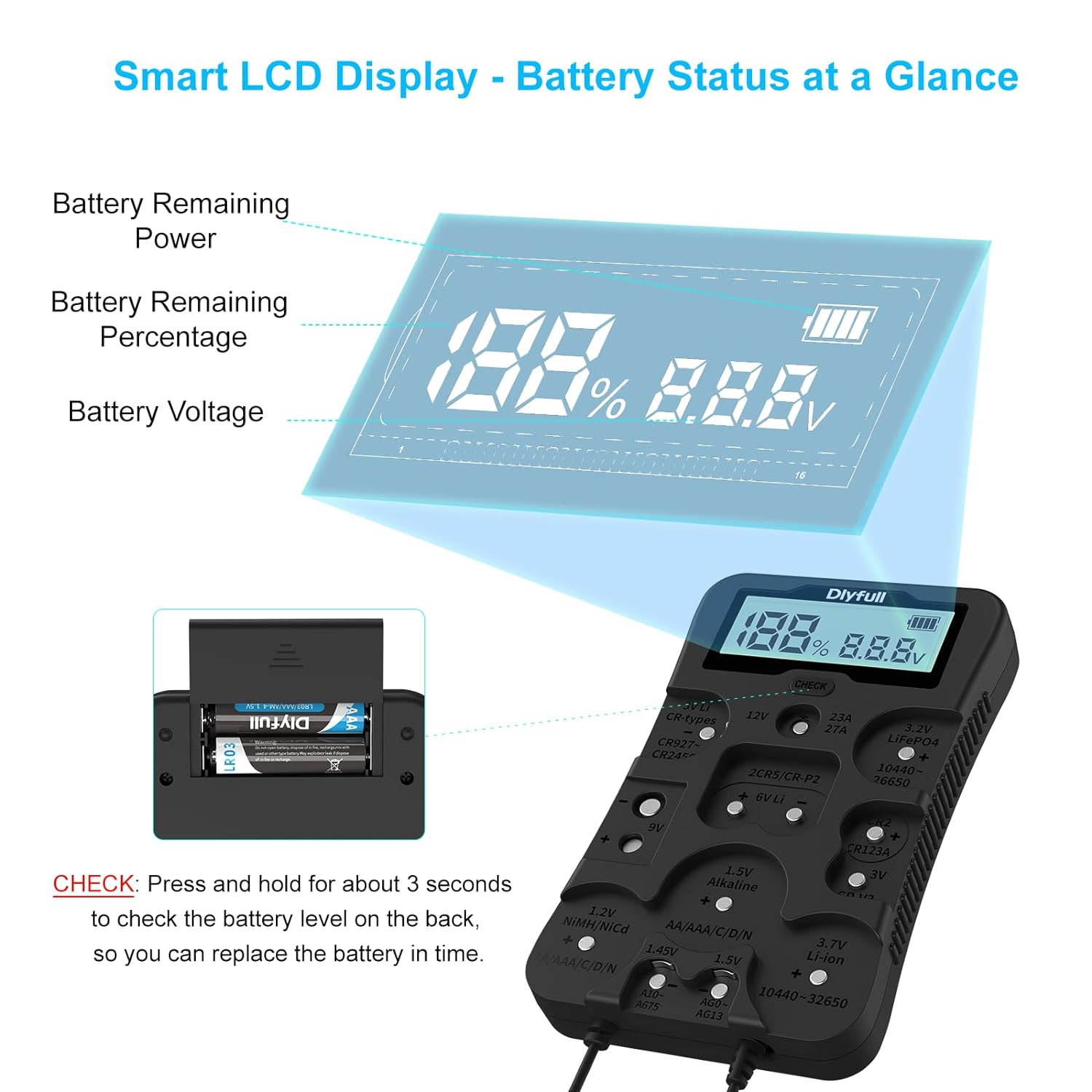
Image: A detailed view of the Dlyfull B4's smart LCD display, illustrating how battery remaining power, percentage, and voltage are clearly shown.
Setup
- Install AAA Batteries: Open the battery compartment on the back of the Dlyfull B4 tester. Insert the two included 1.5V AAA alkaline batteries, ensuring correct polarity (+/-). Close the compartment securely.
- Initial Self-Test: Press and hold the "CHECK" button located on the front of the tester for approximately 3 seconds. The LCD display will show the tester's own battery level. If "Err" appears, ensure the AAA batteries are correctly installed and have sufficient charge.

Image: The back of the Dlyfull B4 Battery Tester, illustrating the compartment for the two AAA power supply batteries.
Operating Instructions
The Dlyfull B4 Battery Tester is designed for straightforward operation. Follow these steps to test your batteries:
- Identify Battery Type: Locate the appropriate testing slot or contact point on the tester for your specific battery type (e.g., 1.5V Alkaline, 3.7V Li-ion, 9V, etc.). The tester has clearly labeled sections for different battery chemistries and sizes.
- Connect Battery:
- Cylindrical Batteries (AA, AAA, C, D, 18650, etc.): Place the positive (+) end of the battery into the designated slot. Use the black negative pin (attached via a coiled cord) to touch the negative (-) end of the battery. Ensure a firm contact.
- Button Cells (CR2032, AG series, etc.): Place the button cell directly into its corresponding slot, observing the polarity markings.
- Multilayer Batteries (9V, 6V, 12V): Insert the battery into the dedicated slot, aligning with the polarity indicators.

Image: The Dlyfull B4 Battery Tester showing clear polarity guidance indicators to ensure correct and safe battery insertion during testing.
- Read Display: Once the battery is correctly connected, the LCD display will automatically show the battery's voltage and remaining charge as a percentage and a battery level bar.
- Remove Battery: Carefully remove the battery from the tester after reading the results.

Image: A collage of images demonstrating the testing process for various battery types, including 1.5V Alkaline, 9V, 3V Li CR-types, and CR2/CR123A batteries, using the Dlyfull B4 Battery Tester.
Maintenance
- Cleaning: Wipe the tester with a soft, dry cloth. Do not use abrasive cleaners or immerse the device in water.
- Storage: Store the tester in a cool, dry place away from direct sunlight and extreme temperatures. If storing for extended periods, remove the AAA batteries from the tester to prevent leakage.
- Tester Battery Replacement: If the self-test function indicates low battery for the tester itself, replace the two AAA alkaline batteries promptly to ensure accurate readings.
Troubleshooting
| Problem | Possible Cause | Solution |
|---|---|---|
| "Err" displayed on LCD |
|
|
| Inaccurate or inconsistent readings |
|
|
| No display when battery is connected |
|
|
Specifications
| Feature | Detail |
|---|---|
| Model | B4 |
| Product Dimensions | 6.1 x 3.6 x 0.9 inches |
| Item Weight | 0.3 Pounds (approx. 4.8 ounces) |
| Power Source | 2 x 1.5V AAA Alkaline Batteries (for tester operation) |
| Display | LCD (Voltage, Percentage, Bar Display) |
| Compatible Battery Types | 1.2V Ni-MH, 1.45V Zinc Air, 1.5V Alkaline, 3.0V Lithium Manganese, 3.2V LiFePO4, 3.7V Li-ion, 6.0V, 9.0V, 12.0V Alkaline packs (AAA, AA, C, SC, D, N, button cells, CR123A, CR-V3, 2CR5, 23A, 27A, etc.) |
| Color | Black |
| Manufacturer | Dlyfull |
Warranty and Support
The Dlyfull B4 Universal Battery Tester comes with a 12-Month Warranty from the date of purchase. DLYFULL also provides Lifetime 24-Hour Friendly Customer Service.
For support, warranty claims, or further inquiries, please refer to the contact information provided in your Welcome Guide or visit the official DLYFULL store:
Related documentsB4

Ask a question about this manual
Ask about setup, troubleshooting, compatibility, parts, safety, or missing instructions. Manuals+ will review the question and use this page’s manual context to help answer it.