
1. Product Overview
The Baseus Bowie E18 True Wireless Earphones offer a high-quality audio experience with a comfortable, ergonomic design. This section provides a visual guide to the components of your new earphones.
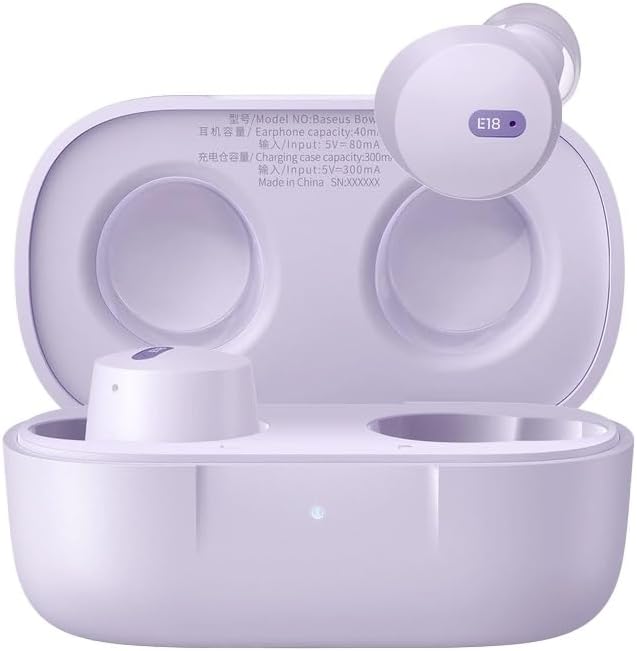
Image 1.1: Baseus Bowie E18 Earphones in their open charging case, showcasing the earbuds and charging contacts.
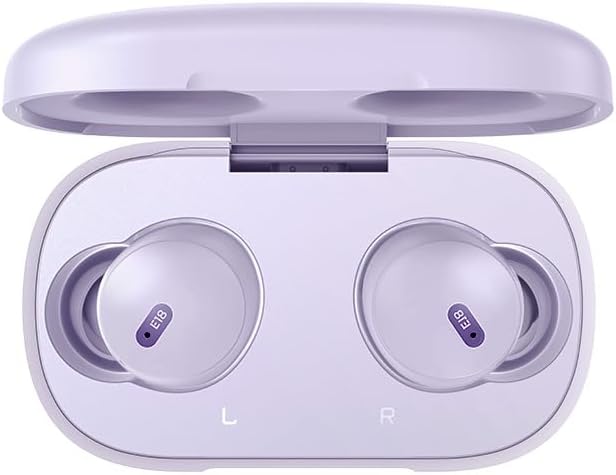
Image 1.2: Top-down view of the Baseus Bowie E18 Earphones nestled in their charging case, showing the 'E18' model indicator on each earbud.
2. Setup and Initial Use
2.1 Charging the Earphones and Case
Before first use, fully charge the earphones and charging case.
- Connect the charging case to a power source using a compatible USB-C cable.
- The indicator light on the case will show charging status.
- Place the earbuds into the charging case. They will automatically begin charging.

Image 2.1: Rear view of the Baseus Bowie E18 charging case, highlighting the USB-C charging port.
2.2 Bluetooth Pairing
To connect your earphones to a device:
- Ensure the earphones are charged and placed in the charging case.
- Open the charging case lid. The earphones will enter pairing mode automatically.
- On your device (smartphone, tablet, etc.), enable Bluetooth.
- Search for available devices and select "Baseus Bowie E18" from the list.
- Once connected, the earphones are ready for use.

Image 2.2: Visual representation of Bluetooth 5.3 technology, emphasizing stable connection and efficient power usage.
2.3 Wearing the Earphones
For optimal sound quality and comfort, ensure a proper fit:
- Gently insert each earbud into your ear canal.
- Adjust the earbud until it feels secure and comfortable.

Image 2.3: An earbud being worn, demonstrating the intended fit for the Baseus Bowie E18.
3. Operating Instructions
3.1 Touch Controls
The Baseus Bowie E18 earphones feature intuitive touch controls for various functions:
- Play/Pause Music: Single tap on either earbud.
- Next Track: Double tap on the right earbud.
- Previous Track: Double tap on the left earbud.
- Answer/End Call: Single tap on either earbud during an incoming call.
- Reject Call: Press and hold either earbud for 2 seconds during an incoming call.
- Activate Voice Assistant: Triple tap on either earbud.
3.2 Power On/Off
- Power On: Open the charging case lid, or take the earbuds out of the case. They will power on automatically.
- Power Off: Place the earbuds back into the charging case and close the lid. They will power off automatically.
4. Maintenance and Care
Proper maintenance ensures the longevity and performance of your earphones.
- Cleaning: Use a soft, dry, lint-free cloth to clean the earbuds and charging case. Do not use harsh chemicals or abrasive materials.
- Storage: When not in use, store the earphones in their charging case to protect them from dust and damage.
- Battery Care: Avoid fully discharging the battery frequently. Charge the earphones regularly, even if not used for extended periods, to maintain battery health.
- Water Resistance: The Baseus Bowie E18 earphones are IPX4 water resistant, meaning they are protected against splashing water from any direction. They are not designed for submersion in water or use during swimming. Avoid exposure to heavy rain or extreme moisture.

Image 4.1: Visual representation of IPX4 water resistance, indicating protection against splashes.
5. Troubleshooting
If you encounter issues with your Baseus Bowie E18 earphones, try the following solutions:
- Earphones not pairing:
- Ensure both earbuds are charged.
- Turn off Bluetooth on your device and turn it back on.
- Delete "Baseus Bowie E18" from your device's Bluetooth list and attempt to re-pair.
- Place earbuds back in the case, close the lid, wait 10 seconds, then open to re-enter pairing mode.
- No sound from one earbud:
- Ensure both earbuds are charged.
- Try placing both earbuds back in the case, closing the lid, and then taking them out again.
- Perform a factory reset (refer to manufacturer's website for specific instructions if not detailed here).
- Charging issues:
- Check the charging cable and adapter for damage.
- Ensure the charging contacts on the earbuds and inside the case are clean and free of debris.
- Try a different charging cable and power source.
- Earbuds falling out:
- Ensure you are using the correct size ear tips for a secure fit.
- Adjust the angle of the earbuds in your ear.
6. Specifications
Detailed technical specifications for the Baseus Bowie E18 True Wireless Earphones:
| Feature | Specification |
|---|---|
| Model Name | Bowie E18 |
| Model Number | A00023800537-Z1 |
| Bluetooth Version | 5.0 |
| Bluetooth Range | Up to 10 Meters |
| Earbud Battery Capacity | Approximately 50mAh (Each Earbud) |
| Charging Case Battery Capacity | Approximately 500mAh |
| Music Playback Time | Up to 5 Hours (Single Charge) / Up to 30 Hours (With Charging Case) |
| Talk Time | Up to 5 Hours (Single Charge) / Up to 30 Hours (With Charging Case) |
| Charging Time | Approximately 1.5 Hours |
| Weight | Approximately 50g (Including Charging Case) |
| Driver Unit | 10mm |
| Frequency Response | 20Hz-20kHz |
| Impedance | 32 Ohms |
| Sensitivity | 120.5 dB |
| Water Resistance | IPX4 |
| Battery Cell Composition | Lithium Ion |

Image 6.1: Illustration emphasizing the extended listening time provided by the Baseus Bowie E18 earphones with their charging case.
7. Warranty and Support
7.1 Manufacturer's Warranty
The Baseus Bowie E18 True Wireless Earphones come with a 1-Year Manufacturer's Warranty from the date of purchase. This warranty covers manufacturing defects and ensures the product meets its specified performance standards under normal use. Please retain your proof of purchase for warranty claims.
For specific terms and conditions of the warranty, please refer to the official Baseus website or contact their customer service.
7.2 Customer Support
If you require further assistance, have questions not covered in this manual, or need to make a warranty claim, please contact Baseus customer support through their official website or the retailer where you purchased the product.


