
Introduction
This instruction manual provides comprehensive guidance for the installation, operation, and maintenance of your Synvy Privacy Screen Protector Film, designed specifically for the okejeye 4K Action Camera OK800. Please read this manual carefully to ensure proper application and optimal performance of the product. This protector is a Thermoplastic Polyurethane (TPU) soft film, not tempered glass.
Product Overview
The Synvy Privacy Screen Protector Film offers advanced protection and privacy features for your okejeye 4K Action Camera OK800. Key features include:
- Privacy Protection: The screen is only visible to individuals directly in front of it, safeguarding your sensitive information from prying eyes.
- Scratch Resistance: With a 4H hardness rating, the film effectively protects your device screen from scratches caused by everyday objects like keys and knives.
- Oleophobic Coating: Reduces smudges and fingerprints, keeping your screen clear and clean.
- Self-Healing Properties: Minor scratches on the TPU material are designed to weaken and disappear within 48 hours.
- Bubble-Free Installation: Features 100% bubble-free adhesives for a smooth application process and no residue upon removal.
- Matte Finish: Provides an anti-glare surface for improved visibility in various lighting conditions.
What's in the Box
Upon opening your package, please verify that all the following items are included:
- Synvy Privacy Screen Protector Film
- Micro Fiber Cleaning Cloth
- Dry Wipe
Installation Guide
Follow these steps carefully for a successful and bubble-free installation of your screen protector:
- Prepare Your Workspace: Choose a clean, dust-free environment to prevent particles from getting trapped under the protector.
- Clean the Screen: Use the provided dry wipe to thoroughly clean the screen of your okejeye 4K Action Camera OK800. Ensure all dust, smudges, and fingerprints are removed.
- Align the Protector: Carefully peel off the protective layer (usually marked '1' or 'back') from the screen protector. Align the protector precisely with the edges and cutouts of your camera screen.
- Apply the Protector: Once aligned, gently lay the protector onto the screen. The automatic adsorption layer will begin to adhere.
- Remove Bubbles: Use the microfiber cloth or a soft card (not included) to gently push any air bubbles towards the edges of the screen. Work from the center outwards. A careful screen-wipe technique can significantly reduce bubbles.

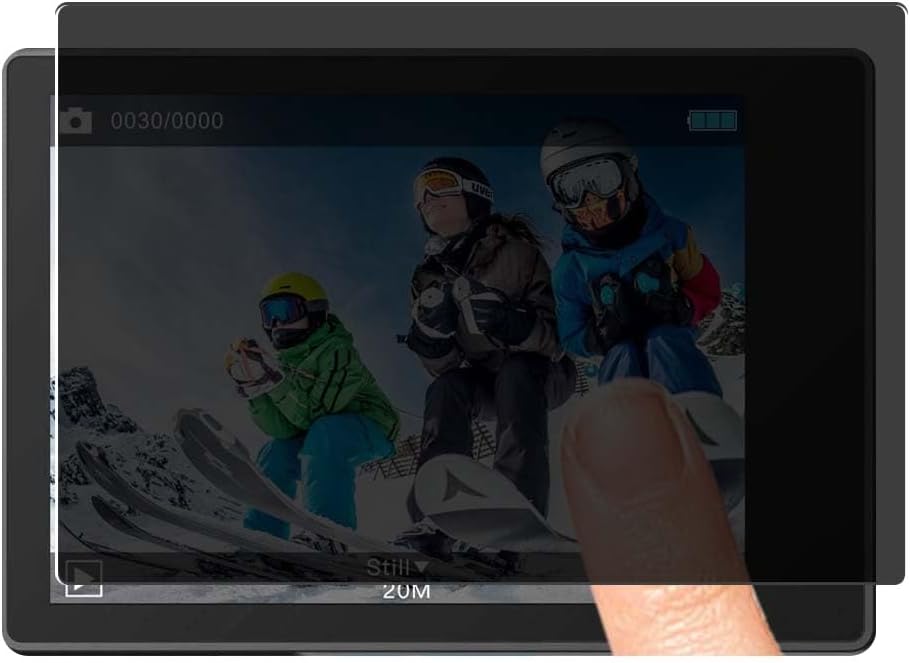
Usage and Features
Privacy Functionality
The privacy feature of this screen protector ensures that your screen content is only visible to you when viewed directly. From side angles, the screen appears darkened, preventing others from viewing your display.


Note: Due to the privacy filter, the screen may appear slightly darker than usual. You may need to adjust your device's display brightness to your preferred level.
Scratch Resistance
The 4H hardness rating provides robust protection against daily wear and tear. This film is designed to resist scratches from common items such as keys, coins, and other hard substances.

Anti-Fingerprint and Self-Healing
The oleophobic and hydrophobic coating on the protector significantly reduces smudges and fingerprints, keeping your screen clean. Additionally, the military-grade thermoplastic urethane material has self-healing properties, meaning minor scratches will weaken and disappear within approximately 48 hours.


Maintenance
To maintain the clarity and effectiveness of your Synvy Privacy Screen Protector Film, follow these simple guidelines:
- Cleaning: Use the provided microfiber cloth to gently wipe the screen protector. For stubborn smudges, slightly dampen the cloth with water.
- Avoid Harsh Chemicals: Do not use abrasive cleaners, alcohol, or solvents, as these can damage the oleophobic coating and the film material.
- Handle with Care: While scratch-resistant, excessive force or sharp objects can still damage the film.
Troubleshooting
If you encounter any issues during or after installation, refer to the following common problems and solutions:
- Bubbles After Installation: Small bubbles often disappear within 24-48 hours as the film adheres completely. For larger bubbles, gently lift the nearest edge of the protector and re-apply, pushing the bubble out with the microfiber cloth.
- Dust Particles Under the Film: If dust is trapped, carefully lift the nearest corner of the protector and use a piece of tape to dab the dust particle off both the screen and the adhesive side of the protector. Then re-apply.
- Misalignment: If the protector is significantly misaligned, carefully peel it off slowly and re-apply, ensuring proper alignment. The adhesive is designed to be residue-free upon removal.
- Reduced Screen Brightness: This is a normal characteristic of privacy screens. Adjust your camera's display brightness settings to compensate.
Specifications
| Material | Thermoplastic Polyurethane (TPU) |
| Item Hardness | 4H |
| Finish Type | Matte |
| Special Features | Privacy, Anti-peeping, Scratch Resistant, Touch Sensitive, Anti-Shatter, Anti-Fingerprint, Bubble Proof |
| Compatible Devices | okejeye 4K Action Camera OK800 |
Warranty and Support
For any questions, concerns, or support regarding your Synvy Privacy Screen Protector Film, please contact the seller directly through your purchase platform. Please refer to your purchase documentation for specific warranty details, if applicable.