
1. Introduction
This manual provides instructions for the Arkaia replacement remote control, designed for specific Philips TV models. This remote offers full functionality for the listed models without requiring any programming.
Important Note: This remote control is only compatible with the Philips TV models specified in the title: PUS7009, 32PHS6009/12, 43PUS7009/12, and 40PFS6009/12. It is not suitable for other models.
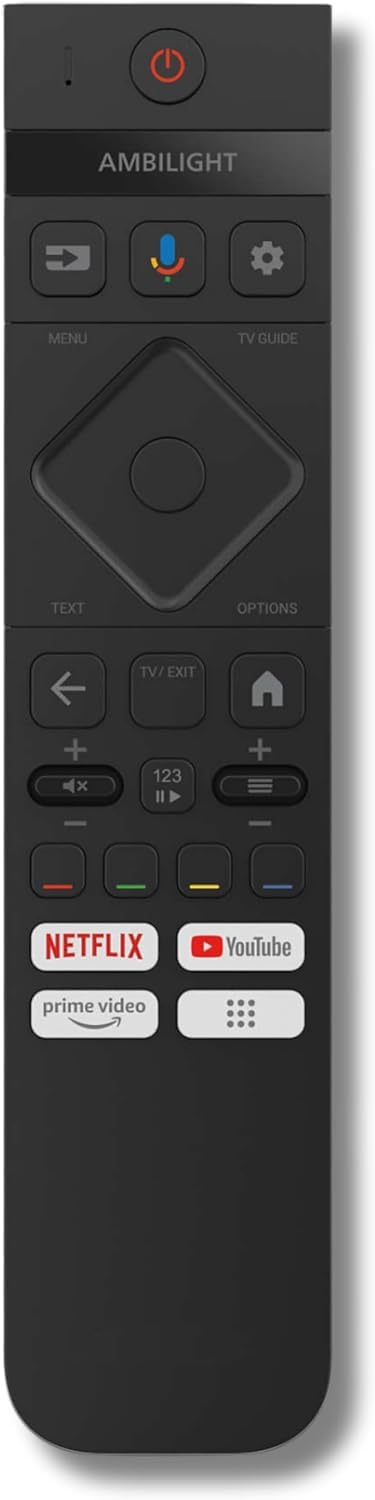
Image of the Arkaia replacement remote control, showing its layout and buttons.
2. Setup
The Arkaia replacement remote control is designed for immediate use with compatible Philips TV models. No complex programming or pairing is required.
2.1. Battery Installation
- Locate the battery compartment on the back of the remote control.
- Slide open the battery compartment cover.
- Insert two AA batteries (not included), ensuring the correct polarity (+ and -) as indicated inside the compartment.
- Close the battery compartment cover securely.
Once batteries are installed, the remote control is ready to operate your compatible Philips TV.
3. Operating Instructions
This remote control functions identically to your original Philips TV remote for the specified models. Point the remote directly at your television's infrared sensor for optimal performance.
3.1. Basic Functions
- Power Button: Turns the TV on or off.
- Channel Buttons (CH+/CH-): Changes the TV channel up or down.
- Volume Buttons (VOL+/VOL-): Increases or decreases the TV volume.
- Mute Button: Mutes or unmutes the TV sound.
- Number Buttons (0-9): Directly selects TV channels.
- Menu/Home Button: Accesses the TV's main menu or smart TV interface.
- Navigation Buttons (Up, Down, Left, Right, OK): Navigates through menus and confirms selections.
- Back/Exit Button: Returns to the previous screen or exits a menu.
Refer to your Philips TV's user manual for specific functions and menu navigation details.
4. Care and Maintenance
To ensure the longevity and optimal performance of your remote control, follow these maintenance guidelines:
- Cleaning: Wipe the remote control with a soft, dry cloth. For stubborn dirt, slightly dampen the cloth with water or a mild cleaning solution, then wipe dry immediately. Do not use abrasive cleaners or solvents.
- Battery Replacement: Replace batteries when the remote's response becomes sluggish or stops working. Always replace both batteries at the same time with new ones of the same type (AA).
- Storage: Store the remote control in a cool, dry place away from direct sunlight, extreme temperatures, and high humidity. If the remote will not be used for an extended period, remove the batteries to prevent leakage.
- Avoid Drops: Protect the remote from physical impact, as drops can damage internal components.
5. Troubleshooting
If you experience issues with your Arkaia replacement remote control, please refer to the following common solutions:
- Remote Not Responding:
- Check if the batteries are correctly inserted with the proper polarity.
- Replace the batteries with fresh AA batteries.
- Ensure there is a clear line of sight between the remote control and the TV's infrared sensor. Remove any obstructions.
- Verify that the TV's infrared sensor is not blocked or dirty.
- Limited Functionality or Incorrect Responses:
- Confirm that your TV model is one of the compatible Philips models listed in this manual (PUS7009, 32PHS6009/12, 43PUS7009/12, 40PFS6009/12). This remote is specifically designed for these models.
- If your TV model is not listed, this remote may not be fully compatible.
- Short Operating Range:
- Ensure batteries are fresh.
- Check for strong light sources (like direct sunlight) that might interfere with the infrared signal.
If the problem persists after trying these steps, please refer to the Warranty and Support section for further assistance.
6. Specifications
| Feature | Detail |
|---|---|
| Brand | Arkaia |
| Model Name | PUS7009 |
| Compatible Devices | Television |
| Compatible TV Models | Philips 32PHS6009/12, 43PUS7009/12, 40PFS6009/12 |
| Connectivity Technology | Infrared |
| Maximum Range | 10 Meters |
| Number of Buttons | 10 |
| Controller Type | Button Control |
| Special Feature | No programming required |
| Color | Black |
| Battery Type | AA (not included) |
7. Warranty and Support
7.1. Product Warranty
The Arkaia replacement remote control comes with a 2-year warranty from the date of purchase. This warranty covers manufacturing defects and ensures the product functions as described under normal use. Please retain your proof of purchase for warranty claims.
7.2. Customer Support
For any questions, technical assistance, or warranty claims, please contact the seller or the manufacturer, ARKAIA, through the platform where the product was purchased. Provide your product model number (PUS7009) and details of the issue for efficient support.