
1. Introduction
Welcome to your Samsung Galaxy S24+ Plus 5G. This renewed device offers premium performance and advanced features. This manual provides essential information to help you set up, operate, and maintain your smartphone.
The Galaxy S24+ Plus 5G features a 6.7-inch Dynamic AMOLED 2X QHD+ display with a 1-120Hz adaptive refresh rate and a peak brightness of 2,600 nits, providing a sharp and bright visual experience. It is powered by an upgraded internal hardware with 12GB RAM and a Snapdragon 8 Gen 3 or Exynos 2400 processor, ensuring smooth multitasking and superior performance. The device includes a large 4,900mAh battery with 45W wired and 15W wireless charging capabilities for extended use and faster recharge times. Its durable build features an Enhanced Armor Aluminum frame and IP68 dust/water resistance, making it a reliable daily flagship.
2. Product Overview
Familiarize yourself with the key components and features of your Samsung Galaxy S24+ Plus 5G.
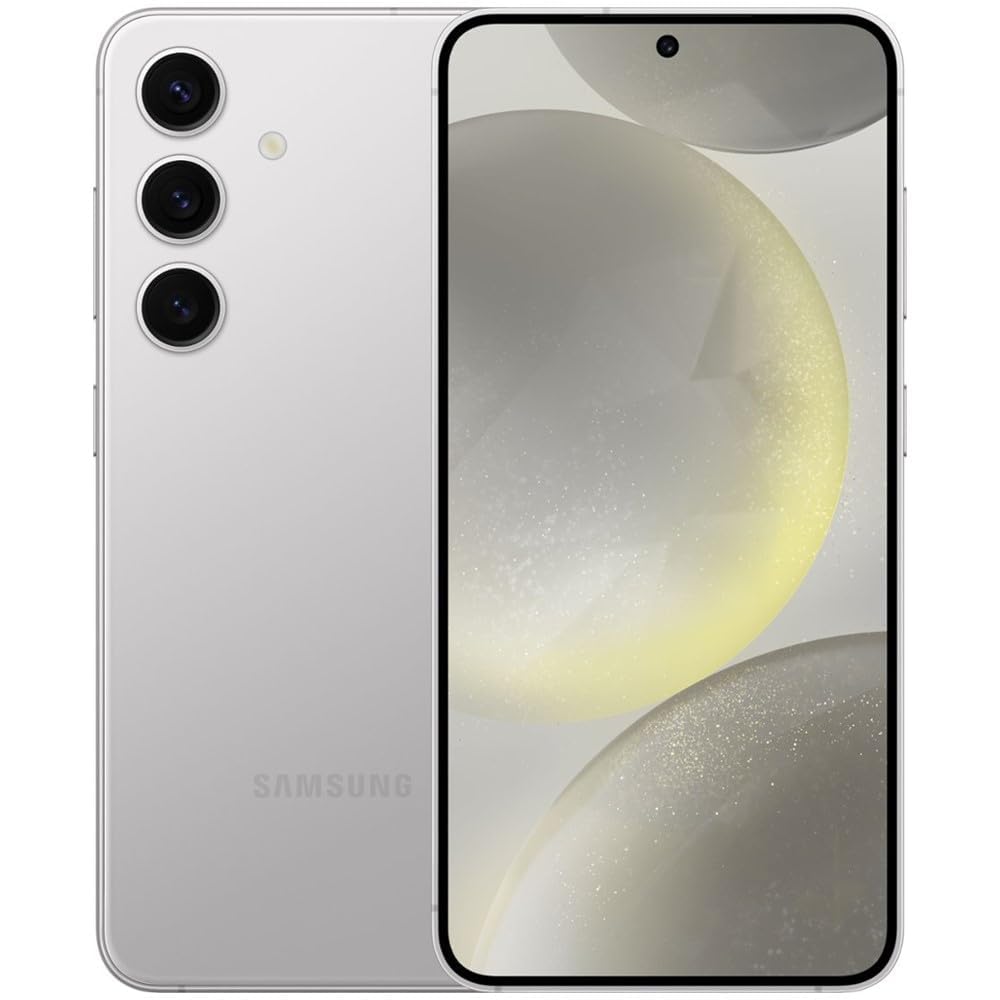
Figure 1: Samsung Galaxy S24+ Plus 5G in Marble Gray, showcasing its sleek design.
Key Features:
- Display: 6.7-inch Dynamic AMOLED 2X, QHD+ display with 1-120Hz adaptive refresh and ~2,600nits peak brightness.
- Performance: 12GB RAM and Snapdragon 8 Gen 3 / Exynos 2400 processor for smooth multitasking.
- Battery: Larger 4,900mAh battery with 45W wired + 15W wireless charging.
- Camera: Triple-rear camera array (50MP main + 12MP ultrawide + 10MP telephoto with 3x optical zoom) plus a 12MP front camera.
- Durability: Enhanced Armor Aluminum frame, IP68 dust/water resistance.
- Connectivity: 5G, NFC, UWB.
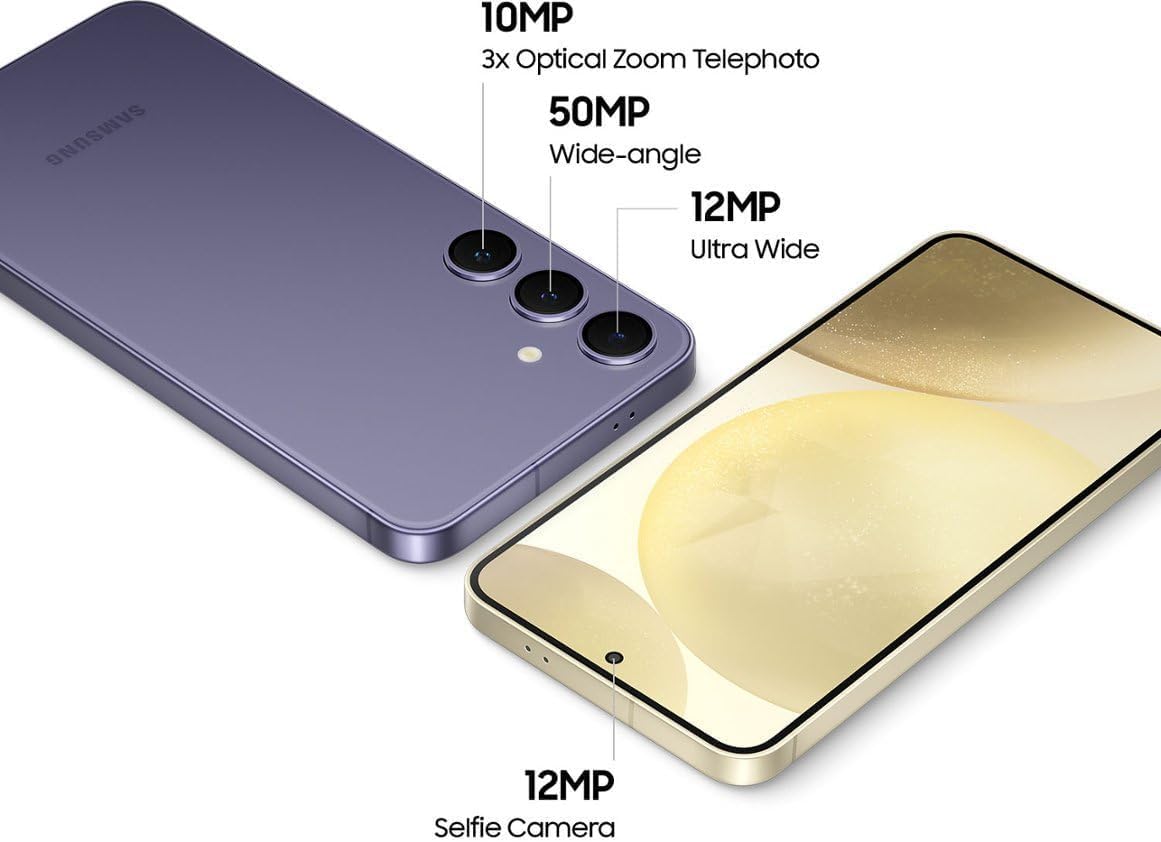
Figure 2: Detailed view of the Samsung Galaxy S24+ Plus 5G camera system, highlighting the 10MP 3x Optical Zoom Telephoto, 50MP Wide-angle, 12MP Ultra Wide, and 12MP Selfie Camera.

Figure 3: The Circle to Search with Google feature on the Samsung Galaxy S24+ Plus 5G, allowing users to circle an object on screen to search for information.

Figure 4: A user editing a photo on the Samsung Galaxy S24+ Plus 5G, demonstrating the ability to erase shadows and reflections.
3. Setup
Follow these steps to set up your new Samsung Galaxy S24+ Plus 5G:
- Power On: Press and hold the Power button until the Samsung logo appears.
- Initial Configuration: Follow the on-screen prompts to select your language, connect to Wi-Fi, and agree to the terms and conditions.
- Google Account: Sign in with your Google account or create a new one. This is essential for accessing the Google Play Store and other Google services.
- Data Transfer: If you are transferring data from an old device, follow the Smart Switch prompts.
- Security Setup: Set up your preferred security method, such as face recognition, fingerprint, PIN, password, or pattern.
- SIM Card: Insert your Nano SIM card into the SIM card tray. The device supports Dual SIM functionality.
Video 1: An unboxing and initial setup guide for the Samsung Galaxy S24+ Plus 5G, demonstrating the first steps to get your device ready for use.
Video 2: A detailed explanation of how the Samsung Galaxy S24+ Plus 5G works and what to expect during daily usage, including setup tips.
4. Operating Instructions
Your Galaxy S24+ Plus 5G is designed for intuitive use. Here are some key operational highlights:
- Navigation: Use gestures or the traditional navigation bar for seamless interaction.
- Circle to Search with Google: Simply circle an object on your screen to instantly search for information about it. (Requires internet connection; results may vary.)
- Live Translate: Utilize real-time translation during phone calls using the native Samsung dialer. (Requires Samsung account log-in and internet connection.)
- Chat Assist: Get tone suggestions and grammar checks for your messages. (Requires Samsung account log-in and internet connection.)
- Note Assist: Summarize and format notes in Samsung Notes. (For text in Samsung Notes only (200-4000 characters); requires Samsung account log-in and internet connection.)
5. Camera Features
Capture stunning photos and videos with the advanced camera system:
- Rear Cameras: 50MP Main, 12MP Ultrawide, 10MP Telephoto (3x optical zoom).
- Front Camera: 12MP.
- Video Recording: Supports 8K and 4K video capture at 60 fps.
- Shooting Modes: Automatic, Portrait, Landscape, Night Mode, Sports.
- Moon Mode: Specialized settings for capturing detailed images of the moon.
Video 3: A review highlighting the photography capabilities of the Samsung Galaxy S24+ Plus 5G, showcasing its performance in various scenarios.
Video 4: A tutorial on how to access and utilize the 'Moon Mode' settings on the Samsung Galaxy S24+ Plus 5G for enhanced lunar photography.
6. Battery and Charging
The Galaxy S24+ Plus 5G is equipped with a robust battery and efficient charging options:
- Battery Capacity: 4900 Milliamp Hours (Lithium-Ion).
- Wired Charging: Supports 45W Super Fast Charging. (25W Super Fast Charger sold separately. Use only Samsung-approved chargers and cables.)
- Wireless Charging: Supports 15W wireless charging.
- Average Battery Life: Up to 18 hours of average use, 31 hours of talk time.
Video 5: A demonstration of the Fast Charge 2.0 feature on the Samsung Galaxy S24+ Plus 5G, showing its charging speed and efficiency.
7. Connectivity
Stay connected with various network and device options:
- Cellular Technology: 5G, 4G, 3G Data Capable.
- Wireless Network: Bluetooth, GSM, LTE, Wi-Fi.
- Wireless Provider: Unlocked for All Carriers (T-Mobile, AT&T, MetroPCS, Verizon, Sprint).
- SIM Card Slot: Dual SIM.
- Connector Type: USB Type C.
- Additional Features: NFC, UWB.
8. Maintenance
To ensure the longevity and optimal performance of your device, follow these maintenance guidelines:
- Cleaning: Use a soft, lint-free cloth to clean the screen and body. Avoid harsh chemicals.
- Water and Dust Resistance: The device has an IP68 rating for dust and water resistance. While durable, avoid intentional submersion or exposure to high-pressure water.
- Temperature: Operate the device within recommended temperature ranges to prevent damage.
- Software Updates: Regularly check for and install software updates to ensure your device has the latest features and security patches.
- Storage Management: Periodically clear unnecessary files and apps to maintain optimal performance.
9. Troubleshooting
If you encounter issues with your device, try these common troubleshooting steps:
- Device Not Responding: Press and hold the Power button and Volume Down button simultaneously for about 7 seconds to restart the device.
- App Issues: If an app is not working correctly, try clearing its cache and data in the app settings, or uninstall and reinstall it.
- Network Connectivity: If you have network issues, try toggling Airplane Mode on and off, or reset your network settings.
- Battery Drain: Check battery usage in settings to identify apps consuming excessive power. Adjust settings or restrict background activity as needed.
- Screen Issues: If the screen is unresponsive or has display anomalies, perform a soft reset. If issues persist, contact support.
- Factory Reset: As a last resort, you can perform a factory reset. Back up all important data before proceeding, as this will erase all data on the device.
10. Specifications
| Feature | Specification |
|---|---|
| Brand | Samsung |
| Model Name | Galaxy S24 Plus |
| Operating System | Android |
| RAM Memory Installed Size | 12 GB |
| Memory Storage Capacity | 256 GB |
| Screen Size | 6.7 Inches |
| Resolution | 2560 x 1440 |
| Refresh Rate | 120 hertz |
| CPU Model | Snapdragon |
| CPU Speed | 2.9 GHz |
| Rear Facing Camera Photo Sensor Resolution | 50 MP |
| Front Photo Sensor Resolution | 12 MP |
| Battery Capacity | 4900 Milliamp Hours |
| Water Resistance Level | Water Resistant (IP68) |
| Biometric Security Feature | Face Recognition |
| Item Weight | 6.88 ounces |
| Item Dimensions | 6.24 x 2.99 x 0.3 inches |
11. Warranty and Support
Your Samsung Galaxy S24+ Plus 5G (Renewed) comes with a 90 Day Limited Warranty. For any issues or support needs, please refer to the seller's return and support policies.
Amazon Renewed products typically offer a 90-day refund or replacement policy. For specific details regarding your purchase, please check your order information on Amazon.com or contact the seller directly.