
COLMi P81
COLMi P81 Sport Smartwatch User Manual
Model: P81
Brand: COLMi
1. Introduction
The COLMi P81 Smartwatch is a versatile and durable companion designed for an active and connected lifestyle. It offers essential functionalities in an elegant and robust design, including comprehensive health monitoring, smart notifications, and various sports modes. This manual provides detailed instructions to help you set up, operate, and maintain your smartwatch.

Figure 1.1: COLMi P81 Smartwatch
2. What's in the Box
Upon opening your COLMi P81 Smartwatch package, please verify that all the following items are included:
- 1 x COLMi P81 Smartwatch
- 1 x Magnetic Charging Cable
- 1 x English User Manual

Figure 2.1: Items Included in the Box
3. Setup
3.1 Charging the Smartwatch
Before initial use, fully charge your COLMi P81 Smartwatch. The device uses a 2-pin magnetic charging cable.
- Connect the magnetic end of the charging cable to the charging points on the back of the smartwatch. Ensure a secure connection.
- Plug the USB end of the cable into a standard USB power adapter (5V/1A recommended) or a computer's USB port.
- The screen will display a charging indicator. A full charge takes approximately 2 hours.

Figure 3.1: Smartwatch Charging Indicator
3.2 Powering On/Off
- Power On: Press and hold the side button for a few seconds until the screen lights up.
- Power Off: From the watch face, swipe down to access quick settings, or navigate to 'Settings' > 'System' > 'Power Off'. Confirm your choice.
3.3 App Installation and Pairing
To unlock the full potential of your COLMi P81, download and install the compatible health application on your smartphone (Android or iOS).
- Scan the QR code in the manual or on the watch, or search for the official COLMi app in your phone's app store.
- Install the app and create an account if prompted.
- Enable Bluetooth on your smartphone.
- Open the app, go to 'Device' or 'Add Device', and select 'COLMi P81' from the list of available devices.
- Follow the on-screen prompts to complete the pairing process. Ensure the pairing code displayed on the watch matches the one in the app.
4. Operating Instructions
4.1 Basic Navigation
- Touch Screen: Swipe left/right to navigate between main functions (e.g., activity, heart rate, weather). Swipe up to view notifications. Swipe down to access quick settings.
- Side Button: Press to return to the watch face or to wake the screen. Press and hold for power options or to access the voice assistant.
4.2 Notifications
Once paired with your smartphone, the COLMi P81 can receive notifications for calls, messages, and social media apps directly on your wrist. Ensure notification permissions are enabled in both the smartwatch app and your phone's settings.
4.3 Health Monitoring
The smartwatch provides 24/7 health monitoring, offering valuable insights into your well-being:
- Heart Rate: Monitors your heart rate throughout the day.
- Blood Pressure: Provides estimated blood pressure readings.
- Blood Oxygen (SpO2): Measures your blood oxygen saturation levels.
- Sleep Tracking: Analyzes your sleep patterns, including deep sleep, light sleep, and wake times.
Access detailed historical data for all health metrics within the companion app.
4.4 Sports Modes
The COLMi P81 supports over 100 sports modes, allowing you to track various activities comprehensively. It records data during exercise, helping you understand your performance and adjust your fitness routine.

Figure 4.1: Sports Data and Modes
4.5 Bluetooth Calling
The COLMi P81 features an integrated microphone and speaker, enabling you to make and receive calls directly from your wrist when connected to your smartphone via Bluetooth.

Figure 4.2: Bluetooth Call Functionality
4.6 Voice Assistant
The smartwatch includes a voice assistant function, allowing you to control music playback and initiate calls on your connected mobile phone using voice commands.

Figure 4.3: Voice Assistant Interface
5. Maintenance
5.1 Water Resistance (IP68)
The COLMi P81 Smartwatch is IP68 water-resistant, meaning it can withstand immersion in water up to 1.5 meters for 30 minutes. It is suitable for daily use, including hand washing, rain, and swimming in shallow water. However, it is not recommended for hot showers, saunas, or diving, as steam and high-pressure water jets may compromise the seal.
5.2 Cleaning
To keep your smartwatch clean and in good condition:
- Wipe the screen and body with a soft, damp cloth.
- For the silicone strap, you can wash it with mild soap and water, then rinse thoroughly and dry. The silicone material is durable and adjustable.
- Avoid using harsh chemicals or abrasive materials.

Figure 5.1: Silicone Strap
5.3 Battery Care
The COLMi P81 features a 230mAh lithium polymer battery, offering up to 7 days of continuous use on a single charge. To prolong battery life:
- Avoid extreme temperatures.
- Charge the device before the battery is completely depleted.
- If storing for a long period, charge it to about 50% and power it off.
6. Troubleshooting
- Smartwatch not turning on: Ensure the device is fully charged. Connect it to the charger and wait a few minutes before attempting to power on again.
- Cannot pair with smartphone:
- Ensure Bluetooth is enabled on your phone and the smartwatch.
- Make sure the smartwatch is within the Bluetooth range of your phone.
- Restart both the smartwatch and your phone.
- Clear the Bluetooth cache on your phone (if applicable).
- Try unpairing and re-pairing the device through the app.
- Inaccurate health readings: Ensure the smartwatch is worn snugly on your wrist, about one finger's width from your wrist bone. Avoid excessive movement during measurements.
- Notifications not received: Check notification permissions in both the smartwatch app and your phone's system settings. Ensure the app is running in the background.
7. Specifications
| Feature | Detail |
|---|---|
| Brand | COLMi |
| Model | P81 |
| Main Chip | RTL8763EWE |
| Heart Rate Chip | HX3602 |
| Display | 1.9-inch IPS, 240*286 pixels |
| Battery Capacity | 230mAh Lithium Polymer |
| Charging Method | 2-pin Magnetic Cable |
| Approx. Charging Time | 2 hours |
| Usage Time | Up to 7 days |
| Water Resistance | IP68 |
| Compatible Devices | Android Smartphones, iOS Smartphones |
| Connectivity | Bluetooth, Wi-Fi |
| User Input | Touch Screen |
| Color | Black |
| Memory Storage Capacity | 128 MB |
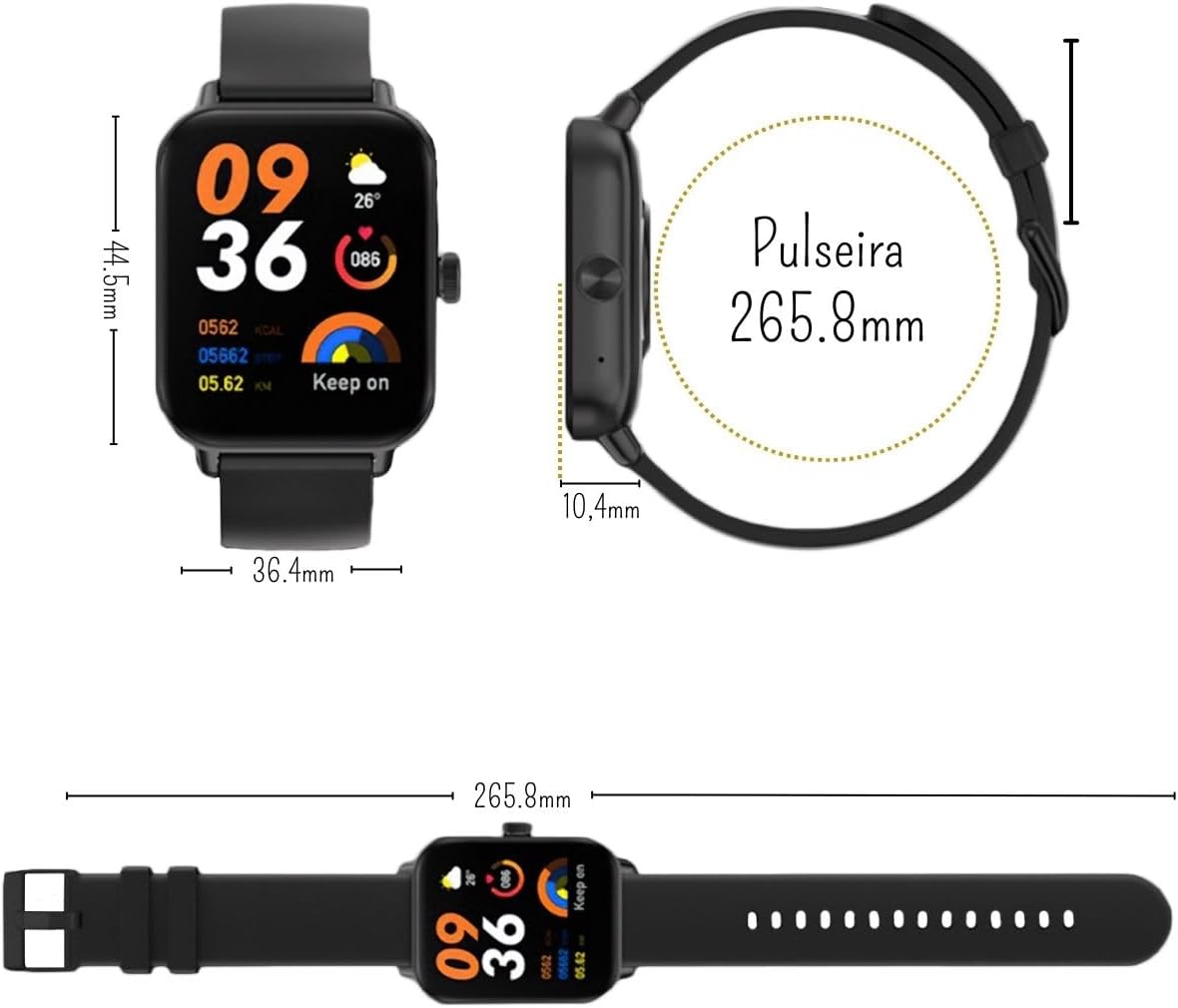
Figure 7.1: Smartwatch Dimensions
8. Warranty and Support
8.1 Manufacturer's Warranty
The COLMi P81 Smartwatch comes with a manufacturer's warranty of 30 days from the date of purchase. This warranty covers manufacturing defects and malfunctions under normal use. It does not cover damage caused by misuse, accidents, unauthorized repairs, or normal wear and tear.
8.2 Customer Support
For any questions, technical assistance, or warranty claims, please contact the seller or the manufacturer's customer support. Refer to your purchase documentation for specific contact details.
Related documentsP81


Ask a question about this manual
Ask about setup, troubleshooting, compatibility, parts, safety, or missing instructions. Manuals+ will review the question and use this page’s manual context to help answer it.