Introduction
This manual provides comprehensive instructions for the installation, operation, maintenance, and troubleshooting of the Whirlpool W11122560 Genuine OEM Oven Control Board. This component is crucial for monitoring oven temperature and managing heating functions in compatible Whirlpool ovens. Please read this manual thoroughly before proceeding with any installation or maintenance.
Safety Information
WARNING: Before installing this part, you must unplug the oven or shut off the house circuit breaker for the appliance. Failure to do so may result in electrical shock, injury, or death.
This replacement part requires basic hand tools, some disassembly of the appliance, and novice repair experience. If you are unsure about any step, it is recommended to consult a qualified technician.
Product Overview
The Whirlpool W11122560 Oven Control Board is a genuine OEM replacement part designed to ensure the proper functioning of your oven's temperature regulation and control panel. It replaces several previous part numbers, ensuring broad compatibility with select Whirlpool oven models.

Figure 1: Angled view of the Whirlpool W11122560 Oven Control Board, showing the display and control buttons.
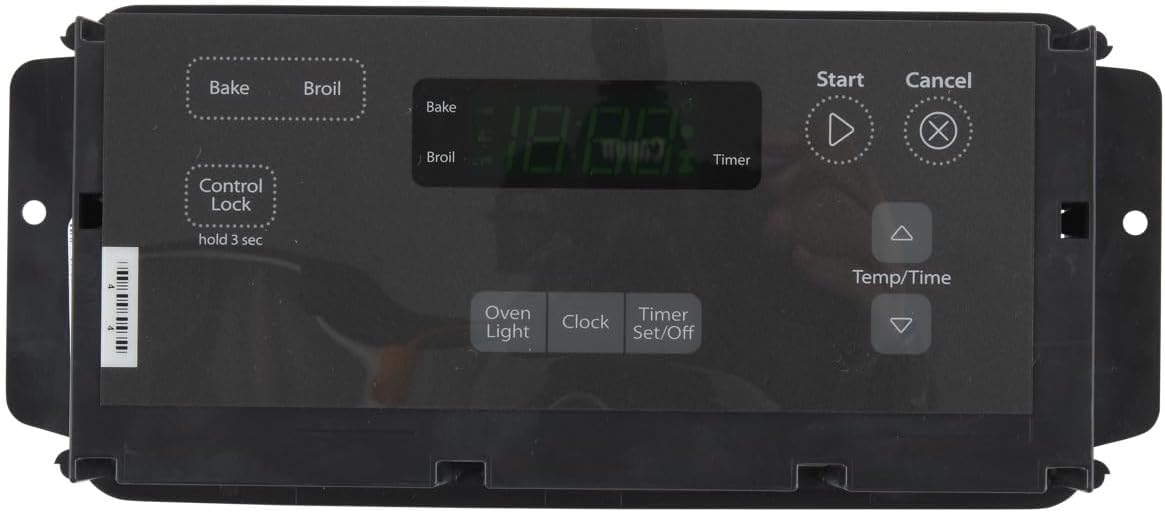
Figure 2: Front view of the Whirlpool W11122560 Oven Control Board, highlighting the user interface with 'Bake', 'Broil', 'Start', 'Cancel', 'Temp/Time', 'Oven Light', 'Clock', and 'Timer Set/Off' buttons.

Figure 3: Rear view of the Whirlpool W11122560 Oven Control Board, showing the circuit board and various connection points.
Key Features:
- Monitors oven temperature for precise cooking.
- Controls all oven heating functions.
- Genuine OEM part ensures compatibility and quality.
- Replaces multiple previous part numbers: W10424883, W10734613, W10834014, W10887898, W11032182, and WPW10734613.
Setup and Installation
This section outlines the general steps for replacing the oven control board. Specific steps may vary depending on your oven model. Always refer to your appliance's service manual for detailed instructions.
- Disconnect Power: Locate the circuit breaker for your oven and turn it off, or unplug the oven from the wall outlet. Verify that power is off before proceeding.
- Access Control Panel: Depending on your oven model, you may need to remove screws or clips to access the rear of the control panel where the board is located.
- Document Connections: Before disconnecting any wires, take clear photos or make a diagram of all wire connections to the existing control board. This is critical for correct reassembly.
- Disconnect Wires: Carefully disconnect all wire harnesses and connectors from the old control board.
- Remove Old Board: Unscrew or unclip the old control board from its mounting brackets.
- Install New Board: Position the new Whirlpool W11122560 control board in place and secure it with the screws or clips removed earlier.
- Reconnect Wires: Using your photos or diagram, carefully reconnect all wire harnesses and connectors to the new control board. Ensure all connections are secure.
- Reassemble Control Panel: Reattach the control panel cover and any other components removed to access the board.
- Restore Power: Turn the circuit breaker back on or plug the oven back into the wall outlet.
- Test Functionality: Test the oven's functions (e.g., bake, broil, clock, timer) to ensure the new control board is operating correctly.
Operating Instructions
Once the control board is installed, the oven's operation will be as per your appliance's original user manual. The control board facilitates the functions initiated via the oven's user interface.
- Setting Temperature: Use the "Temp/Time" buttons to adjust the desired oven temperature.
- Baking/Broiling: Select "Bake" or "Broil" and then "Start" to begin the cooking cycle.
- Timer Functions: Utilize the "Timer Set/Off" button to set cooking timers or the clock.
- Oven Light: Press the "Oven Light" button to illuminate the oven interior.
- Control Lock: For models with this feature, press and hold "Control Lock" for 3 seconds to activate or deactivate the control lock, preventing accidental changes.
Maintenance
The Whirlpool W11122560 Oven Control Board is a sealed electronic component and requires no routine maintenance. To ensure its longevity and proper function:
- Keep the oven's control panel clean using a soft, damp cloth. Avoid abrasive cleaners.
- Ensure proper ventilation around the oven to prevent overheating of internal components.
- Always disconnect power before attempting any cleaning or service that involves opening the appliance.
Troubleshooting
If you experience issues after installing the new control board, consider the following troubleshooting steps:
| Problem | Possible Cause | Solution |
|---|---|---|
| Oven not heating or heating inconsistently. | Incorrect wiring, faulty temperature sensor (thermostat), or element issue. | Verify all wire connections to the control board are secure. Check the oven's temperature sensor and heating elements for continuity. |
| Display not working or showing error codes. | Loose ribbon cable, power supply issue, or board malfunction. | Ensure the ribbon cable connecting the display to the board is properly seated. Check power supply to the board. If error codes persist, consult a service manual for your specific oven model. |
| Buttons unresponsive. | Control panel overlay issue, or board malfunction. | Inspect the control panel overlay for damage or misalignment. Ensure the control lock is not activated. |
| Oven continuously beeps. | Stuck button or internal error. | Press each button to ensure none are stuck. Disconnect power for 5 minutes to reset the board, then restore power. |
If troubleshooting steps do not resolve the issue, it is recommended to contact Whirlpool customer support or a certified appliance technician.
Specifications
| Attribute | Detail |
|---|---|
| Model Number | W11122560 |
| Brand | Whirlpool |
| Part Type | Genuine OEM Oven Control Board |
| Replaces Part Numbers | W10424883, W10734613, W10834014, W10887898, W11032182, WPW10734613 |
| Operating Temperature | 325 Degrees Fahrenheit (as per product data, likely max operating temp for oven, not board itself) |
| Item Weight | 15 ounces (0.94 Pounds) |
| Package Dimensions | 15.25 x 7 x 2.88 inches |
| UPC | 883049479729 |
Warranty Information
Whirlpool Genuine OEM Parts, including the W11122560 Oven Control Board, typically come with a one-year warranty. This warranty covers defects in materials and workmanship under normal use. For specific warranty terms and conditions, please refer to the documentation included with your purchase or visit the official Whirlpool website.
Support and Contact
For further assistance, technical support, or to inquire about service, please contact Whirlpool customer service. You can find contact information on the official Whirlpool website or through your product's original documentation.
Whirlpool Official Website: www.whirlpool.com
When contacting support, please have your oven's model and serial number, as well as the part number W11122560, ready for faster service.


