
1. Introduction
This manual provides essential information for setting up, operating, maintaining, and troubleshooting your Vivo V30e 5G Smartphone. Please read this guide thoroughly to ensure proper use and to maximize the device's features.
The Vivo V30e 5G features an upgraded Aura Light for enhanced portrait photography, offering softer lighting and intelligent illumination. It automatically adjusts color temperature to create natural lighting effects. The device also boasts a high refresh rate display for smooth visuals during gaming and video playback, complemented by an extremely narrow bezel for an immersive viewing experience.
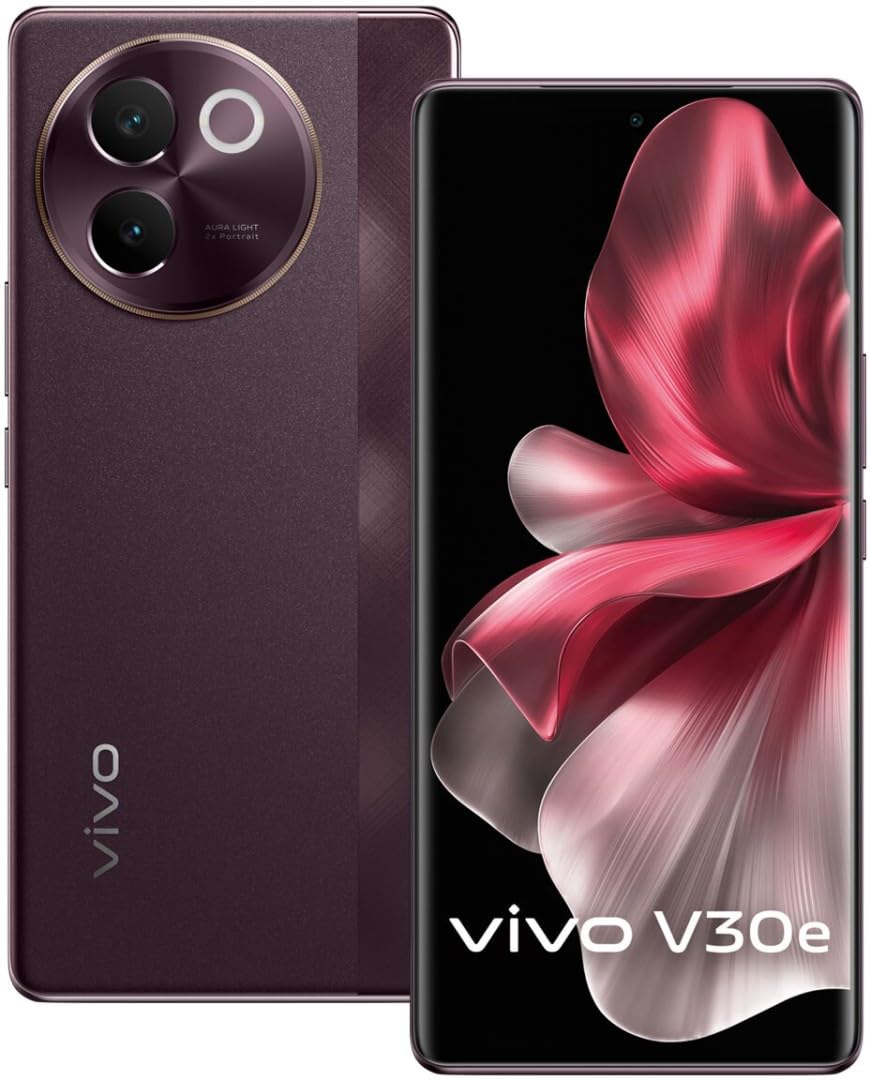
Figure 1: Vivo V30e 5G Smartphone, showcasing its sleek design and camera module.
2. Setup
2.1. Unboxing and Initial Charge
Upon unboxing your Vivo V30e 5G, ensure all components are present. The box typically includes the smartphone and a charger. Before first use, it is recommended to fully charge the device. The 5500 mAh battery can be charged to full in approximately 45 minutes using the provided charger.
2.2. SIM Card Installation
- Locate the SIM card tray on the side of your device.
- Insert the SIM ejector tool into the small hole next to the tray and press firmly until the tray pops out.
- Place your Nano SIM card(s) into the designated slots on the tray. This device supports Dual SIM functionality.
- Carefully reinsert the SIM card tray into the phone.

Figure 2: Top and bottom view of the Vivo V30e 5G, highlighting the SIM card tray and USB-C port.
2.3. Powering On and Initial Setup
Press and hold the power button located on the side of the device until the Vivo logo appears. Follow the on-screen instructions to complete the initial setup, which includes selecting your language, connecting to Wi-Fi, setting up your Google account, and configuring security features like fingerprint recognition.

Figure 3: Side view of the Vivo V30e 5G, illustrating the placement of the power and volume buttons.
3. Operating Instructions
3.1. Basic Navigation
The Vivo V30e 5G runs on Android 14 and utilizes a touch-based interface. Swipe gestures and taps are used for navigation. Familiarize yourself with the home screen, app drawer, notification panel, and quick settings.
3.2. Display Features
Your device features a 6.78-inch OLED display with a resolution of 1080 x 2400 pixels and a 120Hz refresh rate, providing vibrant colors and smooth scrolling. Adjust display settings such as brightness, dark mode, and eye protection mode in the Settings menu.

Figure 4: Front view of the Vivo V30e 5G, showcasing its immersive OLED display.
3.3. Security Features
The Vivo V30e 5G includes Fingerprint Recognition for secure and quick unlocking. To set up your fingerprint, navigate to Settings > Security > Fingerprint and follow the on-screen instructions.
3.4. Connectivity
- 5G Network: Enjoy high-speed internet connectivity with 5G support.
- Wi-Fi: Connect to wireless networks for internet access.
- Bluetooth: Pair with wireless headphones, speakers, and other Bluetooth-enabled devices.
- USB: Use the USB Type-C port for charging and data transfer.
- NFC: Utilize Near Field Communication for contactless payments and quick pairing.
4. Camera Features
The Vivo V30e 5G is equipped with advanced camera capabilities for capturing high-quality photos and videos.
4.1. Rear Camera System
The device features a dual-camera setup on the rear, including a 50 MP optical sensor and an 8 MP sensor. The iconic Aura Light has been upgraded to provide softer, intelligent illumination, automatically adjusting color temperature for natural-looking portraits.
4.2. Front Camera
A 32 MP front camera is available for high-resolution selfies and video calls.
4.3. Shooting Modes and Video
Explore various shooting modes, including Portrait mode, to enhance your photography. The device supports video capture at 1080p and 4k resolutions at 30 frames per second.

Figure 5: Detailed back view of the Vivo V30e 5G, highlighting the camera module with Aura Light.
5. Maintenance
5.1. Cleaning Your Device
Use a soft, lint-free cloth to clean the screen and body of your smartphone. Avoid using harsh chemicals or abrasive materials that could damage the finish. The device is water resistant, but avoid intentional submersion.
5.2. Software Updates
Regularly check for and install software updates to ensure your device has the latest features, security patches, and performance improvements. Go to Settings > System > System update.
5.3. Battery Care
To prolong battery life, avoid exposing your phone to extreme temperatures. It is recommended to keep the battery charge between 20% and 80% for optimal longevity.
6. Troubleshooting
6.1. Device Not Powering On
Ensure the battery is charged. Connect the charger and wait a few minutes before attempting to power on again. If the issue persists, perform a forced restart by holding the power button and volume down button simultaneously for about 10-15 seconds.
6.2. Network Connectivity Issues
If you experience issues with 5G or Wi-Fi, try toggling Airplane Mode on and off. Check your SIM card insertion and ensure your Wi-Fi password is correct. Restarting the device can often resolve minor connectivity problems.
6.3. Apps Crashing or Freezing
Close and reopen the problematic app. If the issue continues, clear the app's cache and data via Settings > Apps > [App Name] > Storage > Clear cache/Clear data. Ensure all your apps are updated to their latest versions.
7. Specifications
| Feature | Detail |
|---|---|
| Brand | vivo |
| Model | V30e 5G |
| Operating System | Android 14 |
| RAM Memory | 8 GB |
| Memory Storage Capacity | 128 GB |
| CPU Model | Snapdragon |
| CPU Speed | 1.8, 2.2 GHz |
| Colour | Red |
| SIM Card Slot Count | Dual SIM (Nano) |
| Connector Type | USB Type-C |
| Biometric Security | Fingerprint Recognition |
| Water Resistance Level | Water Resistant |
| Flash Memory Supported Size Maximum | 1 TB |
| Front Photo Sensor Resolution | 32 MP |
| Rear Facing Camera Photo Sensor Resolution | 50 MP (Optical Sensor), 8 MP |
| Number of Rear Facing Cameras | 2 |
| Number of Front Cameras | 1 |
| Item Weight | 0.46 Kilograms |
| Battery Capacity | 5500 Milliamp Hours (Lithium-Ion) |
| Battery Charge Time | 45 Minutes |
| Screen Size | 6.78 Inches |
| Resolution | 1080 x 2400 |
| Refresh Rate | 120 Hz |
| Display Type | OLED |
| Cellular Technology | 5G |
| Wireless Network Technology | Bluetooth, GSM, LTE, NFC, Wi-Fi |
| Video Capture Resolution | 1080p, 4k |
| Frame Rate | 30 frames_per_second |
8. Warranty and Support
For detailed warranty information, please refer to the warranty card included with your product or visit the official Vivo website. For technical support, software updates, or service inquiries, please contact Vivo customer service or visit an authorized service center.
You can find more information and support resources on the official Vivo website: vivo.com/in/support
9. Additional Resources
While this manual aims to be comprehensive, for the most up-to-date information, tips, and tricks, please visit the official Vivo support pages or community forums.
Note: No official product videos from the seller were available for embedding in this manual.


