Introduction
Thank you for choosing the TCFUNDY 16" LED RGB Low Profile Ceiling Fan Light. This manual provides essential information for the safe installation, operation, and maintenance of your new ceiling fan. Please read these instructions thoroughly before installation and keep them for future reference.
Product Features
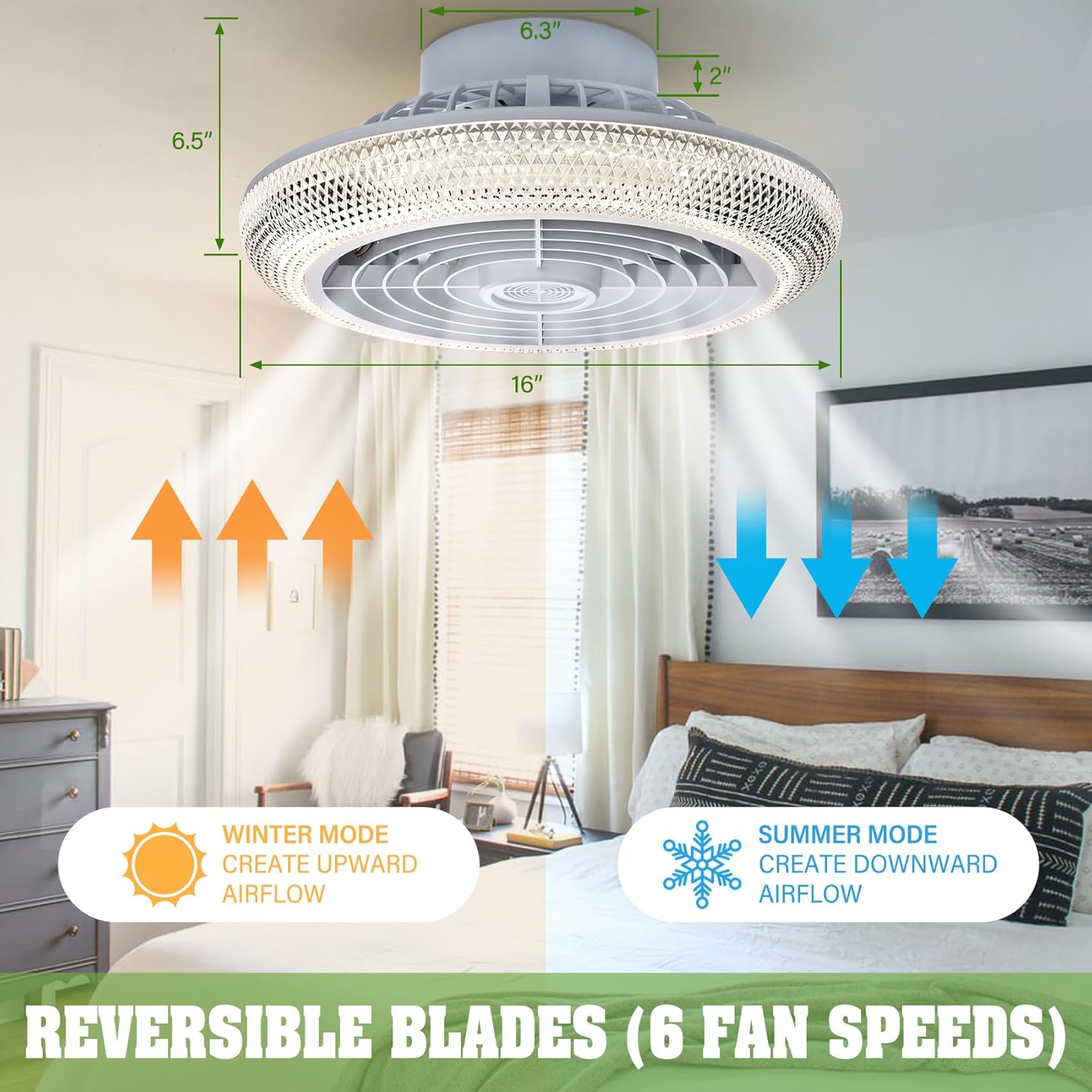
- Versatile Wind Speeds: Offers six adjustable wind speeds for personalized comfort, from a gentle breeze to powerful airflow.
- Dynamic Lighting: Customizable RGB effects and adjustable cool to warm white tones (2800K-6500K) to match mood or decor.
- Convenient Control Options: Manage the fan and light using the included remote control or the user-friendly mobile application.
- Voice-Activated Smartness: Compatible with Google Assistant, Alexa, and Siri for hands-free operation.
- Elegant Aesthetics: Crystal refractive surface provides a sophisticated look and creates a mesmerizing ceiling light effect.
- Reversible Blades: Supports both summer (downward airflow) and winter (upward airflow) modes for year-round comfort.
- Low Noise Operation: Designed for quiet performance, especially in Night Light Mode (≤35dB).
- Timer Function: Set operational timers for convenience.
Package Contents
Verify that all components are present and undamaged before beginning installation.
- TCFUNDY Ceiling Fan with Light Unit
- Remote Control
- Mounting Brackets
- Installation Hardware Kit
- User Manual
Safety Information
Always follow basic safety precautions when installing and operating electrical appliances. Ensure power is disconnected at the circuit breaker before installation or maintenance. Consult a qualified electrician if you are unsure about any part of the installation process.
Setup and Installation
This ceiling fan is designed for indoor use and ceiling mount installation. Ensure the mounting surface can support the weight of the fan.
- Power Disconnection: Turn off power at the main circuit breaker to prevent electrical shock.
- Mounting Bracket Installation: Secure the mounting bracket to the ceiling junction box using the provided hardware. Ensure it is firmly attached.
- Wiring Connections: Connect the fan's electrical wires to the household wiring according to local electrical codes. Typically, this involves connecting live, neutral, and ground wires.
- Fan Unit Attachment: Carefully lift the fan unit and attach it to the mounting bracket. Ensure all connections are secure.
- Final Assembly: Complete any remaining assembly steps as per the detailed diagrams in the included physical manual.
- Power Restoration: Restore power at the main circuit breaker.

Operating Instructions
Your TCFUNDY ceiling fan can be controlled via the included remote or a dedicated mobile application.
Remote Control Operation
The remote control allows for direct adjustment of fan speed, light settings, and other functions.
- Power On/Off: Press the red power button to turn the unit on or off.
- Fan Speed: Use buttons 1-6 to select desired fan speed. 'FAN ON/OFF' button controls fan power.
- Light On/Off: Press the light bulb icon button to toggle the light.
- Brightness Adjustment: Use the sun icon with up/down arrows to increase or decrease light brightness.
- Color Temperature (White Light): Use the 'K' button with up/down arrows to cycle through different white light color temperatures (e.g., 6500K Cool White, 4500K Natural White, 3000K Warm White).
- RGB Color Change: Press the RGB icon button to activate and cycle through various RGB ambient light colors.
- Reversible Fan Direction: Use the button with two curved arrows to switch between summer and winter modes.
- Timer Function: Set a 1-hour or 4-hour timer using the respective buttons.
Mobile Application Control
Download the TCFUNDY Smart Fan Light app from your device's app store. Follow the in-app instructions to pair your fan. The app provides comprehensive control over all fan and light functions, including advanced RGB customization and scheduling.
Voice Control (Alexa, Google Assistant, Siri)
Integrate your TCFUNDY fan with compatible smart home systems. Enable the TCFUNDY skill or add the device through your smart home app. Use voice commands such as "Alexa, turn on the ceiling fan" or "Hey Google, set fan light to blue".


Maintenance
Regular maintenance ensures optimal performance and longevity of your TCFUNDY ceiling fan.
- Cleaning: Before cleaning, ensure the power is off. Wipe the fan and light surfaces with a soft, damp cloth. Do not use abrasive cleaners or solvents.
- Dust Removal: Periodically remove dust from the fan blades and light cover to maintain airflow and light output.
- Inspection: Annually inspect all mounting hardware and electrical connections for tightness.
Troubleshooting
If you encounter issues with your TCFUNDY ceiling fan, refer to the following common problems and solutions:
| Problem | Possible Cause | Solution |
|---|---|---|
| Fan or Light Not Working | No power, loose wiring, remote battery dead, remote not paired. | Check circuit breaker. Ensure all wiring connections are secure. Replace remote batteries. Re-pair remote with the fan (refer to remote pairing instructions in the full manual). |
| Fan Makes Excessive Noise | Loose mounting screws, unbalanced blades, internal obstruction. | Tighten all mounting screws. Ensure blades are clean and free of debris. Check for any internal obstructions. |
| Remote Control Not Responding | Dead batteries, remote out of range, interference. | Replace batteries. Ensure you are within effective range. Minimize interference from other electronic devices. |
| Light Flickers or Changes Unexpectedly | Loose connection, power fluctuations, software glitch. | Check wiring connections. Reset power to the fan at the circuit breaker. Update the mobile application if applicable. |
Specifications
- Brand: TCFUNDY
- Model Name: ceiling fan with light
- Model Number: TCFD-HD0000114-WH
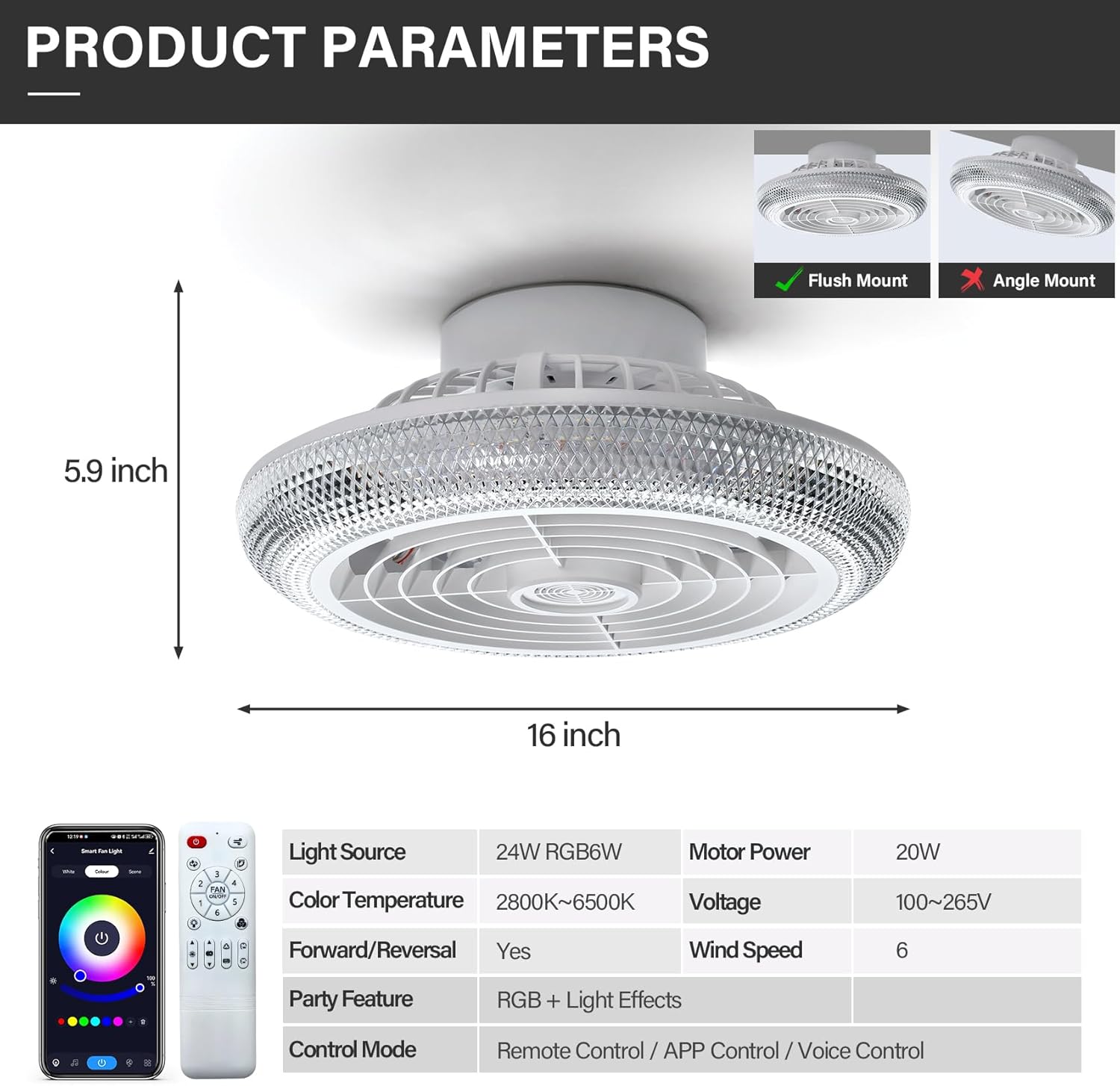
- Product Dimensions: 5.9"D x 15.75"W x 15.75"H
- Electric Fan Design: Ceiling Fan
- Color: White with RGB Light
- Power Source: AC
- Voltage: 110 Volts
- Wattage: 20 watts
- Number of Speeds: 6
- Speed: 1050 RPM
- Controller Type: App Control, Remote Control, Voice Control
- Special Features: LED Light, Reversible Motor, Low Noise (≤35dB), Timer Function, Memory Function
- Material: Metal, Plastic (Blade Material)
- Indoor/Outdoor Usage: Indoor
- Light Source: 24W RGB 6W LED
- Color Temperature: 2800K~6500K

Warranty and Support
For warranty information, product support, or to purchase replacement parts, please contact TCFUNDY customer service. Refer to the contact details provided in your product packaging or visit the official TCFUNDY website.
Return Policy: This product is eligible for a 30-day refund/replacement policy from the date of purchase.


