
1. Safety Information
Please read and understand all instructions before beginning installation. Failure to follow these instructions may result in electric shock, fire, or personal injury.
- Ensure the power is disconnected at the circuit breaker before installation or maintenance.
- All electrical connections must be in accordance with local codes and ordinances, and the National Electric Code (NEC). If you are unfamiliar with proper electrical wiring, seek assistance from a qualified electrician.
- The mounting structure must be capable of supporting the weight of the fan (approximately 10 lbs).
- Do not bend the fan blades during installation or cleaning.
- Do not insert objects into the path of the fan blades.
- This fan is intended for indoor use only.
2. Package Contents
Verify that all components are present before installation:
- Ceiling Fan Unit with Integrated Light
- Remote Control (batteries not included, requires 2x AAA)
- Mounting Bracket
- Hardware Pack (screws, wire nuts, etc.)
- Instruction Manual
3. Product Overview
The TCFUNDY 18" LED RGB Low Profile Ceiling Fan with Light is designed to provide air circulation and customizable lighting for various indoor spaces. It features multiple control options including a remote, a smart app, and voice commands via compatible smart assistants.

Image: Overview of the TCFUNDY ceiling fan highlighting its features including RGB lighting, multiple control options, and integrated functions.
Key Features:
- Six Wind Speeds: Adjustable fan speeds for personalized comfort.
- Dynamic RGB Lighting: Customizable RGB effects and adjustable color temperatures (6000K White, 4500K Natural, 3000K Warm).
- Multiple Control Options: Operate via included remote control, smartphone app, or voice commands (Alexa, Google Assistant, Siri).
- Reversible Airflow: Summer mode for downward airflow and Winter mode for upward airflow.
- Integrated Bluetooth Speaker: Play audio directly from the fan.
- Low Noise Operation: Designed for quiet performance, especially in night light/sleep mode.
4. Setup (Installation)
Professional installation is recommended for electrical wiring. Ensure power is off at the circuit breaker before proceeding.
Installation Steps:
- Prepare Wiring: Turn off power at the main circuit breaker. Remove existing light fixture if applicable.
- Install Mounting Bracket: Secure the mounting bracket to the ceiling junction box using the provided screws. Ensure it is firmly attached and can support the fan's weight.
- Make Electrical Connections: Connect the fan's wires to the household electrical wires according to the wiring diagram in the full manual. Typically, this involves connecting live, neutral, and ground wires. Use wire nuts to secure connections.
- Mount the Fan: Carefully lift the fan unit and attach it to the mounting bracket. Ensure all connections are secure and the fan is properly seated.
- Secure Fan to Bracket: Fasten the fan unit to the mounting bracket with the appropriate screws.
- Restore Power: Turn the power back on at the circuit breaker.
5. Operating Instructions
The fan can be controlled using the remote, a smartphone app, or voice commands.

Image: Overview of available control methods: remote, app, and voice control.
5.1 Remote Control
Insert 2x AAA batteries (not included) into the remote control. Point the remote towards the fan for operation.
- ON/OFF Button: Powers the fan and light on or off.
- Fan Speed Buttons (1-6): Adjusts the fan speed from 1 (lowest) to 6 (highest).
- Light ON/OFF: Toggles the main light on or off.
- Light Control: Adjusts brightness and color temperature of the main light.
- RGB Light Control: Activates and cycles through RGB color modes.
- Music Control: Play/Pause for the Bluetooth speaker.
- Reversible Rotation: Changes the direction of fan blade rotation (Summer/Winter mode).
5.2 App Control
Download the compatible smart home app (e.g., Smart Life, Tuya Smart) from your device's app store. Follow the in-app instructions to pair your fan.
- Pairing: Ensure your phone is connected to a 2.4GHz Wi-Fi network. Open the app, select 'Add Device', and follow the prompts to connect the fan.
- Full Control: The app provides comprehensive control over fan speeds, light brightness, color temperature, RGB effects, timer settings, and Bluetooth speaker functions.
5.3 Voice Control
The fan is compatible with Alexa, Google Assistant, and Siri. Ensure your fan is connected to the smart home app and linked to your voice assistant account.

Image: Demonstrates voice control functionality with smart assistants.
- Linking Accounts: In your voice assistant app (e.g., Alexa app, Google Home app), enable the skill for your smart home app and link your accounts.
- Voice Commands: Use commands such as:
- "Alexa, turn on the ceiling fan."
- "Hey Google, set fan speed to 3."
- "Siri, change fan light to blue."
5.4 Fan Functions
- Speed Adjustment: Select from 6 available wind speeds to suit your preference.
- Reversible Airflow: The fan features reversible blades for year-round use.
- Summer Mode (Downward Airflow): Creates a cooling effect.
- Winter Mode (Upward Airflow): Circulates warm air trapped near the ceiling.
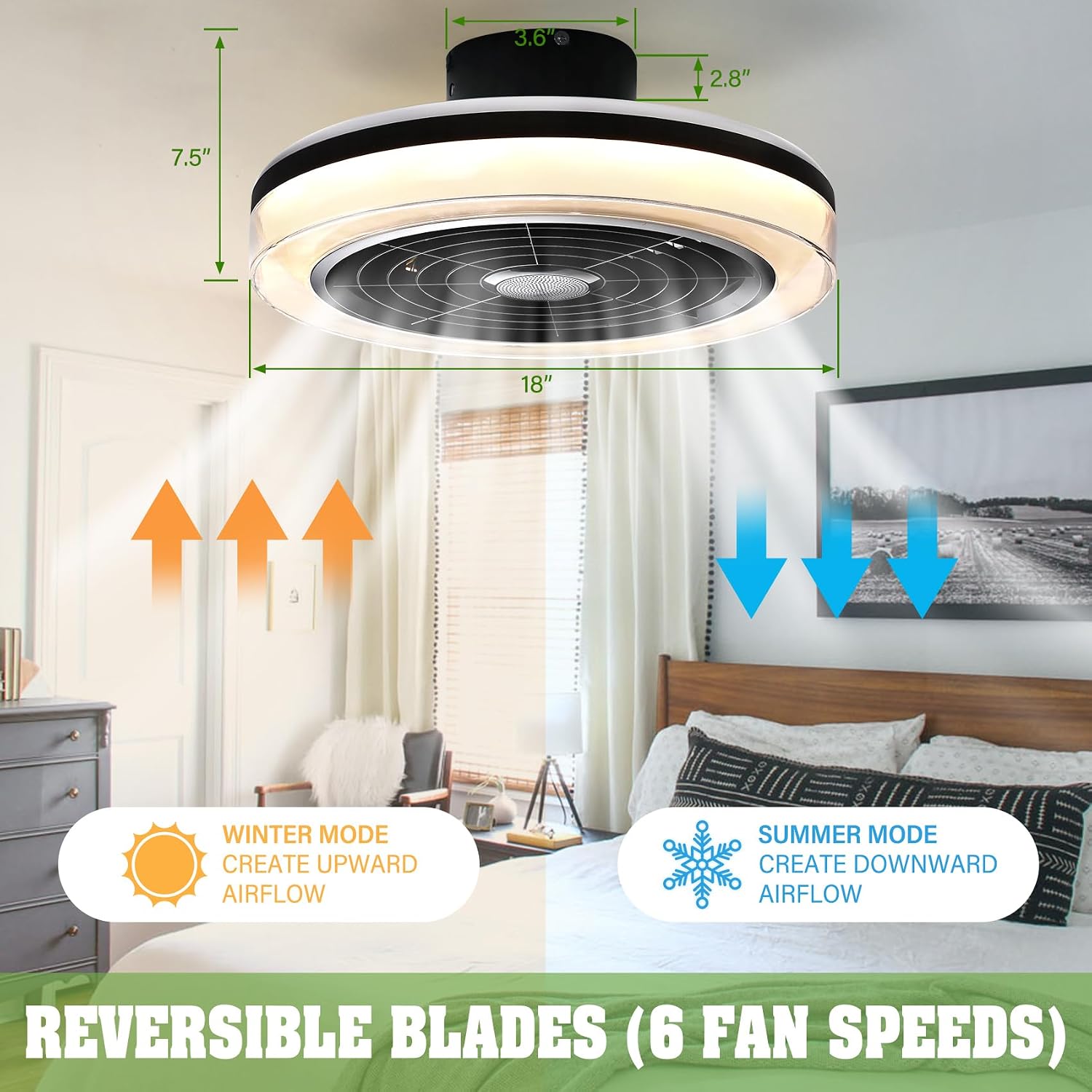
Image: Illustration of reversible airflow for summer and winter modes.
5.5 Light Functions
- Dimmable LED: Adjust the brightness of the main light from 20% to 100%.
- Color Temperature: Choose between 6000K (White Light), 4500K (Natural Light), and 3000K (Warm Light).
- RGB Effects: The fan includes reversed RGB lights that can project various colors onto the ceiling.

Image: Demonstrates the dimmable LED light feature with adjustable color temperatures.

Image: The fan's reversed RGB lights creating dynamic color effects on the ceiling.
5.6 Bluetooth Speaker
The integrated Bluetooth speaker allows you to play music or audio directly from your paired device.
- Pairing: Enable Bluetooth on your smartphone or audio device. Search for the fan's Bluetooth name (usually 'TCFUNDY Fan' or similar) and connect.
- Audio Playback: Once paired, audio from your device will play through the fan's speaker. Control playback (play/pause) via the remote or app.

Image: The ceiling fan's Bluetooth speaker and RGB lights creating an entertaining atmosphere.
6. Maintenance
Regular maintenance ensures optimal performance and longevity of your ceiling fan.
- Cleaning: Before cleaning, ensure the power is turned off at the circuit breaker. Use a soft, damp cloth to wipe down the fan housing and blades. Do not use abrasive cleaners or solvents.
- Blade Inspection: Periodically check that all blade screws are tight. Loose screws can cause wobbling and noise.
- Light Source: The LED light source is integrated and not user-replaceable. If the light fails, contact customer support.
7. Troubleshooting
Refer to the following table for common issues and their solutions.
| Problem | Possible Cause | Solution |
|---|---|---|
| Fan does not start | No power supply; Loose wiring; Remote control battery low/dead. | Check circuit breaker; Verify wiring connections; Replace remote control batteries. |
| Light does not work | No power supply; Loose wiring; Light function off; Integrated LED failure. | Check circuit breaker; Verify wiring connections; Ensure light is turned on via remote/app; Contact customer support if LED is faulty. |
| Fan wobbles | Loose mounting bracket; Unbalanced blades; Loose blade screws. | Ensure mounting bracket is secure; Check for bent blades; Tighten all blade screws. |
| Remote control not working | Low/dead batteries; Remote not paired; Obstruction between remote and receiver. | Replace batteries; Re-pair remote if necessary (refer to full manual); Ensure clear line of sight. |
| App control not working | Fan not connected to Wi-Fi; Incorrect Wi-Fi band (requires 2.4GHz); App not paired with fan. | Ensure fan is connected to 2.4GHz Wi-Fi; Re-pair fan with the app. |
| Bluetooth speaker not connecting | Bluetooth not enabled on device; Fan's Bluetooth not discoverable; Already connected to another device. | Enable Bluetooth on your device; Ensure fan is powered on; Disconnect from other devices and try again. |
8. Specifications
| Feature | Detail |
|---|---|
| Brand | TCFUNDY |
| Model Number | TCFD-HD0000113-WH |
| Product Dimensions | 8.1"D x 17.72"W x 17.72"H |
| Electric Fan Design | Ceiling Fan |
| Power Source | AC |
| Voltage | 110 Volts |
| Wattage | 75 Watts |
| Fan Speed | 6 Levels (Max 1050 RPM) |
| Light Type | Integrated LED (Dimmable, RGB, 3 Color Temperatures) |
| Control Methods | Remote Control, App Control, Voice Control (Alexa, Google Assistant, Siri) |
| Special Features | Reversible Airflow, Bluetooth Speaker, Low Noise Operation (≤35dB), Timer Function |
| Material | Metal |
| Indoor/Outdoor Usage | Indoor Only |
9. Warranty and Support
For warranty information or technical support, please refer to the contact details provided with your purchase or visit the official TCFUNDY website. Keep your purchase receipt as proof of purchase for warranty claims.