
Introduction
This manual provides detailed instructions for the assembly, operation, and maintenance of your Zevemomo Full Bed Frame. Please read thoroughly before beginning assembly and retain for future reference.
Safety Information
- Caution: Be careful around sharp edges during assembly to prevent injury.
- Ensure proper assembly to prevent instability or noise. All fasteners must be securely tightened.
- Do not exceed the weight capacity of the bed frame or drawers. Refer to product specifications for limits.
- Keep electrical components (charging ports, LED lights) away from liquids to avoid electric shock.
- Always unplug the bed frame from the power source before cleaning or performing any maintenance.
Package Contents
Verify all components are present and undamaged before starting assembly. If any parts are missing or damaged, please contact customer support.
- Headboard with Built-in Charging Station and LED Lights
- Bed Frame Components (Metal Slats, Side Rails, Support Legs)
- 8 Storage Drawers
- Assembly Hardware (Screws, bolts, Allen wrench)
- Installation Manual (This document)
Assembly Instructions
Assembly is recommended for two adults. Lay out all parts on a soft, clean surface (e.g., carpet or a blanket) to prevent scratches.
- Step 1: Unpack and Identify Parts
Carefully remove all components from the packaging. Refer to the included parts list to identify each piece. Each part is individually labeled for easy identification.
Video: Demonstrates unboxing and initial part identification for a similar bed frame.
- Step 2: Assemble the Headboard
Attach the headboard sections together, ensuring the charging station and LED light strip are correctly positioned. Connect any necessary wiring for the LED lights and charging ports as per the specific instructions provided with the headboard components.

Image: Close-up of the headboard with integrated LED lighting and charging ports.
- Step 3: Construct the Main Bed Frame
Connect the side rails to the headboard and footboard using the provided hardware. Ensure all connections are secure but do not fully tighten until all parts are aligned.
Video: Assembly process of a bed frame, showing how main frame components connect.
- Step 4: Install Bed Slats and Support Legs
Place the metal bed slats across the frame and secure them. Attach any central support legs to ensure stability. The frame is designed to support a mattress directly, eliminating the need for a box spring.

Image: The full bed frame structure with metal slats, ready for a mattress.
- Step 5: Assemble and Insert Storage Drawers
Assemble the 8 storage drawers according to their individual instructions. These drawers are designed to roll smoothly on wheels under the bed frame.

Image: View of the bed frame with multiple storage drawers pulled out, showcasing their capacity.
- Step 6: Final Checks
Double-check all screws and bolts to ensure they are fully tightened. Confirm the bed frame is stable and level. Plug in the power cord for the headboard's electrical features.
Operating Instructions
Adjustable RGB LED Lights
The headboard features adjustable RGB LED lights to customize your room's ambiance. Use the provided remote control to change colors, adjust brightness, and set various lighting modes or timing functions.

Image: The headboard displaying different RGB LED light colors, with icons illustrating control features.
Built-in Charging Ports & Outlets
The headboard includes built-in USB ports (5V/2A) and standard plug outlets (125V/12A). Connect the bed frame's main power cord to a wall outlet to activate these features. You can then charge your electronic devices conveniently from your bed.
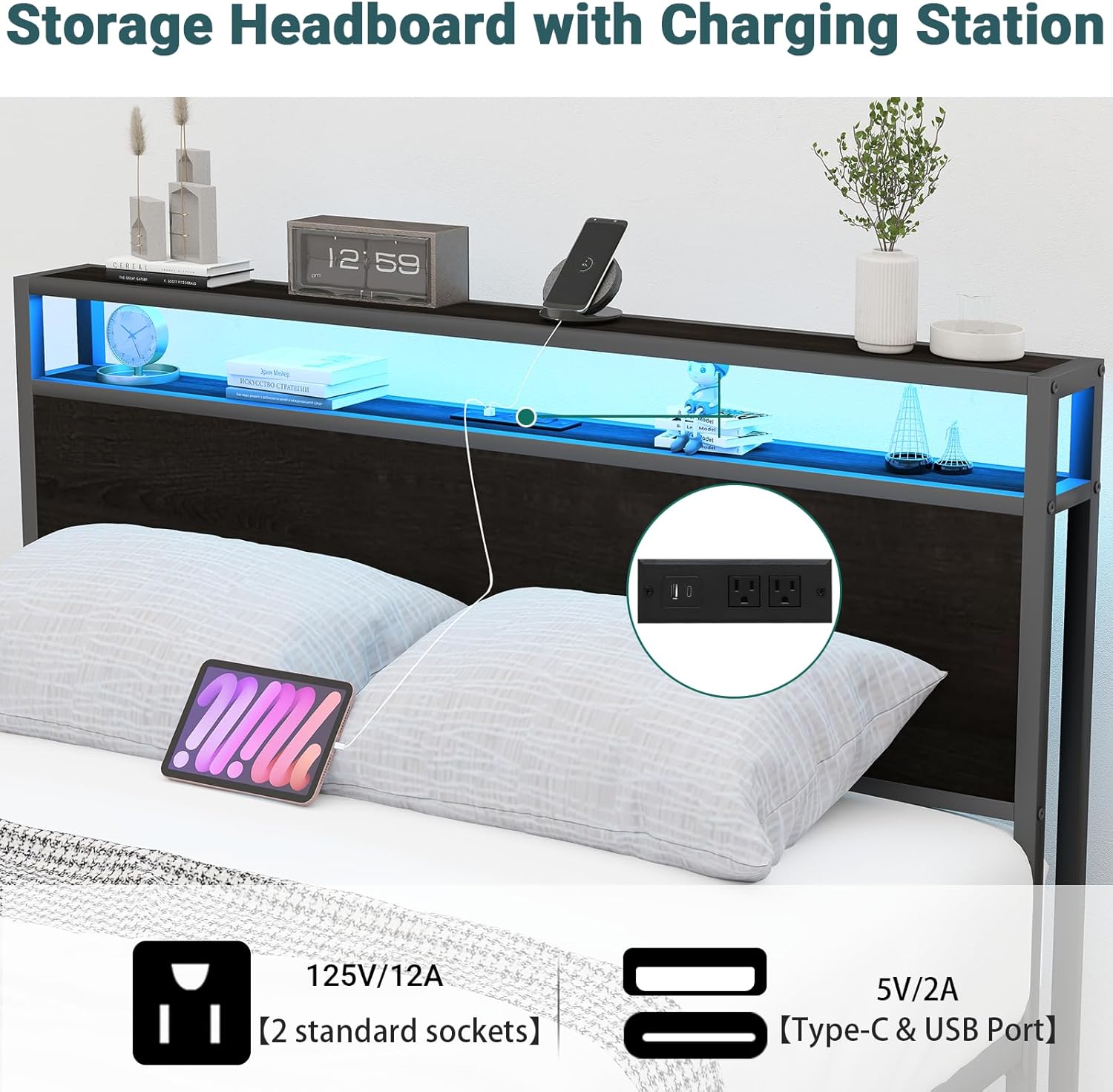
Image: Detail of the charging station on the headboard, showing USB and standard power outlets.
Storage Drawers
The 8 storage drawers are designed for easy access and organization of your belongings. They roll on smooth wheels for effortless opening and closing. Ensure items are placed evenly to prevent jamming.

Image: An overhead view of the bed with all eight storage drawers open, revealing organized contents.
Maintenance
- Cleaning: Wipe the metal and wood surfaces with a soft, damp cloth. Avoid using abrasive cleaners or harsh chemicals that could damage the finish.
- Drawer Care: Periodically check drawer wheels for smooth operation. Clean any dust or debris that may hinder movement.
- Electrical Components: Ensure charging ports and LED lights are free from dust. Do not attempt to repair electrical components yourself; contact a qualified technician if issues arise.
- Fasteners: Periodically check and tighten all screws and bolts to maintain the bed frame's stability and prevent squeaking.
Troubleshooting
| Problem | Possible Cause | Solution |
|---|---|---|
| Bed frame is wobbly or noisy | Loose fasteners; uneven floor | Tighten all screws and bolts. Adjust leg levelers if available, or place shims under legs on an uneven floor. |
| LED lights not working | Power cord unplugged; remote control battery low; loose connection | Ensure power cord is securely plugged in. Check remote battery. Verify LED strip connection to the power source. |
| Charging ports not working | Power cord unplugged; device cable faulty | Ensure power cord is securely plugged in. Try a different charging cable or device to rule out cable issues. |
| Drawers do not slide smoothly | Obstruction in wheels; misaligned | Check for debris in the wheels and clear it. Ensure drawers are aligned correctly within their tracks. |
Video: A short preview video demonstrating the bed frame's features, including LED lights and drawers, which can be useful for visual troubleshooting.
Specifications
- Size: Full
- Material: Metal, Wood
- Product Dimensions: 86.49"L x 60.19"W x 39.17"H
- Style: 8 Drawers + LED + Charger
- Special Features: Charging Station, LED Lighting, No Box Spring Needed, Storage Drawers
- Included Components: Drawer, Headboard, Installation Manual
- Brand: Zevemomo
- Model Number: 51110GFBK
- Compatible Mattress Size: Full
- Item Weight: 71 Pounds
- Assembly Required: Yes

Image: Detailed dimension diagram of the Zevemomo Full Bed Frame.
Warranty and Support
For warranty information or further assistance, please refer to the documentation included in your product packaging or contact Zevemomo customer support directly.
You can visit the official Zevemomo store for more information: Zevemomo Store.


