
1. Introduction
This manual provides essential information for the safe and effective installation, operation, and maintenance of the Eurotherm Drives 690P/0055/400/0010/Uk/0/0/0/0/B0/0/0 460V 3Ph AC Drive. Please read this manual thoroughly before attempting any procedures to ensure proper handling and to prevent damage or injury.
2. Safety Information
WARNING: Risk of electric shock. This device operates at high voltages. Only qualified personnel should perform installation, maintenance, and troubleshooting. Always disconnect power before servicing.
- Ensure all local and national electrical codes are followed during installation.
- Allow at least 3 minutes after de-energisation for capacitor discharge before servicing.
- Do not operate the drive with covers removed.
- Verify proper grounding before applying power.
- Use appropriate personal protective equipment (PPE) when working with electrical equipment.
3. Setup and Installation
3.1 Unpacking and Inspection
Carefully unpack the AC drive and inspect it for any signs of shipping damage. Report any damage to the carrier immediately. Ensure all components listed in the packing slip are present.
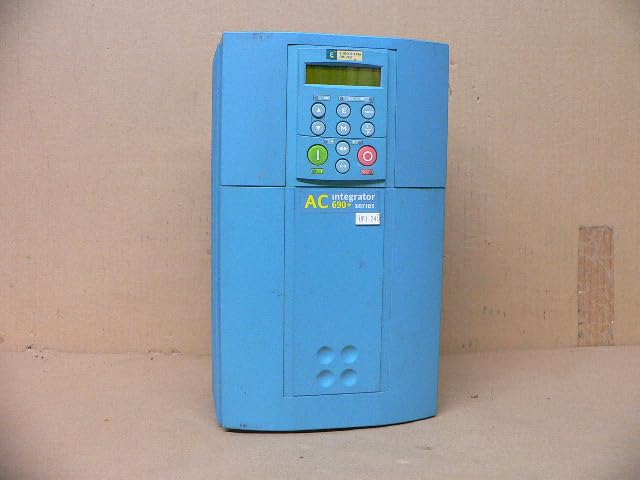
Figure 3.1: Front view of the Eurotherm Drives 690P AC Drive. This image displays the main body of the drive, featuring its blue casing and the integrated control panel with display and buttons.
3.2 Mounting
Mount the drive vertically on a flat, stable surface, ensuring adequate ventilation. Maintain proper clearance around the unit for airflow and heat dissipation. Refer to the product dimensions for space requirements.
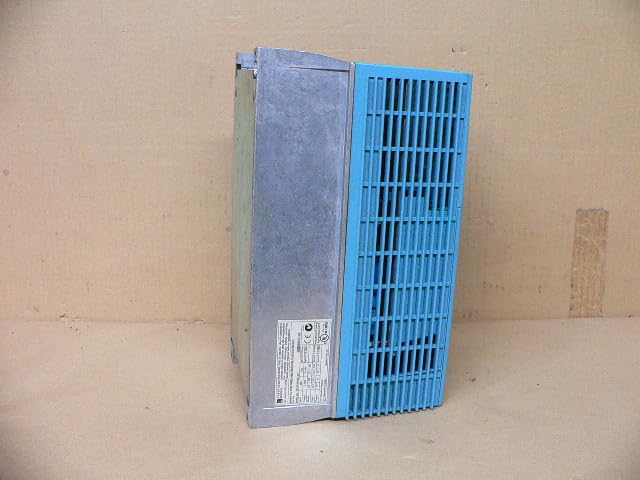
Figure 3.2: Side view of the Eurotherm Drives 690P AC Drive. This image highlights the cooling fins on the side, essential for heat management, and the robust metal casing.
3.3 Wiring
Connect the main power supply (460V 3Ph AC) to the designated input terminals. Connect the motor to the output terminals. Ensure all connections are secure and correctly phased. Refer to the wiring diagram provided with the drive for detailed instructions.
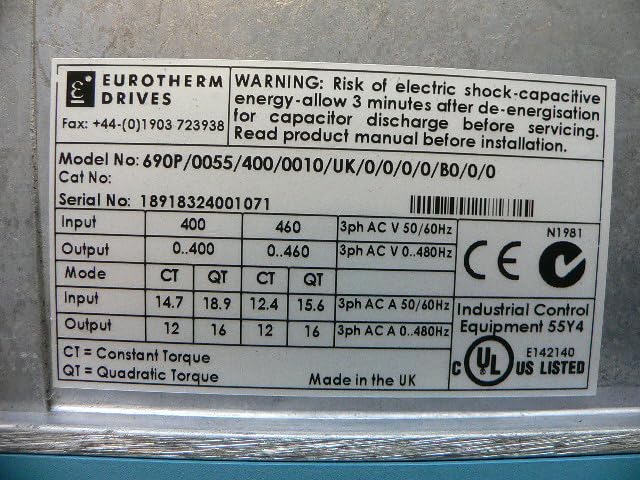
Figure 3.3: Product label of the Eurotherm Drives 690P AC Drive. This label provides critical information including the model number, serial number (18918324001071), input/output voltage and current ratings, and important safety warnings regarding electric shock and capacitor discharge time.
3.4 Initial Power-Up
Before applying power, double-check all wiring connections. Apply power and observe the drive's display for any error codes or abnormal behavior. If an error occurs, refer to the Troubleshooting section.
4. Operating Instructions
4.1 Control Panel Overview
The drive features an integrated control panel with a display and various buttons for operation and parameter adjustment. Common buttons include START (green), STOP (red), navigation arrows, and an ENTER button.
4.2 Basic Operation
- Start: Press the green START button to initiate motor operation.
- Stop: Press the red STOP button to halt motor operation.
- Speed Adjustment: Use the up/down arrow buttons to adjust the motor speed, if configured for local control.
4.3 Parameter Adjustment
The drive allows for configuration of various operational parameters (e.g., acceleration/deceleration times, motor data, control modes). Refer to the detailed programming manual (not included in this document) for specific parameter settings and their functions.
5. Maintenance
Regular maintenance ensures the longevity and reliable operation of your AC drive. Always disconnect power and wait for capacitor discharge before performing any maintenance.
- Cleaning: Periodically clean the drive's exterior and cooling fins to prevent dust buildup, which can impede heat dissipation. Use a soft, dry cloth or compressed air.
- Inspection: Regularly inspect wiring connections for tightness and signs of wear or corrosion. Check for any unusual noises or vibrations during operation.
- Environmental Conditions: Ensure the operating environment remains within specified temperature and humidity ranges.
6. Troubleshooting
This section provides guidance for common issues. For complex problems or persistent errors, contact qualified service personnel.
| Problem | Possible Cause | Solution |
|---|---|---|
| Drive does not power on | No input power; Blown fuse; Internal fault | Check power supply; Inspect fuses; Contact service |
| Motor does not run | Incorrect wiring; Parameter settings; Motor fault | Verify wiring; Check parameters; Test motor independently |
| Overcurrent fault | Motor overload; Short circuit; Incorrect acceleration time | Reduce load; Check motor/cables; Increase acceleration time |
| Overheat warning | Insufficient ventilation; High ambient temperature; Dirty cooling fins | Ensure proper airflow; Lower ambient temp; Clean fins |
7. Specifications
The following specifications are for the Eurotherm Drives 690P/0055/400/0010/Uk/0/0/0/0/B0/0/0 AC Drive:
- Model: 690P/0055/400/0010/Uk/0/0/0/0/B0/0/0
- Input Voltage: 460V 3Ph AC (also supports 400V 3Ph AC)
- Input Frequency: 50/60Hz
- Output Voltage: 0-460V 3Ph AC (also supports 0-400V 3Ph AC)
- Output Frequency: 0-480Hz
- Input Current (CT/QT): 14.7A/18.9A (400V), 12.4A/15.6A (460V)
- Output Current: 12A/16A
- Product Dimensions: 7.87 x 8.46 x 13.78 inches
- Product Weight: 17.89 Pounds
- ASIN: B0D33ZPFQN
- Manufacturer: Generic
- Country of Origin: USA
- Serial Number (from label): 18918324001071
8. Warranty and Support
This item is described as used and in working condition. Specific warranty terms for used industrial equipment may vary. Please consult with the seller (Rylan-MRO) for any applicable warranty information or return policies.
For technical support or further assistance, please contact the manufacturer, Generic, or the seller directly. Refer to the product label for manufacturer contact details such as the Fax number: +44-(0)1903 723938.