
KALI AUDIO IN-8W V2
Kali Audio IN-8W V2 8-inch Powered 3-Way Studio Monitor User Manual
Model: IN-8W V2
1. Introduction
The Kali Audio IN-8W V2 is a 3-way powered studio monitor designed for critical listening and mixing applications. It features an 8-inch woofer, a 4-inch midrange driver, and a 1-inch soft dome tweeter, with the midrange and tweeter arranged coaxially for precise imaging. These near-field monitors deliver accurate, extended low frequencies and detailed high frequencies with low distortion, suitable for monitoring at various volume levels. With a flat frequency response and neutral tonality, the IN-8W V2 allows users to hear subtle details in their mixes. Its balanced XLR and 1/4" TRS inputs, along with RCA inputs, ensure easy integration into any studio setup.

Front view of the Kali Audio IN-8W V2 8-inch powered 3-way studio monitor in white, showcasing the coaxial midrange and tweeter above the main woofer.
2. Important Safety Instructions
- Read these instructions thoroughly before operating the product.
- Keep these instructions for future reference.
- Heed all warnings on the product and in the operating instructions.
- Follow all instructions for safe use and operation.
- Do not use this apparatus near water or moisture.
- Clean only with a dry cloth.
- Do not block any ventilation openings. Install in accordance with the manufacturer's instructions.
- Do not install near any heat sources such as radiators, heat registers, stoves, or other apparatus (including amplifiers) that produce heat.
- Do not defeat the safety purpose of the polarized or grounding-type plug. A polarized plug has two blades with one wider than the other. A grounding-type plug has two blades and a third grounding prong. The wide blade or the third prong are provided for your safety. If the provided plug does not fit into your outlet, consult an electrician for replacement of the obsolete outlet.
- Protect the power cord from being walked on or pinched, particularly at plugs, convenience receptacles, and the point where they exit from the apparatus.
- Only use attachments/accessories specified by the manufacturer.
- Unplug this apparatus during lightning storms or when unused for long periods of time.
- Refer all servicing to qualified service personnel. Servicing is required when the apparatus has been damaged in any way, such as power-supply cord or plug is damaged, liquid has been spilled or objects have fallen into the apparatus, the apparatus has been exposed to rain or moisture, does not operate normally, or has been dropped.
3. Package Contents
Upon unpacking your Kali Audio IN-8W V2 studio monitor, please ensure all items are present and in good condition:
- One Kali Audio IN-8W V2 Studio Monitor
- One Power Cable
4. Key Features
- Powerful Performance: 140-watt Class D digital amplifier system delivers clear and accurate sound for studio mixing and mastering.
- Precise Control: Independent level controls, low-cut filters, and input selection allow customization of the monitors for any application or room environment.
- Studio Reference: 8-inch woofer, 4-inch midrange driver, and 1-inch soft dome tweeter (coaxially mounted) reproduce a wide frequency response from 42Hz to 22kHz.
- Versatile Connectivity: Balanced XLR and 1/4" TRS inputs, along with unbalanced RCA inputs, ensure broad compatibility with studio equipment.

Angled front view of the Kali Audio IN-8W V2 studio monitor, highlighting its sleek design and driver arrangement.
5. Setup
5.1 Placement
Proper placement of your studio monitors is crucial for accurate sound reproduction. Position the monitors to form an equilateral triangle with your listening position. The tweeters should ideally be at ear level. Avoid placing monitors directly against walls or in corners without utilizing the boundary compensation settings.
5.2 Connections
The IN-8W V2 offers three types of audio inputs:
- XLR Input (+4 dBu): For balanced professional audio equipment.
- TRS Input (+4 dBu): For balanced or unbalanced 1/4-inch connections.
- RCA Input (-10 dBV): For unbalanced consumer audio equipment.
Connect your audio source to one of these inputs. Only use one input at a time. Ensure the volume knob on the monitor is set to its lowest position before connecting the power cable.
5.3 Powering On
After connecting your audio source, plug the power cable into the monitor and then into a suitable AC outlet. Flip the power switch to the 'On' position. The LED indicator on the front of the monitor will illuminate.
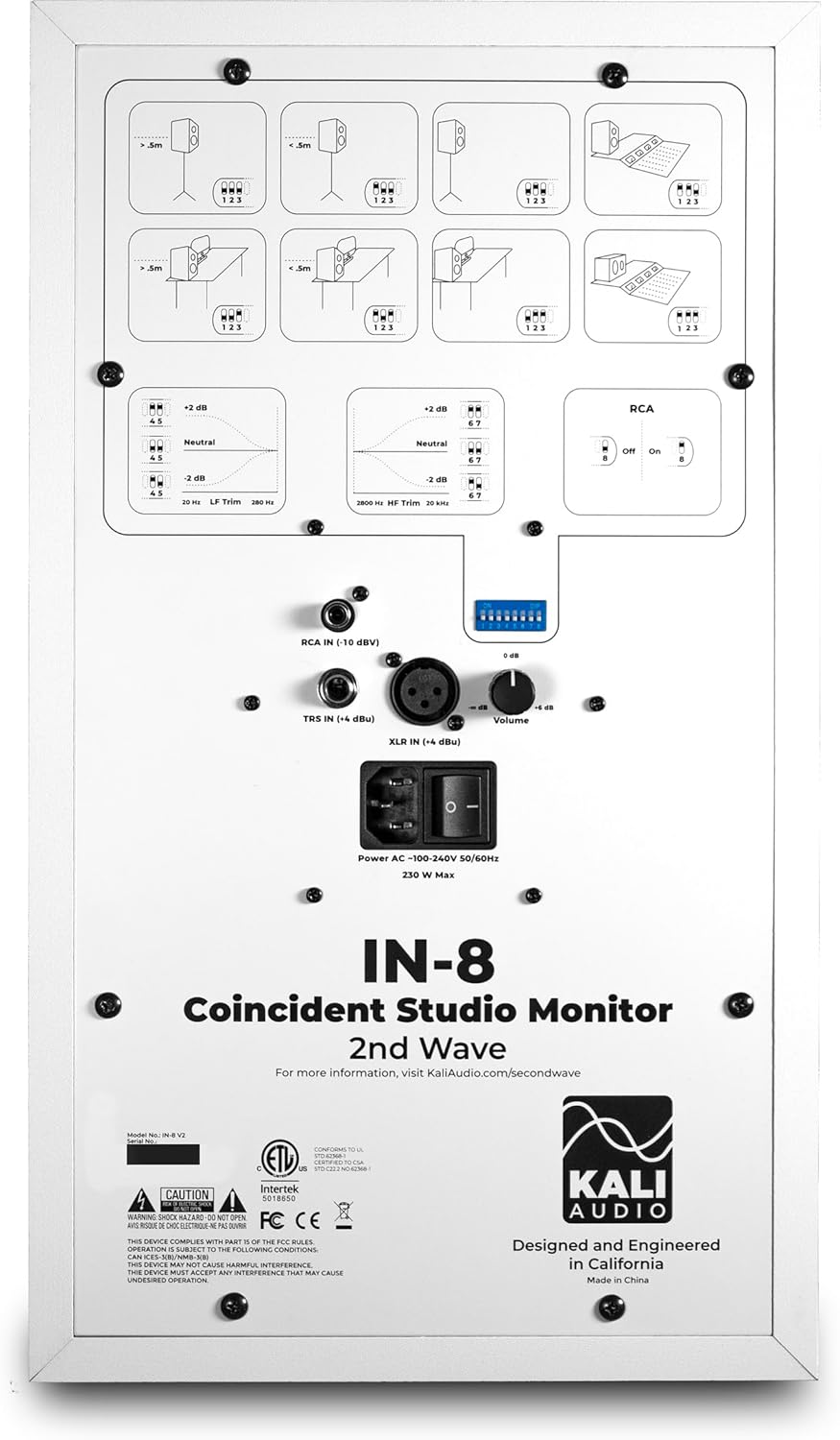
Detailed view of the rear panel of the Kali Audio IN-8W V2 studio monitor, displaying input connections (XLR, TRS, RCA), volume control, and DIP switches for boundary compensation and EQ settings.
6. Operating Instructions
6.1 Volume Control
The large knob on the rear panel controls the output volume of the monitor. Start with a low volume and gradually increase it to a comfortable listening level.
6.2 Input Selection
The IN-8W V2 automatically detects which input is active. If multiple inputs are connected, ensure only one source is playing audio at a time to avoid signal conflicts.
6.3 Boundary Compensation EQ Settings
The IN-8W V2 features a series of DIP switches on the rear panel to adjust the monitor's frequency response based on its placement in your room. These settings help to compensate for acoustic anomalies caused by boundaries (walls, desks, etc.). Refer to the diagrams printed on the rear panel for recommended settings based on your monitor's position.
- LF Trim: Adjusts the low-frequency response.
- HF Trim: Adjusts the high-frequency response.
- RCA Input On/Off: Activates or deactivates the RCA input. Ensure this is set correctly if using RCA.
Experiment with these settings to achieve the most neutral and accurate sound in your listening environment.
7. Maintenance
7.1 Cleaning
To clean the monitor, use a soft, dry cloth. Do not use abrasive cleaners, waxes, or solvents, as these can damage the cabinet finish or drivers. Avoid spraying liquids directly onto the monitor.
7.2 Storage
If storing the monitor for an extended period, ensure it is powered off and disconnected from the power source. Store it in a cool, dry place, ideally in its original packaging, to protect it from dust and physical damage.
8. Troubleshooting
| Problem | Possible Cause | Solution |
|---|---|---|
| No sound |
|
|
| Distorted sound |
|
|
| Hum or noise |
|
|
9. Specifications
| Model Name | IN-8W V2 |
| Speaker Type | 3-Way Powered Studio Monitor |
| Woofer Diameter | 8 Inches |
| Midrange Driver | 4 Inches (Coaxial) |
| Tweeter Diameter | 1 Inch (Coaxial) |
| Amplifier Power | 140 Watts (Class D) |
| Frequency Response | 42 Hz - 22 kHz |
| Inputs | XLR (+4 dBu), TRS (+4 dBu), RCA (-10 dBV) |
| Product Dimensions (D x W x H) | 10" x 15" x 12" |
| Item Weight | 25.9 pounds |
| Color | White |
| Power Source | Corded Electric |
10. Warranty and Support
This Kali Audio IN-8W V2 studio monitor is covered by a manufacturer's warranty. For specific details regarding the warranty period and terms, please refer to the documentation included with your product or visit the official Kali Audio website. For technical support, troubleshooting assistance beyond this manual, or warranty claims, please contact Kali Audio customer service directly.
You can find more information and support resources on the official Kali Audio website: www.kaliaudio.com
Related documentsIN-8W V2


Ask a question about this manual
Ask about setup, troubleshooting, compatibility, parts, safety, or missing instructions. Manuals+ will review the question and use this page’s manual context to help answer it.