
1. Introduction
The SellEton SL-7561 Multi-channel Indicator is engineered to deliver precise and reliable data management, seamlessly integrating with static axle scale systems. Designed for demanding industrial environments, it enhances productivity with a clear, high-resolution LCD display, versatile weighing modes, and essential features like Tare and Zero. With a built-in needle printer and a wide range of wired and wireless connectivity options, this durable and dependable indicator ensures consistent accuracy and adaptable performance, helping to maintain smooth operations even in tough conditions.
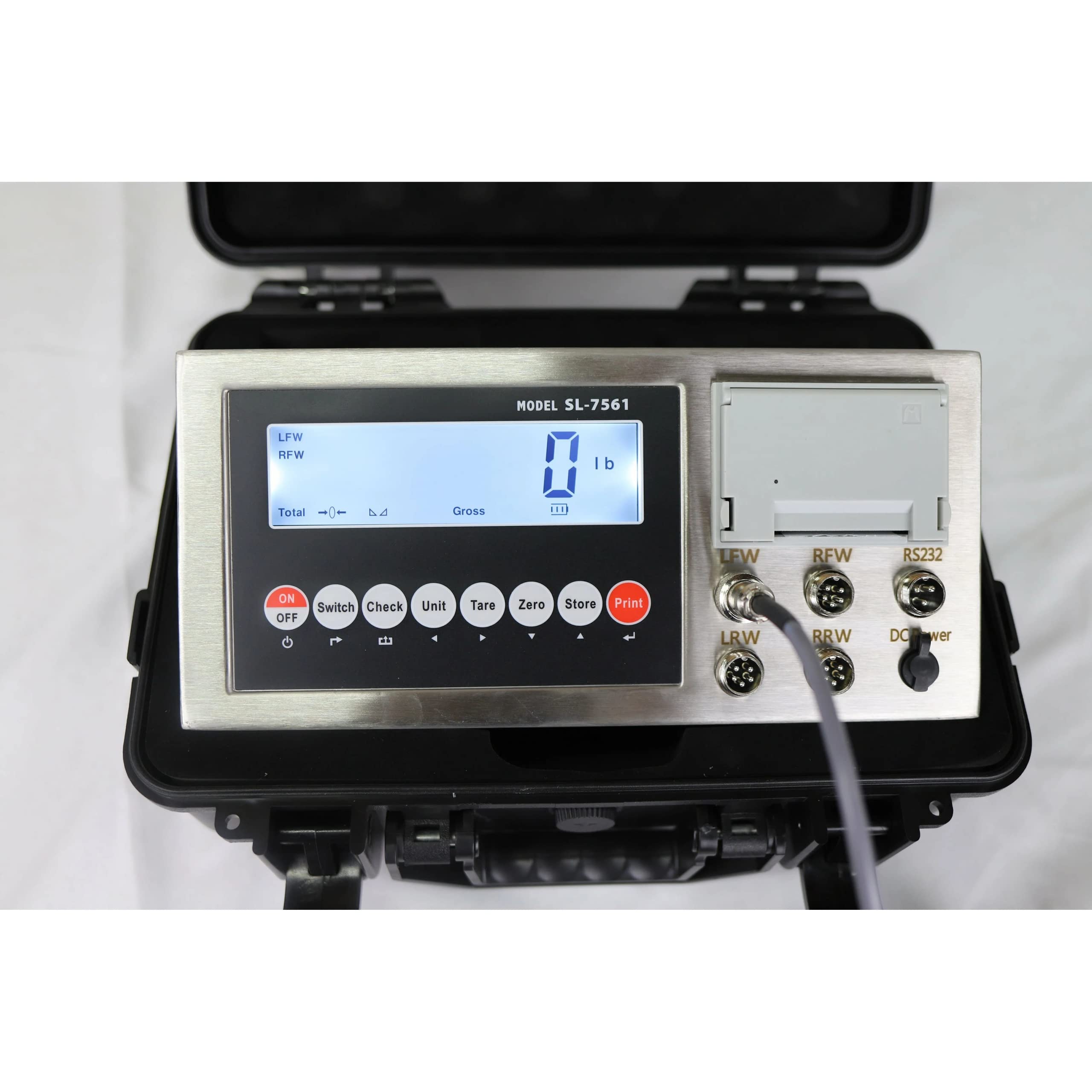
Figure 1: The SellEton SL-7561 Multi-Channel Indicator with its built-in printer, housed in a protective case.
2. Setup
2.1 Initial Inspection
- Unpack all components and verify against the packing list.
- Inspect the indicator and cables for any visible damage.
- Ensure the indicator is placed on a stable, level surface.
2.2 Connecting to Weigh Pads
The SL-7561 indicator can connect with up to four weighing pads. Use the designated ports for Left Front Wheel (LFW), Right Front Wheel (RFW), Left Rear Wheel (LRW), and Right Rear Wheel (RRW). Ensure connections are secure.

Figure 2: Detail of the SL-7561 indicator's connection ports for weigh pads.
2.3 Powering On
- Connect the 9V/1.2A adapter to the DC Power port.
- Alternatively, use the built-in 6V/4.5Ah rechargeable battery for portable operation.
- Press the 'ON' button to power on the indicator.
3. Operating Instructions
3.1 Basic Weighing Functions
- Tare: Use the 'TARE' button to zero out the weight of a container or packaging.
- Zero: Use the 'ZERO' button to reset the display to zero when nothing is on the scale.
- Print: Use the 'PRINT' button to print current weight data via the built-in printer.
- Unit: Switch between Kilograms (Kg) and Pounds (lb) using the 'UNIT' button.
- Save/Store: Save weight data using the 'STORE' button.
- Check/Delete: Review or delete stored data using the 'CHECK' and 'DELETE' functions.
3.2 Calibration Procedure (General)
Accurate calibration is crucial for precise measurements. Follow these steps for general calibration:
- Ensure all feet of the scale are installed and all corners are leveled and touching the ground.
- Connect the scale and indicator properly, without forcing connections.
- Have a known/confirmed weight of at least 50 lbs or more ready.
- A Phillips screwdriver is needed to access the calibration switch.
Video 1: Detailed guide on calibrating the SellEton SL-7561 Multi-Channel Indicator. This video covers setting capacity, accuracy, and performing the weight calibration.
3.3 Calibration for Weigh Pads
When calibrating with weigh pads, specific steps are required to configure the number of pads and their individual capacities.
Video 2: Instructions for calibrating the SL-7561 Multi-channel Indicator for weigh pads, including setting the number of pads and performing linear calibration.
4. Maintenance
- Cleaning: Wipe the display and keyboard with a soft, damp cloth. Avoid abrasive cleaners or solvents.
- Battery Care: Recharge the internal battery regularly to maintain its lifespan. Avoid deep discharge.
- Storage: Store the indicator in a dry, dust-free environment when not in use.
- Cable Inspection: Periodically check all cables for wear, cuts, or damage. Replace damaged cables immediately.
5. Troubleshooting
- No Display: Check power connection and battery charge. Ensure the 'ON' button is pressed.
- Inaccurate Readings: Perform a calibration as described in Section 3.2. Ensure the scale is level and free from obstructions.
- Printer Not Working: Check paper roll and ensure it's correctly loaded. Verify printer settings and connections.
- Connectivity Issues: Ensure all cables are securely connected. For wireless connections, check signal strength and pairing.
6. Specifications
| Feature | Detail |
|---|---|
| Brand | SELLETON.COM ACCURATE SCALES WITH BETTER PRICING |
| Model | SL-7561-Indicator Only |
| Color | Black |
| Display Type | LCD |
| Special Features | Backlit Display, Lightweight |
| Included Components | Indicator with Built-in Printer |
| Connectivity | Wired and Wireless options, RS-232 port |
| Power Source | 6V/4.5Ah rechargeable battery, 9V/1.2A adapter |
7. Warranty and Support
For warranty information, technical support, or service inquiries, please contact SellEton customer service. Refer to your purchase documentation for specific warranty terms and contact details.
You can also visit the official SellEton website for additional resources and support: SellEton Scales Store


