
usmile Y10 PRO
usmile Y10 PRO Electric Toothbrush User Manual
Model: Y10 PRO (80130013-US-NEW)
Introduction
Welcome to the usmile Y10 PRO Electric Toothbrush user manual. This advanced electric toothbrush is designed to provide a superior cleaning experience with its smart display, missed spot detection, and pressure sensor technology. With a long-lasting 180-day battery life and IPX8 waterproof rating, the Y10 PRO offers convenience and effective oral care.

The usmile Y10 PRO Electric Toothbrush, its packaging, and included brush heads.
Key Product Features
- Smart Screen & Missed Spot Detection: Integrates a six-axis sensor to identify and guide you to missed brushing spots for comprehensive cleaning.
- Pressure Sensor: Warns you when brushing too hard and automatically reduces vibration to protect gums.
- 180-Day Battery Life: Offers extended usage on a single charge with convenient USB-C charging.
- IPX8 Waterproof: Ensures durability and allows for safe use in wet environments like the shower.
- Oral Health Improvement: Clinically shown to reduce tooth decay, gum bleeding, and plaque removal.

The smart display provides real-time feedback for effective brushing.
Setup
Initial Charge
Before first use, fully charge your usmile Y10 PRO toothbrush. Connect the universal USB-C charge cable to the charging port at the bottom of the toothbrush and plug it into a compatible USB power adapter. A full charge typically takes 4-5 hours and provides up to 180 days of use.

The usmile Y10 PRO features a convenient USB-C charging port.
Attaching the Brush Head
Align the brush head with the metal shaft on the toothbrush handle and push it down firmly until it clicks into place. Ensure it is securely attached before use.
Operating Instructions
Power On/Off
To turn the toothbrush on, short press the power button. To turn it off, short press the power button again.
Selecting Brushing Modes
The usmile Y10 PRO offers multiple brushing modes to suit your needs. After turning on the toothbrush, short press the function button to cycle through the available modes (e.g., Smart, Soft, White, Clean). The selected mode will be displayed on the smart screen.
Smart Display and Missed Spot Detection
The integrated six-axis sensor and smart screen provide real-time feedback on your brushing. The display will indicate areas that need more attention, helping you achieve comprehensive plaque removal and improve your brushing technique.

The smart screen guides you to missed spots, ensuring thorough cleaning.
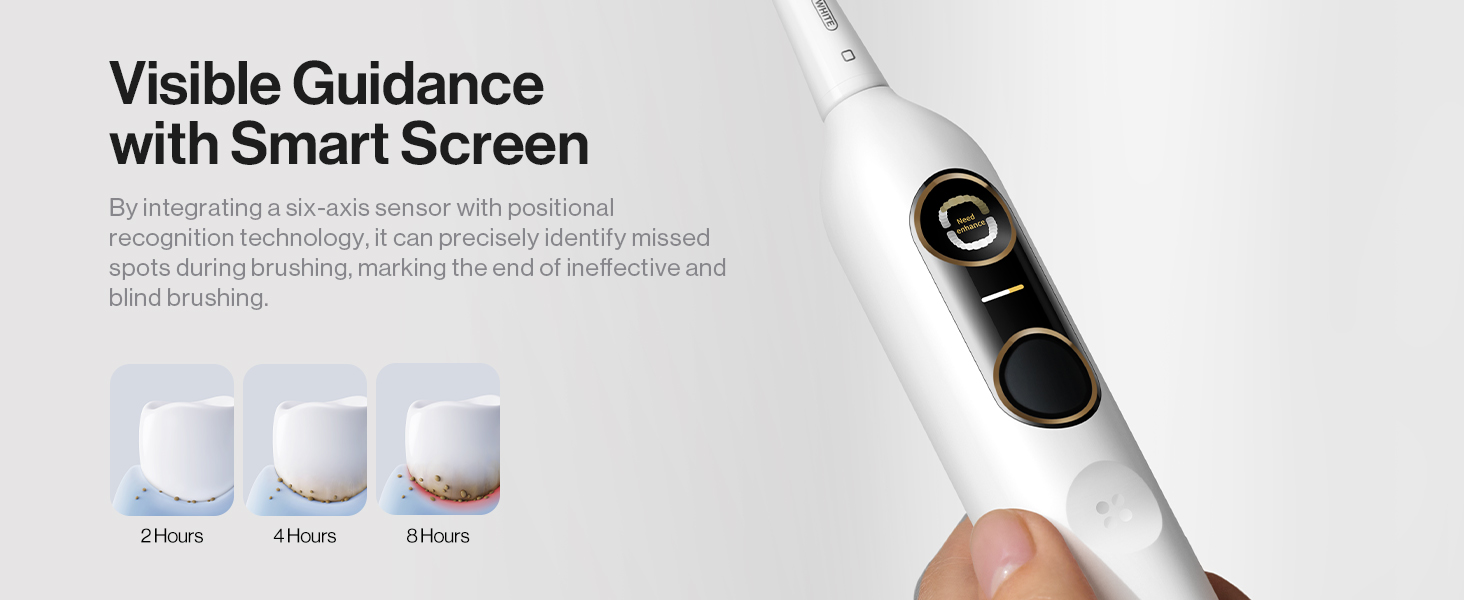
Real-time feedback on the smart screen helps monitor brushing effectiveness.
Pressure Sensor
The usmile Y10 PRO features a pressure sensor that alerts you if you are brushing too hard. When excessive pressure is detected, the screen will display a warning, and the vibration intensity will automatically reduce to protect your gums from damage.

The pressure sensor helps prevent gum bleeding by indicating when to reduce force.
Brushing Timer and Quadrant Prompts
The toothbrush includes a 2-minute basic brush timer, recommended by dentists, and a 4-minute auto-stop feature. It also provides 30-second zone change alerts to ensure you brush all quadrants of your mouth evenly.

The built-in timer and quadrant prompts guide you to brush for the dentist-recommended time.
Language Selection
To select the display language:
- Short press the power button to activate the toothbrush.
- Short press the function button to cycle through Chinese, English, or Japanese.
- Short press the power button again to confirm your selection.

Follow these steps to select your preferred language on the smart screen.
To change the language after initial setup:
- Long press the power button for 5 seconds until "Reset" appears on the screen.
- The toothbrush will reset. Afterward, follow the steps above to select your language again.

Instructions for resetting and changing the display language.
Maintenance
Cleaning Your Toothbrush
After each use, rinse the brush head and bristles thoroughly under running water. Wipe the handle with a damp cloth. Do not submerge the entire handle in water for extended periods, although it is IPX8 waterproof for normal use.

The IPX8 waterproof design allows for easy cleaning and use in the shower.
Charging
The usmile Y10 PRO boasts an impressive 180-day runtime. When the battery is low, connect the USB-C cable to the charging port. The smart screen will indicate charging status. Avoid leaving the toothbrush on the charger indefinitely once fully charged.
Replacing Brush Heads
For optimal performance and hygiene, it is recommended to replace your brush head every 3 months, or sooner if the bristles become frayed. Gently pull the old brush head off the handle and snap a new one into place.
DiamondShine Brush Head with Air-Cushion Technology
The usmile Y10 PRO comes with DiamondShine brush heads featuring innovative Air-Cushion technology. This design provides a gentle yet effective clean, protecting your teeth and gums while ensuring full tooth coverage and plaque removal even in hard-to-reach areas. The bristles are designed for whitening and comprehensive gum care.
Watch this video to learn more about the DiamondShine Brush Head with Air-Cushion technology.

The brush head features an innovative shock-absorbing patent for teeth protection.

The bristles are designed for full tooth coverage and effective plaque removal.

The brush head offers an all-in-one solution for moth proofing, whitening, and gum care.
Troubleshooting
| Problem | Possible Cause | Solution |
|---|---|---|
| Toothbrush does not turn on. | Battery is depleted. | Charge the toothbrush fully using the USB-C cable. |
| Screen display is not working or frozen. | Temporary software glitch. | Perform a language reset (long press power button for 5 seconds until "Reset" appears). |
| Vibration feels too strong or too weak. | Incorrect brushing mode selected. | Short press the function button to cycle through modes (Smart, Soft, White, Clean) to find a comfortable intensity. |
| Pressure sensor warning activates frequently. | Brushing too hard. | Reduce the pressure applied while brushing. The toothbrush will automatically adjust vibration. |
| Brush head feels loose or falls off. | Brush head not properly attached or worn out. | Ensure the brush head is pushed down firmly until it clicks. Replace the brush head if it is old or damaged. |
Specifications
| Feature | Detail |
|---|---|
| Model Number | 80130013-US-NEW |
| Product Dimensions | 1.09 x 1.06 x 9.92 inches |
| Weight | 5.26 ounces |
| Battery Type | 1 Lithium Ion battery (included) |
| Power Source | Battery Powered (USB-C charging) |
| Battery Life | Up to 180 days |
| Special Features | 180-Day Runtime, Plaque Monitor with Smart Screen, Pressure Control, SmartBass Algorithm Built-in |
| Waterproof Rating | IPX8 |
| Age Range | Adult |
| Item Firmness Description | Hard (referring to brush head effectiveness) |
Safety Information
Please read and understand the following safety information before using your usmile Y10 PRO Electric Toothbrush:
- Avoid using excessive pressure while brushing. The built-in pressure sensor will alert you if you are pressing too hard.
- Keep the toothbrush clean and dry when not in use to maintain hygiene and product longevity.
- Do not attempt to disassemble or repair the toothbrush yourself. Contact customer support for assistance.
- Keep out of reach of children unless under adult supervision.
- Do not use the toothbrush if it appears damaged.
Warranty and Support
usmile products are manufactured to high-quality standards. For any warranty claims, technical support, or inquiries regarding your usmile Y10 PRO Electric Toothbrush, please contact usmile customer service through the official usmile website or your point of purchase. Please retain your proof of purchase for warranty purposes.
Ask a question about this manual
Ask about setup, troubleshooting, compatibility, parts, safety, or missing instructions. Manuals+ will review the question and use this page’s manual context to help answer it.