
1. Introduction
The UNI-T UT320T is a versatile 2-in-1 thermometer designed for both non-contact infrared temperature measurement and contact probe temperature measurement. It provides accurate and efficient temperature readings for a wide range of applications, including cooking, HVAC, industrial processes, and refrigeration. This manual provides detailed instructions for the safe and effective use of your UT320T thermometer.
2. Safety Information
Please read all safety warnings and instructions carefully before using the device to prevent injury or damage to the thermometer.
- Laser Safety: This device uses a Class 2 laser. Do not stare directly into the laser beam or direct it at people or animals. Avoid direct eye exposure.
- Probe Safety: The probe tip is sharp. Handle with care to avoid physical injury. The probe can become very hot during use; allow it to cool before touching or folding.
- Temperature Limits: Do not expose the thermometer to temperatures outside its specified operating range (0℃~50℃ / 32℉~122℉).
- Battery Safety: Use only the specified battery type (2 x 1.5V AAA). Do not mix old and new batteries or different types of batteries. Dispose of used batteries responsibly.
- Water Resistance: The device has an IP54 rating, meaning it is protected from dust and splashing water. It is not designed for immersion in water.
- Maintenance: Do not attempt to disassemble or modify the thermometer. Refer all servicing to qualified personnel.
3. Product Overview
3.1 Components
The package includes:
- 1 x UNI-T UT320T 2-in-1 Infrared Probe Thermometer
- 2 x 1.5V AAA Alkaline Batteries
- 1 x User Manual
3.2 Key Features
- 2-in-1 Measurement: Combines non-contact infrared and contact probe temperature measurement.
- Wide Temperature Range: Measures from -40℃~300℃ (-40℉~572℉).
- High Accuracy: Provides precise readings for various applications.
- Collapsible Probe: 180° collapsible probe made of 304 stainless steel for convenience and durability.
- Adjustable Emissivity: Allows for accurate readings on different surface types.
- Backlit LCD Display: Ensures clear data visibility even in low-light conditions.
- Durable Design: Pocket-sized and 2m drop-proof.
- IP54 Rated: Protected against dust and splashing water.
- Multi-language Support: Supports 8 languages (English, French, German, Italian, Spanish, Swedish, Polish, Czech).
3.3 Device Layout

Figure 1: Front view of the UT320T thermometer, showing the digital backlit LCD display and control buttons.

Figure 2: Side view of the UT320T thermometer, highlighting the ergonomic design and button placement.

Figure 3: Back view of the UT320T thermometer, displaying product specifications and safety warnings.
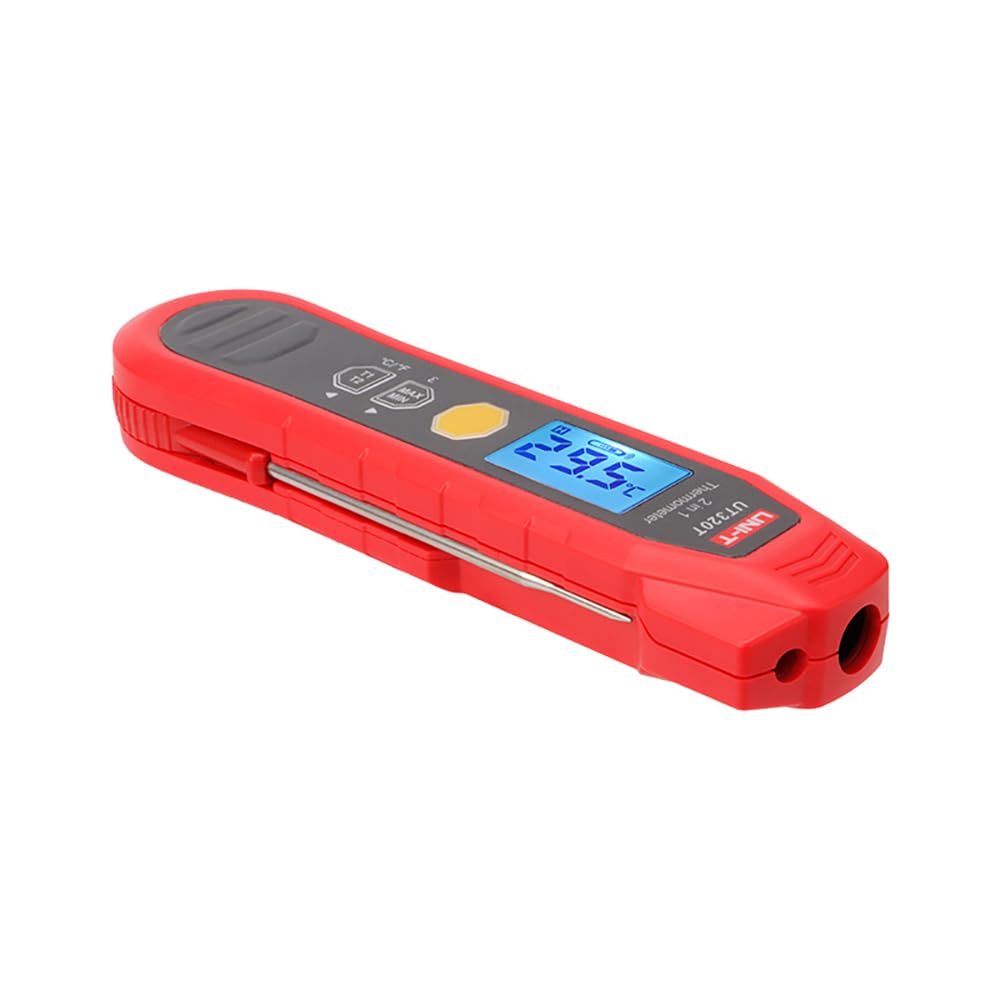
Figure 4: The UT320T thermometer with its 180° collapsible stainless steel probe fully extended for contact measurement.

Figure 5: Demonstrates the comfortable grip and portability of the UT320T thermometer when held in hand.
4. Setup
4.1 Battery Installation
- Locate the battery compartment cover on the back of the thermometer.
- Open the battery compartment by sliding or unscrewing the cover (refer to Figure 3 for location).
- Insert two 1.5V AAA alkaline batteries, ensuring correct polarity (+ and -).
- Close the battery compartment cover securely.
The thermometer is now ready for use.
5. Operating Instructions
5.1 Power On/Off
- To turn on the thermometer, press the power button (usually the trigger or a dedicated button).
- The device will automatically power off after a period of inactivity to conserve battery life.
5.2 Infrared (Non-Contact) Measurement
- Ensure the probe is folded into the device.
- Point the infrared sensor (located at the top front of the device) towards the target surface.
- Press and hold the measurement trigger/button. The laser pointer will activate to indicate the measurement area.
- The temperature reading will be displayed on the LCD screen. Release the button to hold the reading.
Note: Infrared thermometers measure surface temperature. For internal temperatures, use the probe.
5.3 Probe (Contact) Measurement
- Carefully unfold the stainless steel probe until it locks into position (180° rotation).
- Insert the probe tip into the substance or object whose internal temperature you wish to measure.
- Wait for the reading on the LCD screen to stabilize.
- Once the measurement is complete, carefully remove the probe and fold it back into the device after it has cooled.
5.4 Unit Conversion (°C/°F)
Press the °C/°F button to switch between Celsius and Fahrenheit temperature units.
5.5 Emissivity Adjustment
The UT320T allows for emissivity adjustment to improve accuracy for different surface materials. Refer to the specific button labeled with an 'ε' or similar symbol. Consult the full user manual for a detailed emissivity table for common materials.
5.6 MAX/MIN Temperature Display
Press the MAX/MIN button to cycle through maximum, minimum, and average temperature readings recorded during a continuous measurement session.
5.7 Language Selection
The device supports 8 languages. Refer to the full user manual for instructions on how to access and change the language settings.
5.8 Application Examples
Video 1: This video demonstrates various applications of the UNI-T UT320T 2-in-1 thermometer, including non-contact infrared measurement and contact probe measurement for different surfaces and materials. It shows the device in use for tin furnace temperature measurement, pipe temperature measurement, and circuit board aging temperature measurement, highlighting its versatility and ease of use. The video also illustrates the 180° collapsible probe and the calculation of temperature differences.
6. Maintenance and Care
- Cleaning: Wipe the device with a soft, damp cloth. Do not use abrasive cleaners or solvents. Ensure the infrared lens is clean for accurate readings.
- Probe Cleaning: Clean the stainless steel probe with a mild detergent and water after each use, especially when used with food. Ensure it is dry before folding.
- Storage: Store the thermometer in a cool, dry place, away from direct sunlight and extreme temperatures. Remove batteries if storing for extended periods.
- Calibration: The thermometer is factory calibrated. If you suspect a calibration issue, contact customer support.
7. Troubleshooting
| Problem | Possible Cause | Solution |
|---|---|---|
| Device does not power on. | Dead or incorrectly installed batteries. | Check battery polarity; replace with new 1.5V AAA batteries. |
| Inaccurate infrared readings. | Dirty infrared lens; incorrect emissivity setting; distance to target too far. | Clean the lens; adjust emissivity for the target material; ensure proper distance (D:S ratio). |
| Probe readings are inconsistent. | Probe not fully inserted; probe damaged. | Ensure probe is fully inserted into the substance; inspect probe for damage. |
| Display shows "Err" or other error codes. | Measurement out of range; internal error. | Ensure target temperature is within -40℃~300℃; restart the device. If error persists, contact support. |
8. Specifications
| Parameter | Value |
|---|---|
| Measuring Range | -40℃~300℃ (-40℉~572℉) |
| Highest Operating Altitude | 2000m |
| Waterproof Rating | IP54 |
| Operating Temperature | 0℃~50℃ (32℉~122℉) |
| Product Size | 155 x 42 x 22.5 mm |
| Product Weight | Approx. 110g (with batteries) |
| Battery Type | 2 x 1.5V AAA |
| Display Type | Digital |
| Outer Material | Plastic |
| Special Feature | Non-Contact, Collapsible Probe |
9. Warranty and Support
The UNI-T UT320T thermometer comes with a standard manufacturer's warranty. Please refer to the warranty card included in your product packaging for specific terms and conditions. For technical support, troubleshooting assistance, or warranty claims, please contact UNI-T customer service through their official website or the contact information provided in your product documentation.
Manufacturer: UNI-T


