
1. Product Overview
The WALKINGPAD A1 Pro is a foldable walking pad treadmill designed for home and office use, offering a compact solution for daily exercise. It features adaptive speed control and requires no assembly, making it convenient for small spaces.

Image: The WALKINGPAD A1 Pro in both its folded state and unfolded with a user walking on it, demonstrating its compact design and usability.
Key Features:
- Foldable Design: Folds completely in half for easy storage, reducing footprint by 50%.
- High Weight Capacity: Supports users up to 300 lbs.
- Integrated Display: Shows time, speed, and distance directly on the unit.
- Extended Walking Belt: 47-inch belt length for a natural stride.
- Variable Speed: Adjustable speed from 0.5 to 3.75 mph.
- Quiet Operation: Brushless motor ensures a calm and quiet walking experience (below 65dB).
- No Assembly Required: Ready to use out of the box.
2. Setup and Initial Use
Unpacking and Placement:
The WALKINGPAD A1 Pro comes fully assembled. Carefully remove it from its packaging. Place the walking pad on a flat, stable surface. Ensure there is adequate clearance around the unit for safe operation, especially at the rear for user movement.

Image: A user walking on the WALKINGPAD A1 Pro positioned under a standing desk, highlighting its suitability for office environments and its 300 lbs maximum load capacity.
Power Connection:
Locate the power input port, typically at the front of the unit. Connect the provided power cord to the walking pad and then to a standard electrical outlet. Ensure the connection is secure.
Folding and Storage:
The A1 Pro features a unique folding mechanism. To fold, lift the rear section of the walking belt until it folds in half. The unit can then be easily slid under furniture like a bed or sofa, or stored upright against a wall using its built-in wheels for portability.

Image: A sequence showing the WALKINGPAD A1 Pro being folded in half, then stored compactly under a sofa, and finally illustrating its spacious walking area dimensions.
3. Operating Instructions
Powering On/Off:
To power on the walking pad, ensure it is plugged in and press the power button on the remote control or the unit itself. The display will illuminate. To power off, press and hold the power button.
Speed Control and Modes:
The WALKINGPAD A1 Pro offers multiple ways to control your workout:
- Remote Control: Use the included remote to adjust speed (increase/decrease), start, and stop the treadmill. The remote also allows switching between modes.
- Adaptive Speed Control (Automatic Mode): In this mode, the treadmill adjusts its speed based on your position on the belt. Walking towards the front increases speed, while walking towards the rear decreases it. This mode is ideal for hands-free operation.
- Manual Mode: Set a constant speed using the remote control.
- Mobile App Control: Download the official WALKINGPAD app to your smartphone for advanced control and tracking features. The app allows precise speed adjustments and provides detailed workout data.
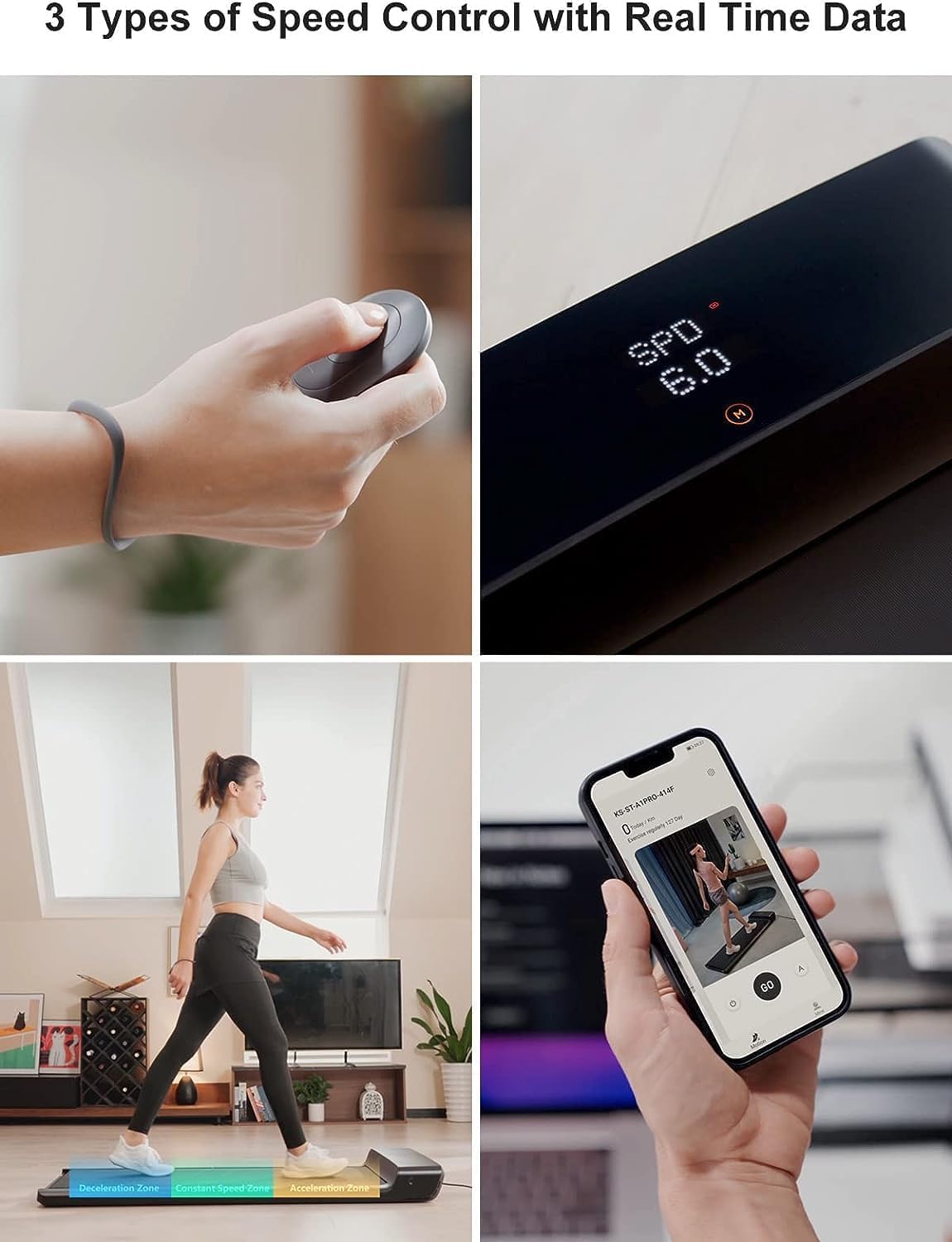
Image: Illustrations of the three primary speed control methods: using the remote control, viewing real-time data on the integrated display, and controlling the treadmill via the mobile application.
Display Information:
The integrated LED display provides real-time workout metrics:
- SPD: Current Speed (Miles per Hour)
- STEP: Number of Steps
- TIME: Elapsed Workout Time
- DIST: Distance Covered
- CAL: Calories Burned (via app)

Image: A detailed diagram showing the WALKINGPAD A1 Pro's display screen with metrics (Speed, Steps, Time, Distance) and an annotated remote control illustrating its Acceleration, Start/Stop, Deceleration, and Wake Up/Mode Switch buttons.
Safety Features:
The walking pad is equipped with an automatic shutdown feature that activates if no user is detected on the belt for a short period, enhancing safety during use.
4. Maintenance
Regular maintenance ensures the longevity and optimal performance of your WALKINGPAD A1 Pro.
Lubrication:
Apply silicone oil to the walking belt every 3 months, or more frequently with heavy use. This reduces friction and extends the life of the motor and belt. Refer to the included user manual for specific instructions on how to apply the lubricant.
Cleaning:
Dust can accumulate on and under the walking belt. Regularly clean the surface of the belt and the surrounding areas with a soft, damp cloth. For dust under the belt, it is recommended to gently lift the belt and vacuum or wipe the deck beneath.
Belt Alignment:
Over time, the walking belt may shift slightly to one side. If you notice the belt is not centered, refer to the user manual for instructions on how to adjust the belt tension and alignment using the provided tool. Proper alignment prevents wear and ensures smooth operation.
5. Troubleshooting
This section addresses common issues you might encounter with your WALKINGPAD A1 Pro.
| Problem | Possible Cause | Solution |
|---|---|---|
| Treadmill not powering on. | Loose power connection, power outlet issue. | Ensure power cord is securely plugged into the unit and a working outlet. Check the power switch if available. |
| Belt is not moving smoothly or is off-center. | Lack of lubrication, belt misalignment. | Apply silicone oil as per maintenance instructions. Adjust belt alignment using the provided wrench. |
| Unusual noise during operation. | Belt rubbing, motor issue, fan noise. | Check for belt alignment. Ensure no foreign objects are under the belt. A slight fan noise is normal. If noise persists or is excessive, contact customer support. |
| Automatic mode not working as expected (too fast/slow, stops). | User position on the belt, sensor obstruction. | Ensure consistent foot placement for adaptive speed control. Clean any debris from sensor areas. Consider using manual mode if automatic mode is not suitable for your walking style. |
| Mobile app connectivity issues. | Bluetooth interference, app version outdated. | Ensure Bluetooth is enabled on your device. Restart the app and the walking pad. Update the app to the latest version. |
| Burning smell during initial use. | Normal break-in period. | A slight burning smell can occur during the first few uses as components settle. This should dissipate quickly. If it persists or is strong, discontinue use and contact support. |
6. Specifications
| Attribute | Detail |
|---|---|
| Brand | WALKINGPAD |
| Model Name | WALKINGPAD A1 Pro |
| Color | Grey |
| Product Dimensions (LxWxH) | 56.5"D x 21.5"W x 5"H |
| Folded Size (LxWxH) | 32.5" x 21.5" x 5.0" |
| Item Weight | 63 Pounds |
| Material | Aluminum |
| Maximum Speed | 3.75 Miles per Hour |
| Minimum Speed | 0.5 Miles per Hour |
| Maximum Weight Recommendation | 300 Pounds |
| Deck Length | 47 Inches |
| Deck Width | 16.5 Inches |
| Display Type | LED |
| Power Source | Corded Electric |
| Included Components | Power Cord, Remote Control, Tool Kit, User Manual |
| Assembly Required | No |
7. Warranty and Support
Warranty Information:
The WALKINGPAD A1 Pro comes with a one-year warranty from the date of purchase. This warranty covers manufacturing defects and issues arising from normal use. Please retain your proof of purchase for warranty claims.
Customer Support:
For any questions, technical assistance, or warranty claims, please contact WALKINGPAD customer support. You can find contact information on the official WALKINGPAD website or through your purchase platform. For more information, visit the WALKINGPAD Store on Amazon.


