
1. Introduction
This manual provides detailed instructions for the installation, operation, and maintenance of your Podofo 7-inch Android Car Stereo. This unit features a 7-inch 2.5D 1080P HD IPS touchscreen, 2GB RAM, 64GB ROM, and supports offline/online GPS navigation and Wi-Fi connectivity. It is designed for various Volkswagen and SEAT models, including Jetta, Caddy, Golf, Passat, Polo, Tiguan, Touran, SKODA, and SEAT vehicles.
Please review this manual thoroughly before installation and operation to ensure proper use and to maximize the functionality of your new car stereo.
2. Package Contents
Verify that all items listed below are included in your package:
- Podofo 7-inch Android Car Stereo Unit
- External Microphone
- AHD Backup Camera
- Power Cable Harness
- RCA Cable Set
- 38Pin Canbus Plug
- USB Cables (x2)
- Rear Camera Input Cable
- Radio Antenna
- GPS Antenna
- User Manual

Image: Package contents and unit dimensions. Please ensure all listed items are present.
3. Vehicle Compatibility and Pre-Installation
This car stereo is designed for specific Volkswagen and SEAT models. Before purchasing and installing, it is crucial to verify the size and shape of your vehicle's center console and dashboard to ensure compatibility. Some vehicles may require a 52-pin power cable (ASIN: B0BFF93CGV), which may need to be acquired separately if not included.

Image: Examples of compatible and incompatible vehicle dashboards for installation.
4. Installation Guide
Installation of the car stereo involves connecting various cables and mounting the unit. It is recommended that installation be performed by a qualified professional if you are unfamiliar with car audio wiring.
4.1 Wiring Harness Connections
Refer to the following diagrams for proper connection of the power cable, RCA cables, and other accessories.

Image: Main wiring harness guide with labeled connections.
4.2 Power Cable Identification (36pin/40pin/52pin)
Identify the correct power cable type for your vehicle based on the pin configuration. The unit supports 36-pin, 40-pin, and 52-pin connections.

Image: Visual guide for identifying 36-pin, 40-pin, and 52-pin power cables.
4.3 Canbus Connection (36pin/40pin)
For 36-pin and 40-pin systems, follow these specific Canbus connection instructions:
- 36-pin: Connect ACC (A and B). No need to connect D.
- 40-pin: Disconnect ACC (A and B). Connect D to the back of the car stereo (Connection D powers the Canbus).

Image: Detailed Canbus wiring for 36-pin and 40-pin systems.
5. Operating Instructions
5.1 Wireless CarPlay and Android Auto
The unit supports wireless CarPlay and Android Auto, providing a familiar interface for accessing phone apps, navigation, music, and messages. Connect your smartphone wirelessly via Wi-Fi or USB for seamless integration.

Image: Wireless CarPlay and Android Auto interfaces on the stereo display.
5.2 GPS Navigation and Wi-Fi
Utilize the built-in GPS receiver for both online and offline navigation. Connect to Wi-Fi to access online maps, browse the internet, and download various applications such as YouTube, TikTok, and Spotify.

Image: GPS navigation and Wi-Fi connectivity features.
5.3 Bluetooth and FM/RDS Radio
Stay connected with hands-free calling, address book synchronization, and mobile phone music playback via Bluetooth. The FM/RDS radio allows you to enjoy your favorite radio stations with clear reception.

Image: Bluetooth calling and FM/RDS radio functionality.
5.4 Mirror Link and Split Screen
Mirror your phone's screen onto the stereo display using Mirror Link for iOS and Android devices. The split-screen functionality allows you to run two applications simultaneously, with adjustable sizing and positioning.

Image: Mirror Link and split-screen capabilities.
5.5 User Interface and Audio Customization
Choose from multiple user interface themes to personalize the stereo's appearance. The Hi-Fi audio system includes a 32-band equalizer (DSP) for fine-tuning sound output, allowing you to adjust high, medium, and low frequencies for optimal audio quality.

Image: Various UI themes for personalization.

Image: Adjustable equalizer for audio customization.
5.6 Physical Controls
The unit features physical knobs for convenient control of volume and track selection, allowing for quick adjustments without diverting attention from the road.

Image: Physical knobs for volume and track control.
6. Backup Camera and Steering Wheel Control (SWC)
The included AHD reversing camera provides ultra-clear images, even in low-light conditions, with a 170-degree wide-angle lens for enhanced parking safety. The stereo is compatible with your car's original steering wheel controls, allowing for safe and convenient operation.
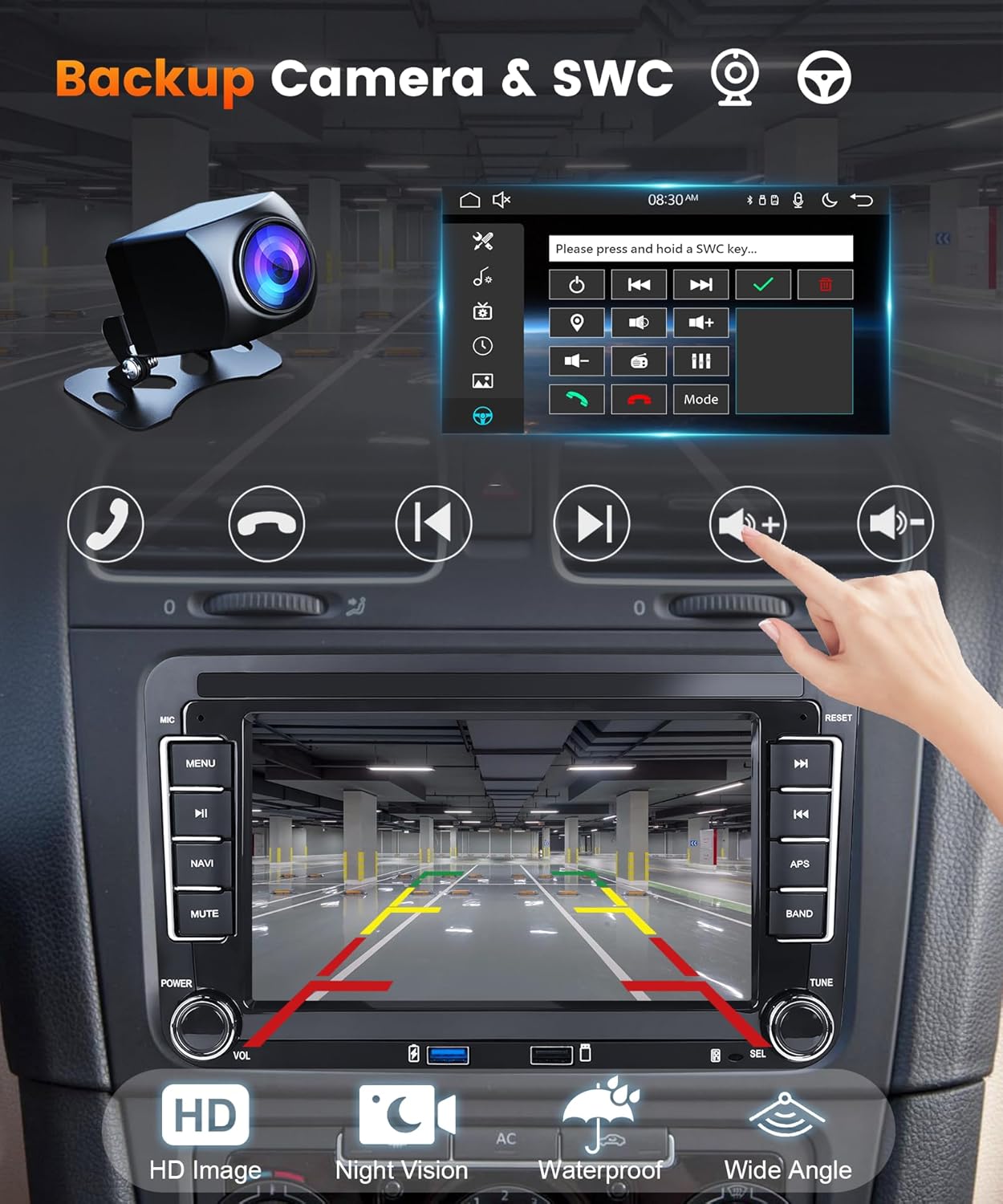
Image: Backup camera view and steering wheel control setup.
7. Maintenance
To ensure the longevity and optimal performance of your Podofo car stereo, follow these general maintenance guidelines:
- Cleaning: Use a soft, dry cloth to clean the touchscreen and exterior. Avoid abrasive cleaners or solvents.
- Software Updates: Periodically check for and install available software updates to ensure the system runs efficiently and securely.
- Environmental Conditions: Avoid exposing the unit to extreme temperatures or direct sunlight for prolonged periods.
- Cable Connections: Ensure all cables are securely connected and free from damage.
8. Troubleshooting
If you encounter issues with your car stereo, refer to the following common problems and solutions:
- No Sound Output: If there is no sound, your car may have a factory power amplifier. Locate the power cable for the amplifier and connect it to the 12V ACC wire of the car stereo.
- Unit Does Not Power On: Check all power connections, including the ACC wire and ground. Ensure the fuse is intact.
- Touchscreen Unresponsive: Try restarting the unit. If the issue persists, a factory reset may be necessary (refer to system settings).
- GPS Signal Issues: Ensure the GPS antenna is properly installed and has a clear view of the sky.
- Backup Camera Not Displaying: Verify the camera's power and video signal connections. Ensure the reverse trigger wire is correctly connected.
- Bluetooth Connectivity Problems: Ensure Bluetooth is enabled on both the stereo and your smartphone. Delete previous pairings and attempt to re-pair.
For persistent issues, contact Podofo customer support.
9. Specifications
| Feature | Specification |
|---|---|
| Display Size | 7 Inches |
| Operating System | Android |
| RAM | 2GB |
| ROM | 64GB |
| Connectivity | Bluetooth, USB, Wi-Fi, Wireless Android Auto, Wireless CarPlay |
| Special Features | Android Auto, Apple CarPlay, Built-In Bluetooth, GPS, Touchscreen |
| Audio Output Mode | Stereo |
| Surround Sound Channel Configuration | 4.0 |
| Item Weight | 1.76 pounds |
| Package Dimensions | 11.42 x 6.69 x 3.54 inches |
| Color | Black |
10. Warranty and Support
The Podofo 7-inch Android Car Stereo comes with a 2-year warranty on labor and parts. For technical support, warranty claims, or further assistance, please contact Podofo Tech, the manufacturer, or refer to their official support channels.
Manufacturer: podofo


