
1. Introduction
This manual provides essential instructions for the setup, operation, and maintenance of your OEMGMINER Goldshell Mini Doge 3 ASIC Miner. The Mini Doge 3 is an upgraded version designed for mining Dogecoin (DOGE) and Litecoin (LTC) with improved hashrate and energy efficiency. It features quiet operation, making it suitable for home environments.

Figure 1: Goldshell Mini Doge 3 ASIC Miner. This image shows the compact, dark gray mining device with two large cooling fans visible on the front panel, along with various ports and indicators at the top.
2. Safety Information
Please read and understand all safety warnings before operating the device to prevent injury or damage.
- Ensure the device is placed on a stable, flat surface in a well-ventilated area.
- Do not block the ventilation openings. Maintain adequate clearance around the device for airflow.
- Use only the specified power cable (10A) and ensure the input voltage is within the 100-240V range.
- Important: If your model requires two 6-pin power connectors, ensure both are connected to separate power sources before powering on. Failure to do so may cause damage.
- Keep the device away from water, moisture, and high temperatures.
- Do not attempt to open or repair the device yourself. Contact qualified personnel for service.

Figure 2: Power Connection Warning. This image highlights the two 6-pin power input ports on the miner, emphasizing the need to connect both to separate power sources.
3. Product Overview
The Goldshell Mini Doge 3 is a compact ASIC miner designed for efficient cryptocurrency mining. Key components include:
- Cooling Fans: Two integrated fans for optimal heat dissipation.
- Power Input: Connects to your power supply unit (PSU not included with WiFi version).
- Ethernet Port: For network connectivity.
- Status Indicators: LEDs to show operational status.
- WiFi Antenna: For wireless network connection (on WiFi version).

Figure 3: Front Panel and Ports. This image displays the front of the miner, clearly showing the two cooling fans, the power input ports, the Ethernet port, and LED indicators. The WiFi antenna is visible on the side.
4. Setup Guide
- Unpacking: Carefully remove the miner from its packaging. Inspect for any visible damage.
- Placement: Position the miner in a cool, dry, and well-ventilated environment. Ensure sufficient space around the device for airflow.
- Power Connection:
- Connect the power cable (10A) to a compatible Power Supply Unit (PSU).
- Connect the PSU's 6-pin power connectors to the corresponding ports on the miner. Ensure both 6-pin ports are connected if applicable.
- Plug the PSU into a grounded electrical outlet.
- Network Connection:
- Ethernet: Connect an Ethernet cable from your router/switch to the miner's Ethernet port.
- WiFi (if applicable): Ensure the WiFi antenna is securely attached. The device will typically broadcast a setup SSID or allow configuration via the web interface after initial power-on.
- Power On: Once all connections are secure, power on the device. The status indicators should illuminate.
- Initial Configuration: Access the miner's web interface via its IP address (usually found through a network scanner or by checking your router's connected devices) to configure mining pools and settings. Refer to the Goldshell official documentation for detailed software setup.
5. Operating Modes
The Goldshell Mini Doge 3 supports dual operating modes to balance hashrate and power consumption:
- Default Hashrate Mode: Provides a hashrate of 700MH/s (±5%) with a power consumption of 400W (±5%).
- Low-Power Mode: Offers a hashrate of 550MH/s (±5%) with reduced power consumption of 260W (±5%).
These modes can typically be selected and configured through the miner's web interface. The device operates quietly at approximately 35dB, comparable to rustling leaves, making it suitable for home use.

Figure 4: Operating Modes Comparison. This image illustrates the two primary operating modes of the Mini Doge 3, showing the corresponding hashrate and power consumption for each.
Advanced Dashboard
The miner features an advanced dashboard accessible via its web interface. This dashboard allows users to monitor real-time hashrate, observe fluctuations, and manage mining settings for a user-friendly experience.
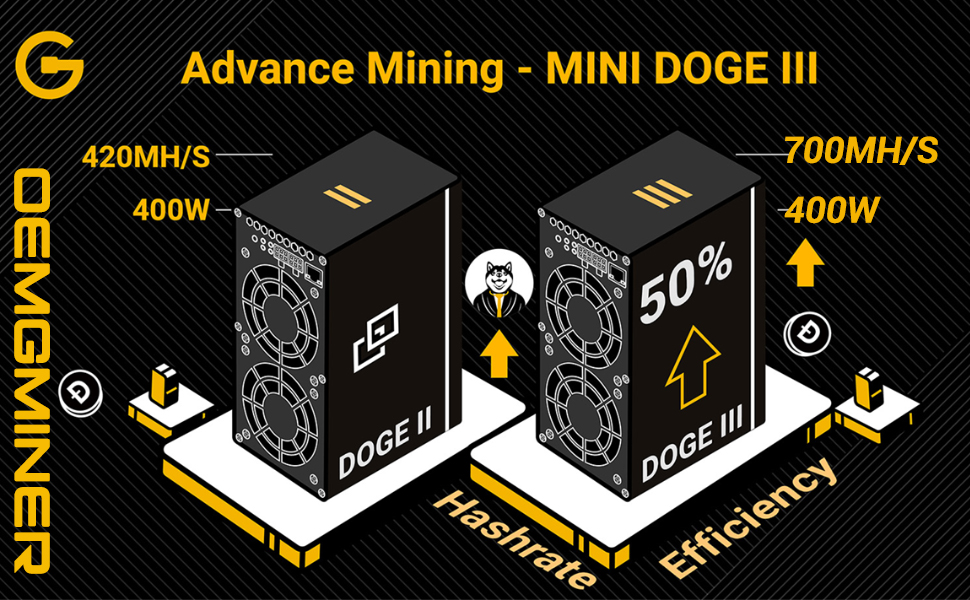
Figure 5: Advanced Dashboard Interface. This image shows a graphical representation of the miner's web interface, displaying metrics such as hashrate over time, providing a visual overview of performance.
6. Maintenance
Regular maintenance ensures optimal performance and longevity of your miner.
- Cleaning: Periodically clean the exterior of the miner and the fan grilles to prevent dust buildup. Use a soft, dry cloth or compressed air. Do not use liquid cleaners.
- Environment: Maintain a stable operating environment within the recommended temperature (0~35°C) and humidity (≤65%) ranges.
- Firmware Updates: Check the manufacturer's website for any available firmware updates. Follow official instructions carefully when performing updates.
7. Troubleshooting
If you encounter issues, refer to the following common troubleshooting steps:
- Miner Not Powering On:
- Verify all power cables are securely connected to both the miner and the PSU, and the PSU is plugged into a working outlet.
- Ensure the PSU is functional and provides adequate power.
- No Network Connection:
- Check the Ethernet cable connection to both the miner and your router/switch.
- For WiFi models, ensure the antenna is attached and the WiFi settings are correctly configured in the web interface.
- Restart your router and the miner.
- Low Hashrate or Instability:
- Ensure the miner is in a well-ventilated area and not overheating. Clean any dust from the fans.
- Verify your mining pool settings and internet connection stability.
- Check for any error messages in the miner's dashboard.
- Device Overheating:
- Improve ventilation around the device.
- Ensure fans are operating correctly and not obstructed.
- Consider operating in Low-Power Mode if high temperatures persist.
For persistent issues, consult the official Goldshell support resources or contact OEMGMINER customer support.
8. Specifications
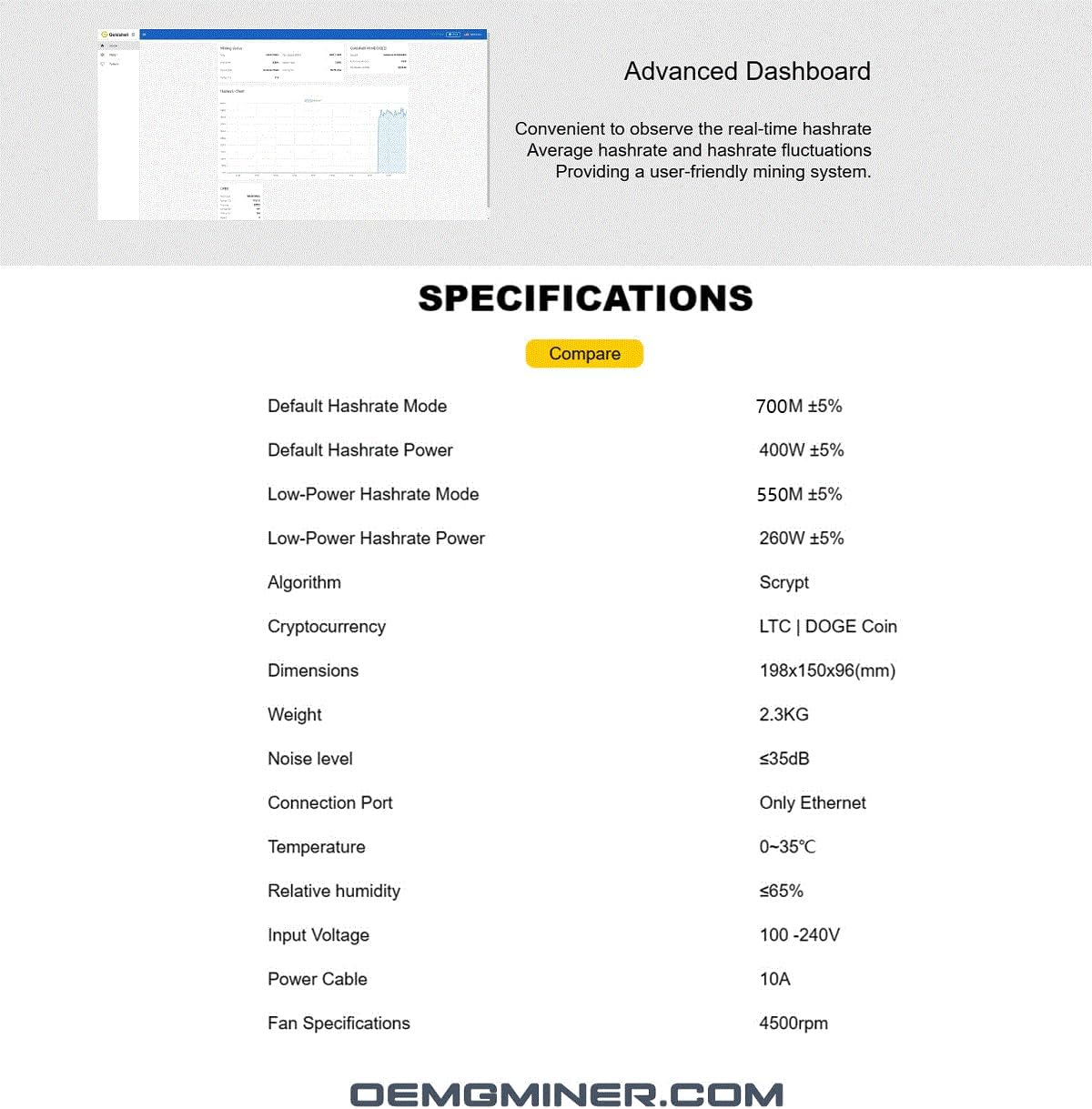
Figure 6: Detailed Specifications. This image presents a table outlining the technical specifications of the Goldshell Mini Doge 3, including hashrate, power consumption, dimensions, and environmental requirements.
| Feature | Detail |
|---|---|
| Model Name | Mini Doge 3 (WiFi Version without PSU) |
| Algorithm | Scrypt |
| Cryptocurrency | LTC | DOGE Coin |
| Default Hashrate Mode | 700MH/s ±5% |
| Default Hashrate Power | 400W ±5% |
| Low-Power Mode Hashrate | 550MH/s ±5% |
| Low-Power Mode Power | 260W ±5% |
| Dimensions (L×W×H) | 198×150×96 mm (7.8 x 5.9 x 3.8 inches) |
| Weight | 2.3 KG |
| Noise Level | ≤35dB |
| Connection Port | Ethernet (and WiFi for this version) |
| Operating Temperature | 0~35°C |
| Relative Humidity | ≤65% |
| Input Voltage | 100-240V |
| Power Cable | 10A |
| Fan Specifications | 4500rpm |
9. Warranty and Support
For warranty information and technical support, please refer to the official OEMGMINER or Goldshell website. Keep your purchase receipt as proof of purchase for warranty claims.
Manufacturer: Goldshell
Seller: OEMGMINER
Date First Available: April 29, 2024
For further assistance, visit the OEMGMINER Store on Amazon.